


Jump to content

AdminUltimateVision 1.0.0

$4.95
   (0 reviews)
Message added by Mazyt666,

Please leave a review - it helps with plugin development and support.

3 Screenshots

  • 144
  • 3
  • 33.18 kB
  • Update details
    v1.0.0
    Released
    Download size33.18 kB
    Total versions1
    Freshness Updated today

About AdminUltimateVision

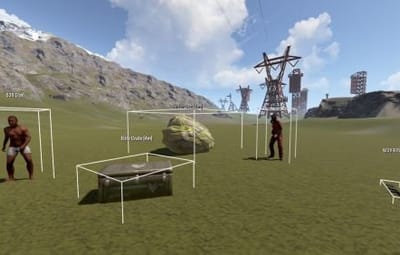
AdminUltimateVision is a powerful ESP (Extra Sensory Perception) plugin designed for Rust server administrators. This plugin provides real-time visualization of various entities on the server, making server management and monitoring significantly easier. With its intuitive interface and customizable settings, administrators can quickly locate players, NPCs, loot containers, dropped items, ores, and corpses within a specified range.

Key Features
🎯 Entity Visualization
Players: Track all online players with their names and distances
NPCs: Monitor scientists, bandits, peacekeepers, and other NPCs
Animals: Visualize bears, wolves, boars, stags, chickens, horses, and other wildlife
Loot Containers: Locate crates, barrels, elite crates, airdrops, toolboxes, and bags
Dropped Items: Find items dropped by players on the ground
Ores: Discover sulfur ore, metal ore, and stone ore deposits
Corpses: Track player corpses with their original player names
🎮 User Interface
Clean, compact menu design that doesn't obstruct gameplay
Toggle buttons for each entity category
Real-time distance display (optional)
3D bounding boxes around entities (optional)
Adjustable render distance (50m - 500m)
Easy-to-use reset function
⚙️ Customizable Settings
Render Distance: Adjust from 50 to 500 meters in 25m increments
Box Display: Toggle 3D wireframe boxes around entities
Distance Display: Show/hide distance information in labels
Category Filtering: Enable/disable specific entity types
Performance Optimization: Efficient update system to minimize server impact
Commands
Chat Commands
/atool - Opens the main AdminUltimateVision interface
/avision - Alternative command to open the interface
Console Commands (Automatic)
The plugin automatically handles all console commands through the UI. No manual console input required.

How to Use
1. Opening the Interface
Type /atool or /avision in chat
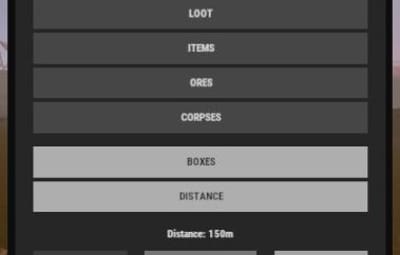
The compact menu will appear on the right side of your screen
2. Configuring Entity Types
Click on any category button to toggle visibility:
PLAYERS - Show/hide online players
NPC - Show/hide NPCs and animals
LOOT - Show/hide loot containers
ITEMS - Show/hide dropped items
ORES - Show/hide ore deposits
CORPSES - Show/hide player corpses
3. Adjusting Display Options
BOXES - Toggle 3D wireframe boxes around entities
DISTANCE - Toggle distance information in entity labels
4. Setting Render Distance
Use + and - buttons to adjust render distance
Range: 50m to 500m (increments of 25m)
Higher distances may impact performance
5. Resetting Settings
Click RESET to restore default settings
Click CLOSE to close the interface
Tips and Best Practices
🚀 Performance Tips
Start Small: Begin with a lower render distance (100-150m) and increase as needed
Selective Viewing: Only enable categories you currently need to reduce visual clutter
Regular Resets: Use the reset function if the interface becomes unresponsive
🎯 Usage Scenarios
Player Monitoring: Track player movements and locations during events
Loot Management: Locate and manage loot spawns across the map
Resource Tracking: Find ore deposits for base planning
Cleanup Operations: Locate and remove abandoned items and corpses
Event Management: Monitor NPC spawns during server events
🔧 Troubleshooting
Nothing Visible: Ensure at least one category is enabled and render distance is appropriate
Performance Issues: Reduce render distance or disable unnecessary categories
UI Not Responding: Use the reset function or restart the plugin
⚡ Advanced Usage
Combine Categories: Enable multiple categories for comprehensive area monitoring
Distance Optimization: Adjust render distance based on your current task
Box Visualization: Use boxes for precise entity location and size reference
Configuration
The plugin includes several configurable options in the config file:

{
  "DefaultRenderDistance": 150.0,
  "MaxRenderDistance": 500.0,
  "MinRenderDistance": 50.0,
  "UpdateRate": 0.05,
  "EnableBoxes": true,
  "EnableDistanceDisplay": true
}
Permissions
Admin Only: This plugin requires admin privileges to use
Automatically checks for admin status before allowing access
Compatibility
Rust Version: Compatible with current Rust builds
Server Impact: Minimal performance impact with optimized update system
Client Side: No client-side modifications required

AdminUltimateVision.json


User Feedback

About Us

Codefling is the largest marketplace for plugins, maps, tools, and more, making it easy for customers to discover new content and for creators to monetize their work.

Downloads
2.5m
Total downloads
Customers
11.1k
Customers served
Files Sold
159.2k
Marketplace sales
Payments
3.4m
Processed total
×
×
  • Create New...

Important Information

We have placed cookies on your device to help make this website better. You can adjust your cookie settings, otherwise we'll assume you're okay to continue.
