Jump to content

2 Screenshots

  • 1.4k
  • 114
  • 32.1 kB
  • Update details
    v2.1.0
    Released
    Download size32.1 kB
    Total versions3
    Time between versions 3 days
    Typical update pace About every 30 days
    Freshness Updated today

This area is for discussion and questions. Please use the support area for reporting issues or getting help.

Recommended Comments

Aussie4life

Posted

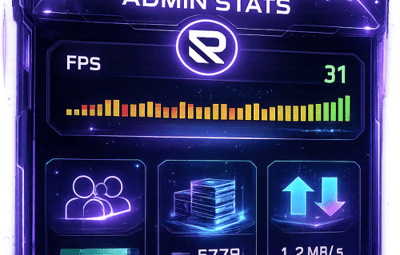
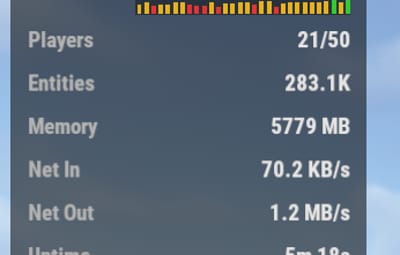
Hey. Just downloaded the plugin. Looks like a great replacement for PerformanceUI which ive used for the longest time. One question/idea i have. Can you add the ability in the config to allow us to set custom thresholds for the fps graph colours? We run our servers locked at 30fps. I would like to be able to set say anything above 25fps is green, below 25 but above 15 as yellow and below 15 as red as an example. Would this be possible?

Thanks in advance

romzar

Posted

25 minutes ago, Aussie4life said:

Hey. Just downloaded the plugin. Looks like a great replacement for PerformanceUI which ive used for the longest time. One question/idea i have. Can you add the ability in the config to allow us to set custom thresholds for the fps graph colours? We run our servers locked at 30fps. I would like to be able to set say anything above 25fps is green, below 25 but above 15 as yellow and below 15 as red as an example. Would this be possible?

Thanks in advance

Yes sure! Will be in the next update. Meanwhile you can change these constants in the .cs file (look for the file in the plugin folder):
private const int FPS_GOOD = 30;
private const int FPS_WARNING = 20;
private const int FPS_HISTORY_SIZE = 30;


Aussie4life

Posted

4 minutes ago, romzar said:

Yes sure! Will be in the next update. Meanwhile you can change these constants in the .cs file (look for the file in the plugin folder):
private const int FPS_GOOD = 30;
private const int FPS_WARNING = 20;
private const int FPS_HISTORY_SIZE = 30;


Wow thanks for the speedy reply. i did try adjusting the fps warning to 15 but it didnt seem to affect the colours. i was still yellow at 29fps or below. Not a big deal tho

romzar

Posted

1 hour ago, Aussie4life said:

Wow thanks for the speedy reply. i did try adjusting the fps warning to 15 but it didnt seem to affect the colours. i was still yellow at 29fps or below. Not a big deal tho

We just pushed v2.1.0 which adds exactly this feature. In your AdminStats.json config you'll now find:

"FPS Good Threshold": 25,
"FPS Warning Threshold": 15

So with the example you mentioned:

  • >= 25 FPS → Green
  • 15-24 FPS → Yellow
  • < 15 FPS → Red

The colors themselves are also fully configurable (FPS Good Color, FPS Warning Color, FPS Critical Color) if you want to change the actual RGB values.

Just update the plugin, tweak the config to your liking and reload — no restart needed. Let us know if you need anything else!

Create an account or sign in to comment

You need to be a member in order to leave a comment

Create an account

Sign up for a new account in our community. It's easy!

Register a new account

Sign in

Already have an account? Sign in here.

Sign In Now
  • Like 1

User Feedback

2.3m

Downloads

Total number of downloads.

10.6k

Customers

Total customers served.

152.8k

Files Sold

Total number of files sold.

3.3m

Payments Processed

Total payments processed.

×
×
  • Create New...

Important Information

We have placed cookies on your device to help make this website better. You can adjust your cookie settings, otherwise we'll assume you're okay to continue.