
World_Gamerz's Wishlist
-
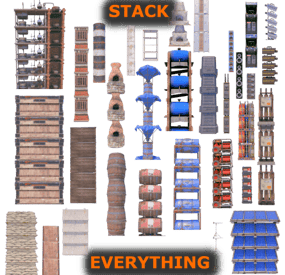
$9.99$7.50Stack Everything - Stack all entities, Chest Stacks, Farm Stacks, and more
Stack Everything - Stack all entities, Chest Stacks, Farm Stacks, and more, allows you to stack all entities, such as: Stack Chest, Barricade, Large Water Catcher, Small Water Catcher, Locker, Barbeque, Water Barrel, Storage Box, Wood Box, Storage Barrel, Composter, Furnace, Legacy Furnace , Electric Furnace, Hobo Barrel, Mixing Table, Cooking Workbench, Battery, Generator, Test Generator, Water Purifier, Chippy Arcade, Boom Box, Farming entities, etc...
Naval Deep Sea support, stack entities.
Support for: Storage Box Pack DLC (https://rust.facepunch.com/news/shipshape#StorageBoxPackDLC)
Support for: Industrial Decor Pack DLC (https://rust.facepunch.com/news/built-different#IndustrialDecorPack)
Allows you to add new entities to stack, set stack size limits, and limit which entities can be stacked based on player permissions. Stack as many entities as you want with just one plugin!
Oxide/Carbon compatibility
PERMISSIONS:
To be able to stack entities, the player must have the permission:
stackeverything.use - Allows to use the plugin. In addition, 4 other permissions are created (Default, VIP1, VIP2, VIP3), each of which allows you to create different configurations to assign to the various players.
stackeverything.default - Assign configurations: Default. stackeverything.vip1 - Assign configurations: VIP1. stackeverything.vip2 - Assign configurations: VIP2. stackeverything.vip3 - Assign configurations: VIP3. These are the groups that are created by default, but you can add and/or edit groups as you wish.
For example, if you change the group vip1 to vip_elite, the permission stackeverything.vip_elite will be created
If you create a new group, for example vipvanilla, the permission stackeverything.vipvanilla will be created.
If you are part of a clan/team and there are 1 more members who have the VIP/ROLE, then all members of the clan/team will benefit.
You can enable this setting from the configuration file: "Share Group With Clan/Team members. Default FALSE": false": true
CONFIGURATION:
The settings and options can be configured in the StackEverything.json under the config directory. The use of an editor and validator is recommended to avoid formatting issues and syntax errors. { "Use Clan/Team": true, "Share Group With Clan/Team members. Default FALSE": false, "Spawn SkinID Blacklist. Skin IDs that cannot be used for Spawned Entity": [], "Stacking SkinID Blacklist. Block stacking of entities that have these skin IDs": [], "Role Permission": { "default": { "Priority. (lower = higher priority)": 100, "Maximum number of stackable entities": 2, "Exclude stacking of these entities": [], "Maximum stack number per entity": {} }, "vip1": { "Priority. (lower = higher priority)": 1, "Maximum number of stackable entities": 4, "Exclude stacking of these entities": [], "Maximum stack number per entity": {} }, "vip2": { "Priority (lower = higher priority)": 2, "Maximum number of stackable entities": 6, "Exclude stacking of these entities": [], "Maximum stack number per entity": {} }, "vip3": { "Priority. (lower = higher priority)": 3, "Maximum number of stackable entities": 10, "Exclude stacking of these entities": [], "Maximum stack number per entity": {} } }, "Stackable Items": [ { "Display Name": "Concrete Barricade", "Item Name": "barricade.concrete", "Item Id": -1950721390, "Enable Stacking": true, "Prefab Name": "assets/prefabs/deployable/barricades/barricade.concrete.prefab", "Radius Check": 0.1, "Collider Height": 1.5, "YOffset": 1.24, "Effect Name": "assets/prefabs/deployable/barricades/effects/barricade-concrete-deploy.prefab" }, { "Display Name": "Stone Barricade", "Item Name": "barricade.stone", "Item Id": 15388698, "Enable Stacking": true, "Prefab Name": "assets/prefabs/deployable/barricades/barricade.stone.prefab", "Radius Check": 0.1, "Collider Height": 1.4, "YOffset": 1.24, "Effect Name": "assets/prefabs/deployable/barricades/effects/barricade-stone-deploy.prefab" }, { "Display Name": "Sandbag Barricade", "Item Name": "barricade.sandbags", "Item Id": -559599960, "Enable Stacking": true, "Prefab Name": "assets/prefabs/deployable/barricades/barricade.sandbags.prefab", "Radius Check": 0.1, "Collider Height": 1.4, "YOffset": 1.18, "Effect Name": "assets/prefabs/deployable/barricades/effects/barricade-sandbags-deploy.prefab" }, { "Display Name": "Large Water Catcher", "Item Name": "water.catcher.large", "Item Id": -1100168350, "Enable Stacking": true, "Prefab Name": "assets/prefabs/deployable/water catcher/water_catcher_large.prefab", "Radius Check": 0.1, "Collider Height": 4.168319, "YOffset": 4.1, "Effect Name": "assets/prefabs/deployable/water catcher/effects/water-catcher-large-deploy.prefab" }, { "Display Name": "Small Water Catcher", "Item Name": "water.catcher.small", "Item Id": -132247350, "Enable Stacking": true, "Prefab Name": "assets/prefabs/deployable/water catcher/water_catcher_small.prefab", "Radius Check": 0.1, "Collider Height": 2.67044, "YOffset": 2.5, "Effect Name": "assets/prefabs/deployable/water catcher/effects/water-catcher-deploy.prefab" }, { "Display Name": "Locker", "Item Name": "locker", "Item Id": -110921842, "Enable Stacking": true, "Prefab Name": "assets/prefabs/deployable/locker/locker.deployed.prefab", "Radius Check": 0.1, "Collider Height": 2.3, "YOffset": 2.238, "Effect Name": "assets/prefabs/deployable/locker/effects/locker-deploy.prefab" }, { "Display Name": "Barbeque", "Item Name": "bbq", "Item Id": 1099314009, "Enable Stacking": true, "Prefab Name": "assets/prefabs/deployable/bbq/bbq.deployed.prefab", "Radius Check": 0.1, "Collider Height": 1.2, "YOffset": 0.84, "Effect Name": "assets/prefabs/deployable/bbq/effects/barbeque-deploy.prefab" }, { "Display Name": "Water Barrel", "Item Name": "water.barrel", "Item Id": -1863559151, "Enable Stacking": true, "Prefab Name": "assets/prefabs/deployable/liquidbarrel/waterbarrel.prefab", "Radius Check": 0.1, "Collider Height": 2.67044, "YOffset": 1.594, "Effect Name": "assets/prefabs/deployable/liquidbarrel/effects/liquid-barrel-deploy.prefab" }, { "Display Name": "Wood Storage Box", "Item Name": "box.wooden", "Item Id": -180129657, "Enable Stacking": true, "Prefab Name": "assets/prefabs/deployable/woodenbox/woodbox_deployed.prefab", "Radius Check": 0.1, "Collider Height": 0.5552952, "YOffset": 0.5552952, "Effect Name": "assets/prefabs/deployable/woodenbox/effects/wooden-box-deploy.prefab" }, { "Display Name": "Large Wood Box", "Item Name": "box.wooden.large", "Item Id": 833533164, "Enable Stacking": true, "Prefab Name": "assets/prefabs/deployable/large wood storage/box.wooden.large.prefab", "Radius Check": 0.1, "Collider Height": 0.790511, "YOffset": 0.76, "Effect Name": "assets/prefabs/deployable/large wood storage/effects/large-wood-box-deploy.prefab" }, { "Display Name": "Storage Barrel Horizontal", "Item Name": "storage_barrel_c", "Item Id": -1421257350, "Enable Stacking": true, "Prefab Name": "assets/prefabs/misc/decor_dlc/storagebarrel/storage_barrel_c.prefab", "Radius Check": 0.1, "Collider Height": 0.94, "YOffset": 0.94, "Effect Name": "assets/prefabs/misc/decor_dlc/storagebarrel/effects/storage-barrel-deploy.prefab" }, { "Display Name": "Storage Barrel Vertical", "Item Name": "storage_barrel_b", "Item Id": 1307626005, "Enable Stacking": true, "Prefab Name": "assets/prefabs/misc/decor_dlc/storagebarrel/storage_barrel_b.prefab", "Radius Check": 0.1, "Collider Height": 1.3, "YOffset": 1.3, "Effect Name": "assets/prefabs/misc/decor_dlc/storagebarrel/effects/storage-barrel-deploy.prefab" }, { "Display Name": "Fridge", "Item Name": "fridge", "Item Id": 1413014235, "Enable Stacking": true, "Prefab Name": "assets/prefabs/deployable/fridge/fridge.deployed.prefab", "Radius Check": 0.1, "Collider Height": 2.0, "YOffset": 2.0, "Effect Name": "assets/prefabs/deployable/fridge/effects/fridge-deploy.prefab" }, { "Display Name": "Salvaged Shelves", "Item Name": "shelves", "Item Id": 1950721418, "Enable Stacking": true, "Prefab Name": "assets/prefabs/deployable/shelves/shelves.prefab", "Radius Check": 0.1, "Collider Height": 2.8, "YOffset": 2.8, "Effect Name": "assets/prefabs/deployable/shelves/effects/shelves-deploy.prefab" }, { "Display Name": "Stone Fireplace", "Item Name": "fireplace.stone", "Item Id": -1535621066, "Enable Stacking": true, "Prefab Name": "assets/prefabs/deployable/fireplace/fireplace.deployed.prefab", "Radius Check": 0.1, "Collider Height": 2.9, "YOffset": 2.9, "Effect Name": "assets/prefabs/deployable/campfire/effects/campfire-deploy.prefab" }, { "Display Name": "Composter", "Item Name": "composter", "Item Id": -1488398114, "Enable Stacking": true, "Prefab Name": "assets/prefabs/deployable/composter/composter.prefab", "Radius Check": 0.1, "Collider Height": 1.64, "YOffset": 1.54, "Effect Name": "assets/prefabs/deployable/furnace/effects/furnace-deploy.prefab" }, { "Display Name": "Furnace", "Item Name": "furnace", "Item Id": -1999722522, "Enable Stacking": true, "Prefab Name": "assets/prefabs/deployable/furnace/furnace.prefab", "Radius Check": 0.1, "Collider Height": 1.6, "YOffset": 1.44, "Effect Name": "assets/prefabs/deployable/furnace/effects/furnace-deploy.prefab" }, { "Display Name": "Legacy Furnace", "Item Name": "legacyfurnace", "Item Id": -1310391395, "Enable Stacking": true, "Prefab Name": "assets/prefabs/deployable/legacyfurnace/legacy_furnace.prefab", "Radius Check": 0.1, "Collider Height": 1.6, "YOffset": 1.44, "Effect Name": "assets/prefabs/deployable/furnace/effects/furnace-deploy.prefab" }, { "Display Name": "Electric Furnace", "Item Name": "electric.furnace", "Item Id": -1196547867, "Enable Stacking": true, "Prefab Name": "assets/prefabs/deployable/playerioents/electricfurnace/electricfurnace.deployed.prefab", "Radius Check": 0.1, "Collider Height": 1.2, "YOffset": 1.15, "Effect Name": "assets/prefabs/deployable/playerioents/electricfurnace/effects/electric-furnace-deploy.prefab" }, { "Display Name": "Cursed Cauldron", "Item Name": "cursedcauldron", "Item Id": 1242522330, "Enable Stacking": true, "Prefab Name": "assets/prefabs/misc/halloween/cursed_cauldron/cursedcauldron.deployed.prefab", "Radius Check": 0.1, "Collider Height": 1.1, "YOffset": 0.95, "Effect Name": "assets/prefabs/deployable/campfire/effects/campfire-deploy.prefab" }, { "Display Name": "Hobo Barrel", "Item Name": "hobobarrel", "Item Id": -1442559428, "Enable Stacking": true, "Prefab Name": "assets/prefabs/misc/twitch/hobobarrel/hobobarrel.deployed.prefab", "Radius Check": 0.1, "Collider Height": 1.2, "YOffset": 1.13, "Effect Name": "assets/prefabs/deployable/campfire/effects/campfire-deploy.prefab" }, { "Display Name": "Mixing Table", "Item Name": "mixingtable", "Item Id": 1259919256, "Enable Stacking": true, "Prefab Name": "assets/prefabs/deployable/mixingtable/mixingtable.deployed.prefab", "Radius Check": 0.1, "Collider Height": 1.64, "YOffset": 0.9, "Effect Name": "assets/prefabs/deployable/mixingtable/effects/mixing-table-deploy.prefab" }, ............................................................ ], "VersionNumber": { "Major": 1, "Minor": 2, "Patch": 3 } }
Chat Prefix: Chat message prefix.
Enable Chat Messages: Enable sending messages in chat. Default: TRUE
Enable Toast Messages: Enable Toast display for the player. Default: TRUE
Use Clan/Team: If set to TRUE and the player is part of the clan/team, he can stack entities on entities owned by his teammates. Default: TRUE
Share Group With Clan/Team members: If set to TRUE, the group assigned to a player is shared with all members of the clan/team. The group with the lowest priority is shared, then all members of the clan/team will benefit. Default FALSE
Spawn SkinID Blacklist. Skin IDs that cannot be used for Spawned Entity: Here you can enter skins that are prohibited. When an entity is stacked, if it has one of these skins, the skin will be removed.
Configuration example:
"Spawn SkinID Blacklist. Skin IDs that cannot be used for Spawned Entity": [ 3429684712, 3429687195 ]
Stacking SkinID Blacklist. Block stacking of entities that have these skin IDs: If the entity to be stacked has one of these skin ids, the entity cannot be stacked.
Configuration example:
"Stacking SkinID Blacklist. Block stacking of entities that have these skin IDs": [ 3429688031, 3429685478 ]
Role Permission: Here you can set the configurations for the various roles: Priority. (lower = higher priority) -- Each group has its own property, the lower this number is, the more important the group is. This is useful in the case where a player has more roles assigned. In this case, the group with the lowest priority will be assigned, the most important group. Negative numbers are also allowed.
Maximum number of stackable entities: Maximum number of entities that can be stacked. Number of entities that can be placed on top of each other in the stack. Exclude stacking of these entities: Entities that cannot be stacked even if they have been enabled in the configuration file. Here you must enter the PrefabName that you can find in the configuration file in the section: Stackable Items.
Configuration example:
"Exclude stacking of these entities": [ "assets/prefabs/deployable/bbq/bbq.deployed.prefab", "assets/prefabs/misc/decor_dlc/storagebarrel/storage_barrel_c.prefab" ]
Maximum stack number per entity: Here you can configure the maximum stack size for the single entity bypassing the base limit: Maximum number of stackable entities Also if an entity is disabled in the configuration file, if it is entered here, the entity will now be enabled for the players that are part of this configuration.
Configuration example:
"Maximum stack number per entity": { "assets/prefabs/deployable/woodenbox/woodbox_deployed.prefab": 4, "assets/prefabs/misc/decor_dlc/storagebarrel/storage_barrel_c.prefab": 3, "assets/prefabs/deployable/composter/composter.prefab": 4, "assets/prefabs/deployable/furnace/furnace.prefab": 6 }
Stackable Items: Here all the entities that can be stacked are defined. You can add new ones manually or open a support request to request a new entity to be added to the plugin. Enable Stacking: If set to TRUE, the entity can be stacked, otherwise not. If the entity is not enabled, you can always bypass the block by configuring: Maximum stack number per entity LOCALIZATION
The plugin, therefore the automatic messages and statistics, are translated into the following languages:
English Italian Spanish Russian Translation files are located in the /oxide/lang folder, here is an example of a /oxide/lang/en/StackEverything.json translation file.
You can add translations for other languages by adding them to the folder: /oxide/lang
AVAILABLE ENTITIES:
Concrete Barricade, Stone Barricade, Sandbag Barricade, Large Water Catcher, Small Water Catcher, Locker, Barbeque, Water Barrel, Wood Storage Box, Large Wood Box, Ammo Storage Box, Armor Storage Box, Charcoal Storage Box, Clothing Storage Box, Comps Storage Box, Explosives Storage Box, Food Storage Box, Guns Storage Box, Meds Storage Box, Metal Storage Box, Ore Storage Box, Scrap Storage Box, Stone Storage Box, Sulfur Storage Box, Tools Storage Box, Wood Storage Box, Medieval Large Wood Box, Storage Barrel Horizontal, Storage Barrel Vertical, Black Box, Abyss Horizontal Storage Tank, Abyss Vertical Storage Tank, Bamboo Barrel, Wicker Barrel, Krieg Storage Crates, Krieg Storage Barrel, Industrial Storage Horizontal Barrel, Industrial Storage Vertical Barrel, Industrial Electric Furnace, Half Height Industrial Shelves, Salvaged Industrial Shelves, Fridge, Mini Fridge, Salvaged Shelves, Bamboo Salvaged Shelves, Stone Fireplace, Composter, Furnace, Legacy Furnace, Small Oil Refinery (Available in the next plugin update), Electric Furnace, Cursed Cauldron, Hobo Barrel, Mixing Table, Cooking Workbench, Command Block, Test Generator, Large Rechargeable Battery, Medium Rechargeable Battery, Small Rechargeable Battery, Large Solar Panel, Small Generator, Powered Water Purifier, RF Broadcaster, RF Receiver, Chippy Arcade Game, Strobe Light, Laser Light, Snow Machine, Fogger-3000, Audio Alarm, Spooky Speaker, Boom Box, Pookie Bear, Large Planter Box, Small Planter Box, Triangle Planter Box, Rail Road Planter, Triangle Rail Road Planter, Minecart Planter, Bath Tub Planter, Single Plant Pot, Beehive.
NAVAL DEEP SEA:
Small Boat Engine, Sail.
NEW ENTITIES:
New entities will be added with future releases.
If you want to request the addition of a specific entity, feel free to open a support request and it will be added to the plugin.
ENTITY IMAGE PREVIEW:
Concrete Barricade Stone Barricade Sandbag Barricade Large Water Catcher Small Water Catcher Locker Barbeque Water Barrel Wood Storage Box Large Wood Box Storage Barrel Horizontal Storage Barrel Vertical Ammo Storage Box Armor Storage Box Charcoal Storage Box Clothing Storage Box Comps Storage Box Explosives Storage Box Food Storage Box Guns Storage Box Meds Storage Box Metal Storage Box Ore Storage Box Scrap Storage Box Stone Storage Box Sulfur Storage Box Tools Storage Box Wood Storage Box Abyss Horizontal Storage Tank Abyss Vertical Storage Tank Black Box Krieg Storage Crates Krieg Storage Barrel Mini Fridge Industrial Storage Horizontal Barrel Industrial Storage Vertical Barrel Industrial Electric Furnace Half Height Industrial Shelves Salvaged Industrial Shelves Bamboo Barrel Wicker Barrel Bamboo Salvaged Shelves Cooking Workbench Fridge Salvaged Shelves Stone Fireplace Composter Furnace Legacy Furnace Small Oil Refinery (Available in the next plugin update) Electric Furnace Cursed Cauldron Hobo Barrel Mixing Table Test Generator Large Rechargeable Battery Medium Rechargeable Battery Small Rechargeable Battery Large Solar Panel Command Block Sail Small Boat Engine Small Generator Powered Water Purifier RF Broadcaster RF Receiver Chippy Arcade Game Strobe Light Laser Light Snow Machine Fogger-3000 Audio Alarm Spooky Speaker Boom Box Pookie Bear Medieval Large Wood Box Large Planter Box Small Planter Box Triangle Planter Box Rail Road Planter Triangle Rail Road Planter Minecart Planter Bath Tub Planter Single Plant Pot Beehive Propane Explosive Bomb Firebomb
- #stack everything
- #stack entity
- (and 54 more)
-
$7.99
Info Messages (AdvertCycler)
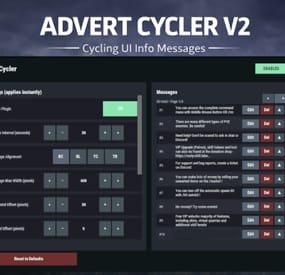
AdvertCycler lets you create a rotating list of on-screen info messages (“adverts”) that display to players without spamming chat. It’s a clean, unobtrusive alternative to chat-based announcers, and the positioning is designed to remain consistent across different screen resolutions and UI scale settings.
Messages cycle on a configurable timer, either in order or randomly. You can fine-tune how the message looks and where it appears using:
Preset alignment modes (Bottom Center / Bottom Left / Top Center / Top Right) Horizontal + Vertical offsets (with small/big nudge controls for precise positioning) Max text line width Font size Optional text outline with configurable color (quick-pick color swatches in the UI)
Admin UI (Instant Apply)
AdvertCycler includes a built-in admin UI for live editing and previewing changes in real time:
Toggle the plugin on/off Adjust interval, alignment, offsets, width, and font settings Enable/disable outline and pick outline color Choose whether the advert displays on Overlay or Hud Manage the message list: Add / Edit / Delete Reorder messages (move up/down) Paging for large lists All changes apply instantly, so you can visually tune placement and style while in-game.
Permissions
advertcycler.admin - Grants access to the admin UI and allows editing of all AdvertCycler settings and messages.
advertcycler.view - players/groups with this permission will be shown the advert messages.
Chat Command
/adverts - opens the editor UI
Config Example
{ "AdvertCycler": { "Enable Plugin": true, /Can disable globally from config if needed for whatever reason. "Update Interval (seconds)": 30, /How often the message should change "Message Alignment (BottomCenter/BottomLeft/TopCenter/TopRight)": "BottomLeft", /Base position where the messages should appear "Message Max Width (pixels)": 300, /Maximum line width for text. Anything beyond carries on new line "Vertical Offset (pixels)": 10, /Fine Up and Down adjustment of text position "Horizontal Offset (pixels)": 2, /Fine Left and Right adjustment of text position "Enable Text Outline": true, /Enable or disable text outline "Text Outline Color (HEX)": "#000000", /Color of text outline. Black by default. "Font Size (pixels)": 12, /Text font size "Display as Overlay": true, /Displaying the messages as overlay will allow them to be seen on top of other in game hud screens such as inventory "Randomize Messages": false, /Messages can be displayed at random "Message List": [ "For server info, type <color=#30FEDE>/info</color> in chat.", "There are many different types of PVE enemies. Be careful!" ] } } HTML can be used in messages to modify color in full or partially, example:
For server info, type <color=#30FEDE>/info</color> in chat.