
AlaEddineYahia's Wishlist
-
$15.00
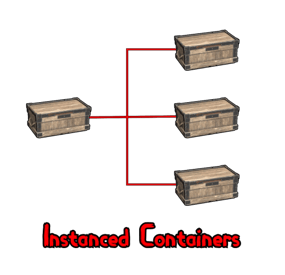
Instanced Containers
By imthenewguy in Plugins
Are you sick of your base being cluttered by countless items and having nowhere to store them?
Have you had to build an extra wing on your base entirely for storage?
Look no further, Instanced Containers has you covered!
Instanced containers is a plugin that allows for players to create multiple containers inside of 1 container, saving them a significant amount of space in their base.
It supports small/large wooden boxes and coffins by default, but can be used for any container by adjusting the config.
The plugins has 3 user based permissions included:
instancedcontainers.use - will allow the user to create instances of a container (3 instances per container by default). instancedcontainers.free - bypasses the cost for creating an instance of a container. You can also create your own permission groups through the config and add your own instance limits.
Example: "vip": 6 would create a permission called instancedcontainers.vip and give players with the permission access to add 6 instances per container.
- #storage
- #containers
- (and 4 more)
-

$15.00
AITweaks
By DarknessItself in Plugins
Updates NPCs' stats & behavior aspects to make PVE combat against NPCs much more comfortable.
Details:
- NPCs Gen2 (new NPCs):
-- only 1 / 3 chance to throw a smoke grenade
-- when throwing a smoke grenade: 80% to self smoke, 20% to throw the grenade to player's direction with applying random shift velocity,
i.e. no more always perfect grenade throws.
-- slows down movement speed a bit
-- 'hiding' time is reduced to 30 sec. MAX (no more of annoying infinite sitting in corners logic)
-- base damage is reduced by 15%
-- adrenaline distance: 40 meters
- legacy NPCs:
-- adrenaline distance: 25 meters
- common:
-- delayed healing is not cancelled in time of receiving damage from NPCs (syringes, medkits, food, ..)
-- reduces outgoing damage % based on player's(target) equipped clothes (fix of the default logic) plus the adrenaline effect(s)
-- while player is wounded: receiving damage is only 1 / 10 plus clothing protection
-- adrenaline 2 factor additional protection:
I) by distance: up to 15% additional protection, the closer NPC the less total damage
II) by low HP(less than 50% of MAX): up to 15% additional protection, the less HP left the less total damage
Additional info (examples):
- Damage % reduction:
-- max damage block: best clothes + adrenaline effect(s) is about 70%
-- only projectile(i.e. bullets) attacks are processed
-- the % formula in simplified way may be declared as: ((HEAD + BODY + LEGS) / 3) * MAX%
-- damage block % examples: (base projectile protection without inserted armor plates)
I) hazmat: 30% * 0.6(60%) = 18%
II) full heavy set gear: (HEAD: 90% | BODY: 75% | LEGS: 75%) / 3 = (240% / 3) * 0.6(60%) = 80% * 0.6(60%) = 48%
III) high tier armor set: ((HEAD: 50% | BODY: 25% + 20% + 10% | LEGS: 20% + 15% + 10%) / 3) * 0.6(60%) = (150% / 3) * 0.6(60%) = 50% * 0.6(60%) = 30%
-- inserting armor plates are also taken into account
-- clothes: 60% damage block is MAX (+ inserting plates). Default damage block is not yet disabled, so the total damage block will be a bit higher.
-- player's armor has 3 sections: HEAD | BODY | LEGS, each of the sections may be protected by 1 or more clothing item(s),
and to reach MAX % effect it's needed to have at least 1 equipped armor item for each the section,
OR to equip any item which protects entire the body (like: hazmat).
Usage:
Copy the downloaded DLL file into server/HarmonyMods folder
Compatibility:
Should work both with: Oxide & Carbon, or as Harmony the only installed mod
Dependencies:
No
Known bugs:
- NPCs Gen2 : may teleport to a close point or to receive extra(unreal) movement velocity, it's because of bugs in cur. official code base, hope 'Facepunch' will fix the bugs, or will try to do it by myself in next ~3 months.
Support:
Use private messages on this site
-
$39.99
PowerfulAdmin - Best admin panel
In-game admin panel Oxide & Carbon Our Discord Everything you open RCON for,
without leaving the game. PowerfulAdmin is an admin panel that lives inside Rust. Fourteen pages in the sidebar cover players, permissions, plugins, the live console, ConVars, a working server map and your own buttons. Four more tools work out in the world, on whatever you happen to be looking at. Every page and every action has a permission of its own, so a junior moderator gets what you hand them and nothing else.
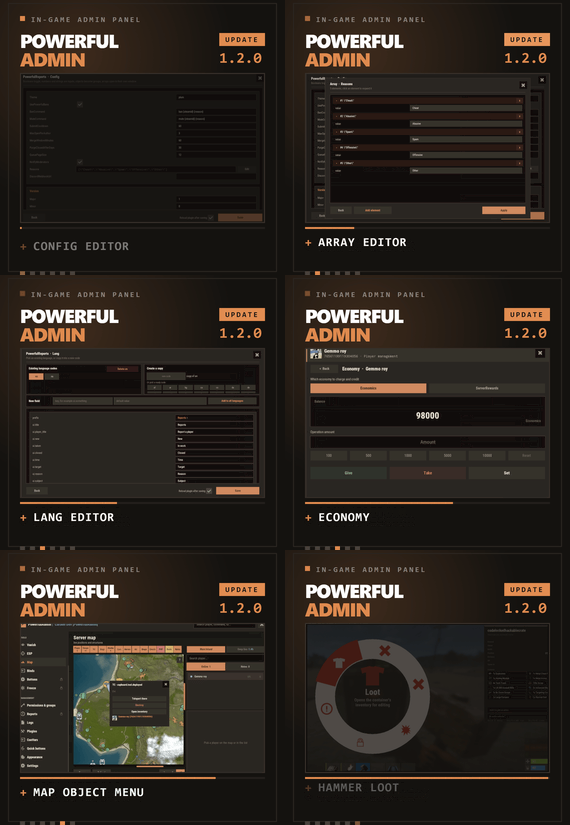
/padmin opens it. After that it is point and click, or a key you bound yourself. 00 New in 1.2.0 Five things this version adds Config editor Open any plugin from the Plugins page and edit its config as a form. Booleans become switches, numbers and strings become fields, an object becomes a group, an array opens in its own window. Save writes the file and can reload the plugin for you. Lang editor The same form for language files. Copy the open language into a new code to start a translation, delete one you no longer need, or add a key and push it into every localization at once. Map objects Cupboards, bags and stashes on the map used to be dots. Click one and a menu opens with the owners and their avatars, a teleport, a remote inventory, and a destroy behind a confirmation. Economy If you run Economics, ServerRewards or IQEconomic, the player card shows the balance and lets you add to it, take from it or set it. Reading and changing are separate permissions. Hammer & hints The hammer edits container contents instead of only listing them, its action menu moved to a radial you open by holding E, and its HUD can be dragged. Tooltips were added across the sidebar, the actions and the toggles. 01 The sidebar Fourteen pages, plus whatever docks in The panel reopens on the page you left. Add-ons appear in the same sidebar, use the same permission system and follow the theme the admin picked.
Dashboard Live console Players Vanish ESP Server map Binds Permissions Logs Plugins ConVars Quick buttons Appearance Settings Bans DLC Freeze DLC Whitelist DLC Your own sections land here too, through the API at the bottom of this page 02 Out in the world Walk up to it and deal with it Most moderation starts with you standing in front of a base, a player or a locked crate, not in a menu. Four tools cover that, and none of them asks the admin to install anything on their client.
Vanish You leave the world properly: networking, colliders, entity queries and the game's own AI target list. NPCs stop shooting and forget you were standing there. Radiation, cold, wetness, hunger, thirst and drowning stop touching you, and everything is restored the way it was when you switch Vanish off. A silhouette for other admins, auto vanish on connect, opening locks and noclip riding along are all optional, and each has a permission. Admin hammer Hold a hammer, look at anything, and the HUD reads out the owner, position, health, upkeep, power, who is authorized, the code lock codes and what is in the container. Hold E to pick an action from the radial menu, then Shift+LMB runs it: delete, delete with gibs, delete the whole linked structure, edit the container contents, or on a hackable crate unlock it now and set its timer to any value you type. Inspect Look at a player and act on them without typing a name. E opens their inventory, RMB opens their full card. A hint on screen keeps telling you which key does what. Server ESP The server draws it with the engine's own debug draw and sends it only to admins who hold the permission. Players and sleepers carry their name, HP and held item. Loot, boxes, cupboards, bags, traps, stashes, NPCs, scientists, turrets and vehicles each get their own colour. You set the radius, the opacity and the text size, and enemy, team and admin are coloured apart. 03 The player card One card per player, awake or asleep A searchable, paginated roster of everyone the server has ever seen. The card holds the SteamID, live status, current session and total playtime, total Rust hours from the Steam API, groups, first and last seen, the balance if you run an economy plugin, and the IP behind a permission of its own. Under that sit the actions.
Heal Kill Strip Kick Ban Freeze Mute Teleport Inventory Spectate Give Blueprints Modifiers Vitals Permissions Notes Show on map Each of these has its own permission Give is a cart, not a single item. Search the item list, stack up what you want, edit any quantity by clicking the number, then send the lot. Vitals reads the real limits off the prefab, so a raised max HP or a frozen metabolism survives death, respawn, reconnect and wipe. 04 The map The server map, drawn inside the panel The island and the Deep Sea, with zoom. Layers go on one at a time, so you look at what you came for and nothing else.
Layers Players, sleepers, cupboards, bags, stashes, cars, horses, air, shops, events and map notes. Cars, boats, submarines, trains, horses and player helicopters each have their own icon and an arrow showing where they are heading. The cargo ship, the cargo plane and the chinook are on the map with the rest. Click an object Cupboards, bags and stashes open a menu that names the owners and shows their Steam avatars. From there you can teleport to it, open its inventory from where you are standing, or destroy it behind a confirmation. Each of the three actions has a separate permission, so a moderator can be allowed to look without being allowed to delete. Heat PVP and raid heat build up from kills that actually happened and explosive damage that actually landed, over a window you set. It shows where the server is loud right now rather than guessing. Side panel A player search next to the map, and a card for whoever you picked with the same actions as the full player card. Hold Shift and place a map note to teleport straight to it. 05 Server control The parts you used to need RCON for Live console Server output as it happens, filtered by category, with a command line and history. It can be switched off entirely for everyone in Settings. Permissions Every permission on the server, grouped under the plugin that owns it. Toggle per user or per group, create and delete groups, set a parent group, and search across thousands of entries. PowerfulAdmin's own permissions can be locked so nobody edits them from inside the panel. Plugins Load, unload and reload anything on the server, then open its config and language files as a form and edit them without touching the filesystem. Editing is a separate permission from reloading, so an admin can restart a plugin without being able to rewrite it. ConVars Edit the server ConVars that matter, grouped and searchable. The panel keeps them in its own cfg file and applies them again on boot, so a restart does not quietly undo your work. Logs Commands, chat, joins, leaves, errors and warnings, colour coded and capped at a number you choose. Companion plugins write into the same log through the API. 06 Make it yours Bend it to how your team works Quick buttons Your own console commands as buttons, each with an icon, a colour, an optional confirmation and a permission of its own. You decide where a button shows up: the player card, the map, the dashboard or the floating widget. Binds Ready bind lines for the panel, Vanish, god mode, noclip, ESP, the hammer, inspect and the map. Type the key you want, select the generated line, Ctrl+C, paste into F1. One key toggles both ways. Appearance Three themes, Rust, Midnight and Plum, chosen per admin. Fonts are picked per slot, the window can be dragged, and the ESP text size is adjustable. Fonts without Cyrillic are marked in the picker. Notifications Panel messages go through Notify or NCP if you have either installed, or through chat, or nowhere at all. You pick the provider in Settings and the add-ons follow it. Storage SQLite by default, and it needs no setup. MySQL is there for networks that share data between servers, JSON for people who prefer files. Moving between them is one click in Settings and the data comes along. Discord An optional companion plugin ships in the same archive. Two way chat relay, feeds for bans, actions and errors, a bot with a live status line, and roles that decide who may run commands from Discord. It is set up in game, not in a config file. 07 Permissions Twenty seven of them, and that is the point A trial moderator can be given Vanish, the player card and nothing else. A head admin gets the lot. The panel greys out what an admin cannot reach instead of hiding it, so nobody has to guess why a page is missing.
powerfuladmin.use Open the panel at all powerfuladmin.players Player page and player cards powerfuladmin.map Map page powerfuladmin.map.teleport Teleport to an object on the map powerfuladmin.map.loot Open an object's inventory from the map powerfuladmin.map.remove Destroy an object from the map powerfuladmin.esp ESP page and the overlay itself powerfuladmin.vanish Vanish powerfuladmin.vanish.unlock Open locked doors and boxes while vanished powerfuladmin.hammer Admin hammer powerfuladmin.hammer.codes See code lock codes in the hammer HUD powerfuladmin.hammer.loot Edit container contents with the hammer powerfuladmin.plugins Plugin page, load and reload powerfuladmin.plugins.edit Edit plugin configs and language files powerfuladmin.economy See a player's balance powerfuladmin.economy.edit Change a player's balance powerfuladmin.console Live console page powerfuladmin.perms Permission manager powerfuladmin.logs Logs page powerfuladmin.convars ConVar editor powerfuladmin.quickbuttons Create and edit quick buttons powerfuladmin.settings Settings, storage and Discord powerfuladmin.godmode God mode toggle powerfuladmin.noclip Noclip toggle powerfuladmin.viewip Reveal player IP addresses powerfuladmin.candisablevitals Edit player vitals and metabolism powerfuladmin.countableondashboard Counts toward the admins online figure On top of that, every action in the player card carries powerfuladmin.player.NAME, and every quick button you create carries powerfuladmin.quickbtn.NAME. You do not have to grant them one by one on day one: pa.setup <steamid or name> in the server console hands a player the whole set at once. 08 Commands One in chat, three in console There is nothing else to memorise. The console ones exist mainly so you can bind them to keys.
/padmin Open the panel pa.open <page> Open the panel straight on a page, for example pa.open map pa.toggle <feature> Flip vanish, god, noclip, ESP, hammer or inspect. Called without a value it toggles, so one key does both directions pa.setup <steamid|name> Grant the full permission set to a player, once, on install Install 1 Drop the plugin into your scripts folder. It loads and writes a clean config on its own. Oxide and Carbon both work. 2 Run pa.setup with your name or steamid once in the server console. 3 Type /padmin in game. You are in. 4 Optional, later, in Settings: switch to MySQL, connect Discord, add a Steam API key for Rust hours, and copy your binds out of the Binds page. 09 Add-ons Bans, Freeze and Whitelist, sold separately Three companion plugins drop into the sidebar and share the card, the permissions and the storage backend. They are extras rather than missing pieces: everything above this line works without them.
PowerfulBans Timed and permanent bans in their own database, reason templates, per role duration caps, ban history and login enforcement. Runs standalone too. PowerfulFreeze Freeze a player where they stand while you talk to them, from the card, the map or the world, with live countdowns and three freeze modes. PowerfulWhitelist Closed server whitelisting with JSON, SQLite or MySQL storage and its own standalone commands. 10 Before you buy The questions that actually get asked Will it lag my server? It is built not to. Objects are pooled and buffers reused, only the element that changed repaints instead of the whole panel, saves are debounced, state is cached behind signatures, and ESP, inspect and the map run on intervals you can tune. Nothing runs for an admin who is not looking at it. Is the ESP a cheat? There is no client mod involved. The server draws it through the engine's own debug draw and sends it only to admins holding powerfuladmin.esp. Take the permission away and it stops existing for that admin. Can a junior moderator abuse it? Only as far as you let them. Every page has a permission, every action in the player card has one, every quick button you make has one, and the plugin's own permissions can be locked so they cannot be edited from inside the panel. Do I need a database? No. SQLite is the default and needs no configuration. MySQL is there for networks that want shared data, JSON for people who like plain files, and moving between them is one click in Settings. Do I have to set up Discord or a Steam API key? Neither. Discord is optional and configured in game when you want it. The Steam key only fills in the total Rust hours figure on player cards. Without it that one line reads n/a and nothing else changes. Can I manage players who are offline? Yes. Teleport to a sleeper, heal them, strip them, edit the inventory, mute, change permissions. Only the actions that need a live connection are disabled while a player is away. Oxide or Carbon? Both. On Carbon the panel's internal commands are protected on top of that, so nothing outside the panel can call them, while the public ones stay open for your binds. What language does it speak? English and Russian out of the box, and every string lives in a language file. Adding another locale is a translation rather than a code change, and you can now do it from inside the panel. I write plugins. Can I hook into it? Yes, and the section below shows how. 11 For developers Your plugin, inside the panel Any plugin can register its own sidebar section and draw inside the panel, in the player's language and in whichever theme the admin picked. Bans, Freeze and Whitelist are built on this same public API, so it gets exercised on every release.
[PluginReference] private Plugin PowerfulAdmin;
var definition = new Dictionary<string, object>
{
["id"] = "mystats",
["icon"] = "assets/icons/star.png",
["category"] = "nav.cat.tools",
["permission"] = "myplugin.view",
["title"] = (Func<BasePlayer, string>)(p => "My Stats"),
["hint"] = (Func<BasePlayer, string>)(p => "Kills, deaths, playtime"),
["open"] = (Action<BasePlayer>)OpenSection,
["cardRows"] = (Func<string, List<string[]>>)CardRows,
["settings"] = (Action<BasePlayer, CuiElementContainer, string, int>)DrawSettings,
["settingsHeight"] = (Func<BasePlayer, int>)(p => 180),
["popupActions"] = new Dictionary<string, Action<BasePlayer, ulong, string>>
{
["ban"] = OnBan
}
};
PowerfulAdmin.Call("API_AddSection", definition); Only id is required. Every other key is optional, and the permission is registered for you if no plugin has claimed it yet. Read API_SectionContext on every render to get the parent layer, the body size, the padding, the player's language and the full theme palette, because the admin can switch themes while your page is open.
API_AddSection(def) Register or replace a section API_RemoveSection(id) Unregister, call it in Unload API_OpenSection(player, id) Send a player to your section API_SectionContext(player) Geometry, language and palette for rendering API_ReopenPanel(player) Reopen the panel where it was API_RefreshPlayerCard(steamId) Repaint a player card after your data changes API_RefreshSettings(player) Repaint the settings page after saving a value API_Notify(player, message, isError) Notify through the admin's chosen provider API_Log(message, category) Write a line into the Logs page API_KnownPlayers() Every player the server has seen API_RustHours(steamId) Total Rust playtime from the Steam API, cached Support, updates and feature requests Bugs get fixed and requests get read. LR Development Discord- #admin
- #adminpanel
- (and 14 more)