
RTimer
-
Posts
80 -
Joined
-
Last visited
-
Days Won
3
Content Type
Profiles
Warranty Claims
Downloads
Forums
Store
Services
Downloads Plus Support
DOWNLOADS EXTRA
Reels
Everything posted by RTimer
-
Hello! Thank you so much for bringing the issue with the API hooks to my attention. You were absolutely right — they needed an update to properly handle multiple active checkpoints at the same time. I have just uploaded version 1.0.2, which includes a full fix for this. The hooks will now correctly trigger for each individual event instance. I also standardized the API based on your feedback: OnCheckpointEventCompleted now passes the CheckpointInstance as the first argument so you can easily access event-specific data (like coordinates), and I added a new OnCheckpointEventExpired hook for when an event times out without a winner. Please update to the latest version and let me know if everything is working smoothly for your custom setup! Also, if you are happy with the update and are enjoying the plugin, I would really appreciate it if you could leave a quick review on the plugin page. It helps a lot and means a great deal to me! Thanks again for helping improve the plugin. Best regards, RTimer
-
Changed Status from Pending to Work in Progress Changed Fixed In to 1.0.1
-
Hi, thanks for letting me know about the issue! I’ll fix it as soon as possible tomorrow and test everything again to make sure it works correctly. I really appreciate the honest review from you — feedback like this helps me make my work better.
-
Hi again! Ah, that explains it perfectly. You are currently using version 1.0.0. In that initial version, some of the chat messages were accidentally hardcoded in Russian, which is why your lang file translation isn't affecting the chat text. The good news is that I have already fixed this! Please wait a little while for the 1.0.1 update to be released. In version 1.0.1, this issue is completely resolved, and all messages will properly correspond to your translated lang file. Your Czech translation will work flawlessly in the chat once you update. Thank you for your patience and for reporting this!
-
The en version of the plugin only makes the configuration file (oxide/config/DailyRewards.json) generate in English for easier setup. The in-game chat messages are handled automatically by Oxide based on the language chosen in the player's game settings. The player in your screenshot is playing in Czech (cs). Since there is no Czech translation file by default, Oxide falls back to your server's default language (which appears to be set to Russian in your oxide.config.json). You can easily add Czech or any other language yourself without needing a new update! Here is how: Open your server files and navigate to the oxide/lang/en/ folder. Copy the DailyRewards.json file. Go back to oxide/lang/ and open (or create) a folder named cs. Paste the DailyRewards.json file inside the cs folder. Open the file and translate the English phrases into Czech. Run o.reload DailyRewards in your server console. Now, any player using the Czech version of the game will automatically see your translated messages!
-
Hi. Give me a few minutes, I’ll look into it.
-
Version 1.0.4
61 downloads
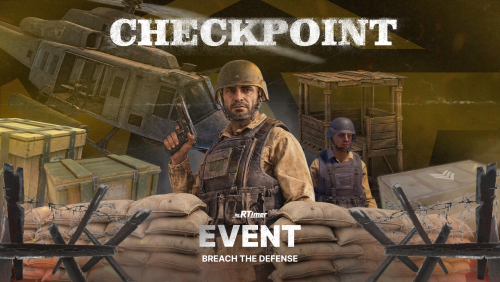
Checkpoint Event Checkpoint Event is a fully featured PvE event for Rust, transforming ordinary procedural roads into dangerous, heavily fortified military combat zones filled with valuable rewards. During the event, a military checkpoint spawns on a randomly selected road section, protected by armed NPC guards, snipers, auto-turrets, and occasionally a Patrol Helicopter. The encounter is driven by a new dynamic Difficulty System, meaning the size of the base layout, the number of guards, the presence of a helicopter, and the final loot will scale based on the randomly selected difficulty. Players must breach the perimeter, fight through the defenders, and loot the crates. The event utilizes a unique Competitive Scoring System: players earn points for killing NPCs, destroying turrets and helicopters, and looting crates. The event is successfully completed only when all guards are eliminated and every crate is looted. The player with the highest score at the end of the event is declared the winner! This creates an intense PvE and PvP experience where players must fight not only the military but potentially each other for the highest score. Features Random road location selection (automatically avoids monuments). Dynamic Expandable Difficulty System (Easy, Normal, Hard, Nightmare by default, but completely customizable — add, remove, or edit as many levels as you want!). Difficulty-based Scaling: Each difficulty dictates its own base layout size (Small, Medium, Large), guard counts, crate quantities (Regular, Military, Elite), loot tables, and whether a Patrol Helicopter spawns. Competitive Scoring System: Awards points to players for specific actions (kills, looting). Custom Defenses: Checkpoints are fortified with high stone walls, gates, watchtowers, sandbags, and auto-turrets deployed on junkpiles. Notify Plugin Support for modern UI announcements. Customizable Chat Prefix with color support. Fully customizable crate loot per difficulty. Option to remove the default crate loot. Dynamic Map Markers: Vending machine and radius markers displaying a live countdown timer until the event expires. Automatic event completion once all NPCs are cleared and all crates are fully looted. Automatic event scheduling and cleanup timers. Manual event control through chat and console commands. Oxide permission support. Fully configurable through the configuration file. Commands /checkpoint start [difficulty] - Chat command checkpointevent start [difficulty] - Console command Starts the event. You can optionally specify a difficulty name (e.g., Easy, Normal) to force a specific tier. /checkpoint stop - Chat command checkpointevent stop - Console command Stops and completely despawns the currently active event. Permissions checkpoint.admin (Used only when permission checks are enabled in the config to control who can manually start/stop the event). API & Hooks Checkpoint Event provides API hooks that allow server owners and developers to easily integrate the event with external UI plugins, custom reward managers, or economy systems: OnCheckpointEventStarted - Called when the checkpoint event successfully spawns on the map. OnCheckpointEventStopped - Called when the event is forcefully stopped or cleaned up. OnCheckpointEventCompleted(BasePlayer winner, string difficultyName) - Called when the event is successfully completed (all guards dead, all crates looted). Returns the player with the highest score and the name of the completed difficulty. Localization The plugin includes full localization support for: English Russian All in-game messages are fully translated and automatically displayed according to the server language. Configuration The configuration file allows you to customize almost every aspect of the event, including: Custom Difficulty Profiles (Add/Remove difficulties, adjust spawn chances, layouts, and helicopter presence). Difficulty-Specific Loot Tables: Complete loot control per crate type (Regular, Military, Elite) per difficulty (item amounts, drop chances, and skin IDs). Scoring Values: Adjust how many points players receive for killing NPCs, turrets, helicopters, and looting crates. Chat & UI Customization: Chat Prefix settings and Notify Information Type ID support. Automatic event interval & Event lifetime. Map marker radius and names. Guard & Sniper NPC presets. Option to remove the default crate loot. Permission requirement for chat commands. CONFIG EXAMPLE PvE Mode Support The plugin features full built-in compatibility with PveMode. When PveMode is installed on your server, the event automatically generates a dedicated PVE zone upon spawning. You can fully customize all PVE rules, permissions, damage scaling, crate looting restrictions, and owner status settings directly through the plugin configuration file. Dependencies Required Dependency: NPC Spawn: Checkpoint Event requires the NPC Spawn plugin to function. The event relies on it to spawn all NPC guards and snipers. Without NPC Spawn, the plugin will not work. Note: You must configure your own NPC presets or use default ones in the NpcSpawn data folder that match the preset names defined in the Checkpoint config. TELEGRAM CHANNEL$14.99- 2 comments
-
- 1
-

-
- #event
- #checkpoint
- (and 5 more)
-
Changed Status from Not a Bug to Closed Changed Fixed In from 1.0.7 to 1.0.8
-
.thumb.png.869cef4c06723841adb05a43027fe8f0.png) It means: “Whether to take the player’s armor (equipment) into account when calculating the damage dealt by the Bomber’s explosion.” In other words, whether the damage should be reduced based on the player’s armor percentage, just like armor reduces bullet damage, etc.
It means: “Whether to take the player’s armor (equipment) into account when calculating the damage dealt by the Bomber’s explosion.” In other words, whether the damage should be reduced based on the player’s armor percentage, just like armor reduces bullet damage, etc. -
Changed Status from Pending to Not a Bug Changed Fixed In to Next Version
-
Yes, of course. I will add this feature in the next update.
-
I understand the issue. I’ll think about the best way to handle this and try to address it in one of the upcoming updates.
-
Changed Status from Pending to Not a Bug Changed Fixed In to Next Version
-
Okay, I’ll add this to the config in the next update.
-
Changed Status from Pending to Not a Bug Changed Fixed In to 1.0.7
-
Regarding the map marker, the radius is already customizable in the config under “Map Marker Radius”. You can change the marker radius there, so there shouldn’t be any need to modify the hardcoded value in the code.
-
The smoke, remaining crates, and other event elements no longer disappear instantly right after winning. Instead, I added a short delay before cleanup so players have plenty of time to loot everything safely, especially now that events can spawn multiple crates. This cleanup delay is completely customizable via the Despawn Delay option in your config, which is set to 2 minutes (120 seconds) by default. Hope this helps clarify things!
-
Changed Status from Pending to Closed Changed Fixed In to 1.0.7
-
I'm not sure why that happened, as I couldn't reproduce this bug on my end. If this problem pops up again, definitely let me know (if you have any console errors, please send them over too—they help resolve issues much faster). It might have just been a minor, isolated conflict on the server. Thanks for your time!
-
Did this start happening after updating to version 1.0.7, or has it always been like this? Is this the first time you've encountered it? Also, have you tried restarting the event to see if the map marker appears?
-
Hello! This behavior was intentionally designed as part of the event's mechanics. Players are not supposed to leave the event area while the hacking process is in progress. If they do, the hacking progress is reset and the event starts over. However, you can easily adjust this to better fit your server. In the config file, there are two settings that control this behavior. By default, they are set to fairly strict (low) values: - Maximum Distance (trigger zone) — increase this value to expand the event area. - Return Time — increase the number of seconds a player has to return to the event area before the hacking progress is reset.
-
Fixed in version 1.0.7
-
updated in version 1.0.7
-
Thank you for the detailed explanation, I completely understand the issue now. You are right, that is definitely a bug. I will fix it in the nearest update!
-
Just to clarify how the plugin currently works: new bombers stop spawning as soon as the crate hack timer finishes, so everything is functioning correctly on that front. However, any bots that were already spawned will remain alive in the area until a player comes down, kills them, takes all the loot, and completes the event. If a player dies, those remaining bots will simply stay there until someone else arrives. Would you like us to add a reset feature for this—for example, if a player dies or leaves and no one interacts with or loots the crate within 2–3 minutes, the event automatically resets? Or how exactly would you prefer it to work? Alternatively, if I misunderstood your message and you encountered an actual bug (such as bombers continuing to spawn endlessly even after the hack timer ended), please describe the exact scenario in more detail so I can look into it!