maxalt
-
Posts
297 -
Joined
-
Last visited
Content Type
Profiles
Warranty Claims
Downloads
Forums
Store
Services
Downloads Plus Support
DOWNLOADS EXTRA
Reels
Everything posted by maxalt
-
I may have asked a similar question about a year ago, but I'd like to ask again. With the settings in the attached file, is Lockout currently functioning? Recently, some players have reported that the Lockout UI does not appear after they successfully complete a purchased Raidable Base. Does Lockout not apply to purchased Raidable Bases? Or is Lockout only applied when players complete automatically spawned Raidable Bases? I'm currently using your plugin on a custom map, and I've encountered an issue where some Raidable Bases spawn partially inside custom monuments, making them impossible to complete. Because of this, I advised affected players to use the /rbe despawn command to despawn the problematic base and then purchase another one. However, they reported that despawning the base triggers the Buyable Cooldown, preventing them from purchasing another base immediately. Is there any workaround that would allow players to purchase another Raidable Base immediately after despawning one? Thank you for your help! Additional note: I've currently disabled Buyable Cooldown, but since Lockout doesn't seem to apply to purchased Raidable Bases, players can now repeatedly purchase and complete them without any cooldown. RaidableBases.json
-
Sorry for the late reply. I’ve just confirmed that there is no longer any conflict with the recycler. Thank you very much for taking care of it!
-
It seems that the latest version is interfering with SkillTree’s recycler speed increase feature. There are no runtime errors or anything like that, but even if the SkillTree recycler speed is leveled up enough for recycling to finish almost instantly, the recycler becomes much slower as soon as this version of OwnCasinoPremium is loaded. If I unload OwnCasinoPremium, the recycler works normally again at the speed set by SkillTree.
-
same
-
I was able to configure it in /config/RustEdit.json. Sorry about that!
-
This Bradley APC appears to be a vanilla one. Is there any way to prevent it from spawning?
-
Got it! Thank you very much!
-
Ah! I think I renamed the SkillTree.cs file, and that caused a compilation error. Is there any command or other way to manually trigger OnNewSave? It seems like that was the cause. I’m sorry about that!! Thank you very much!
-
Hello! Regarding this setting, the contents of players' ExtraPockets were not wiped and remained intact. What could be causing this?
-
[18:48:18] UnityEngine.Component:SendMessage_Injected(IntPtr, ManagedSpanWrapper&, Object, SendMessageOptions) [18:48:18] UnityEngine.Component:SendMessage(String, Object, SendMessageOptions) [18:48:18] Oxide.Plugins.<>c__DisplayClass111_1:<SpawnBradleyCrates>b__0() [18:48:18] Oxide.Core.OxideMod:OnFrame(Single) [18:48:18] Oxide.Core.Unity.UnityScript:Update() [18:48:18] [18:48:18] MissingMethodException: Method 'LockedByEntCrate.SetLockingEnt' not found. [18:48:18] at System.RuntimeType.InvokeMember (System.String name, System.Reflection.BindingFlags bindingFlags, System.Reflection.Binder binder, System.Object target, System.Object[] providedArgs, System.Reflection.ParameterModifier[] modifiers, System.Globalization.CultureInfo culture, System.String[] namedParams) [0x006e0] in <e605204d165a49d89ae7579f3d894429>:0 [18:48:18] at UnityEngine.SetupCoroutine.InvokeMember (System.Object behaviour, System.String name, System.Object variable) [0x0001e] in <7ef4b7e39e5e4212acadbf6d2e50d7fa>:0 [18:48:18] UnityEngine.Component:SendMessage_Injected(IntPtr, ManagedSpanWrapper&, Object, SendMessageOptions) [18:48:18] UnityEngine.Component:SendMessage(String, Object, SendMessageOptions) [18:48:18] Oxide.Plugins.<>c__DisplayClass111_1:<SpawnBradleyCrates>b__0() [18:48:18] Oxide.Core.OxideMod:OnFrame(Single) [18:48:18] Oxide.Core.Unity.UnityScript:Update() [18:48:18] [18:48:18] MissingMethodException: Method 'LockedByEntCrate.SetLockingEnt' not found. [18:48:18] at System.RuntimeType.InvokeMember (System.String name, System.Reflection.BindingFlags bindingFlags, System.Reflection.Binder binder, System.Object target, System.Object[] providedArgs, System.Reflection.ParameterModifier[] modifiers, System.Globalization.CultureInfo culture, System.String[] namedParams) [0x006e0] in <e605204d165a49d89ae7579f3d894429>:0 [18:48:18] at UnityEngine.SetupCoroutine.InvokeMember (System.Object behaviour, System.String name, System.Object variable) [0x0001e] in <7ef4b7e39e5e4212acadbf6d2e50d7fa>:0 [18:48:18] UnityEngine.Component:SendMessage_Injected(IntPtr, ManagedSpanWrapper&, Object, SendMessageOptions) [18:48:18] UnityEngine.Component:SendMessage(String, Object, SendMessageOptions) [18:48:18] Oxide.Plugins.<>c__DisplayClass111_1:<SpawnBradleyCrates>b__0() [18:48:18] Oxide.Core.OxideMod:OnFrame(Single) [18:48:18] Oxide.Core.Unity.UnityScript:Update()
-
"Wipe and plugin update settings": { "Automatically wipe player data after x days if they have not logged in? [0 = off] [only checks on wipe]": 0, "Manual wipe settings": { "Wipe all player data files [setting true will ignore all below settings that handle data reset]?": false, "How should we handle xp, levels and skills when the server wipes [None, Reset, Refund]?": "None", "Should we wipe prestige levels?": false, "Wipe xp debt?": true, "Wipe respec multiplier?": true, "Reset pending xp pools on wipe?": true, "Erase ExtraPockets storage on wipe": true, "Give the player with the highest xp bonus skill points next wipe": false, "How many skill points should they receive for winning?": 5 }, "Forced wipe settings": { "Wipe all player data files [setting true will ignore all below settings that handle data reset]?": false, "How should we handle xp, levels and skills when the server wipes [None, Reset, Refund]?": "None", "Should we wipe prestige levels?": false, "Wipe xp debt?": true, "Wipe respec multiplier?": true, "Reset pending xp pools on wipe?": true, "Erase ExtraPockets storage on wipe": true, "Give the player with the highest xp bonus skill points next wipe": false, "How many skill points should they receive for winning?": 5 Hello! Regarding this setting, the contents of players' ExtraPockets were not wiped and remained intact. What could be causing this?
-
Setting the Chinook’s altitude to 200m fixed the issue!
-
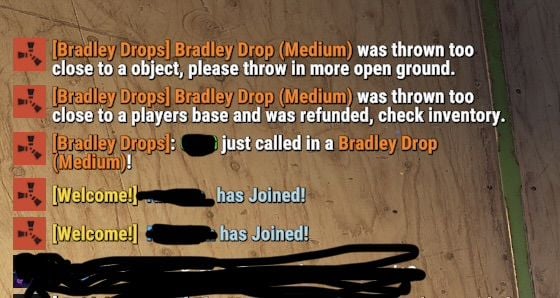
Hello, and thank you for this great plugin. However, I’ve received reports that the Chinook will sometimes fail to spawn at all, or it will spawn without a Bradley attached and simply fly straight past. I’m sending part of the log as an example. In this player’s case, the log shows just called ..., but the Chinook never actually arrived. I’ve also attached my config file just in case. Thank you in advance for your help. [08:00:02] [Shop] Player ?? (76561198) bought items for 4000RP$: [ITEM--312880514] supply.signalx1 [08:03:53] [Bradley Drops] INFO: Entity: grenade.supplysignal.deployed | No construction found underneath. [08:03:53] [Bradley Drops] DEBUG: Started event: Bradley Drop (Medium) BradleyDrops.json

-
Thank you for creating such an amazing plugin! I run a PvE server, but players still occasionally forget to lock their entities, which sometimes leads to theft. Would it be possible to make the /lock UI permission-based? For example, if a player doesn't have the .admin permission, the options for automatically locking TCs, chests, and other entities would be hidden. Instead, they would only see: Streamer Mode (On/Off) Code Lock combination The full UI would only be available to players with the .admin permission. I think this would make the interface much simpler for regular players while still allowing administrators to access all of the advanced options.
-
Thank you! In that case, could you please tell me how to add the vanilla Bradley APC and Patrol Helicopter?
-
How would I go about integrating with plugins such as HeliSignals, BradleyDrops, and BotReSpawn? For example, I'd like to track things like: the number of helicopters completed for each difficulty in https://codefling.com/clients/purchases/179417-heli-signals/, the number of Bradleys completed for each difficulty in https://codefling.com/clients/purchases/208775-bradley-drops/, and the number of bots killed in https://codefling.com/clients/purchases/153297-botrespawn/. Is there a recommended way to access those statistics or receive those events?
-
Sorry for the late reply! It turns out it was just a mistake in my configuration. I sincerely apologize for the confusion.
-
Thank you for creating this unique plugin! I'm also using BotReSpawn. In BotReSpawn, I have APC Safe set to true, so the vanilla Bradley APC does not target BotReSpawn bots. However, Bradley APCs spawned by this plugin still attack BotReSpawn bots. Would it be possible to make the Bradley spawned by this plugin respect BotReSpawn's APC Safe setting, so it won't target BotReSpawn bots as well? [Bradley Drops] ERROR: Error in MonitorAIState: Object reference not set to an instance of an object.
-
Thank you for creating such an interesting plugin! There are a few locations, such as the Harbor and Lighthouse, where I would like to change the event spawn points. However, even if I edit /data/SulfurEventSpawnData.json, the values revert to their original positions whenever I reload the plugin. How can I change the spawn locations permanently?
-
So, if I understand correctly… Even if a player has a Player Lockout, they can still complete a Raidable Base that they purchased themselves. That means it’s especially important for the Buyable Cooldown to work correctly, since that’s what actually prevents players from repeatedly purchasing their own raids. Is that correct?
-
Hello! With this setting, if a player is currently on a lockout, they won’t be able to enter the Dome even if they’re in a team. Is that correct? RaidableBases.json
-
Sorry, would you mind if I ask something that's not directly related? It seems I completely misunderstood how this works. Am I correct in understanding that: Player Lockout = the amount of time before a player is allowed to enter another Raidable Base (the dome/event area). Buyable Cooldown = the amount of time before a player can purchase another Raidable Base. So, for example, if I set the Player Lockout to 90 minutes, does that mean that after completing a raid, the player must wait 90 minutes before they can enter another Raidable Base, whether it's an automatically spawned one or a buyable one? Is that correct?
-
Thank you very much! I really appreciate your help. By the way, I have one more question. As I mentioned earlier, suppose a team has a mix of online and offline players. If the online players complete a raid and the team cooldown becomes active, then one of the players who was offline logs in afterward. In that situation, is it the expected behavior for the cooldown UI to appear for the player who has just logged in?
-
[05:09:34] Loaded 210 items from RaidableBases/Difficulty_Loot/Easy [05:09:34] Loaded 281 items from RaidableBases/Difficulty_Loot/Medium [05:09:34] Loaded 303 items from RaidableBases/Difficulty_Loot/Expert :[05:09:34] Loaded 314 items from RaidableBases/Difficulty_Loot/Nightmare [05:09:34] Loaded 4 items from RaidableBases/Base_Loot/Easy Bases [05:09:34] Loaded 9 items from RaidableBases/Base_Loot/Medium Bases [05:09:34] Loaded 9 items from RaidableBases/Base_Loot/Expert Bases [05:09:34] Loaded 11 items from RaidableBases/Base_Loot/Nightmare Bases [05:09:51] [RaidableBases] 25% loaded (121 potential points) [05:10:04] [RaidableBases] 50% loaded (281 potential points) [05:10:17] [RaidableBases] 75% loaded (607 potential points) [05:10:30] [RaidableBases] 100% loaded (1029 potential points) [05:10:30] [RaidableBases] Grid initialization completed in 58 seconds and 355 milliseconds on a 4500 size map with 1029 potential points. By the way, there don't seem to be any errors in the server logs.