.png.df584754d37a9df21dd7ea3ace18de4b.png)
-
Posts
352 -
Joined
-
Last visited
Content Type
Profiles
Warranty Claims
Downloads
Forums
Store
Services
Downloads Plus Support
DOWNLOADS EXTRA
Reels
Everything posted by VENIQQ
-

-
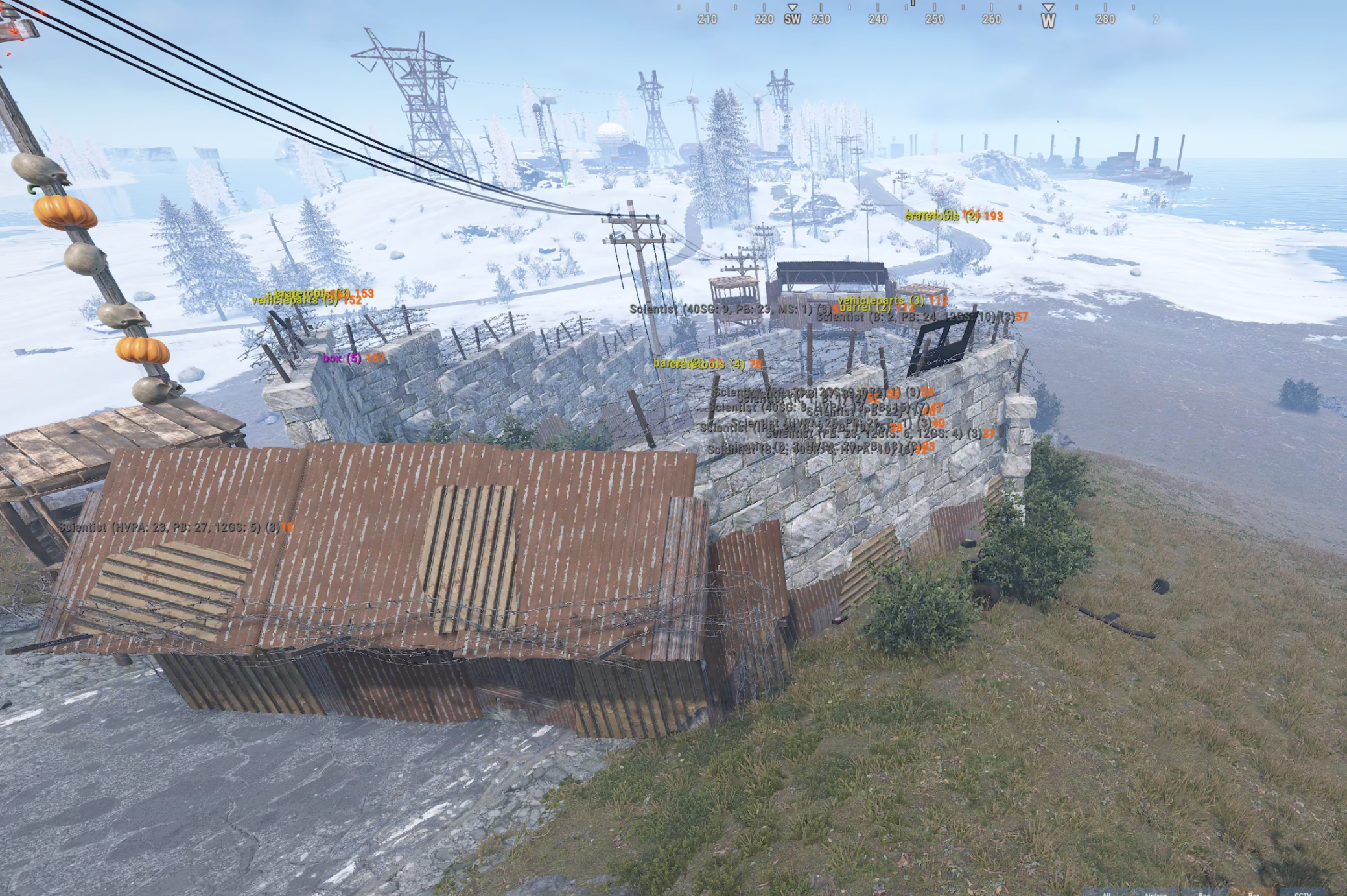
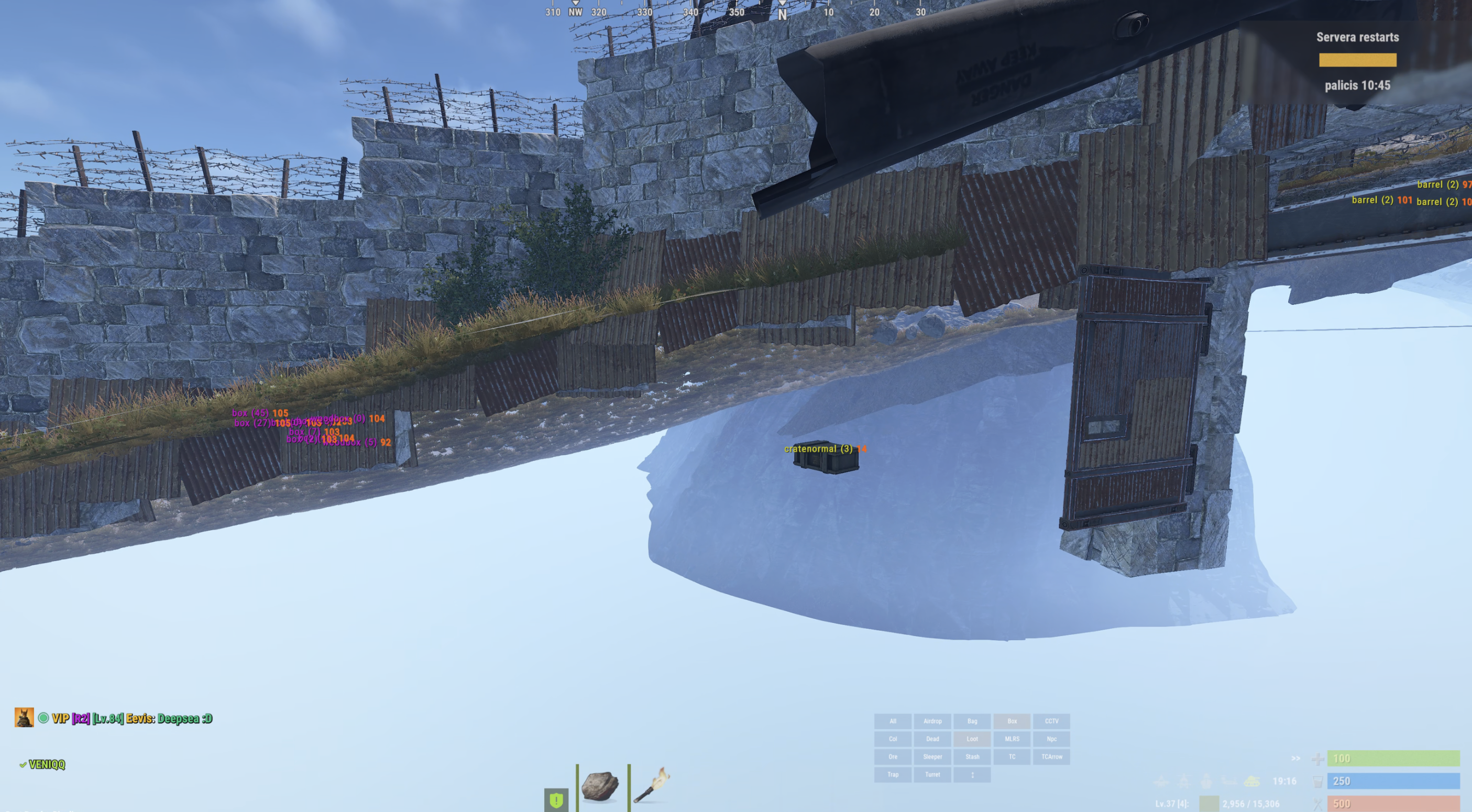
Hey, Is there any way to prevent crates and bots spawn underground? see screenshot. This happens mostly when one side of the rode is much higher than the other - on the slopes. So often crates spawn somewhere under terrain and players can't complete an event. Thanks
-
 Does this apply optimization on raidable bases as well?
- 5 comments
-
- 1
-

-
- #low fps
- #fps counter
- (and 12 more)
-
We were not able to catch it as it happens randomly from time to time
-
Hi, For several weeks players and me have noticed a strange bug that some items, especially large boxes - randomly change skin withoyt player interactions with them. Sometimes this happens also for unskinned vanilla items - e.g. I place a large box, return to base after some time and it now has random skin applied. Any clues how this could be happening in this plugin? or from something else?
-
 Does anyone else have issue with skins randomly changing for boxes from time to time? Like by itself?
 -
After force wipe stops recycling items after first stack and stops... All works fine if Custom Recycle is unloaded. Please check when you have some time
-
true
-
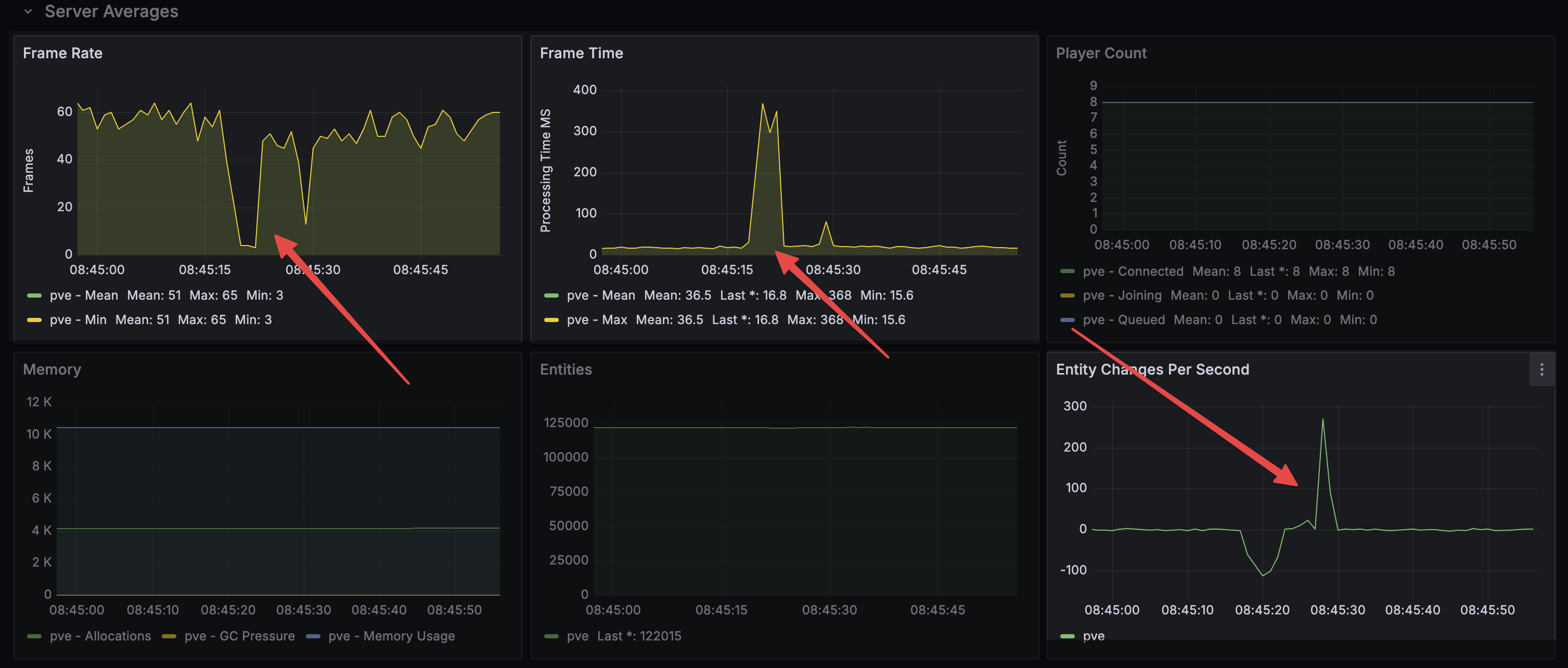
Hello, We experience strong server lag/hitch during automated (Easy) dungeon event spawn/despawn sequence. This is especially noticeable after wipe. For now I've disabled this on our server, but here is the usual chart at the Spawn/Despawn time: 05/09 08:45:18 | [DungeonEvents] Removed inactive dungeon of tier Easy at grid X10. 05/09 08:45:28 | [DungeonEvents] Enqueued Dungeon Auto Spawn of tier Easy. 05/09 08:45:28 | [DungeonEvents] Generating portal spawn point. 05/09 08:45:28 | [DungeonEvents] Generating dungeon spawn point. 05/09 08:45:29 | [DungeonEvents] Easy Dungeon spawned successfully at grid: X21. Often the largest spike/lag happens 1-2mins after "success" is logged in RCON. Here is also a summary from plugin overview by LLM: * Same timer tick does both jobs HandleDungeonTimers removes X16 and starts N23 together. No config for “wait until destroy finishes.” * Floors/ceilings/corridors spawn with almost no yield CreateCustomProceduralDynamicDungeon Spawn()s the building in one go. Delay settings only apply later (walls every 100, NPCs every 10). * Teardown dump at the end is unbatched RemoveEntitiesForDungeon Kill()s leftovers in one frame. * After “spawned successfully,” NPCs and turrets keep ticking 15 NPCs + boss + 5 turrets (ScanTargets every 1s from T+3s). That matches FPS noise for a minute or two. It is not a second build, and there is no “AI budget” setting. So 04:12:47 is the overlapped spawn/despawn. The later 5.3s frame + GC spike is leftover teardown and/or Mono catching up from that burst — not a missed config value.
-
Same
-
Hi, Skin IDs are available, however we can't set custom item names at the moment. Would it be possible to add this for this event plugin as well? Thanks.
-
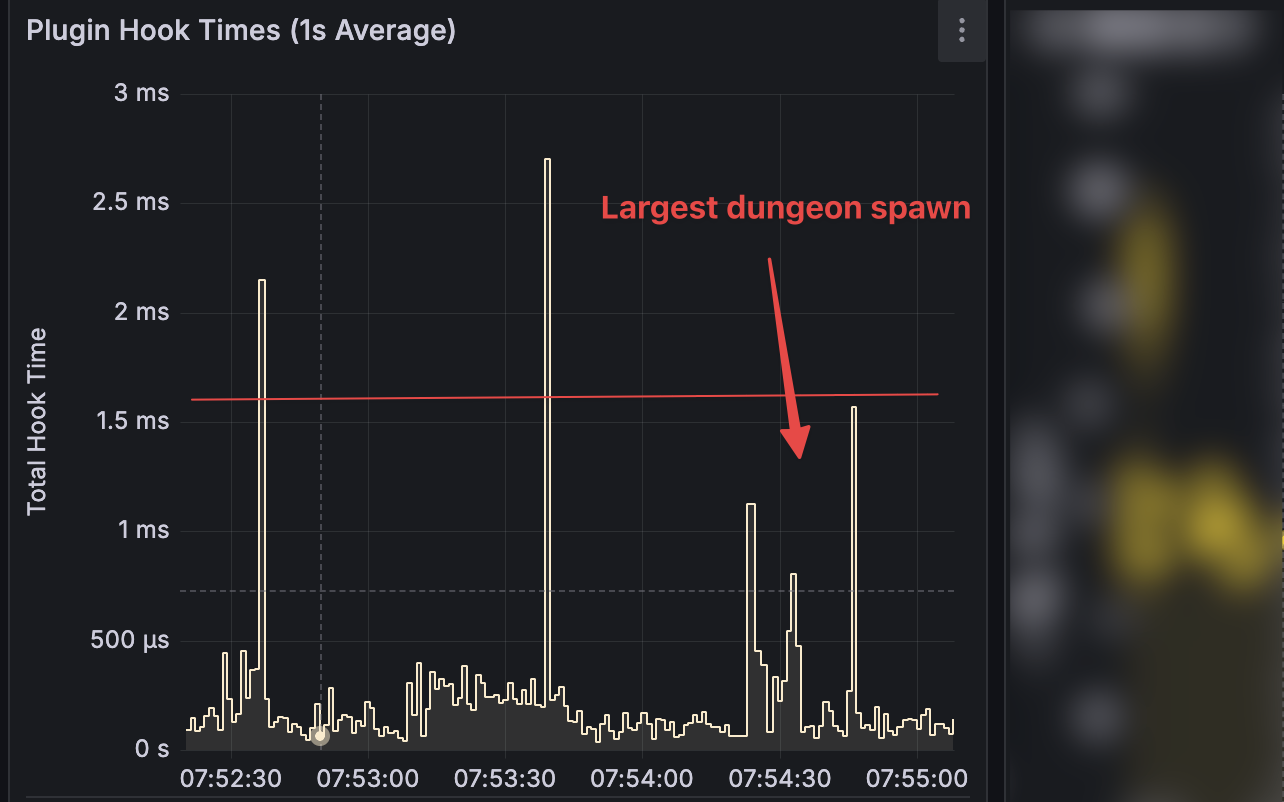
@Martian Hook times improved signigicantly to around 1-2ms for the largest dungeon spawn. However there is still noticeable FPS drop during the spawn itself - I believe that could be due to spawning of the building blocks in too large batches or something? It's similar to what I saw on large RaidBases before tweaking batch size for CopyPaste plugin. What reduced the spike significantly in case of CopyPaste/RaidableBases bases was the entity count per batch, which was reduced from 10 to 1. Not sure if something similar applies to your plugin as well...
-
I mean the name of the event on the marker. It's hardcoded
-
For now I've just hardcoded the zone to 80f, however would be great if that would be configurable in some way
-
is there a specific zone from where Im considered an event owner? I kill many bots outside of the smoke zone and still not considered an owner, even if damage amount is set to 50. When I enter smoke zone and kill NPC - only then I'm recorded an owner. I would like to adjust that, so that players can kill NPC before entering smoke and be considered an owner (so that nobody else can hijack event halfway).
-
can we please have a customizable map marker in the config? currently changed hardcoded value from the code, but that would break each time plugin is updated
-
It seems SubwayEvent bomber bots do not explode if player stands a bit higher on crates (so they don't touch player) - can we adjust so that bots explode either way after timer expires even if not touched by player?
-
Hi, We have enabled automatic door closing after person is shoot down, however often NPCs enter spawn zone before doors are closed. Player re-entering the portal are shot down by NPCs since they are now camping spawn zone. Is there any way of stopping NPCs and animals to enter spawn zone? E.g. some lower wall barrier next to doors, or some other elaborate solution? Thanks
-
Hey, when armored train stops there are no NPCs inside. Instead they run on railway somewhere behind… so players have to search them on the map before accessing loot. please check. Happens right after recent update
-
@Scalboxcan I disable it somehow? it literally spams 3-4 times per second. I use your plugin only to connect recycler to pypes - that's all I need no stacks
-
After some recent updates I get a lot of this spam. 16/07 22:29:38 | Calling hook CanStackItem resulted in a conflict between the following plugins: Loottable - False (Boolean), UltimateIndustrialFarm (True (Boolean)) 16/07 22:29:40 | Calling hook CanStackItem resulted in a conflict between the following plugins: Loottable - False (Boolean), UltimateIndustrialFarm (True (Boolean)) 16/07 22:29:40 | Calling hook CanStackItem resulted in a conflict between the following plugins: Loottable - False (Boolean), UltimateIndustrialFarm (True (Boolean)) 16/07 22:29:40 | Calling hook CanStackItem resulted in a conflict between the following plugins: Loottable - False (Boolean), UltimateIndustrialFarm (True (Boolean)) 16/07 22:29:40 | Calling hook CanStackItem resulted in a conflic
-
Disregard, I'm stupid
-
Broken after force wipe
-
No, I didn; No, I didn't modify our plugin in any way. Will try after force wipe then
-
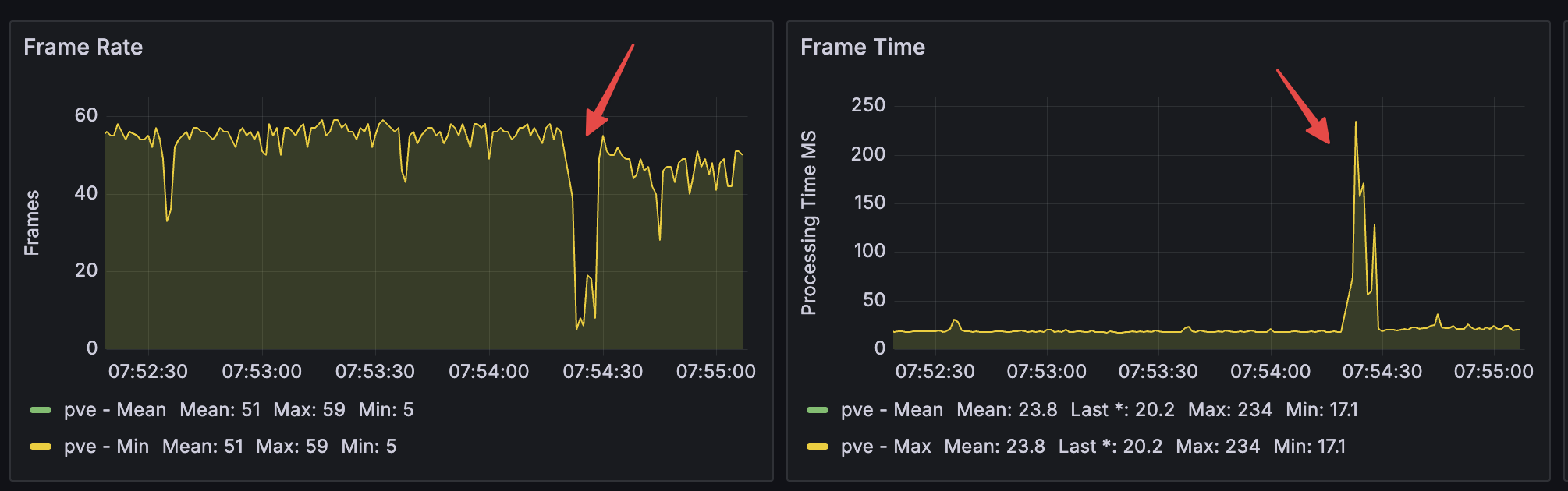
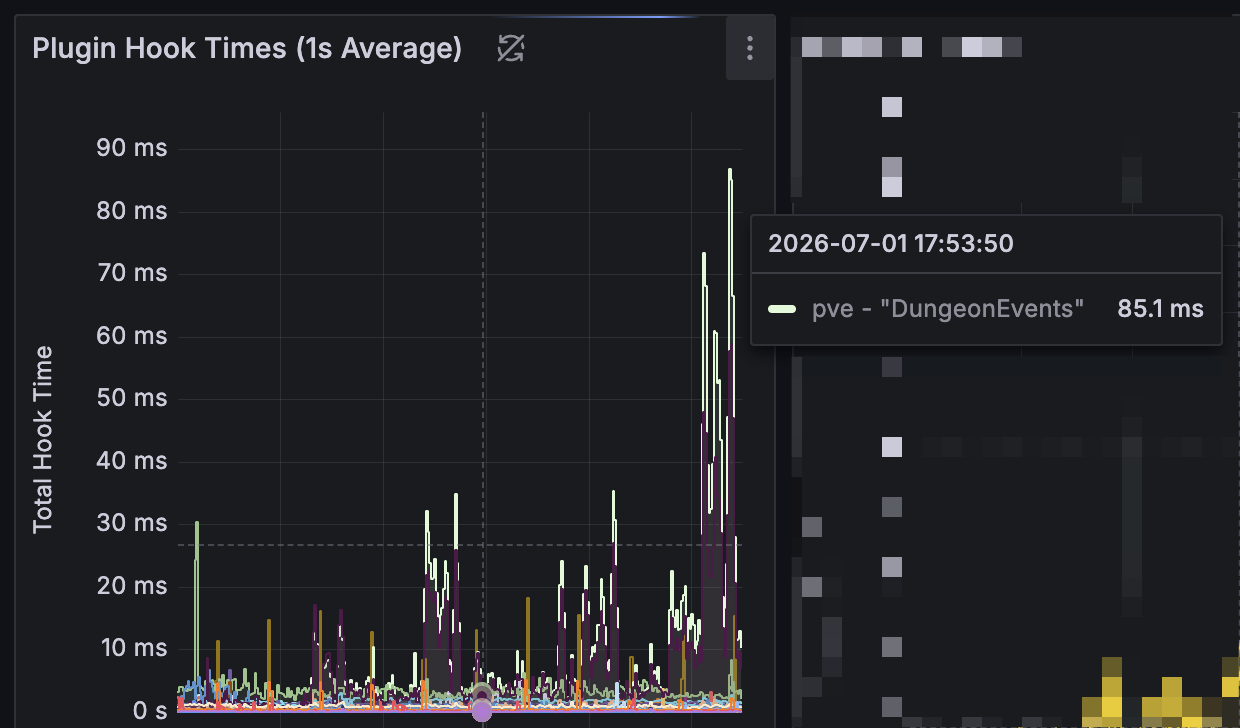
Hey, Could you check performance after latest plugin update and see if something can be optimized? Previously largest dungeons had like 30-40ms Hook time, now in 3.9.6 - it's like 70-80. Players can feel more lag and I see lower FPS. Is that indended? anything can be done about that?
.thumb.png.23774bd0711d767461aa56017d18ab28.png)