
NooBlet
-
Posts
1,613 -
Joined
-
Last visited
-
Days Won
14
Content Type
Profiles
Warranty Claims
Downloads
Forums
Store
Services
Downloads Plus Support
DOWNLOADS EXTRA
Reels
Everything posted by NooBlet
-
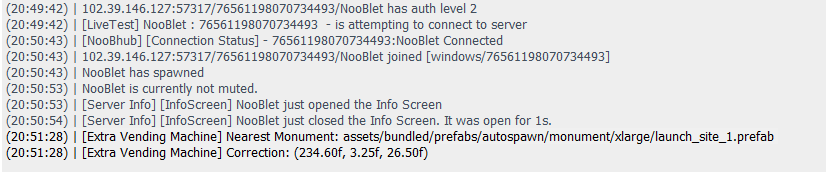
The server logs where you get the output of the plugin.
-
i dont need the config file . i need the days console logs , and the outpost is it a normal or custom outpost
-
Version 1.0.0
4 downloads
AdminSit provides Rust server admins with a dedicated environment to bring players in for administrative discussions, warnings, rule violations, investigations, or disciplinary meetings. Instead of chasing players around the map or trying to handle situations through chat, AdminSit creates a temporary meeting area with a table and chairs, allowing admins to bring players into a controlled environment and manage the situation efficiently. Whether you're dealing with a rule breaker, investigating a report, resolving a player dispute, or simply need a private conversation, AdminSit gives you the tools to handle it without disrupting the rest of your server. Features Dedicated Admin Sit Sessions – Start your own private administrative meeting area. Player Selection Interface – Browse online players through an easy-to-use UI. Player Search & Filtering – Quickly find players by name. Multiple Players – Bring multiple players into the same session for group discussions. Temporary Meeting Setup – Automatically spawns a table and chairs for the meeting. Player Control – Players attending the sit cannot freely leave their seats. Voice Mute – Mute or unmute individual players during the session. Warning System – Issue a warning directly from the admin sit interface. Kick Players – Kick players directly from the meeting. Permanent Bans – Ban players directly from the session. Temporary Bans – Apply bans with configurable durations. Custom Reasons – Add reasons when kicking or banning players. Player Protection – Seated players cannot be damaged by other players during the session. Easy Release – Release individual players and return them to their original location. Session Cleanup – Ending a session automatically returns players and removes the temporary meeting setup. Confirmation Prompts – Confirmation dialogs help prevent accidental actions. Pagination – Easily navigate player lists on populated servers. Commands /adminsit Toggle your AdminSit session on or off. Permissions adminsit.use Allows players with this permission to use AdminSit. Server administrators can also access the plugin. Optional Integration AdminSit supports optional integration with NooBzWarning. If the plugin is installed, admins can open the NooBzWarning interface directly from their AdminSit session.$5.00 -
normal outpost or custom. and if normal send me your complete logs of that day so i can have a look
-
Just tested and it posted in server console as expected are you trying to place it at a custom monument . or what monument are you trying to place , bc if you not a chat message will tell you no monument detected

-
server console sir
-

Version 1.0.2
8 downloads
NooBzWarning – Advanced Player Warning & Management System A complete, UI-driven warning and disciplinary management system for Rust servers. NooBzWarning gives server administrators a professional and centralized way to manage player behavior, issue warnings, track disciplinary history and automate punishments based on configurable warning thresholds. Featuring a fully integrated Rust CUI interface, persistent warning records and an interactive player acknowledgement system, NooBzWarning makes server moderation easier, more organized and more transparent. Whether you run a small community server or a large public Rust server, NooBzWarning provides the tools to keep player discipline under control. Key Features Advanced Admin Panel Clean, custom-built graphical administration interface. View online and sleeping players in one convenient list. Select players and issue warnings directly through the UI. Add custom warning reasons. Player selection highlighting. Paginated player lists. Customizable interface colors and appearance. Player Warning System Issue warnings with individual reasons. Players receive a dedicated full-screen warning notification. Warning displays the reason, issuing administrator and timestamp. Players must acknowledge their warning using the ACCEPT button. Outstanding warnings are automatically displayed when players reconnect. Warning acceptance is recorded and stored. Warning History & Management Dedicated warning history interface. View all players with recorded warnings. See total warning counts per player. View individual warning reasons, dates and issuing administrators. Track accepted and pending warnings. Edit pending warning reasons. Remove individual warnings. Clear all warnings for a player. Paginated warning history for easier management. Punishment commands are configurable, allowing administrators to customise their own disciplinary actions. Supported command placeholders: {steamid} – Player Steam ID. {name} – Player name. {reason} – Punishment reason. Customisation Commands CommandDescription /warn Opens the administration panel. /warnlis tOpens the warning management interface. Permissions Permission: noobzwarning.admin Config { "Permission": "noobzwarning.admin", "Punishments": [ { "Warning Count": 3, "Command": "banid {steamid} 1d \"Automated ban: 3 warnings\"" }, { "Warning Count": 5, "Command": "banid {steamid} 7d \"Automated ban: 5 warnings\"" }, { "Warning Count": 10, "Command": "banid {steamid} 30d \"Automated ban: 10 warnings\"" }, ], "UI Settings": { "Admin Panel Title": "NooBzWarning - Admin Panel", "Warning Overlay Title": "⚠ WARNING ⚠", "Accept Button Text": "ACCEPT", "Overlay Background Color": "0.8 0.1 0.1 0.95", "Overlay Text Color": "1 1 1 1", "Admin Panel Background Color": "0.1 0.1 0.1 0.95", "Admin Panel Text Color": "1 1 1 1", "Button Color": "0.2 0.6 0.2 1", "Button Text Color": "1 1 1 1", "Input Field Background": "0.25 0.25 0.25 1", "Input Field Border": "0.4 0.4 0.4 1", "Input Field Text Color": "1 1 1 1", "Player List Background": "0.15 0.15 0.15 1", "Selected Player Highlight": "0.2 0.6 0.2 0.8", "Logo Image URL": "", "Background Image URL": "" } }$3.00 -
Changed Status from Pending to Fixed Changed Fixed In from Not set to 2.2.1
-
Changed Status from Pending to Can't Reproduce
-
Server.zip
-
Im from south africa and its my own website . I cant control global internet issues
-
Issue is your carbon is not recognize the website . Use links in config and download images and then do own hosting. Simple
-
-
still waiting for all the details ive asked ,,,, with out it i cant help , you keep giving me just segments , i need all ,
-
Then it must be your server fps . As no one else have this issue . Myself is playing on high ping and this have never happend to me . What is your server specs . And im still waiting on logs (complete) from begin to end . Plugin list . And config you used at time of issue . Without those details i cant realy help
-
always should start center of map
-
and yes i know the config issue , but thats a carbon issue i need to find a workaround , just got it to work for you . an you dont give me the complete logs , i need that , from event start till end . here is a video to how you that all works as expected. .
-
gi9ve a list of your plugins loaded in server and what map you running , ass non of these happened in testing this morning , and dont run debug mode not ment for players just my testing .
-
Changed Status from Work in Progress to Fixed Changed Fixed In from Not set to Next Version
-
will have the fix in a few
-
Changed Status from Can't Reproduce to Fixed Changed Fixed In from Not set to Next Version
-
can you supply me with the console spam please
-
Changed Status from Pending to Can't Reproduce
-
Changed Status from Pending to Work in Progress