


NooBlet
-
Posts
1,568 -
Joined
-
Last visited
-
Days Won
14
Content Type
Profiles
Warranty Claims
Downloads
Forums
Store
Services
Downloads Plus Support
DOWNLOADS EXTRA
Reels
Everything posted by NooBlet
-
 Ill have a look at code in 2hour when i get home but normal player should not be able to spawn multiple
 -
Only admins can spawn multiple . Player are blocked to only one
-

Would love to see suppoort for running on...
NooBlet replied to GeekGarage's Support Report in Support
you have to give me time its is a big rewrite to do this -
update released @rrex
-
TUGBOATS ? .ILL ADD SOMTHING FOR THAT
-
not sure what you asking .... you want the normal spawn boats to be invincible ?
-
Would love to see suppoort for running on...
NooBlet replied to GeekGarage's Support Report in Support
ok give me a day or so . ill try get you a copy of with rustplugin instead of covalence -
As the tugboat despawn rate is so hight you can only spawn once per irl day . I feel thats fine . And offcourse cant spawn if you already have one ... ill get a cooldown on fetch in yes
-
Would love to see suppoort for running on...
NooBlet replied to GeekGarage's Support Report in Support
Changed Status from Pending to Not a Bug -
Would love to see suppoort for running on...
NooBlet replied to GeekGarage's Support Report in Support
the do recommend but its not essential . as i dont use carbon . i have no way to test a carbon build .... but carbaon states its compatible with oxide . si it should work -
Would love to see suppoort for running on...
NooBlet replied to GeekGarage's Support Report in Support
this plugin is for rust just used the covalence plugin framework and according to carbon documentation it should be compatible with carbon... -
-
give me 5min ill make one quick
-
Version 1.0.4
148 downloads
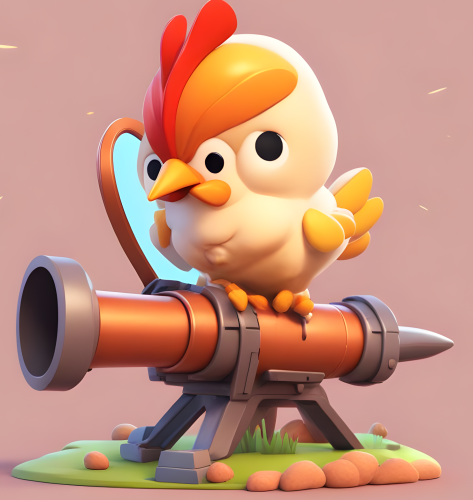
About Chicken Launcher Adds a new rocket launcher that shoots Chickens instead of rockets. I don't even know why but I need one. Permission ChickenLauncher.spawn - required to spawn launcher ChickenLauncher.shoot - required to shoot launcher Only one command: /cl CONFIG { "1. Launcher does Damage ": true, "2. FireRateCooldown in Sec's": 5, "3. Chicken Launch velocity [default = 20]": 20 } ...and soon this no point becomes your point The Launcher can be added to Plugin "Kits" all you need is the SkinID which ill supply in DM if needed (keep in mind this has no limit on ammo so think before giving to normal players) Does kill players . even if you have TruePVE$2.00 -
Version 1.0.6
121 downloads
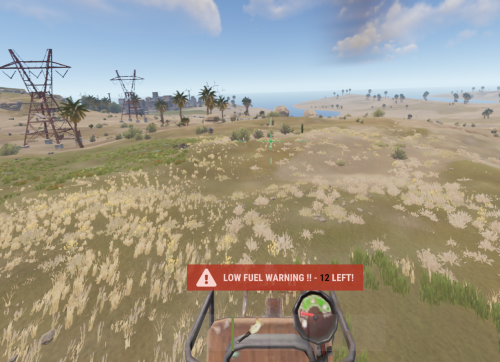
MiniLowFuelWarning warns minicopter drivers when there fuel is low Permissions MiniLowFuelWarning.use - player gets low fuel warning$1.50 -
Clearallbuttons command throws exception
NooBlet replied to RuGRustServer's Support Report in Support
Changed Status from Work in Progress to No Response -
@Covfefe it is fixed in the nect update tomorrow , ill try to get the pve commands in for you
-
Clearallbuttons command throws exception
NooBlet replied to RuGRustServer's Support Report in Support
ive looked at code . and i dont seem to see what could have caused it . and cant reproduce my side ... add me on discord NooBlet#1804 so i can give you an update to see if it works for you -
Clearallbuttons command throws exception
NooBlet replied to RuGRustServer's Support Report in Support
Changed Status from Pending to Work in Progress -
Clearallbuttons command throws exception
NooBlet replied to RuGRustServer's Support Report in Support
Thanks for ticket . Its 9pm right now for me and my country is in a power cut ... ill tend to your issue in the morning . Hope thats ok . Im not able to start pc at moment . But will lookinto it as soon as i can -
as of the morning I realize I never put in place a persistence to the tug setting on server restart . so players loos there speed and duel consumption... Im realy sorry guys . i have a working fix . but you will loose all the other subs alive on server so best time is to do an update next wipe . or help all players replace what they got as the data file needs to be remade. so ill release the update on thursday
-
Changed Status from Pending to No Response
-
Version 1.4.0
719 downloads
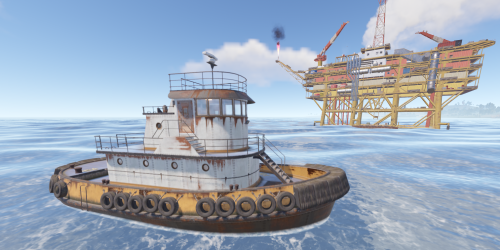
MyTugBoat Gives players the ability to own and spawn TugBoats players will be limited to one , and can call command once per IRL day (ex . if you have a tug boat you cant spawn new one un till it breaks but only once a day) Permissions MyTugBoat.use - allows use of command MyTugboat.fetch - allows the fetch Command MyTugboat.Vip - allows the player to get VIP settings tug Commands /tugboat - Spawns TugBoat at look location /tugboat fetch - pulls you tug boat to you 40 meter infront of you Config { "1. Incincible Tug ": false, "2. Tug no decay": false, "3. Fetch Cooldown in Minutes": 10, "4. Limit Admins to Spawn Limits (dalse will allow admin to unlimited spawns)": true, "5. Use 24Hour spawn Restriction (False will alow spawn after tug death)": true, "6. Group Settings": { "playertug": { "TugboatSpeed": 200000, "TugBoatFuelPerSec": 0.33, "StartingFuelAmmount": 100 }, "viptug": { "TugboatSpeed": 400000, "TugBoatFuelPerSec": 0.2, "StartingFuelAmmount": 200 }, "admintug": { "TugboatSpeed": 800000, "TugBoatFuelPerSec": 0.0, "StartingFuelAmmount": 1000 } }, "7. Tug Health Settings (default = 3000)": 3000.0, "8. Door Health Settings": { "Wooden Door Health (default = 200) ": 200.0, "Metal Door Health (default = 250) ": 250.0, "Industrial Door Health (default = 250) ": 250.0, "Armor Door Health (default = 1000) ": 1000.0 } }$5.00 -
Subwars don't do anything to backpacks(plugin) but player inventory does get saved and restored . please supply the console logs surrounding event . ill try to see what went wrong
-
Version 1.4.5
145 downloads
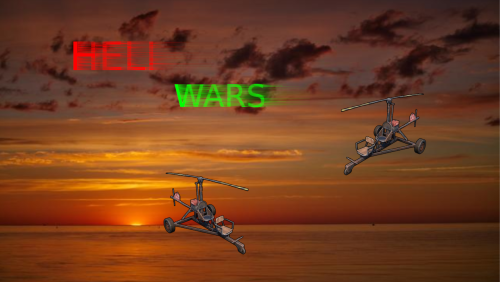
HeliWars is a Death Race style Event for your Server with race catchup speed boost and rockets or c4 to fight other players TruePVE supported Commands heliwars - manualy starting event (admin only) hwtop - view leaderboard of wipe jhw - join event lhw - leave event heliwarsconfig - ingame config settings (admin only) Player Inputs primary Fire - Shoots rockets (only active after reaching first waypoint) secondary Fire - Drops suspended C4 behing you (only active after first waypoint) reload - Detonates droped c4's ( if setting is on) Permission HeliWars.use - gives player ability to use open event command Video Demo Config { "1. Event Settings": { "Auto Spawn Event (false will disable spawn commands)": true, "Min Players requered to start Event": 2, "Time to enter Event in minutes": 1, "Auto Spawn Timer Minimum (in minutes)": 120, "Auto Spawn Timer Maximum(in minutes)": 180, "Ping System - use on event players": true, "Ping System - min amount of players to start ping": 3, "List of Monuments to Exclude (Prefab Name ex. assets/bundled/prefabs/autospawn/monument/fishing_village/fishing_village_a.prefab or fishing_village)": [ "assets/bundled/prefabs/autospawn/monument/cave/cave_small_medium.prefab", "cave", "underwater", "bunker", "power_sub", "launch_site", "radtown", "tiny", "ice" ] }, "2. Heli Settings": { "Use Set amount of ammo (if false - ammo will refill on a player elimination)": true, "Start Ammo ammount": 500, "Use Remote controlled C4 (Detonate with Reload Button)": true }, "3. Prize Settings": { "Give Random Item in list (false will give all)": true, "Give Random Command in list (false will give all)": true, "All Custom Commands": [ "GiveRank {playerid} VIP", "GiveRank {playerid} VIP+" ], "All Prize Items": [ { "Item Amount": 2000, "Item Short Prefab Name": "scrap", "Item Skin ID (0 = Default)": 0, "Item Display Name (empty = Default)": "" } ], "Winner Prize : 0 None , 1 = Item , 2 = Customcommand , 3 = Item + Customcommand": 1 }, "4. External Plugin Settings": { "Chat commands to block in event": [ "shop", "shops", "tp", "tpa", "home" ], "Console commands to block in event": [ "god" ] }, "5 HeliWars Chat Commands": { "Chat command to start HeliWars": "heliwars", "Chat command to enter HeliWars": "jhw", "Chat command to leave HeliWars": "lhw", "Chat command to see HeliWars LearderBoard": "hwtop" }, "6. Debug Settings": { "Enable Debug? (enabled will start event without notify and no limit on entry)": false } } Lang File { "alreadyenteredMessage": "You have already Entered, please wait for admin to start event", "notinlistMessage": "You have not entered the Event to leave sed Event", "enteredeventMessage": "You are now entered the HeliWars event , Wait for Admin to start", "lefteventMessage": "You now left the HeliWars event", "capreachedMessage": "Event is full!", "WinnerMessage": "<size=14>Congratz to <color=green>{playername}</color> for winning the HeliWars!!</size>", "EventOpenTooltip": "HeliWars Now Active!!!!", "EventopenMessage": "<size=20>HeliWars Event is now open to join . use <color=green>{commandjoin}</color> to enter and ,<color=green>{commandleave}</color> to leave..And to see LeaderBoard <color=green>{commandleaderboard}</color> .You got {timetoevent} min's</size>", "GoGoMessage": "<color=green><size=20> Go! Go! Go!</color></size>", "jointimerMessage": "<color=green><size=18> The Admin started the Event</color></size>", "eventalreadystartedMessage": "Event already started, you cant join in , Sorry!", "MINPlayersEnterd": "Min Requered Players to Enter not met ", "QuePlayersText": "Queuing Players!!", "EventActiveText": "Active!!", "EventStatusText": "Event Status :", "PlayercountText": "Player Count :", "YouKilled": "You killed <color=#FFD700>{playername}</color>", "KilledBy": "You Got Killed by <color=#FFD700>{playername}</color>", "Joinbutton": "Join HeliWars", "Rejectbutton": "Reject HeliWars" } Players with sleeping bags in there building prev will be teleported to one after event . Naming a bag yo heliwars . Will then use only that bag . If no bags will return to original pos . All inv does get saved Credits We would like to thank Noobhub & Meinrust Community's for the help in testing$10.00


