-
Posts
46 -
Joined
-
Last visited
Content Type
Profiles
Warranty Claims
Downloads
Forums
Store
Services
Downloads Plus Support
DOWNLOADS EXTRA
Everything posted by hionet.com
-
I specialize in high-performance Rust plugin development focused on custom gameplay mechanics, scalable systems and clean server architecture. If you are building a serious Rust server or want to create a unique gameplay experience, I can design and develop optimized plugins using modern frameworks such as Carbon as well as Oxide/uMod. My work focuses on performance-safe implementation, modular structure and long-term maintainability so your server can grow without unnecessary lag or technical limitations. I can help with: Custom gameplay systems and progression mechanics PvP features, events and unique server mechanics UI-driven plugin functionality and player interaction logic Economy systems, rewards balancing and gameplay tuning Optimization or refactoring of existing plugins Expanding current plugins with new features Designing modular plugin architecture for future scalability Whether you need a completely new plugin or improvements to an existing system, feel free to send a message to discuss your idea. Discord: hionet.com Discord userid: 345641206715514882
-
Version 1.0.3
11 downloads
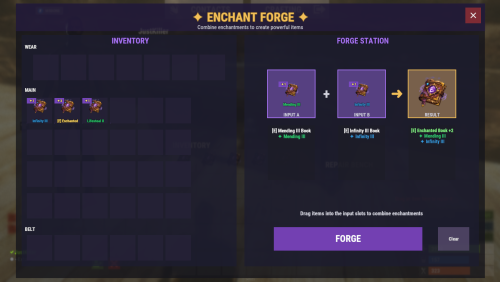
Introduction System Overview Installation (Oxide/uMod & Carbon) Configuration Guide Commands Reference Permissions System 1. Introduction Welcome to Weapon Enchantments Pack, a professional-grade weapon enchantment system designed for Rust servers that require full control over progression, balance, and monetization. What Is Weapon Enchantments Pack? Weapon Enchantments Pack is a fully configurable enchantment framework that stores all enchantment data directly on weapon items. This architecture removes the need for world entities, background scanning, or wipe-sensitive databases, making it ideal for long-term wipes and high-population servers. Key Features Complete weapon coverage (all Rust weapon categories). Physical enchant books (store- and kit-friendly). Custom Forge UI for player progression. Permission-driven VIP and tiered access. Store-safe, performance-focused design (no entity scanning / polling loops). Fully configurable — no fixed balance values locked behind code. Who Should Use This Pack? Monetized servers with web stores or donation systems. VIP-based progression servers. Long-term wipe servers (monthly or longer). PvP-focused servers. Vanilla+ servers seeking controlled progression. 2. System Overview Plugin Structure Weapon Enchantments Pack consists of two plugins that work together: EnchantCore.cs Core framework: registry, item storage, Forge UI, enchanting tables, and book handling. EnchantWeapons.cs Weapon-specific logic and default enchantments (requires EnchantCore) Data Storage Model All enchantment data is stored directly on the item instance. This ensures: No wipe-sensitive external databases are required. Enchantments persist through plugin reloads. No performance impact from entity scanning or polling loops. Enchanted items can be traded without losing enchantments. 3. Installation (Oxide/uMod & Carbon) Prerequisites Rust server running Oxide/uMod or Carbon. Access to server file system (FTP or panel). Ability to reload plugins or restart the server. Install Steps Upload both plugin files: EnchantCore.cs EnchantWeapons.cs Oxide/uMod: oxide/plugins/EnchantCore.cs oxide/plugins/EnchantWeapons.cs Carbon: carbon/plugins/EnchantCore.cs carbon/plugins/EnchantWeapons.cs Loading / Reloading Plugins compile automatically on upload. You can also load/reload manually: Oxide/uMod console: o.reload EnchantCore o.reload EnchantWeapons Carbon console: c.reload EnchantCore c.reload EnchantWeapons Verify Installation Check server console for successful load messages (version text may vary by build): Loaded plugin EnchantCore v1.0.0 by hionet.com Loaded plugin EnchantWeapons v1.0.0 by hionet.com Quick Test Commands Give yourself an Enchanting Table and a test book: enchantcore.givetable YourName 1 enchantcore.givebook YourName sharpness 1 1 Then as server admin (ownerid <YourSteamID> ) run: /forge 4. Configuration Guide Weapon Enchantments Pack uses two configuration files. Both Oxide/uMod and Carbon use the same JSON structure, but the config paths differ. Config File Paths Oxide/uMod: oxide/configs/EnchantCore.json oxide/configs/EnchantWeapons.json Carbon: carbon/configs/EnchantCore.json carbon/configs/EnchantWeapons.json EnchantCore.json config file explanation General Settings "Config Version": 1 - Internal version used for safe upgrades. Do not change this manually. "Command Prefix": "enchant" - Controls the admin chat command prefix. Useful if another plugin already uses /enchant Enchanting Table Settings "Enchanting Table": { "Entity Shortname": "box.repair.bench", "Skin ID": 3653802947, "Open Forge By Default": true } Entity Shortname - Base Rust entity used as the table, default: box.repair.bench Skin ID (IMPORTANT) - Required skin to identify the table. Prevents normal repair benches from becoming enchanting tables. Only benches with this skin will open the Forge. Open Forge By Default: true: Opening the table opens the Forge UI automatically (recommended) false: Players must manually use /forge while looting the table UI Settings (Forge Appearance) "UI Settings": { "Panel Background Color": "0.1 0.1 0.1 0.95", "Accent Color": "0.4 0.2 0.8 1.0", ... } These settings control visual appearance only. Rarity Colors (Hex) "Rarity Colors (Hex)": { "Common": "#B0B8C2", "Uncommon": "#2ECC71", "Rare": "#3498DB", "Epic": "#9B59B6", "Legendary": "#F39C12" } Used for: Forge UI Book display Weapon tooltip text If an enchant rarity has no color, it uses: "Default Rarity Color (Hex)": "#FFFFFF" Display Settings (Item Text) "Display Settings": { "Enchant Prefix": "[E]", "Enchant Suffix": "", "Separator": ", " } Controls how enchantments appear on weapons. Example output: [E] Sharpness III, Lifesteal II Prefix/Suffix are purely visual Separator controls spacing between enchants Performance Settings (IMPORTANT) "Performance Settings": { "Cache Permission Results": true, "Cache Item Applicability Results": true, "Max Enchantments Per Item (Default)": 3, "Purge Unknown Enchantments": true, "Purge Unknown Delay Seconds": 300 } These settings keep the plugin safe for high-pop servers. Cache Permission Results Caches permission checks per player Strongly recommended to keep true Cache Item Applicability Results Caches which enchants apply to which items Prevents repeated weapon-category checks Max Enchantments Per Item (Default) Base limit for players without VIP permissions Can be overridden by: VIP permissions Admin overrides Other plugins via hooks Purge Unknown Enchantments Automatically removes enchants that no longer exist in config Prevents broken items after config updates Purge Unknown Delay Seconds Delay before purge runs after server start Prevents race conditions during load Loot Books System (Optional LootTable Books inject system) "Loot Books": { "Enabled": false, ... } This system injects enchant books into loot containers. Loot Injection Controls "Max Container Capacity": 36, "Replace Random Item If Full": true Prevents loot overflow Allows replacement if container is full "Refresh Existing Containers On Load": true Refreshes already-spawned containers on server start Useful for long wipes Containers "Containers": { "crate_normal": { "Chance": 0.05, "Min": 0, "Max": 1, "Pool": "default" } } Explanation: Chance: Spawn probability (0.05 = 5%) Min / Max: Number of books spawned Pool: Which enchant pool to use Pools (Balance Control) "Pools": { "default": { "Rarity Weights": { "Common": 60.0, "Uncommon": 30.0, "Rare": 9.0, "Epic": 1.0 }, "Min Level": 1, "Max Level (0 = enchant max)": 0 } } Pools control what kind of books drop. Rarity Weights Higher value = more common Percentages do not need to total 100 Min / Max Level Controls enchant level range 0 = use the enchant’s configured max level This is your main anti-pay-to-win lever. Recommended Defaults (Best Practice) For monetized servers: Disable loot books Sell books via store Use Forge for progression For survival / grind servers: Enable loot books Low spawn chances (1–5%) Restrict high rarities to elite pools EnchantWeapons.json config file explanation This section explains the major sections of the EnchantWeapons configuration file and how it affects weapon balance, VIP tiers, book progression, and compatibility. EnchantCore handles UI + storing enchants on items. EnchantWeapons defines what the enchants actually do and which weapons they apply to. Global Settings "Global Settings": { "Default Book Item": "documents", "Default Book Skin": 3653712312, "Max Enchants Per Item (Default)": 3, "VIP Max Enchants": { "enchantweapons.vip": 4, "enchantweapons.elite": 5 }, "Combine Success Rates": { "1": 100, "2": 85, "3": 65, "4": 40, "5": 25 }, "Electric Hit Effect": "...", "Electric Chain Effect": "...", "AOE Center Effect": "...", "AOE Target Effect": "" } Default Book Item "Default Book Item": "documents" - The default Rust item used as enchant books. Most servers use documents because it’s common and visually “book-like”. "Default Book Skin": 3653712312 - Skin ID applied to enchant books. This is important for consistency and presentation (store / kits). "Max Enchants Per Item (Default)": 3 - Base maximum number of enchantments allowed on a weapon for players without VIP permissions. "VIP Max Enchants": { "enchantweapons.vip": 4, "enchantweapons.elite": 5, "enchantweapons.customname": 10 } This is how you create VIP tiers safely. If a player has enchantweapons.vip, they can have 4 enchants on a weapon If a player has enchantweapons.customname, they can have 10 enchants on a weapon Combine Success Rates "Combine Success Rates": { "1": 100, "2": 85, "3": 65, "4": 40, "5": 25 } Controls the success chance (%) when combining or upgrading books to produce the result level. Example: Level 3 result: 65% success chance Level 5 result: 25% success chance This is your main “progression speed” lever. Lower rates = grind + scarcity. Higher rates = casual / fast progression. Effect Prefabs (Visuals Only) "Electric Hit Effect": "assets/...", "Electric Chain Effect": "assets/...", "AOE Center Effect": "assets/...", "AOE Target Effect": "" These define the visual effects used for specific enchant types. Changing these does not change damage or mechanics — it only changes visuals. If AOE Target Effect is empty, no “target FX” will play. Enchantments "Enchantments": { "sharpness": { ... }, "lifesteal": { ... }, "critical": { ... } } This is the heart of the plugin. Each enchantment is a dictionary entry: Key = enchant ID (used in commands and internal logic) Example: sharpness Value = the enchant definition Enchantment Definition Fields Example structure: "sharpness": { "Name": "Sharpness", "Description": "Increases all damage dealt", "Max Level": 5, "Book Item": "documents", "Book Skin": 3653712312, "Permission": "", "Rarity": "Common", "Applies To": [ "all_weapons" ], "Conflicts With": [], "Target Types": [ "all" ], "Conditions": null, "Levels": [ ... ] } Name / Description Display-only text shown in UI and info commands. Max Level Maximum level this enchantment can reach. Also defines how far upgrades can go. Should match the number of entries you provide in Levels. Common mistake: setting Max Level to 5 but only defining 3 Levels. Book Item / Book Skin Overrides the global defaults for this enchant only. Use this when you want: Different book visuals by rarity Special store-only book appearances Permission (VIP/Store Lock) If empty: anyone can use it. If set: players must have that permission to use/apply/upgrade that enchant. Example: "Permission": "" "Permission": "enchantweapons.legendary" This is the cleanest way to create VIP-exclusive or store-tier enchantments without giving admin access. Rarity "Rarity": "Common" Used for: UI rarity colors (from EnchantCore UI settings) Loot book weighting (if EnchantCore Loot Books is enabled) Rarity does not automatically balance anything — it’s a classification. Applies To (Weapon Compatibility) "Applies To": [ "ranged", "bows" ] Controls which weapons can receive the enchant. Usually you reference categories from Weapon Categories: melee ranged snipers shotguns bows launchers all_weapons Conflicts With "Conflicts With": [ "frost" ] Prevents incompatible enchants from being placed on the same weapon. Example: fire_aspect conflicts with frost This is critical for balance and prevents “stack abuse”. Target Types "Target Types": [ "living" ] Defines what the enchant can affect. Common values: all player animal scientist npc living building vehicle helicopter bradley deployable Example use: Armor Piercing only targets player Looting only targets living entities Conditions (Optional Extra Rules) The Conditions block allows you to restrict when an enchant is allowed to activate. All conditions are optional — if a condition is not set (or set to zero / empty), it is ignored. Conditions are evaluated after TriggerChance succeeds. (check Levels for TriggerChance) "Conditions": { "HeadshotOnly": false, "TargetHealthBelow": 0.30, "TargetHealthAbove": 0.0, "DistanceBelow": 0.0, "DistanceAbove": 0.0, "TimeOfDay": "" } You can use one, multiple, or none of these conditions together. All enabled conditions must pass for the enchant to trigger. Examples: HeadshotOnly - The enchant will only trigger on headshots TargetHealthBelow - The enchant only triggers if the target’s current health percentage is below this value. (0.30 = target below 30% HP) TargetHealthAbove - The enchant only triggers if the target’s current health percentage is above this value. (0.50 = target above 50% HP) DistanceBelow - The enchant only triggers if the distance between attacker and target is below this value (in meters). DistanceAbove - The enchant only triggers if the attacker is farther than this distance from the target. TimeOfDay - Restricts the enchant to a specific time of day. ("day" , "night" ) Using TargetHealthBelow + TargetHealthAbove Together You can combine both to define a health window. "TargetHealthBelow": 0.60, "TargetHealthAbove": 0.30 Enchant only triggers when target is between 30% and 60% HP DistanceBelow + DistanceAbove Together You can define a distance band. "DistanceAbove": 10.0, "DistanceBelow": 50.0 Enchant triggers only between 10m and 50m Levels (How Enchant Power Is Defined) The Levels section defines what an enchant does and how strong it is at each level. "Levels": [ { "DamageMultiplier": 1.1 }, { "DamageMultiplier": 1.2 } ] How this works: First entry = Level 1 Second entry = Level 2 And so on The number of entries must match Max Level IMPORTANT If Max Level is 5, you must define 5 level entries. How Level Effects Work Each level is a list of effects Any effect you don’t define is ignored Any effect set to 0 is disabled Multiple effects can be combined in one level Effects only activate if: TriggerChance succeeds (if used) Conditions pass (if used) Most Common Effects and Examples Damage Bonus (Always On) { "DamageMultiplier": 1.20 } Increases all damage 1.20 = +20% damage Best for simple enchants Chance-Based Damage { "DamageMultiplier": 1.50, "TriggerChance": 0.25, "Cooldown": 2.0 } 25% chance to trigger Can’t trigger again for 2 seconds (per target) Prevents constant burst damage Critical Strike { "CritMultiplier": 1.75, "TriggerChance": 0.15, "Cooldown": 1.0 } Occasional high-damage hits Classic RPG “crit” behavior Lifesteal { "Lifesteal": 0.10, "TriggerChance": 0.30, "Cooldown": 2.0 } Heals for 10% of damage Cooldown prevents infinite sustain Lifesteal With Cooldown and 2 Levels "Levels": [ { "Lifesteal": 0.10, "TriggerChance": 0.30, "Cooldown": 2.0 // this is Level 1 }, { "Lifesteal": 0.15, "TriggerChance": 0.35, "Cooldown": 2.0 // this is Level 2 } ] DamageMultiplier Increases all damage dealt. Example: 1.20 = +20% damage. FlatDamage Adds a fixed amount of extra damage on hit. Useful for low-damage weapons. CritMultiplier Deals extra damage when the enchant triggers. Usually used with TriggerChance. ArmorPierce Deals extra damage that ignores armor. Example: 0.25 = 25% of damage bypasses armor. Lifesteal Heals the attacker for a percentage of damage dealt. Example: 0.10 = heal for 10% of damage. FlatHeal Heals a fixed amount on hit. Safer than lifesteal for PvP balance. RegenAmount Applies slow healing over time. Good for sustain builds. HealFromDamageMultiplier Turns damage into healing instead (no damage dealt). Example: 1.00 = heal for 100% of damage. BurnDamage Sets the target on fire, dealing damage over time. Uses Duration if set. PoisonDamage Applies poison damage instantly. Affects player metabolism or damage types. ColdDamage Applies cold damage instantly. Useful for exposure-style effects. BleedDamage Applies bleeding damage instantly. RadiationDamage Applies radiation poisoning (players only). KnockbackForce Pushes the target away from the attacker. Higher value = stronger push. NoSprintDuration Prevents the target from sprinting for a short time. Strong control effect. Radius Enables area-of-effect behavior. Applies effects to nearby targets. ElectricDamage Deals electric shock damage on hit. ChainRadius How far electric damage can jump to nearby targets. ChainMaxTargets Total number of targets hit by chain lightning (including the first target). DurabilityBonus Reduces weapon durability loss. Example: 2.0 = weapon loses durability twice as slowly. Mending Repairs weapon condition on hit. AmmoSave Chance to not consume ammo when firing. Any value above 0 enables it. LootBonus Increases loot dropped from killed enemies. Stacks additively with other LootBonus effects. TriggerChance Chance for the enchant to activate. Example: 0.25 = 25% chance. Cooldown Minimum time (seconds) before the enchant can trigger again on the same target. Duration How long time-based effects last (fire, some AOE effects). HydrationDrain Drains water from the target player. CaloriesDrain Drains food from the target player. WetnessAdd Adds wetness to the target player. ComfortReduce Reduces the target’s comfort level. Weapon Categories "Weapon Categories": { "melee": [ "salvaged.sword", "machete", ... ], "ranged": [ "rifle.ak", "pistol.python", ... ] } This section maps category names to Rust item shortnames. Why it exists: Makes configs clean and readable Lets you balance entire weapon groups easily Prevents copy/paste errors across enchants To add more weapons: Add their shortname into the correct category Or create your own category and reference it from Applies To Common mistake: spelling shortnames wrong → enchant will never apply. 5. Commands Reference Admin Chat Commands Admin command prefix is configurable (default: /enchant). These commands are restricted to BasePlayer.IsAdmin (not permission-based). /enchant (shows help) /enchant give /enchant apply /enchant remove /enchant list /enchant info /enchant inspect Console / RCON Commands enchantcore.givebook <player> <enchant_id> <level> [amount] enchantcore.givetable <player> [amount] [skinId] 6. Permissions System Core Permissions enchantcore.forge — Allows players to use the Forge UI (must give this permission if you want to allow players to combine books or to place an enchantment to an item) VIP Enchant Limits VIP enchant limits are configured in EnchantWeapons.json under "VIP Max Enchants". Example defaults: No permission: 3 enchants per weapon enchantweapons.vip: 4 enchants per weapon enchantweapons.elite: 5 enchants per weapon Per-Enchant Permissions Each enchant definition supports an optional Permission field. If set, a player must have that permission to use/apply/combine/upgrade that enchant. This is the recommended method for VIP-exclusive or store-tier enchantments.$39.99-
- #enchantment
- #enchantments
- (and 13 more)
-

- 8 comments
-
- #cui
- #cui editor
-
(and 2 more)
Tagged with:
-
Version 1.0.0
6 downloads
CustomUAV allows you to turn specific RF Transmitters into configurable scanning UAV. By applying a specific Skin ID to an RF Transmitter, it becomes a specialized scanner that can detect players, NPCs, ores, or loot. Features Custom Scanners: Create unlimited unique UAVs defined by their Skin ID. Visual Feedback: Optional F15 jet flyovers and UI ping markers (Crosshair, Loot box, etc.). Configurable Targets: Scan for any entity by its "Short Prefab Name" (e.g., player, boar, sulfur-ore, item_drop). Cooldowns & Limits: Set usage cooldowns or make items "consumable" (destroy after use). Commands /giveuav - Prints a list of all available UAVs defined in your config. /giveuav <player> <uav name> - Gives the target player the specific RF Transmitter item required to trigger that UAV. Permissions customuav.give — Required to use the admin give command. customuav.use — Required to use any UAV. Custom Permissions: You can define specific permissions for each UAV in the config (e.g., customuav.vip). Configuration The configuration is handled in CustomUAV.json. Each entry in the Transmitters list creates a new UAV. The plugin identifies them using the SkinId. Global Settings: Debug: Enables console logs to see what the UAV is detecting. ChatFeedback: Toggles chat messages for the user. UAV Settings: SkinId: The Workshop Skin ID of the RF Transmitter item. EntityPrefabs: A list of short prefab names to scan for. PingType: The icon style (Hostile, Loot, Dollar, GoTo). SpawnJet: Toggle the visual jet flyover. Configuration Example { "Debug": false, "ChatFeedback": true, "Broadcasters": [ { "Name": "Loot UAV", "SkinId": 3635869496, "Description": "Scans for dropped loot", "Permission": "customuav.loot", "SpawnJet": false, "PingType": "Loot", "DestroyAfterUse": false, "ScanRadius": 300.0, "PingDuration": 8.0, "CooldownSeconds": 30.0, "EntityPrefabs": [ "item_drop", "player_backpack", "corpse" ] } ] }$11.99 -
Thanks for asking — and no worries at all. At the moment I don’t have a fixed public roadmap or specific “next features” I can promise. Right now my focus is on polishing and improving the current feature set: stability, performance, usability, and overall quality. That said, I do actively listen to feedback. If there are strong requests from server owners (and they make sense for the sandbox’s direction), I’m open to adding new functionality later — I just prefer to avoid committing to features or dates until I’m sure they can be delivered properly. If you tell me what features you feel are “missing” compared to the other sandboxes you’re looking at, I can honestly tell you whether: it’s already possible via configuration / existing tools, it’s something I’m likely to consider, or it’s outside the scope of this project. The sandbox is modular and currently consists of 9 plugins (same version series), each with a clear role: BuildConfig – central config provider BuildLang – centralized localization/messages BuildPlots – lobby/plots, zones/colliders, domes, markers BuildCore – player flow (/build, /leave, safe teleport/init) BuildUI – the in-game UI BuildOptions – creative privileges + command restrictions + tools BuildIO – saving/loading/renaming/deleting/share codes (integrates with CopyPaste) BuildGuests – guest invites/requests/permissions BuildCosts – build + upkeep cost calculation display Overall the plugins are pretty light when idle — there’s no heavy background load. The main resource hit is during actions like save/load/paste (or mass tools), and BuildIO is optimized for that (queued operations, per-player locks, fast limit checks) to avoid lag spikes. For the server itself, I recommend a modern 4–8 core CPU, plus an SSD/NVMe and at least ~12–16GB RAM
- 19 comments
-
- 1
-
-
There are some commands already like /fly , /f , /noclip , /god , /g that toggle the noclip and fly. Also there are default KEYs like F for toggle fly mode, R (with a hammer in hand) to REMOVE an entity, MIDDLE CLICK to open the UI also admin console commands like "ent kill", "noclip", "god 1", "spawn" through F1 spawn items and vehicles will work just fine I am not sure what are you trying to achive with theese commands in UI, it will be even harder for players to open the UI, navigate down to the Custom Commads and then click on the UI button since they can just use hammer in hand and press R to remove or press F to fly.
- 19 comments
-
- 19 comments
-
- 19 comments
-
- 1
-
-
Hello RoggerRab, For sure I will add more features for this system, for the moment you can remove using `ent kill` like admins if you are inside your building plot. ent kill Also don't forget you can test the system live, search in the server list for Build System Demo | by hionet.com or connect directly to 46.224.9.69:25015
- 19 comments
-
Version 1.2.4
208 downloads
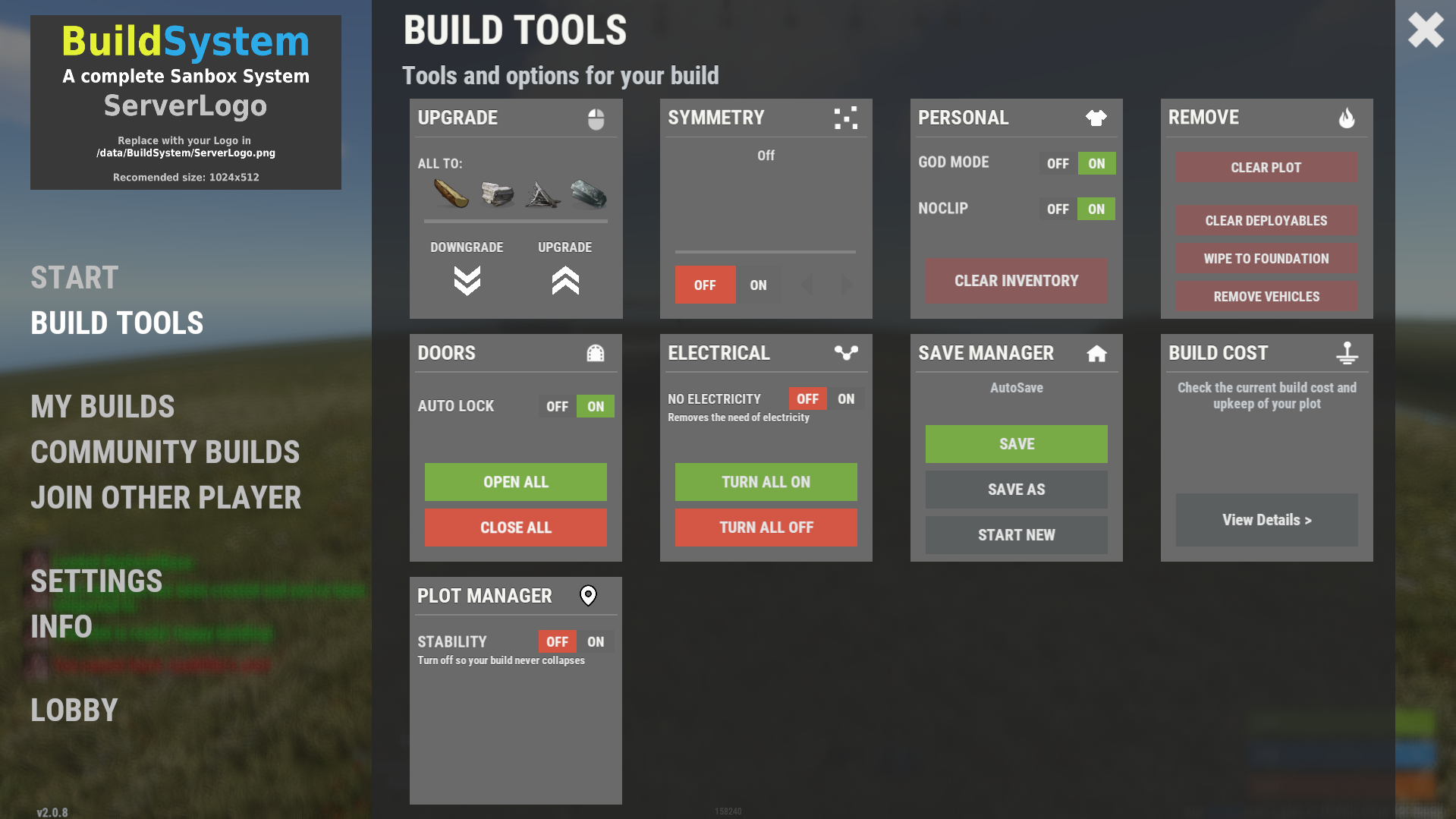
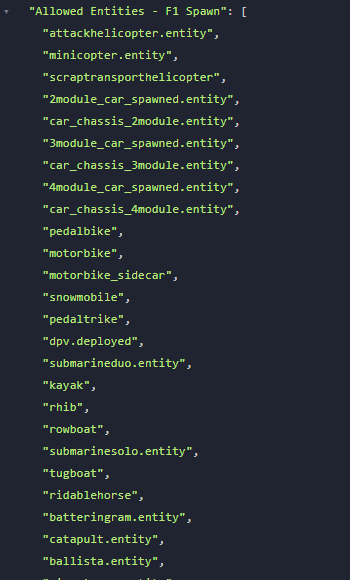
Complete Build System / Sandbox System 1.2.3 A premium all-in-one creative sandbox system for Rust build servers. Personal and VIP build plots for monetization and tiered access Built-in save/load system with share codes and native BuildSaves backend Guest system with permissions for collaborative building Basic symmetry tools, modern UI, and optimized build workflow Designed for serious build servers, practice servers, and creative communities Live Test: client.connect 46.224.9.69:25015 Core Features - Personal build plots with automatic plot assignment - Normal and VIP plots with separate radius and entity limits - Plot categories and biome-based plot layouts - Central lobby with teleport flow and optional respawn handling - Optional randomized plot allocation - Plot domes, map markers, radius control, and sound isolation - Custom build kits for every player plot - Included functional custom build map for a ready-to-run creative environment Save / Load / Share System - Native `BuildSaves` backend built directly for BuildSystem - No longer relies on CopyPaste as the active save/load dependency - Save unlimited builds per player - Load saved builds directly into your plot - Rename and delete saves - Category-aware last save loading for better biome/category continuity - Share code generation and importing - Guest restrictions enforced during save/load actions - Faster load validation through stored entity metadata - Safer queued save handling - Improved shutdown and unload protection so plots save more reliably - Legacy CopyPaste saves can be migrated with: `buildsaves.migrate` Guest & Collaboration System - Invite players to your plot - Request access to another player's plot - Accept or decline requests - Granular guest permissions: - Build - Remove - Demolish - Craft - Save copy - Guests can be moved cleanly back to lobby when needed - Better synchronization with `/leave`, disconnect cleanup, and plot ownership flow Creative Build Environment - Full creative building workflow - Free building and repairing - Blueprint unlock support - Noclip / fly support - God mode support - Optional off-plot restrictions - Blacklisted item support - Vehicle spawn whitelisting - Per-player vehicle limits - Built-in hammer remove support - Auto-upgrade support - Mass-upgrade support - One-click power on/off support for IO entities - Virtual item refresh support for reliable creative inventories - Safe spawn logic and improved off-plot behavior Limits, Protection & Automation - Separate normal and VIP entity limits - Live entity counting - Optional entity limit HUD - Build cost calculation - Upkeep calculation - Plot radius damage restriction - Auto-save interval support - Spawned entity auto-cleanup in lobby, plots, and outside managed areas - Player-owned and server/plugin-owned cleanup controls - Improved restart and disconnect cleanup behavior Plot Symmetry / Mirror Building - Optional symmetry building system via `BuildMirror` - Plot-based symmetry with hammer-selected pivot points - Multiple symmetry modes - Visual guide rendering - Limit-aware mirrored placement - Safer placement rejection when mirrored placement is invalid - Designed for faster, cleaner base prototyping Modern UI - Full Nexus-style graphical interface - Lobby UI and build menu workflow - Save/load/share management through UI - Guest management through UI - Tools and server info tabs - Keyboard shortcut support - Localized text system - Optional middle-click menu opening - Configurable footer text and layout Included Custom Build Map Includes a functional custom build map designed specifically for creative build servers. What the map provides: - Organized plot layout - Central lobby area - Space for normal and VIP plots - Cleaner server launch experience - Ready-to-use build-focused environment - Better structure for high-pop creative or practice servers Included Modules - `BuildConfig.cs` - central configuration provider - `BuildCore.cs` - player flow, plot lifecycle, connect/leave handling - `BuildPlots.cs` - lobby, plots, domes, markers, categories, teleport handling - `BuildIO.cs` - save/load/share orchestration - `BuildSaves.cs` - native save/load backend and legacy migration - `BuildGuests.cs` - guest requests, invites, permissions, guest flow - `BuildOptions.cs` - creative perks, restrictions, upgrades, god/fly, spawn controls - `BuildCosts.cs` - build and upkeep calculations - `BuildMirror.cs` - symmetry / mirror building - `BuildUI.cs` - graphical interface - `BuildLang.cs` - localization system Permissions - `buildcore.vip` - VIP plot size and VIP entity limit access - `buildplots.freeroam` - allows freer off-plot movement behavior - `buildplots.lobbyexit` - allows using the build menu flow from outside normal managed areas Migration Older installations that used CopyPaste-based saves can migrate to the new built-in save system with: `buildsaves.migrate` This makes upgrading older servers much easier while moving to the new native BuildSaves backend. Player Chat Commands - `/build` Open the lobby UI or build menu depending on where the player is. - `/leave` Leave the current plot. - Guests return to lobby - Plot owners save, clear, delete their active plot session, then return to lobby - `/invite <player>` Invite another player to join your plot as a guest. - `/request <player>` Request to join another player's plot. - `/accept <player>` Accept a pending request or invite. - `/decline <player>` Decline a pending request or invite. - `/noclip` - `/fly` - `/f` Toggle noclip/fly, depending on plot/off-plot restrictions. - `/god` - `/g` Toggle god mode, depending on plot/off-plot restrictions. Player Console Commands - `build` Console version of `/build`. - `leave` Console version of `/leave`. - `request <player>` Console version of `/request`. - `buildcost` Console version of `/buildcost`. - `fly` Console version of noclip/fly toggle. - `god` Console version of god mode toggle. Server Owner / Admin Command - `buildsaves.migrate [overwrite] [deleteOld]` Migrate legacy CopyPaste save files into the new BuildSaves format. - `overwrite` = optional true/false - `deleteOld` = optional true/false Example: `buildsaves.migrate` Config Explanation - `Server Settings - Name` Server name field in config. Currently mostly informational and not a major gameplay switch. - `Lobby Settings - Spawn Position` The world position for the lobby center and where players are teleported when sent to lobby. - `Lobby Settings - Radius` The size of the lobby area. Also affects lobby zone checks, dome size, and marker area. - `Plot Settings - Default Radius` Radius used for normal player plots. - `Plot Settings - VIP Radius` Radius used for VIP plots. - `Plot Settings - Randomize Plot Location` If true, players get a random free plot slot instead of the first available slot. - `CoolDown Settings - Share Code (Minutes)` How long a player must wait before generating another share code. - `Links - Discord` Discord link shown in the UI/server info section. - `Links - Website` Website link shown in the UI/server info section. - `Off Plot Settings - Allow F1 Spawn` Controls whether players can use allowed spawn/give behavior outside their own plots. - `Off Plot Settings - Force NoClip` Controls whether noclip/fly is allowed outside plots unless freer permissions apply. - `Off Plot Settings - Force GodMode` Controls whether god mode is allowed outside plots unless freer permissions apply. - `Lobby Settings - Force Teleport on Connect` If true, players are automatically sent to the lobby when they connect. - `Lobby Settings - Clear Inventory on Spawn` If true, inventory is cleared when players are placed into the lobby. - `Lobby Settings - Respawn in Lobby without Plot` If true, players without a valid active/guest plot respawn in the lobby. - `Map Markers - Enable` Enables map markers for lobby/plots. - `Plot Settings - Custom Kit Items` Items automatically given to players when entering a plot. In your example, players receive: - planner in belt slot 5 - hammer in belt slot 4 - `Allowed Entities - F1 Spawn` Whitelist of prefabs allowed through the plugin's F1/entity spawn behavior. Anything not listed is blocked. - `Item Settings - Blacklisted Items` Items blocked from the creative build environment. In your example: - `supply.signal` - `grenade.smoke` - `Vehicle Settings - Max per Player` Maximum number of spawned vehicles each player can own through the system. - `Plot Settings - Limit Damage to Radius` Restricts damage interactions to the plot radius so players cannot affect things outside their area. - `Entity Limits - Normal Max Entities` Max entity count for normal players. - `Entity Limits - VIP Max Entities` Max entity count for VIP players. - `Dome Settings - Lobby Color` Visual dome color for the lobby. - `Dome Settings - Lobby Intensity` Number/intensity of dome visuals in lobby. Higher values create a stronger effect. - `Dome Settings - Plot Color` Visual dome color for plots. - `Dome Settings - Plot Intensity` Number/intensity of dome visuals for plots. - `Plot Settings - Sound Isolation` Helps isolate plot audio/effects so players mainly receive sounds from the relevant managed area. - `UI Settings - Show Limit HUD` Shows or hides the HUD that displays entity/vehicle limits. - `UI Settings - Enable Middle Click` Lets players open the menu with middle mouse click. - `Compatibility - Disable Grade Control (for BuildTools compatibility)` Disables the plugin's built-in grade control features so it does not conflict with BuildTools or similar systems. - `Compatibility - Enable Built-in Hammer Remove (R)` Enables the built-in hammer reload/remove behavior. - `Plot Settings - Hammer Remove Distance` Max distance for hammer-based removal checks. - `Plot Settings - Auto-Save Interval Seconds (min time between auto-saves per player)` Minimum delay between automatic saves for a player's dirty plot. - `UI Settings - Footer Text Align` Screen alignment for footer text. - `UI Settings - Footer Anchor Min` Lower anchor position for the footer UI panel. - `UI Settings - Footer Anchor Max` Upper anchor position for the footer UI panel. - `UI Settings - Footer Text Color (R G B A)` Footer text color and transparency. - `UI Settings - Footer Font Size` Footer text size. - `Spawned Entities - Auto-Remove In Lobby` Enables cleanup of eligible spawned entities in the lobby. - `Spawned Entities - Auto-Remove Inside Plots` Enables cleanup of eligible spawned entities inside plots. - `Spawned Entities - Auto-Remove Outside Plots` Enables cleanup of eligible spawned entities outside managed zones. - `Spawned Entities - Apply Auto-Remove To Player-Owned` Apply cleanup rules to player-owned spawned entities. - `Spawned Entities - Apply Auto-Remove To Server/Plugin-Owned` Apply cleanup rules to server/plugin-owned entities too. - `Plot Symmetry - Enabled` Master switch for the symmetry / mirror building system. - `Plugin Version` Internal config version entry used for config migration/bookkeeping. Developer hooks for compatibility - `CanBuildSystemKillEntity` Lets other plugins prevent BuildSystem from deleting or killing a specific entity during cleanup, removal, or plot clearing actions. - `CanBuildSystemHammerRemoveEntity` Lets other plugins block the built-in hammer remove system before an entity is removed. Example: object CanBuildSystemKillEntity(BaseEntity entity) { if (entity == null) return null; if (entity.ShortPrefabName == "autoturret_deployed") return false; // block BuildSystem from removing it return null; // allow normal BuildSystem behavior } object CanBuildSystemHammerRemoveEntity(BaseEntity entity) { if (entity == null) return null; if (entity.ShortPrefabName == "wall.frame.shopfront") return false; // prevent hammer remove for this entity return null; // allow normal BuildSystem behavior }$99.99- 19 comments
- 4 reviews
-
- 2
-
-
GetRecyclerSpeed works just for StaticRecyclerSpeeds, you should revert back the function to private void StartRecycling(Recycler recycler, BasePlayer player) { recycler.CancelInvoke(nameof(recycler.RecycleThink)); var recycleSpeed = cfg.DefaultSpeed; foreach (var permSpeed in cfg.PermissionSpeeds) if (permission.UserHasPermission(player.UserIDString, permSpeed.Key)) { recycleSpeed = permSpeed.Value; break; } timer.Once(0.1f, () => recycler.InvokeRepeating(recycler.RecycleThink, recycleSpeed - 0.1f, recycleSpeed)); }
- 25 comments
-
- 25 comments
-
[PAID] Make minor changes to the SQL Economics plugin
hionet.com replied to laodu's topic in Requests
Hi, set this line to true: from: [JsonProperty("Store data in MySQL instead of data files")] public bool UseMySql = false; to: [JsonProperty("Store data in MySQL instead of data files")] public bool UseMySql = true; -
- 3 comments
-
- #oxide
- #tournament
-
(and 1 more)
Tagged with: