

-
Posts
116 -
Joined
-
Last visited
Content Type
Profiles
Warranty Claims
Downloads
Forums
Store
Services
Downloads Plus Support
DOWNLOADS EXTRA
Reels
Everything posted by hionet.com
-
 Do you plan on adding support for CuiDraggableComponent and CuiSlotComponent ?
 -

Inquiry Regarding the Reported Issue and a Feature Request
hionet.com replied to Kobani's Support Report in Support
I could try and add this feature in the next update, but you will have to test it, could you add me on discord hionet.com and I will send you the new version for testing before publishing it. -

Version 1.0.2
19 downloads
CustomUAV allows you to turn specific RF Transmitters into configurable scanning UAV. By applying a specific Skin ID to an RF Transmitter, it becomes a specialized scanner that can detect players, NPCs, ores, or loot. Features Custom Scanners: Create unlimited unique UAVs defined by their Skin ID. Visual Feedback: Optional F15 jet flyovers and UI ping markers (Crosshair, Loot box, etc.). Configurable Targets: Scan for any entity by its "Short Prefab Name" (e.g., player, boar, sulfur-ore, item_drop). Cooldowns & Limits: Set usage cooldowns or make items "consumable" (destroy after use). Commands /giveuav - Prints a list of all available UAVs defined in your config. /giveuav <player> <uav name> - Gives the target player the specific RF Transmitter item required to trigger that UAV. Permissions customuav.give — Required to use the admin give command. customuav.use — Required to use any UAV. Custom Permissions: You can define specific permissions for each UAV in the config (e.g., customuav.vip). Configuration The configuration is handled in CustomUAV.json. Each entry in the Transmitters list creates a new UAV. The plugin identifies them using the SkinId. Global Settings: Debug: Enables console logs to see what the UAV is detecting. ChatFeedback: Toggles chat messages for the user. UAV Settings: SkinId: The Workshop Skin ID of the RF Transmitter item. EntityPrefabs: A list of short prefab names to scan for. PingType: The icon style (Hostile, Loot, Dollar, GoTo). SpawnJet: Toggle the visual jet flyover. Configuration Example { "Debug": false, "ChatFeedback": true, "Broadcasters": [ { "Name": "Loot UAV", "SkinId": 3635869496, "Description": "Scans for dropped loot", "Permission": "customuav.loot", "SpawnJet": false, "PingType": "Loot", "DestroyAfterUse": false, "ScanRadius": 300.0, "PingDuration": 8.0, "CooldownSeconds": 30.0, "EntityPrefabs": [ "item_drop", "player_backpack", "corpse" ] } ] }$11.99 -
Inquiry Regarding the Reported Issue and a Feature Request
hionet.com replied to Kobani's Support Report in Support
Changed Status from Pending to Fixed Changed Fixed In to 1.1.3 -
Inquiry Regarding the Reported Issue and a Feature Request
hionet.com replied to Kobani's Support Report in Support
I have checked again and seems like the steam id is not showing anymore in the chat (is just in console logs), can you confirm this? Thank you Michael! -
Inquiry Regarding the Reported Issue and a Feature Request
hionet.com replied to Kobani's Support Report in Support
That is the filename sended to the player in chat by CopyPaste plugin, I will see what I can do without altering the CopyPaste plugin, so is not from my BuildSystem and I can't use playernames in the save system because if 2 players will have the same name it will cause exploits. About thw kit request I will push an update tomorrow -
Inquiry Regarding the Reported Issue and a Feature Request
hionet.com replied to Kobani's Support Report in Support
do you mean this message "The structure was successfully copied as BuildSystem_76561198995337459_test111111" ? -
Inquiry Regarding the Reported Issue and a Feature Request
hionet.com replied to Kobani's Support Report in Support
Hi Michael, Thank you! About the problems you are encountering, I am not aware of "2. Is it planned to display the Steam name in chat instead of the SteamID?", do you use Oxide or Carbon? "1. Is there already an estimate on when the reported issue with building skins will be resolved?" - this was fixed in 1.1.2 version, I am not aware of other bugs regarding this -
 Thanks for asking — and no worries at all. At the moment I don’t have a fixed public roadmap or specific “next features” I can promise. Right now my focus is on polishing and improving the current feature set: stability, performance, usability, and overall quality. That said, I do actively listen to feedback. If there are strong requests from server owners (and they make sense for the sandbox’s direction), I’m open to adding new functionality later — I just prefer to avoid committing to features or dates until I’m sure they can be delivered properly. If you tell me what features you feel are “missing” compared to the other sandboxes you’re looking at, I can honestly tell you whether: it’s already possible via configuration / existing tools, it’s something I’m likely to consider, or it’s outside the scope of this project. The sandbox is modular and currently consists of 9 plugins (same version series), each with a clear role: BuildConfig – central config provider BuildLang – centralized localization/messages BuildPlots – lobby/plots, zones/colliders, domes, markers BuildCore – player flow (/build, /leave, safe teleport/init) BuildUI – the in-game UI BuildOptions – creative privileges + command restrictions + tools BuildIO – saving/loading/renaming/deleting/share codes (integrates with CopyPaste) BuildGuests – guest invites/requests/permissions BuildCosts – build + upkeep cost calculation display Overall the plugins are pretty light when idle — there’s no heavy background load. The main resource hit is during actions like save/load/paste (or mass tools), and BuildIO is optimized for that (queued operations, per-player locks, fast limit checks) to avoid lag spikes. For the server itself, I recommend a modern 4–8 core CPU, plus an SSD/NVMe and at least ~12–16GB RAM
 -
There are some commands already like /fly , /f , /noclip , /god , /g that toggle the noclip and fly. Also there are default KEYs like F for toggle fly mode, R (with a hammer in hand) to REMOVE an entity, MIDDLE CLICK to open the UI also admin console commands like "ent kill", "noclip", "god 1", "spawn" through F1 spawn items and vehicles will work just fine I am not sure what are you trying to achive with theese commands in UI, it will be even harder for players to open the UI, navigate down to the Custom Commads and then click on the UI button since they can just use hammer in hand and press R to remove or press F to fly.
-
What kind of buttons and like where? In the main UI or on the screen? Also about the chat steamid I am not aware of this, but I will check to see if it is because of my plugins or some weird glitch, in any case I will fix it
-
Thank you for reporting this, I will have a fix asap
-
Changed Status from Pending to Not a Bug
-
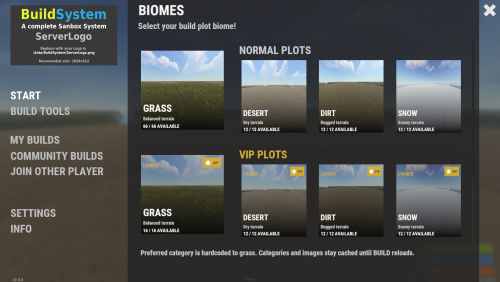
Hi @MrLiquid, Yes, you can use any map you want as long as you change the lobby location in the config file and also define all your plots in /data/BuildSystem/ZoneLocations.json OR it will be a new update soon and this file will be split in more files for custom biomes. (check the image). If you have any other questions feel free to contact me.
-
Contact me on discord if you have any other problems: hionet.com
-
Changed Status from Work in Progress to Fixed Changed Fixed In to 1.0.2b
-
fixed
-
Do a map wipe and use the latest plugins, also meka sure you change the plot locations for each building plot
-
I have fixed the restriction and I am still working to get a fix for CopyPaste null error
-
Ok, I will post a fix soon, seem like even if you add a limit to vehicles in config the limit can be bypased, a player should not be able to spawn more than allowed (5 entities by default)
-
Changed Status from Pending to Work in Progress
-
I am working on a fix for CopyPaste error. Also why you have 5000 rowboats?
-
Hello RoggerRab, For sure I will add more features for this system, for the moment you can remove using `ent kill` like admins if you are inside your building plot. ent kill Also don't forget you can test the system live, search in the server list for Build System Demo | by hionet.com or connect directly to 46.224.9.69:25015
-
Version 2.3.1
547 downloads
BuildSystem A complete creative building and sandbox suite for Rust servers. BuildSystem provides managed plots, procedural land claims, native save/load tools, community build sharing, guest collaboration, creative tools, protection, and modern player/admin interfaces. Live Test client.connect 23.81.34.186:25015 Main Features Fixed plot, procedural claim, or combined build modes Normal and VIP plot categories with configurable limits Central lobby with teleport, respawn, dome, and map marker support Biome-based plot layouts and optional randomized allocation Explore mode with `/claim` for procedural maps Free building, repairing, crafting, and blueprint unlocks God mode, noclip, auto-upgrade, mass upgrade, and auto-lock One-click electrical power and door controls Built-in hammer removal Entity and vehicle limits with optional HUD Automatic plot saving and cleanup Plot sound isolation and boundary protection Configurable startup convars and creative restrictions Ranks Every limit a player gets comes from a rank in the config. Each rank is one block: { "Permission": "buildcore.vip", "Max entities": 6000, "Max vehicles": 8, "Plot radius (meters)": 120.0, "Claim radius (meters)": 120.0, "Max saved builds": 100, "Plot types they can use": [ "normal", "vip" ], "Allow export and import": true, "Allow symmetry": true } The first rank has an empty permission and applies to every player Add as many ranks as you want, any permission starting with buildcore. registers itself A player in two ranks gets the best value of each one, the order doesn't matter Any rank can unlock any plot type, nothing is hardcoded Native Save System BuildSystem includes its own `BuildSaves` backend. CopyPaste is not required. Save, load, rename, and delete builds Unlimited saves by default Optional permission-based save limits Automatic saving on leave, disconnect, server save, and shutdown Category-aware loading High-fidelity entity, inventory, lock, authorization, sign, vehicle, and IO restoration Serialized save/load queue with timeout protection Legacy CopyPaste migration Save-file sanitization and index repair tools Export and Import (optional) Optional and disabled by default. Lets your players move builds in and out of the server in CopyPaste format, so they can use Fortify, build for Raidable Bases, or just share bases between servers. Export a plot to a link on bases.hionet.com, or to a local file in data/copypaste/ Import from a link, or from files you approve in data/copypaste/approvedfiles Access controlled per rank with Allow export and import Configurable cooldown Needs the CopyPaste plugin only if you enable this feature Community Builds Players can publish builds using share codes. Publish with or without a Rust camera photo Browse community builds through the UI Import builds using cards or share codes Community titles, descriptions, authors, images, and ratings Preview imported builds before saving a personal copy Admin controls for hiding, editing, or removing published builds Guest / Friends Building Invite players or request access to their plots Search online players through the UI Accept, decline, or cancel requests Automatic cupboard and turret authorization Owner-controlled guest permissions for building, removing, demolishing, and crafting Guests are returned safely when the owner leaves Symmetry Building BuildMirror provides advanced building symmetry using a hammer-selected foundation pivot. Square, triangle, and hexagon layouts Reflection and rotational modes Rot2, Rot3, Rot4, Rot6, and Quad modes where supported Visual placement guides Mirrored upgrading, rotating, and removal Pause, resume, cycle, and disable controls Optional `buildmirror.use` permission Player UI The interface includes: Start and plot selection Build Tools My Builds Community Builds Join Other Player Guest Settings Server Information Entity and vehicle limit HUD Auto-upgrade and symmetry overlays Middle-click menu shortcut Admin UI Use `/badmin` to open the administration panel. Create, rename, and remove plot categories Add, remove, teleport to, and identify plot slots Manage active plots and players Manage community builds and photos Edit supported settings at runtime Refresh markers, UI, categories, and lobby Run plot cleanup and maintenance actions Admin actions are logged Included Build Map The package includes a purpose-built creative map and matching plot data. Central lobby Organized normal and VIP plot locations Grass, desert, dirt, and snow categories Ready-to-use fixed plot layout Procedural and combined modes can also be used on compatible custom or procedural maps. Player Commands `/build` or `/b` - Open BuildSystem `/leave` - Leave the current plot or roaming session `/myplot` - Return to your active plot `/claim` - Claim land in procedural mode `/request <player>` - Request access to a plot `/invite <player>` - Invite a guest `/accept <player>` - Accept a request or invitation `/decline <player>` - Decline a request or invitatio `/fly`, `/f`, or `/noclip` - Toggle noclip `/god` or `/g` - Toggle god mode `/buildcost` - Calculate build and upkeep costs Build and claim chat aliases are configurable. Permissions buildcore.vip - Default VIP rank in the Ranks config list buildcore.vipmax - Default top rank in the Ranks config list Any other buildcore.* permission you add to Ranks registers itself buildplots.explore - Visit other players' plots. No building, removing, demolishing, damaging or upgrading outside their own plot buildplots.lobbyexit - Allow supported off-plot menu flow buildadmin.use - Access the admin panel and the BuildSaves console commands Export/import and symmetry access are set per rank, they don't have their own permissions anymore. Admin Commands `/badmin` Console: `buildio.rebuildindex` Included Plugins BuildAdmin.cs BuildConfig.cs BuildCore.cs BuildCosts.cs BuildGuests.cs BuildIO.cs BuildLang.cs BuildMirror.cs BuildOptions.cs BuildPlots.cs BuildSaves.cs BuildUI.cs Developer Hooks `CanBuildSystemKillEntity` `CanBuildSystemHammerRemoveEntity` `OnBuildSystemEntityValidated` `OnBuildZoneEnter` `OnBuildZoneExit` `OnBuildConfigChanged` `OnBuildMirrorStateChanged` If you need more details about the hooks or you want something to be added feel free to contact me!$99.99 -
(1).thumb.png.d56d18605bed9090caa8ebd3d3539349.png) GetRecyclerSpeed works just for StaticRecyclerSpeeds, you should revert back the function to private void StartRecycling(Recycler recycler, BasePlayer player) { recycler.CancelInvoke(nameof(recycler.RecycleThink)); var recycleSpeed = cfg.DefaultSpeed; foreach (var permSpeed in cfg.PermissionSpeeds) if (permission.UserHasPermission(player.UserIDString, permSpeed.Key)) { recycleSpeed = permSpeed.Value; break; } timer.Once(0.1f, () => recycler.InvokeRepeating(recycler.RecycleThink, recycleSpeed - 0.1f, recycleSpeed)); }
GetRecyclerSpeed works just for StaticRecyclerSpeeds, you should revert back the function to private void StartRecycling(Recycler recycler, BasePlayer player) { recycler.CancelInvoke(nameof(recycler.RecycleThink)); var recycleSpeed = cfg.DefaultSpeed; foreach (var permSpeed in cfg.PermissionSpeeds) if (permission.UserHasPermission(player.UserIDString, permSpeed.Key)) { recycleSpeed = permSpeed.Value; break; } timer.Once(0.1f, () => recycler.InvokeRepeating(recycler.RecycleThink, recycleSpeed - 0.1f, recycleSpeed)); }

