
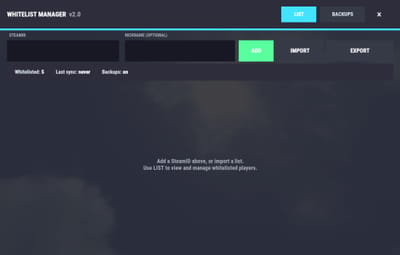
About Whitelist Manager
Manage your server's whitelist the easy way — a clean in-game UI, chat & RCON commands, automatic backups, Discord alerts, and optional multi-server sync through the ToolCupboard.io web panel. No manual file editing, no downtime.
Core features
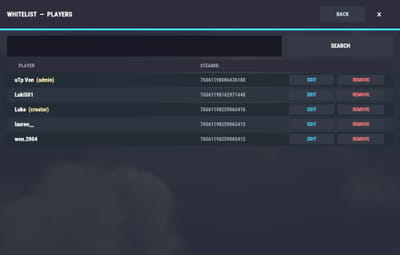
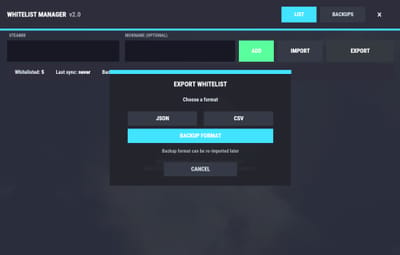
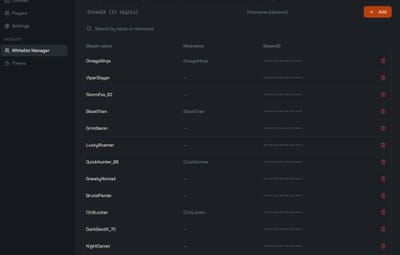
- In-game UI (/whitelist) to add, remove, search and manage whitelisted players
- Per-player nicknames shown next to each entry — set and edit them anytime
- Add or remove players via chat and RCON
- Bulk import of Steam IDs from a JSON file (simple ID list or name-mapped format)
- Auto-whitelist — automatically whitelist admins (by permission) and/or a chosen group
- Search & filter the whitelist directly from the UI
- Fully customizable "Not Whitelisted" message and command names
- Clear success/failure feedback with details on every operation
- Automatic data persistence — players are saved to a secure data file and auto-saved on every change
- Refresh or close the interface dynamically
Backups & export
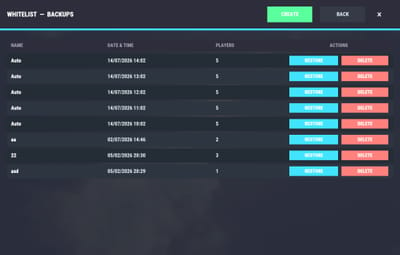
- Scheduled automatic backups with a customizable interval and a configurable number of files to keep
- Named manual backups and one-click restore
- Backups are organized into auto/ and manual/ folders so they never mix
- Export the whitelist as JSON, CSV or backup (the backup format re-imports cleanly into another server)
Integrations
-
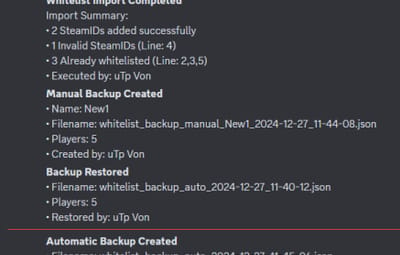
Discord webhook — receive a message when:
a player is added or removed
a backup is created or restored
a bulk import is performed
(optional) an automatic backup runs - Steam API (optional) — fetch and fill in player names automatically when bulk-adding (names normally appear once a player joins the server)
Optional — ToolCupboard.io Web Panel: Whitelist Manager pairs with the ToolCupboard.io web panel — free forever for anyone who owns this plugin — to manage everything from a browser instead of in-game (Try the live demo ). Fully optional: the plugin works standalone. With the panel you can:
- Manage one whitelist across many servers — changes are pushed to every linked server automatically over RCON
- Main-server mode — read the list from a chosen server (ideal for VIP/store setups) and mirror it to the others
- Add, remove and edit players and nicknames from the dashboard, applied live on the server(s)
- Bulk import, download backups and resolve Steam names from the panel
- Automatically kick removed players if they're online, and control how much sync activity is logged to the console
Chat commands
- /whitelist — open the Whitelist Manager UI
- /whitelist backup "name" — create a named backup
- /whitelist restore "name" — restore a backup
- /whitelist export <json|csv|backup> — export the whitelist to a file
RCON commands
- wl.add <steamid> — add a player
- wl.remove <steamid> — remove a player
- wl.list — print the current whitelist
- wl.import — import Steam IDs from imports/whitelist_import.json
- wl.backup "name" — create a named backup
- wl.restore "name" — restore a backup
- wl.listbackups — list available backups
- wl.export <json|csv|backup> — export the whitelist to a file
Permissions
- whitelistmanager.use — access the UI and management commands
- whitelistmanager.whitelisted — grants whitelisted status to a player/group
Configuration
Everything is configurable from the config file — auto-whitelist behaviour, the "Not Whitelisted" message, command names, Steam API, Discord integration, backups (interval and max files), and sync options (kick removed players, console-log verbosity). (Full config below.)
{
  "Auto Whitelist Admins": true,
  "Auto Whitelist Group": false,
  "Auto Whitelisted Group Name": "whitelisted",
  "Not Whitelisted Message": "You are not whitelisted on this server",
  "Use Steam API": false,
  "Steam API Key": "",
  "Discord Integration": {
    "Use Discord Integration": false,
    "Discord Webhook URL": "",
    "Notify Automatic Backups": true
  },
  "Chat Commands": {
    "whitelist": "Opens whitelist UI",
    "/whitelist backup": "Create a named backup",
    "/whitelist restore": "Restore a backup",
    "/whitelist export": "Export whitelist to file"
  },
  "RCON Commands": {
    "wl.add": "Add player to whitelist",
    "wl.remove": "Remove player from whitelist",
    "wl.import": "Import steamIDs from file",
    "wl.backup": "Create a named backup",
    "wl.restore": "Restore a backup",
    "wl.export": "Export whitelist to file",
    "wl.replace": "Replace the whitelist (pushed by the central relay)"
  },
  "Enable Whitelist Backup": true,
  "Backup Interval (Seconds)": 3600,
  "Maximum Backup Files": 5,
  "Whitelist Sync": {
    "Kick removed players if online": true,
    "Console log on sync (always / changes / problems / never)": "changes"
  }
}
Updating from an older version?
Your whitelist, player names and backups are migrated automatically to the new oxide/data/WhitelistManager/ structure — no data loss. As a precaution you can back up oxide/data/WhitelistManager.json before updating.
Support
For any request: [email protected] or the codefling support page
AI-generated content disclaimer: to help me with the work, the logo and images were created with the help of AI.