
About Toggle Notifications
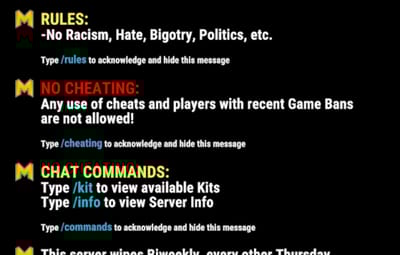
Allows server owners to create Notifications that broadcast at a set interval along with the ability for players to type a command that will toggle that specific notification's visibility for that player.
You can edit, add, or remove messages in the config file, as well as edit their toggle command.
This is helpful for making players agree to rules in chat so there can be no argument about if they were read or not.
It's also helpful for normal broadcast messages that you don't want to spam at players forever. Now they can toggle it if they choose.
FORMATTING HELP:
Type \n wherever you want to enter a new line.
For example: "Welcome!\nPlease read our rules!"
will look like: Welcome
Please read our rules!
Encase text like this to edit the font size: <size=18> Your Text Here </size>
will look like this: Your Text Here
Encase text like this to edit the font color: <color=#ff0000> Your Text Here </color>
or like this: <color=red> Your Text Here </color>
You can use both at once like this: <size=12><color=red> Your Text Here </color></size>
and I like this site for finding the html color codes but you can use any:
https://colorpicker.me/