Jump to content

RaidAlerts 1.0.9

$9.99
   (1 review)

4 Screenshots

  • 5.5k
  • 43
  • 78.48 kB
  • Update details
    v1.0.9
    Released
    Download size78.48 kB
    Total versions12
    Time between versions 48 days
    Typical update pace About every 48 days
    Freshness Updated today

This area is for discussion and questions. Please use the support area for reporting issues or getting help.

Recommended Comments

Tstew

Posted

Is there a way to make the plugin not trigger and notify the server when someone breaks a barrel? My whole server is notified of a raid when someone is running down the road breaking barrels. 
 

also make it so it doesn’t trigger when a player is breaking their own building blocks, or the building blocks belonging to their clan mates. 

redbeardekalb

Posted (edited)

Is there a way to not notify on raidable bases?  for discord notifications?


Edited by redbeardekalb
Duff

Posted

On 2/18/2025 at 10:39 AM, Tstew said:

Is there a way to make the plugin not trigger and notify the server when someone breaks a barrel? My whole server is notified of a raid when someone is running down the road breaking barrels. 
 

also make it so it doesn’t trigger when a player is breaking their own building blocks, or the building blocks belonging to their clan mates. 

This have not been a issue for a while 

Duff

Posted

4 hours ago, redbeardekalb said:

Is there a way to not notify on raidable bases?  for discord notifications?


Your interrested in if its possible to make it so only discord notifications for global notifications to trigger for raidable bases?

redbeardekalb

Posted

To be clear I was intending on using this plugin to log raids on my server to a private discord channel. I would like it to ignore the damage from the Raidable Bases so I am not pinged every time some one is damaging a Raidable Base.

Duff

Posted (edited)

1 hour ago, redbeardekalb said:

To be clear I was intending on using this plugin to log raids on my server to a private discord channel. I would like it to ignore the damage from the Raidable Bases so I am not pinged every time some one is damaging a Raidable Base.

Raidable bases should not trigger a raid warning  so the discord notifications shouldnt mention anything about RaidAbleBases🙂

Edited by Duff
redbeardekalb

Posted

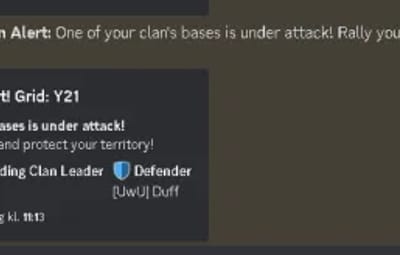
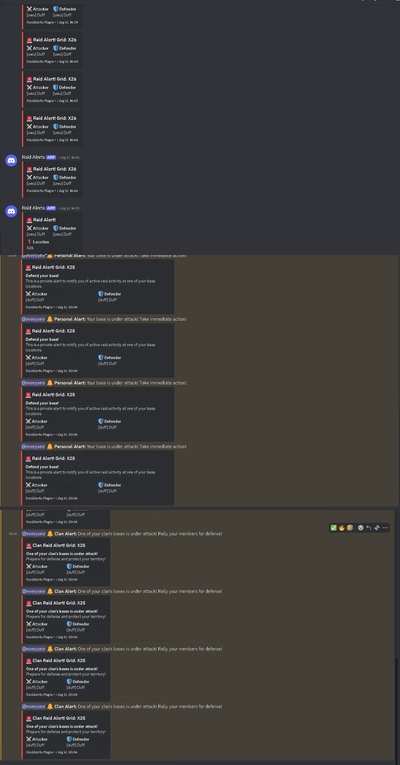
This is what pops up for every item destroyed in a Raidable base.

IMG_1679.jpeg

Duff

Posted

11 minutes ago, redbeardekalb said:

This is what pops up for every item destroyed in a Raidable base.

IMG_1679.jpeg

I corrected some things in the latest update - unintentionally i might have done something so this happend. i will make a Config Line for Disabling RaidableBases Raids


I apologise

MiMiLand

Posted

I have a question regarding the online damage alert feature.

When a notification appears that a building is being destroyed, is there a way to make the name of the person causing the damage appear as anonymous?

Duff

Posted

9 hours ago, MiMiLand said:

I have a question regarding the online damage alert feature.

When a notification appears that a building is being destroyed, is there a way to make the name of the person causing the damage appear as anonymous?

So Maybe something like a stealth permission


Example i have this permission ii start raid your base and in tn the Notification you get it will not say my name it clan, but anonymous?

MiMiLand

Posted (edited)

Absolutely.

It may be a little embarrassing to say this, but my server does not have 100+ players like other servers. It does not even exceed 50 players.
Because of that, when player names are shown, it often leads to people becoming overly fixated on each other, harassing one another, or repeatedly seeking revenge.

I really like the plugin.
I am still such a beginner that I can honestly call myself a complete novice,
but even for me, the plugin is not difficult to use.

However, if the feature I mentioned above could be added,
I think it would be extremely useful even on smaller servers like mine.


The main purpose I want for this plugin is simply as an alert system, like: “Someone is attacking your base!”

For example, if it says:
“Duff is attacking your base,”
people on my server will already be fighting in chat right away, haha.

Edited by MiMiLand
Duff

Posted

6 minutes ago, MiMiLand said:

Absolutely.

It may be a little embarrassing to say this, but my server does not have 100+ players like other servers. It does not even exceed 50 players.
Because of that, when player names are shown, it often leads to people becoming overly fixated on each other, harassing one another, or repeatedly seeking revenge.

I really like the plugin.
I am still such a beginner that I can honestly call myself a complete novice,
but even for me, the plugin is not difficult to use.

However, if the feature I mentioned above could be added,
I think it would be extremely useful even on smaller servers like mine.


The main purpose I want for this plugin is simply as an alert system, like: “Someone is attacking your base!”

For example, if it says:
“Duff is attacking your base,”
people on my server will already be fighting in chat right away, haha.

Yes i can just Imagine the drama that unfolds! 

I think this a brilliant idea i will Implement this for sure, im pretty sure i can this done today :)!


Thank you soo much for the suggestion and your feedback!

  • Like 1

Create an account or sign in to comment

You need to be a member in order to leave a comment

Create an account

Sign up for a new account in our community. It's easy!

Register a new account

Sign in

Already have an account? Sign in here.

Sign In Now
  • Like 1

User Feedback

About Us

Codefling is the largest marketplace for plugins, maps, tools, and more, making it easy for customers to discover new content and for creators to monetize their work.

Downloads
2.4m
Total downloads
Customers
10.8k
Customers served
Files Sold
155.7k
Marketplace sales
Payments
3.3m
Processed total
×
×
  • Create New...

Important Information

We have placed cookies on your device to help make this website better. You can adjust your cookie settings, otherwise we'll assume you're okay to continue.