

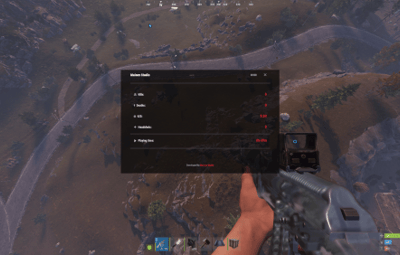
About PlayerStats
A player statistics plugin for Rust servers (Carbon / Oxide), developed by Maison Studio.
What it does
PlayerStats automatically tracks each player's performance while they play on the server, with no setup required. It keeps track of:
Kills — how many players you've eliminated
Deaths — how many times you've died
K/D — the ratio between kills and deaths, calculated automatically
Headshots — how many eliminations were landed with a headshot
Playtime — total time you've spent on the server
This data is saved permanently, so every player's stats keep building up every time they join the server, even after a server restart or update.
The /stats command
Any player can check their own stats at any time by typing:
/stats
This opens an on-screen panel with the full summary — kills, deaths, K/D, headshots, and playtime — styled in the Maison Studio look. The panel has a close button (✕) in the top-right corner.
Checking another player's stats
To see another player's stats while they're online, just add their name after the command:
/stats PlayerName
You don't need to type the full name — just enough to identify the player.
Note
The plugin runs quietly in the background at all times, with no noticeable impact on gameplay or server performance. Admins just need to install it — no extra configuration is needed to get it working.
Developed by Maison Studio
Discord: https://discord.gg/8NytbFFGWt