

About Dynamic Vending Prices
Dynamic Vending Prices
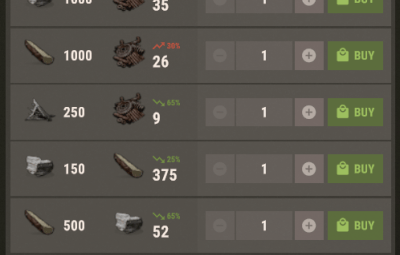
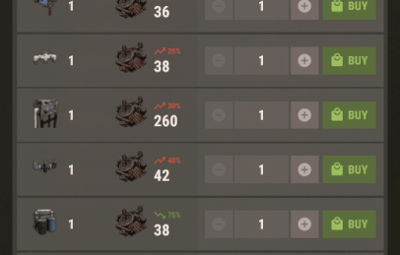
Every NPC shop order rolls its own price — shown on Rust's own vanilla shop badge
Every order at Outpost, Bandit Camp, the Fishing Villages and every other NPC shop rolls its own surcharge or discount, so prices move independently instead of every item sharing one multiplier. The change is drawn by Rust's own percentage badge in the vanilla shop UI — no custom interface, no CUI, no client-side files.
| 45% | 90% | 0 | 1 |
| Max surcharge | Max discount | Dependencies | Permission |
At a glance
- ✓ A separate price for every order — each item in each shop gets its own roll; two shops selling the same item usually show different prices
- ✓ Separate surcharge and discount ranges — rises hurt more than falls help, so the two directions are configured independently (defaults: +45% cap, -90% floor)
- ✓ Rolls on Rust in-game days — prices change at in-game 00:00, roughly once per real hour; real-time rotation is available instead
- ✓ Works with any currency, not just scrap — cloth, wood, fish, low grade fuel and everything else (optional, one config setting)
- ✓ Deterministic — prices are derived from what is being sold, not entity IDs, so a restart, reload or crash never rerolls them mid-day
- ✓ Reverts cleanly — unloading restores your price multiplier convars and hands every machine back to Rust's own pricing
- ✓ No UI, no downloads, no ImageLibrary — it drives the shop panel Rust already has
Requirements: none. No dependencies and no optional plugins. Harmony is used only when non-scrap currency support is enabled, and it ships with Oxide.
01 — The roll
One roll per order, per period
Rust already has a dynamic pricing system for NPC vending machines — it is what draws the green and red percentage badge on the vanilla shop panel. Left alone it moves prices slowly, and only in response to what players buy. This plugin drives that same system directly: for each sell order it computes a multiplier, writes it into the machine's sales data, then calls FullUpdate() so Rust re-derives the displayed price and networks it to clients. Players see a normal Rust shop with normal Rust price badges.
For each order, once per period:
-
1. Roll the direction first —
Chance the price goes UP (%)decides surcharge or discount -
2. Pick a percentage from that direction's own min/max range, in whole steps of
Change step (%) - 3. Convert to a multiplier and write it to the order's slot
The roll is seeded from the shop name, the item sold, the currency and the slot index — never from the machine's entity ID, because those are regenerated on every restart and wipe and would reroll every price. That is what makes prices survive restarts.
Two kinds of price change
Most orders are you pay orders: the multiplier changes the currency cost. Some NPC orders are you sell orders — you hand over fish or wood and receive scrap. For those, Rust does not change the price, it changes how much scrap you receive. The plugin handles both, and reports them differently in vendprices.show:
Outpost | rifle.ak x1        costs 300 -> 165 scrap (-45%)
Fishing | scrap x20          you get 20 -> 29 scrap for 5 fish.troutsmall ( 45%)
02 — Any currency
Vanilla Rust refuses to discount anything not priced in scrap — this lifts that
Rust's GetDiscountForSlot returns "no change" for anything not priced in scrap. With Only scrap-priced orders change set to false (the default) the plugin installs a small Harmony patch so fish, wood, cloth and low grade fuel shops get price changes too. Set it to true to stay entirely inside vanilla behaviour — the plugin still works, it just leaves non-scrap shops alone.
03 — Rotation
In-game days, or your own real-time schedule
By default prices roll at in-game 00:00. A Rust day is about an hour of real time, so prices change roughly every hour, not once a day. If you want a genuine once-a-day rotation, set Roll on Rust in-game days to false and leave the interval at 24 hours — optionally pinned to a UTC hour, with an optional chat broadcast when prices change.
04 — Limits that come from Rust
Two things no plugin can override — so the plugin counts and reports them instead
Deep-sea machines are excluded. Rust sets BypassDynamicPricing on vending machines inside deep-sea zones, and its pricing code then ignores every multiplier regardless of what any plugin writes. These machines are counted and listed separately in vendprices.show so your totals still add up.
Price multiplier clamps. Rust clamps every multiplier with two server convars, stock 0.5 and 2.0 — a -90% discount would be silently clamped to -50%. With Widen Rust's own price multiplier clamps enabled (default), the plugin widens them just enough for your ranges, records your original values in its data file, and restores them on unload. Prefer to manage them yourself? Set the option to false and set npcvendingmachine.minimumpricemultiplier / maximumpricemultiplier by hand.
05 — Commands & permissions
Four console commands, one permission — pricing itself is deliberately ungated
A price is a property of the machine, not of the player looking at it — every player at a shop sees the same price, and no permission changes what anyone pays. The server console always has access; vanilla admin/owner auth works too.
| Command | What it does |
|---|---|
vendprices.show
|
Current period, next roll, machine counts by shop, and every rolled price — run this first when something looks wrong |
vendprices.apply
|
Re-writes current prices to every machine immediately |
vendprices.reroll
|
Forces a brand new roll for the current period — not undoable; it advances a salt, so the previous prices cannot be recovered |
vendprices.debug
|
Per-machine table: sales slots, bypass state, and whether each machine is handled |
dynamicvendingprices.admin

oxide.grant user <name> dynamicvendingprices.admin
oxide.grant group admin dynamicvendingprices.admin
06 — Configuration
Everything has a sane default — most servers change nothing
Default oxide/config/DynamicVendingPrices.json:
{
  "Price fluctuation": {
    "Enabled": true,
    "Surcharge (price goes UP) - minimum (%)": 10,
    "Surcharge (price goes UP) - maximum (%)": 45,
    "Discount (price goes DOWN) - minimum (%)": 10,
    "Discount (price goes DOWN) - maximum (%)": 90,
    "Change step (%)": 5,
    "Chance the price goes UP (%)": 50,
    "Widen Rust's own price multiplier clamps to fit the range above": true,
    "Also randomise what you are paid when selling scrap to a machine": true,
    "Only scrap-priced orders change (false = every currency, uses a Harmony patch)": false
  },
  "Rotation": {
    "Roll on Rust in-game days (every in-game 00:00)": true,
    "Real hours between price rolls (only used when the above is false)": 24.0,
    "Roll at this UTC hour (only used for a 24h real-time interval)": 0,
    "Broadcast a chat message when prices change": true
  },
  "Machines": {
    "Only these shop names (empty = every NPC vending machine)": [],
    "Never touch these shop names": [],
    "Force Rust's dynamic pricing system on (required for the % badge to show)": true,
    "Seconds between rescanning the world for vending machines (0 = never)": 300.0
  },
  "Seconds between re-applying our prices (0 = only on rotation and shop open)": 30.0
}
Price fluctuation
| Setting | Default | Notes |
|---|---|---|
Enabled
|
true
|
false leaves every price at vanilla
|
Surcharge - minimum (%)
|
10
|
Smallest price rise |
Surcharge - maximum (%)
|
45
|
Largest price rise — a 90% AK would be 570 scrap |
Discount - minimum (%)
|
10
|
Smallest price fall |
Discount - maximum (%)
|
90
|
Largest price fall — 90 means an item can cost a tenth of normal
|
Change step (%)
|
5
|
Percentages land on multiples of this — 5 gives 10, 15, 20 …
|
Chance the price goes UP (%)
|
50
|
0 = everything always discounted, 100 = always surcharged
|
Widen Rust's own clamps
|
true
|
See Price multiplier clamps above |
Also randomise what you are paid when selling scrap
|
true
|
false leaves you sell orders alone
|
Only scrap-priced orders change
|
false
|
true = vanilla behaviour, no Harmony patch
|
A minimum above the maximum is corrected automatically rather than throwing.
Rotation
| Setting | Default | Notes |
|---|---|---|
Roll on Rust in-game days
|
true
|
Rolls at in-game 00:00 — roughly hourly on default day length |
Real hours between price rolls
|
24.0
|
Used only when the above is false
|
Roll at this UTC hour
|
0
|
Used only for a 24h real-time interval |
Broadcast a chat message when prices change
|
true
|
Chat broadcast to online players |
Machines
| Setting | Default | Notes |
|---|---|---|
Only these shop names
|
[]
|
Whitelist by shop name — empty means every NPC vending machine |
Never touch these shop names
|
[]
|
Blacklist, applied before the whitelist |
Force Rust's dynamic pricing system on
|
true
|
Sets npcvendingmachine.dynamicpricingenabled — without it the badge does not show
|
Seconds between rescanning the world
|
300.0
|
Self-healing rescan for machines that slipped past the spawn hook — 0 disables
|
Shop names are matched case-insensitively. Run vendprices.show to see the exact names on your map — it groups machines by shop name.
Re-apply interval & data file
Seconds between re-applying our prices — default 30.0. Rust's own demand system keeps recalculating multipliers as players buy things, so the plugin rewrites its values periodically. Prices are also re-applied the moment a player opens a shop, so 0 is a valid setting on a large server; the shop-open hook alone covers what players see.
oxide/data/DynamicVendingPrices.json holds the current period, the reroll salt, a readable snapshot of every rolled price, and your original price multiplier convar values. Deleting it forces a fresh roll — but never delete it while loaded with widened clamps, or unload cannot restore your convars.
Localization
Default oxide/lang/en/DynamicVendingPrices.json:
{
  "PricesChanged": "<color=#8cc63e>Vending machine prices have changed!</color> Every item has a new price for the next {0} hours.",
  "PricesChangedRustDay": "<color=#8cc63e>A new day breaks and vending machine prices have changed!</color> Every item has a new price until the next dawn.",
  "NoPermission": "You need the dynamicvendingprices.admin permission to use that."
}
PricesChanged is used for real-time rotation ({0} = interval in hours); PricesChangedRustDay is used for in-game day rotation and has no placeholder.
07 — Questions
Before you buy
Prices at Outpost look unchanged — what do I check first?
Run vendprices.show. It reports enabled, the current clamps, and how many orders were repriced. If repriced is 0, the machines are being filtered out — check your shop name whitelist. If enabled is False, set Force Rust's dynamic pricing system on to true.
Some machines never change price.
Almost certainly deep-sea machines. Rust marks them BypassDynamicPricing and ignores all multipliers on them. They are listed explicitly at the bottom of vendprices.show.
Shops that trade in fish, wood or cloth are not changing.
Set Only scrap-priced orders change to false. Vanilla Rust genuinely refuses to discount anything not priced in scrap; that setting installs the patch that lifts the restriction.
Does this edit my server config?
Yes — two convars, npcvendingmachine.minimumpricemultiplier and maximumpricemultiplier — and only when the widening option is on and your ranges need more room. Both are Saved = true, so the plugin records your original values and restores them on unload.
Do prices reset when the server restarts?
No. Prices are keyed to the period and to what is being sold, so a restart re-derives exactly the same prices for the rest of the period.
How do I make prices change less often?
Set Roll on Rust in-game days to false. In-game days are about an hour of real time.
Can I make the shops only ever cheaper?
Set Chance the price goes UP (%) to 0.
Does it affect player-placed vending machines?
No. It only touches NPC vending machines.
Does it work with other vending plugins?
It writes to Rust's own sales data. A plugin that also writes there — or that replaces the shop UI entirely — will conflict. Use the shop name blacklist to hand specific shops over.
Performance?
Machines are tracked in a set built at startup and maintained by spawn and kill hooks — no per-frame work, no entity scan on the hot path. The 30-second re-apply pass writes only where a value actually differs.
08 — Hooks & API
For plugin developers
// Returns float, or null if the key is unknown
object multiplier = DynamicVendingPrices?.Call("GetVendingPriceMultiplier", key);

// Returns int - positive for a surcharge, negative for a discount. null if unknown
object percent = DynamicVendingPrices?.Call("GetVendingPriceChange", key);
The key format is shopName|itemToSellID|currencyID|slotIndex — for example Outpost|-1123473824|-932201673|3. An empty shop name becomes the literal shop.
// Called after every price roll, including the first roll at server start
void OnVendingPricesRolled(long period)
period is the in-game day number when rolling on Rust days, or the real-time period index otherwise. It is opaque — treat it as an identity for "which set of prices is current", not as a date.
Credits
Yanwolsing — author. All rights reserved. Redistribution and resale — modified or unmodified — are strictly prohibited. See the license notice in the plugin file.
The plugin drives Facepunch's own NPC vending machine dynamic pricing system rather than replacing it — which is why the price badge is the stock Rust one.