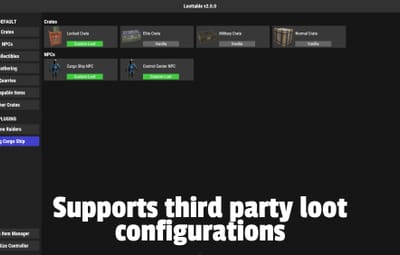
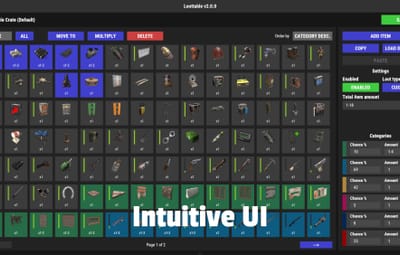
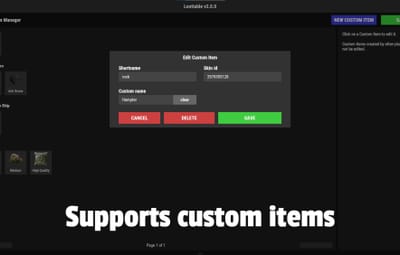
Jump to content
Message added by The_Kiiiing,

Join my discord: https://discord.gg/mqbB5cTSfc

6 Screenshots
  • 361.5k
  • 22.3k
  • 550.7 kB
  • Update details
    v2.2.20
    Released
    Download size 550.7 kB
    Total versions 81
    Typical update pace About every 13 days
    Freshness Updated 6 days ago

This area is for discussion and questions. Please use the support area for reporting issues or getting help.

Recommended Comments


The Coffee Guy

Posted

12 hours ago, hid333 said:

If I set it to "4 - loot table of the Rust objects" and specify multiple prefabs, will the loot be output correctly?

it will be whats vanilla offer, if you want specific loot go to 5 and add what you want under, like here .

you can add what you want, and the quantity,  
if you dont know the code of the item  they all here https://www.corrosionhour.com/rust-item-list/ just search and add them

A77E185B-DF32-4974-B627-B9F50951FB38.png.3f6613d2eca095a5646f1f6f860427be.png

hid333

Posted

1 hour ago, Grumpy_old_man said:

it will be whats vanilla offer, if you want specific loot go to 5 and add what you want under, like here .

you can add what you want, and the quantity,  
if you dont know the code of the item  they all here https://www.corrosionhour.com/rust-item-list/ just search and add them

A77E185B-DF32-4974-B627-B9F50951FB38.png.3f6613d2eca095a5646f1f6f860427be.png

We are aware that custom loot is outputting correctly.
Until now I had it set to 5, which provided vanilla loot plus custom loot of my choice.
However, when I set it to 4 now, the problem is that the items that should be available in vanilla are not available
and only 2-3 items are available.
If I disable loottable, it is output normally.
As I said earlier, this was working fine until recently
but a problem has occurred since the recent update, so I am currently looking for a solution.

0g.Ghost.7373

Posted

Whats "Limit hotbar stack size"?

When I enable it, it doesnt seem to change anything.

The_Kiiiing

Posted

On 6/14/2025 at 10:23 PM, 0g.Ghost.7373 said:

Whats "Limit hotbar stack size"?

When I enable it, it doesnt seem to change anything.

It means that you can no longer stack items with durability e.g. weapons in your hotbar. This is useful when you want to prevent players from accidentally using a stack of multiple weapons as the entire stack looses durability when the weapon is used.

0g.Ghost.7373

Posted

17 hours ago, The_Kiiiing said:

It means that you can no longer stack items with durability e.g. weapons in your hotbar. This is useful when you want to prevent players from accidentally using a stack of multiple weapons as the entire stack looses durability when the weapon is used.

I will have to try again. Cause I keep stacks of most weapons to one just for that reason.  

aomuu

Posted

I want a way to register multiple items at once.

0g.Ghost.7373

Posted

Anyone else seeing this?

Calling hook OnItemSplit resulted in a conflict between the following plugins: CustomMagazine - Item.weapon.mod.extendedmagsx1.1564143 (Item), Loottable (Item.weapon.mod.extendedmagsx1.1564145 (Item))


Deicide

Posted

not sure if anyone is seeing it but im having an issue with the multiple being set at 3x for mats but its only giving vanilla

Any ideas?

0g.Ghost.7373

Posted

Players were telling me the Normal Crates gave out Command Blocks. I tested it and sure enough, one gave me 2. I looked and it is not in the lonottable. Anyone else seeing this?

hid333

Posted

2 hours ago, 0g.Ghost.7373 said:

Players were telling me the Normal Crates gave out Command Blocks. I tested it and sure enough, one gave me 2. I looked and it is not in the lonottable. Anyone else seeing this?

Are there any other plugins that add loot?
In my case, the issue was caused by plugins such as skilltree, itemperk, and cooking, which allow you to obtain random items. It would appear until you put it on the blacklist, so I thought the same thing might be happening on your server. Just for reference.

0g.Ghost.7373

Posted

39 minutes ago, hid333 said:

Are there any other plugins that add loot?
In my case, the issue was caused by plugins such as skilltree, itemperk, and cooking, which allow you to obtain random items. It would appear until you put it on the blacklist, so I thought the same thing might be happening on your server. Just for reference.

Thanks! I will give that a try.

MadDom

Posted

Hi,

is there a way to get the custom item into a vending machine? So that I can trade with them?

Cheers


tacman1981

Posted

On 7/23/2025 at 3:54 PM, Andariel said:

Hi,

is there a way to get the custom item into a vending machine? So that I can trade with them?

Cheers


Custom Item Vending right here on codefling, by "imthenewguy" will do what you want, its excellent

JuJu

Posted

I would like to add the dog tags on the npcs when killed. Has anyone been able to do that. I'm not sure if I would need to make it as custom item. Is it possible I don't see them in the resources. 

Thanks

0g.Ghost.7373

Posted

1 hour ago, JuJu said:

I would like to add the dog tags on the npcs when killed. Has anyone been able to do that. I'm not sure if I would need to make it as custom item. Is it possible I don't see them in the resources. 

Thanks

There's plugins that do just that on here. Adding them with loot table, I am not sure about.

tacman1981

Posted

will this be patched for the update today? it has a generic NRE at compile

The_Kiiiing

Posted

17 hours ago, tacman1981 said:

will this be patched for the update today? it has a generic NRE at compile

Seems to work fine on my servers. Can you send me the full error?

The_Kiiiing

Posted

On 7/29/2025 at 4:54 PM, JuJu said:

I would like to add the dog tags on the npcs when killed. Has anyone been able to do that. I'm not sure if I would need to make it as custom item. Is it possible I don't see them in the resources. 

Thanks

What you are trying to do is absolutely possible. The reason why the dog tags do not show up under resources is because they are hidden items by default. You can find them by including hidden items in your search. Just enter h:dog in the item search bar and they should show up.

tacman1981

Posted

10 minutes ago, The_Kiiiing said:

Seems to work fine on my servers. Can you send me the full error?

it was the "object reference not set to an instance of an object" but since that its not happened again

FeniexGaming

Posted

Im not sure if it is a thing already or not but the ability to edit the barrel rates as well


The_Kiiiing

Posted

16 hours ago, FeniexGaming said:

Im not sure if it is a thing already or not but the ability to edit the barrel rates as well


This is already possible

RustDominions

Posted

skins arent loading in for custom items
image.png.4f0a2c296b560a6c830862fc7d372d79.png

  • Sad 1
FeniexGaming

Posted

is there a list of plugins that work with the editor


Deicide

Posted

Starting within this month, guns that stack are now duplicating ammo/fuel. You can unstack and restack and theyll refuel/reload. This hasnt been the issue until sometime this month. Any ideas?

The_Kiiiing

Posted

On 9/24/2025 at 9:44 PM, Deicide said:

Starting within this month, guns that stack are now duplicating ammo/fuel. You can unstack and restack and theyll refuel/reload. This hasnt been the issue until sometime this month. Any ideas?

I just tested it on staging and everything seems to work fine there except for the military flamethrower. With which weapons did you get the bug?

  • Like 1

Create an account or sign in to comment

You need to be a member in order to leave a comment

Create an account

Sign up for a new account in our community. It's easy!

Register a new account

Sign in

Already have an account? Sign in here.

Sign In Now
  • Like 16
  • Love 5

User Feedback

About Us

Codefling is the largest marketplace for plugins, maps, tools, and more, making it easy for customers to discover new content and for creators to monetize their work.

Downloads
3m
Total downloads
Customers
12k
Customers served
Files Sold
170.9k
Total sales
Payments
3.7m
Processed total
×
×
  • Create New...

Important Information

We have placed cookies on your device to help make this website better. You can adjust your cookie settings, otherwise we'll assume you're okay to continue.