
.thumb.png.67a98d42e59baa0ab131fc277054bd26.png)
About HomeStereo
HomeStereo is a Rust plugin that allows players to attach Portable Boomboxes to common base deployables and stream live internet radio. Instead of relying on default game audio, players can build a personal library of custom stream URLs, allowing them to manage and play their favorite internet radio stations directly through an interactive in-game UI.
Internet Radio & Station Manager UI
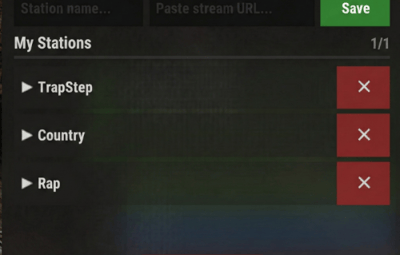
The core feature of HomeStereo is the custom station manager. When a player looks at the prefab of with an installed stereo, they can open a dedicated UI dashboard to add, edit, delete, and play internet radio streams.
- Personal Playlists: Stations are saved directly to the player's profile and organized in a paginated list for easy access.
- One-Click Playback: Players can swap between their saved stations on the fly without typing chat commands.
- Now Playing Interface: The UI actively displays the name and URL of the currently playing station.
- Player Onboarding: If a player's library is empty, the UI provides a quick-copy link to help them find compatible stream URLs.
Server Owner Controls & Persistence
HomeStereo is built to give admins full control over the audio environment while keeping items and data secure.
- Domain Whitelisting: Admins can restrict custom URLs to specific, approved domains (or disable custom URLs entirely) to prevent abuse.
- Stream Persistence: Custom URLs are saved to the server data. If the server restarts, the stereos will remember their assigned station and automatically resume playing.
- Item Requirements: Configure whether a physical Portable Boombox item is consumed upon installation, and easily bypass this requirement for specific players or VIP tiers using the homestereo.free permission.
- Flawless Refund System: The plugin tracks the exact InstallerID of whoever placed the radio. If an admin wipes all stereos using the provided commands, the boomboxes are automatically refunded directly to the original installers' inventories if online.
- Configurable Limits: Set hard limits on how many stereos a player can place in the world, and how many custom URLs they can save to their personal library.
Supported Deployables
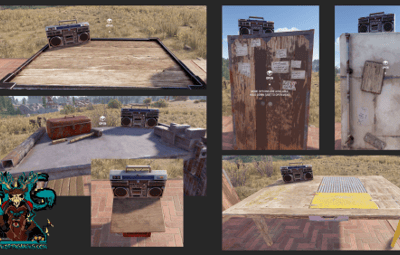
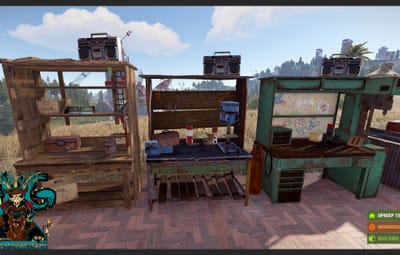
You can configure exactly where stereos sit on each prefab, and enable/disable them individually in the config. By default, stereos can be attached to:
- Large Wood Boxes
- Tables & Beach Tables
- Fireplaces
- Tool Cupboards (Standard & Retro)
- Fridges
- Workbenches (Tier 1, 2, and 3)
- Repair Benches
- Wall Single Shallow Shelves
Minimal On-Screen Prompts
A non-intrusive UI appears in the bottom-right corner of the screen only when looking directly at a configured deployable:
- [Install HomeStereo] - Appears in green on empty compatible deployables.
- [Uninstall HomeStereo] - Appears in red to remove an existing stereo.
- [ ⋯ ] - Opens the main Station Manager dashboard.
Commands
- /installstereo - Installs a stereo on the deployable you are currently looking at.
- /uninstallstereo - Uninstalls the stereo from the deployable you are currently looking at.
- /removestereos - (Admin) Removes all installed stereos across the server and issues refunds.
Permissions
- homestereo.use - Required to install, uninstall, and manage stereos.
- homestereo.admin - Bypasses Tool Cupboard (TC) authorization, placement limits, and grants access to admin commands.
- homestereo.free - Allows players to install stereos without requiring a boombox in their inventory.
Example Configuration:
Quote{
"PlayerRadioLimit": 3,
"ShowUI": true,
"UIAnchorMin": "1 0",
"UIAnchorMax": "1 0",
"UIOffsetMin": "-208 0",
"UIOffsetMax": "-17 85",
"RequireBoomBox": true,
"AllowCustomURLs": true,
"MaxStationsPerPlayer": 15,
"AllowAllURLs": true,
"AllowedURLs": [],
"Radios": [
{
"Name": "HomeStereo",
"Deployables": {
"assets/prefabs/deployable/large wood storage/box.wooden.large.prefab": {
"Position": {
"x": 0.55,
"y": 0.75,
"z": -0.3
},
"Angle": {
"x": 0.0,
"y": -25.0,
"z": 0.0
},
"Enabled": true
},
"assets/prefabs/deployable/table/table.deployed.prefab": {
"Position": {
"x": 0.7,
"y": 0.825,
"z": -0.3
},
"Angle": {
"x": 0.0,
"y": -25.0,
"z": 0.0
},
"Enabled": true
},
"assets/prefabs/misc/summer_dlc/beach_chair/beachtable.deployed.prefab": {
"Position": {
"x": 0.0,
"y": 0.39,
"z": -0.2
},
"Angle": {
"x": 0.0,
"y": 0.0,
"z": 0.0
},
"Enabled": true
},
"assets/prefabs/deployable/fireplace/fireplace.deployed.prefab": {
"Position": {
"x": 0.0,
"y": 1.76,
"z": 0.225
},
"Angle": {
"x": 0.0,
"y": 0.0,
"z": 0.0
},
"Enabled": true
},
"assets/prefabs/deployable/tool cupboard/cupboard.tool.deployed.prefab": {
"Position": {
"x": 0.3,
"y": 1.9,
"z": 0.0
},
"Angle": {
"x": 0.0,
"y": -25.0,
"z": 0.0
},
"Enabled": true
},
"assets/prefabs/deployable/tool cupboard/retro/cupboard.tool.retro.deployed.prefab": {
"Position": {
"x": 0.3,
"y": 1.9,
"z": 0.0
},
"Angle": {
"x": 0.0,
"y": -25.0,
"z": 0.0
},
"Enabled": true
},
"assets/prefabs/deployable/fridge/fridge.deployed.prefab": {
"Position": {
"x": 0.0,
"y": 2.0,
"z": 0.2
},
"Angle": {
"x": 0.0,
"y": 10.0,
"z": 0.0
},
"Enabled": true
},
"assets/prefabs/deployable/tier 1 workbench/workbench1.deployed.prefab": {
"Position": {
"x": -0.4,
"y": 2.2,
"z": 0.1
},
"Angle": {
"x": 0.0,
"y": 15.0,
"z": 0.0
},
"Enabled": true
},
"assets/prefabs/deployable/tier 2 workbench/workbench2.deployed.prefab": {
"Position": {
"x": -0.4,
"y": 2.03,
"z": -0.1
},
"Angle": {
"x": 0.0,
"y": 15.0,
"z": 0.0
},
"Enabled": true
},
"assets/prefabs/deployable/tier 3 workbench/workbench3.deployed.prefab": {
"Position": {
"x": -0.4,
"y": 2.03,
"z": -0.1
},
"Angle": {
"x": 0.0,
"y": 15.0,
"z": 0.0
},
"Enabled": true
},
"assets/prefabs/deployable/repair bench/repairbench_deployed.prefab": {
"Position": {
"x": -0.55,
"y": 1.0,
"z": -0.365
},
"Angle": {
"x": 0.0,
"y": 25.0,
"z": 0.0
},
"Enabled": true
}
}
}
]
}

.thumb.jpg.b3e2ae1b8314fdddbb2707c6a527b8b2.jpg)