Jump to content

Dungeon Events 3.6.6

$25.00
   (10 reviews)

10 Screenshots

  • 39.4k
  • 3k
  • 316.27 kB

This area is for discussion and questions. Please use the support area for reporting issues or getting help.

Recommended Comments


Martian

Posted

Hi @kin8642 ! I’m working on a big update right now and will look into this. Whenever you have this kind of issue, please open a support ticket.

Martian

Posted

On 8/10/2025 at 11:16 PM, hairybeanstalk said:

When can we go higher than 6 dungeons?

I'd love to make 10 dungeon levels or more

Hello! Yes, a big update is coming this week — I’m going to implement that, and you’ll be able to create as many tiers as you want.

  • Love 1
Martian

Posted

IMPORTANT UPGRADE NOTICE (Breaking Changes)
This version changes the configuration format and resets settings on first run. Back up your old config before updating, especially the loot tables. Make a copy of oxide/config/DungeonEvents.json. After installing the update, review the new files and manually merge your custom values—pay extra attention to the new per-tier settings and loot tables.

  • Tier system reworked to allow creating any number of tiers.
  • Loot config moved out of the main config into \data\DungeonEvents: one global Default_Loot.json plus per-tier files (e.g., Easy\boss_loot.json, Easy\lootbox.json, Easy\npc_loot.json).
  • New global settings: “Prevent Drop Backpack” and “Teleport Player To Outside On Death.”
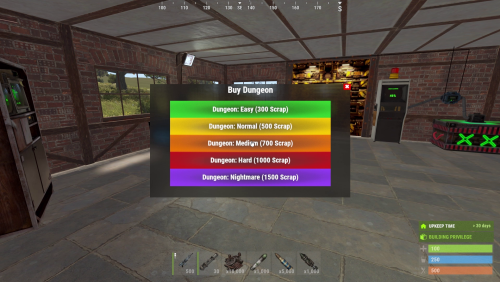
  • New per-tier settings: “Enable Auto Spawn,” “Enable Buy,” “Marker Color Hex,” “Max Auto Spawn (0 = Unlimited),” “Max Buy (0 = Unlimited),” “Per-Tier Buy Cooldown (seconds, 0 = use global),” “Max Items Per Box,” “Max Items Per NPC,” and “Max Items Per Boss NPC.”
  • Fixed validation for loot/NPC item rolls to avoid bugs when min or max is 0 (skips empty rolls).
  • Buy UI rebuilt; adds scrolling automatically when many tiers exist.
  • Startup converted to a coroutine that cleans leftover data and waits smartly based on player count for smoother restarts.
  • Buy cooldowns are now per tier (not global), with per-user, per-tier tracking.
  • Optional safer “teleport on death”: snaps to terrain/water surface to prevent players spawning inside terrain.
  • Codebase refactored across the board for readability and performance.
hairybeanstalk

Posted

@Marte6on the next update, i'd like to request a config setting called "show marker and messages to dungeon buyer only: true" to only display the spawn message to the person who had bought a dungeon, rather than the entire server. Thank you my friend, it's doing fantastic so far!

hairybeanstalk

Posted (edited)

I found it. So far, looking great!


Edited by hairybeanstalk
  • Like 1
Martian

Posted

Hello, yes I sent a notice by email in the update and also posted it here and on Discord

  • Love 1
kin8642

Posted (edited)

Hello, can I add players to purchase access permissions themselves?

This way, I can sell the permissions in the shop, for example:


”Command”: “oxygen.grant user {steamid} dungeonevents.buy.easy”, 
”Command”: “oxy.grant user {steamid}  dungeonevents.buy.normal”,
”Command”: “oxygen.grant user {steamid} dungeonevents.buy.medium”, 
”Command”: “oxy.grant user {steamid} dungeonevents.buy.hard”,
”Command”: “ox.grant user {steamid} dungeonevents.buy.nightmare”,


You need to have the corresponding permissions to purchase access.

Edited by kin8642
Wajeeh Agbariya

Posted

is it possible to add the option to use alphaloot profiles for the loot in the boxes and npcs?

BlackHawk

Posted

On 6/9/2025 at 11:39 AM, Marte6 said:

I just updated the plugin and it should fix all the issues. Here’s what changed:

  • Added /de.reloadconfig to reload settings without restarting the plugin
  • Added /de.toggle to enable/disable dungeon purchases
  • Added /de.removenearest to remove the dungeon with the nearest portal
  • Added removedungeon command so players can remove their own dungeon
  • NPCs can no longer enter the initial spawn room
  • Spawn-room door now closes on player death to protect from NPC fire
  • Dungeon timer only starts when a player actually enters
  • Dungeon lifetime is now configurable per tier and shown/updated on the map
  • foundationPrefab now uses foundations instead of ceilings to fix metal-color bugs
  • Added an extra check when spawning entities to prevent them ending up in locked rooms

"Spawn-room door now closes on player death to protect from NPC fire" is it possible to configure this in any way? This only responds to owner, kinda anoying when doing it as a team.

MadDom

Posted (edited)

Hi, 

I´ve got two questions

Would it be possible to add the commands for new dungeon spawn to rcon?
I´m using an event management system, which only could start console commands and this would be very helpful.

Would it be possible to change the map marker, as Raidable Bases is using the same?

Cheers

Edited by Andariel
MadDom

Posted

Any reaction to my question would be nice!

Grumpy Old Man

Posted

since December wipe, ( December 4th ) rocket do not damage turrets inside the dungeon. 

Martian

Posted

On 11/21/2025 at 5:58 AM, MadDom said:

Hi, 

I´ve got two questions

Would it be possible to add the commands for new dungeon spawn to rcon?
I´m using an event management system, which only could start console commands and this would be very helpful.

Would it be possible to change the map marker, as Raidable Bases is using the same?

Cheers

Hi,

Yes, dungeon spawning is already available through console commands, so you can call them from RCON:

spawnrandomdungeon

spawnfixeddungeon <tierName> [playerID]

buydungeon <tierName> <playerID>

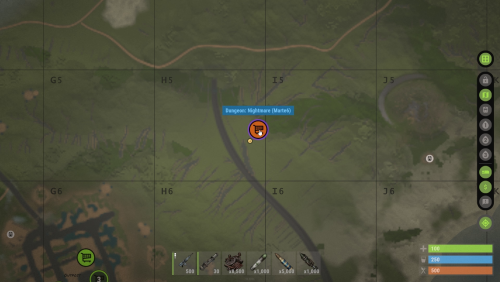
For the map marker: right now the plugin always uses the vending-machine style marker + radius marker. You can change the marker color and radius in the config per tier, but you can’t switch to a completely different marker prefab yet, so it will still look similar to Raidable Bases for now.

Martian

Posted

2 hours ago, Grumpy Old Man said:

since December wipe, ( December 4th ) rocket do not damage turrets inside the dungeon. 

I’ll check this issue. If possible, for better organization, please open a support ticket whenever you encounter a bug or any other problem.

Grumpy Old Man

Posted (edited)

4 minutes ago, Martian said:

I’ll check this issue. If possible, for better organization, please open a support ticket whenever you encounter a bug or any other problem.

cool, on discord ? or here? and its strange, only wen using rocket.  c4 works 


Edited by Grumpy Old Man
Grumpy Old Man

Posted

3 hours ago, Martian said:

I’ll check this issue. If possible, for better organization, please open a support ticket whenever you encounter a bug or any other problem.

dont waste your time, it's Customizable Weapons, it broke rocket launcher,  


sorry  

_Midknight_

Posted

Pretty cool plugin!  Spent some time configuring it and getting it all set up I think players will enjoy this.

Few ideas for you.  I did all these things in my copy of the plugin already and they work great.  I can send the code your way if you would like.

  • Make cooldowns save to hard file rather than just in RAM in case someone's cooldown is longer than the time until the server is restarting or in case there is an issue and the plugin needs to be reloaded it will wipe all cooldowns if only saved in RAM
  • Make some commands to clear all cooldowns, clear all cooldowns for a specific player, or clear a specific tier cooldown for a specific player.  Things can go wrong sometimes like a server stall or something.  And a player may be upset they are on cooldown and never got to finish.  This is a good way to resolve that

Keep up the good work!

Martian

Posted (edited)

For those who are experiencing issues with NPCs, turrets, or error logs, please update the NpcSpawn plugin and check if the problem stops. With the latest version, no error messages are appearing. If the issue persists after updating, please open a support ticket so we can assist you further.


For those who are experiencing issues with loot on NPCs or in chests, please update the NpcSpawn plugin and note that the configuration files have been moved to the "data" folder. Please check the configuration there.

Edited by Martian

Create an account or sign in to comment

You need to be a member in order to leave a comment

Create an account

Sign up for a new account in our community. It's easy!

Register a new account

Sign in

Already have an account? Sign in here.

Sign In Now
  • Like 6
  • Sad 1
  • Love 4

User Feedback

2.2m

Downloads

Total number of downloads.

10.3k

Customers

Total customers served.

149.5k

Files Sold

Total number of files sold.

3.2m

Payments Processed

Total payments processed.

×
×
  • Create New...

Important Information

We have placed cookies on your device to help make this website better. You can adjust your cookie settings, otherwise we'll assume you're okay to continue.