

About Arabic Chat Shaper
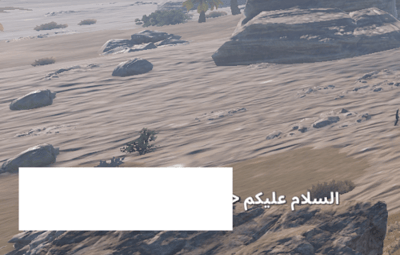
Arabic Chat Shaper improves the display of Arabic-script messages in Rust servers using Better Chat.
Rust’s chat renderer may display Arabic letters disconnected or in the wrong visual order. This plugin applies contextual Arabic letter forms and prepares right-to-left messages for correct display after they are sent.
Features
• Connects Arabic letters using isolated, initial, medial, and final forms
• Corrects right-to-left visual ordering
• Supports Lam-Alef combinations: لا, لأ, لإ, and لآ
• Handles Arabic diacritics
• Supports mixed Arabic, Latin text, and numbers
• Preserves Better Chat ranks, usernames, colors, and formatting
• Includes common Persian and Urdu letter forms
• Requires no commands, permissions, configuration, or data files
Requirements
• Better Chat
• Rust server running Carbon or Oxide
Important
Do not run QRTL at the same time. Both plugins process right-to-left messages and may cause double reversal or corrupted output.
Installation
1. Install and load Better Chat.
2. Upload ArabicChatShaper.cs to your plugin directory.
3. Reload the plugin or restart the server.
Carbon:
c.load ArabicChatShaper
Oxide/uMod:
oxide.reload ArabicChatShaper
Arabic may still appear disconnected or reversed inside the local typing field before the message is sent. This input field is rendered by the Rust client and cannot be changed by a server plugin. Judge the result from the sent chat message.
Support
For bug reports, include the exact message entered, a screenshot of the result, your framework version, your Better Chat version, and any other plugins that modify chat.
Source code and updates:
https://github.com/nostalg1k/Arabic-Chat-Shaper