
Vinni_TV_'s Wishlist
-
$24.99$19.99XCustomExcavator
Take full control of excavators on your Rust server with XCustomExcavator. This powerful plugin lets admins fine-tune excavator functionality, ensuring an optimized experience for players. Adjust mined resources, tweak interface settings, and enjoy multi-language support and robust data storage. Custom settings and progress are preserved after restarts. Seamlessly handle multiple excavators and integrate smoothly with your server.
Key Features
Multi-Language Support: Switch plugin language with ease. Available in EN, RU, UK, and ES. Interface Optimization: Adjusts for different monitor resolutions. Persistent Data Storage: Excavator data saved in oxide/data/XDataSystem/XCustomExcavator. Progress saved after server restarts. Sound Effects: Enjoy interactive menu sounds. Multi-Excavator Support: Works seamlessly with multiple excavators on the map. Customizable Resources: Modify resources including shortname, amount, custom name, permission, and skin. Unlimited Resources: No limit on the number of resources. Chat Integration: View excavator information in chat. User-Friendly Resource Selection: Features like check button, distance to button, permission checks, and more. Error Notifications: Informs you of configuration mistakes.
-> In the code you can switch the plugin language - LanguageEnglish = true <-
Permissions
xcustomexcavator.use - access to UI usage/resource selection. xcustomexcavator.info - chat information. xcustomexcavator.admin - administrator mode.
Commands
/einfo, /exinfo, /excavatorinfo - information about excavator in chat. [ Commands can be changed in the config. ] xcustomexcavator_unload - unload the plugin without consequences. [ For those cases when the plugin will be unloaded and will not be used for some time. ]
API
bool IsValidIndex(int index) - check if the resource index is valid. 1. string GetResourceCustomName(int index) - get the custom name of the resource. 2. string GetResourcePermission(int index) - get the resource permission. 3. ulong? GetResourceSkinID(int index) - get the skin of the resource. 4. string GetResourceAmountString(int index) - get a formatted string of the resource amount. 5. string GetResourceDisplayName(int index) - get the formatted name of the resource. ( For 1-5. If index is invalid, null will be returned. )
Hooks
object OnExcavatorResourceSetUI(ExcavatorArm excavator, int index, ulong skinID, BasePlayer player) - called when player tries to select a resource in UI. Returning non null will prevent this action!
Config
{ "General settings": { "SteamID profile for custom avatar": 0, "Chat prefix": "<size=12><color=#FFFFFF50>[</color> <color=#00FF0050>XCustomExcavator</color> <color=#FFFFFF50>]</color></size>\n", "List of commands to view information about the Excavator": [ "einfo", "exinfo", "excavatorinfo" ] }, "GUI settings": { "Color_background_1": "0.517 0.521 0.509 0.95", "Color_background_2": "0.217 0.221 0.209 0.95", "Color_background_3": "0.527 0.531 0.519 1", "Button color (icons)": "1 1 1 0.75", "Block color": "0.517 0.521 0.509 0.5", "Default block color": "0.417 0.521 0.409 0.5", "Color of the active button next": "0.35 0.45 0.25 1", "Color of the inactive button next": "0.35 0.45 0.25 0.4", "Text color of the active button next": "0.75 0.95 0.41 1", "Text color of the inactive button next": "0.75 0.95 0.41 0.4", "Color of the active button back": "0.65 0.29 0.24 1", "Color of the inactive button back": "0.65 0.29 0.24 0.4", "Text color of the active button back": "0.92 0.79 0.76 1", "Text color of the inactive button back": "0.92 0.79 0.76 0.4" }, "HQM": { "Shortname of the resource to be mined": "hq.metal.ore", "Amount of resource that will be mined - one barrel diesel": 100.0, "Custom item name": null, "Permission": null, "Item skin": 0 }, "Sulfur": { "Shortname of the resource to be mined": "sulfur.ore", "Amount of resource that will be mined - one barrel diesel": 2000.0, "Custom item name": null, "Permission": null, "Item skin": 0 }, "Stone": { "Shortname of the resource to be mined": "stones", "Amount of resource that will be mined - one barrel diesel": 10000.0, "Custom item name": null, "Permission": null, "Item skin": 0 }, "Metal": { "Shortname of the resource to be mined": "metal.fragments", "Amount of resource that will be mined - one barrel diesel": 5000.0, "Custom item name": null, "Permission": null, "Item skin": 0 }, "List of mined resources": [ ... ] } -
$30.00
RaidSelector
By Hiro Of Canton in Plugins
WHAT IS RAIDSELECTOR?
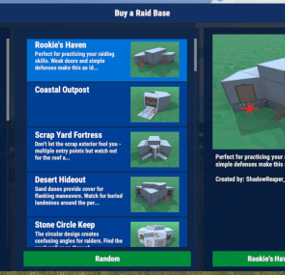
A user-friendly raid base purchasing system for Rust servers that transforms how
players engage with raidable content. Featuring an intuitive UI, multilingual
support, and seamless integration with popular server plugins.
🎯 Perfect for server owners who want:
• Professional player experience with modern UI
• Monetization through VIP raid access
• Multi-language support for international players
• Easy integration with existing economy systems
═══════════════════════════════════════════════════════════════════
WHY CHOOSE RAIDSELECTOR?
═══════════════════════════════════════════════════════════════════
🎮 PLAYER EXPERIENCE
• Intuitive point-and-click interface - no complex commands
• Automatic per-player language via Oxide's lang system
• Beautiful image previews of raid bases
• Clear cost display with multiple currency support
• Instant raid spawning after purchase
💎 MONETIZATION FEATURES
• VIP-only difficulty tiers (Expert, Nightmare)
• Permission-based purchase restrictions
• Tiered access system for progression servers
• Browse-only mode for non-VIP players
🌍 MULTILINGUAL SUPPORT (NEW!)
• Full localization system with external JSON files
• Translates ALL UI text, errors, and base descriptions
• Automatic language detection per player
• Easy translation management for server admins
• Admin command to generate language templates
🔧 PROFESSIONAL INTEGRATION
• Works standalone OR with ServerPanel unified menu
• Seamless Economics, ServerRewards, and Custom Costs integration
• Automatic base detection from RaidableBases profiles
• No manual cost configuration needed
• Russian RaidableBases config support (auto key translation)
🎨 COMPLETE CUSTOMIZATION
• 24+ customizable UI colors for branding
• Custom base names, descriptions, and credits
• Image preview support via ImageLibrary/ImageDatabase
• Unlimited difficulty levels - automatically detected from RaidableBases profiles
• Individual permission control per difficulty tier• Five difficulty levels with individual permission control
⚡ PERFORMANCE OPTIMIZED
• Memory-efficient object pooling
• Cross-platform: Oxide AND Carbon support
• Minimal server impact
• Tested on high-population servers
• Difficulties auto-sorted by cost (cheapest first)
• New bases auto-detected from RaidableBases profiles
═══════════════════════════════════════════════════════════════════
FLEXIBLE PERMISSION SYSTEM
═══════════════════════════════════════════════════════════════════
Granular permissions for complete control:
✓ raidselector.can.use Open the UI
✓ raidselector.admin Manage translations & admin tools
✓ raidselector.difficulty.easy Access Easy raids
✓ raidselector.difficulty.medium Access Medium raids
✓ raidselector.difficulty.hard Access Hard raids (VIP)
✓ raidselector.difficulty.expert Access Expert raids (VIP)
✓ raidselector.difficulty.nightmare Access Nightmare raids (VIP)
✓ raidselector.buyraidspecific Purchase selected bases
✓ raidselector.buyraidrandom Purchase random bases
💡 Smart UI: Buttons automatically hide when players lack permissions
💡 Perfect for VIP tiers: Grant higher difficulties to premium players
💡 Flexible control: Allow browsing but restrict purchasing
═══════════════════════════════════════════════════════════════════
GETTING STARTED - 5 MINUTES TO LAUNCH
═══════════════════════════════════════════════════════════════════
📦 INSTALLATION (2 minutes)
1. Install RaidableBases plugin (required)
2. Drop RaidSelector.cs into oxide/plugins/ or carbon/plugins/
3. Server automatically loads plugin and creates config
4. Done! Players can immediately use /rs
🎮 FOR PLAYERS (30 seconds)
1. Type /rs in chat (or click RAID SELECTOR in ServerPanel)
2. Pick a difficulty level from the left panel
3. Browse bases in the middle or click "Random"
4. Hit "Buy" button - raid spawns instantly!
⚙️ FOR ADMINS (Optional customization)
• Grant basic access: o.grant group default raidselector.can.use
• Create VIP tiers: o.grant group vip raidselector.difficulty.expert
• Add translations: /rsinitlang es (Spanish, French, German, etc.)
• Customize colors and base info in config file
• Add base images via ImageLibrary/ImageDatabase
• Enable Debug mode in config for detailed startup diagnostics and troubleshooting logs
🌐 MULTILINGUAL SETUP (1 minute per language)
1. Run: /rsinitlang <language> (e.g., /rsinitlang es)
2. Edit: oxide/lang/es/RaidSelector.json
3. Reload: o.reload RaidSelector
4. Players see their Steam language automatically!
PLUGIN INTEGRATION
✅ REQUIRED
• RaidableBases - Core raid system and base configurations
🔌 OPTIONAL (Enhance functionality)
• Economics - Use server currency ($) for purchases
• ServerRewards - Use reward points (RP) for purchases
• ImageLibrary (Oxide) - Show base preview images
• ImageDatabase (Carbon) - Show base preview images
• ServerPanel - Unified menu integration (/info command)
💡 Works with ANY combination of optional plugins
💡 Costs automatically detected from RaidableBases config
💡 Supports dual currency: Economics + ServerRewards together!
KEY CONFIGURATION OPTIONS
Config automatically created at: oxide/config/RaidSelector.json
🎨 BRANDING & APPEARANCE
• ChatCommand - Change /rs to your preferred command
• Colors - 24+ RGBA colors for complete UI theming
• Base info - Custom names, descriptions, builder credits
• Images - Add preview images via URLs
🔐 ACCESS CONTROL
• RequiresOxidePermission - Public or permission-based access
• DifficultyPermissions - Enable/disable difficulties, require permissions
• BuyButtonPermissions - Control who can purchase raids
🔌 INTEGRATION
• ServerPanelConfig - Enable/configure ServerPanel integration
- Works standalone, embedded, or both modes
- Perfect for unified server menu systems
📝 All settings hot-reload with: o.reload RaidSelector
SMART PAYMENT SYSTEM
💰 AUTOMATIC COST DETECTION
• Reads costs from RaidableBases config (no duplicate setup!)
• Supports Economics, ServerRewards, Custom Costs, or any combination
• Plugin-based currencies supported via RaidableBases custom costs
• Free raids supported (no payment required)
💵 FLEXIBLE DISPLAY
• Economics only: "Easy ($500)"
• ServerRewards only: "Easy (100 RP)"
• Dual currency: "Easy ($500 + 100 RP)"
• Custom costs: item and plugin currency amounts displayed
• Free raids: "Easy"
✅ PLAYER-FRIENDLY
• Clear cost display before purchase
• Payment handling delegated to RaidableBases (balance checks, charges, refunds)
• Supports free raids with no payment required
USE CASES & SERVER TYPES
✨ PERFECT FOR:
• PvE servers wanting organized raid content
• PvX servers with economy-based raid access
• VIP/donor servers with tiered content access
• International servers needing multi-language support
• High-population servers requiring performance optimization
• Servers using ServerPanel for unified menu systems
🎯 POPULAR CONFIGURATIONS:
• Public Easy/Medium, VIP-only Hard/Expert/Nightmare
• Browse free, purchase requires VIP subscription
• Progressive unlocking: rank up to access harder raids
• Multi-language: Spanish, French, German, Russian supported
• Branded UI matching your server's color scheme
WHAT PLAYERS WILL LOVE
✓ No complicated commands - just /rs or click ServerPanel
✓ See exactly what you're buying with images and descriptions
✓ Know the cost before clicking - clear pricing display
✓ Interface in their own language automatically
✓ Instant raid spawning - no waiting
✓ Professional, polished experience
WHAT ADMINS WILL LOVE
✓ 5-minute setup, works immediately out of box
✓ No manual cost configuration - reads from RaidableBases
✓ Permission system perfect for VIP monetization
✓ Easy translation management for international players
✓ Extensive customization without code editing
✓ Works on both Oxide AND Carbon servers
✓ Detailed configuration documentation included
✓ Debug mode for troubleshooting configuration issues
✓ Automatic Russian config key translation for RaidableBases
✓ New bases auto-detected on reload - zero maintenance
DOCUMENTATION & SUPPORT
📚 INCLUDED DOCUMENTATION:
• CONFIGURATION.md - Complete setup guide with examples
• User changelog - All features and updates
• Design documents - Technical architecture details
🔗 FULL CONFIGURATION GUIDE:
Comprehensive 1900+ line documentation covering:
• Installation walkthrough
• Permission system examples
• Color customization guide
• Multi-currency setup
• Localization system
• ServerPanel integration
• Troubleshooting solutions
• Real-world configuration examples
Base Image Library
I've started a git repository with images we've started collecting of different bases. Feel free to create a pull request if you have any additional base images you'd like to share with others. See the README for information about contributing and creating the pull request.
CONFIGURATION.md.zip
-

$26.49$18.29IQDronePatrol
Immerse your players in a unique world with a fresh gaming experience, introducing drone patrols on monuments! Drone patrols are a fantastic addition to the existing NPCs on monuments, bringing a new level of interest to the game and extending your players' gaming experience!
The plugin introduces dynamic battles, completely transforming the mechanics of monument raids and turning them into airborne combat scenarios!
Give your server a breath of fresh air with the IQDronePatrol plugin. It's a unique addition that will delight players on your servers!
Suitable for both PvP and PvE servers, with maximum customization options and easy plugin installation
Be sure to watch until the end - dynamic moments unfold gradually. This video is worth 1.5 minutes of your time.
Also, check out the screenshots section.
Standard configuration is already provided in the plugin after installation!
List of features :
❗New! New Year's decoration!
Let's add some light decorations for drones, in honor of a suitable holiday!
Raid bases protected by drones! (Raidable Bases):
Now the drone plugin is integrated with RaidableBases.
You can set up drones of varying difficulty and quantity to protect raid bases!
Everything is configured in the RaidableBases configuration.
Bradley Defense :
After the bradley is destroyed by players, patrol drones will fly out to protect its crates!
This will add more variety and enhance the gameplay experience!
Drone Battle :
If you have the IQGuardianDrone plugin installed, your guardian drones will engage patrol drones in thrilling aerial battles!
EMP Grenades :
The plugin features two types of EMP grenades:
- Overload: Upon detonation, creates a visual red zone. Drones caught in this zone immediately explode due to electrical overload.
- Electro: Upon detonation, creates a visual blue zone. Drones caught in this zone are temporarily stunned and crash to the ground, emitting sparks. After some time, they can take off again and resume the fight.
Upon repeated hits with an electro grenade, the drone explodes as if hit by an overload grenade.
Overload Electro
Drone Sizes :
Drones come in four sizes: standard, small, medium, and large. You can create different types of drones of varying sizes on the same monument.
Loot Configuration :
The plugin offers detailed loot configuration. You can create various loot presets and use multiple presets with different loot in drones simultaneously. Drop chances for each item can be customized!
Presets:
The plugin offers detailed customization options for everything!
You can create an unlimited number of drone presets and loot presets.
All of this can be used on monuments, and each monument can be configured separately!
This allows you to create unique battles at each monument, limited only by your imagination and settings!
Drone Display on G-Map:
You can enable drone display on the G-Map for each preset. This allows you to create the visibility of 'hardcore' drones or make 'ninja drones' that will not be displayed on your G-Map for players!
Weapon rotation by wipe time :
The plugin includes weapon rotation for drones over wipe time. This means you can configure drones to have revolvers after a wipe, and after a certain amount of time, their weapons and difficulty level improve!
This is a fully dynamic plugin!
Position generation :
The plugin automatically generates positions for all monuments and saves them until the next wipe. The positions are always unique and unpredictable. Patrol drones fly randomly, patrolling the area and never intersecting at the same position*.
*Supports 80% of monuments!
Optimization :
Optimization features are provided, and the plugin will not operate unnecessarily without player presence. This means that if there are no players at the monument, drones will not operate and will remain in standby mode. As soon as a player approaches the monument, drones activate for the duration of their presence. This prevents unnecessary use of server resources and ensures stable plugin operation.
Limits and restrictions on the number of drones (maximum of 15 per monument) are provided to prevent potential overload
- #drone
- #dronepatrol
- (and 8 more)
-

$14.99
Better Teams
Team HUD · Rust · Oxide Rust tells you who your teammates are, and nothing about what is happening to them BetterTeams puts a live panel on screen with every mate's health, state, held weapon and grid square. It adds a team-only voice channel that ignores distance, a map ping on one key, and automatic authorization on every cupboard, lock, turret and SAM site your team builds. Every part is a config switch, and every player decides what they use. See it What it looks like on the server How it goes From dropping the file in to the night the server dies MINUTE ONE Nothing to set up The panel is already there Drop the file in and anyone who is in a team sees their mates on screen. Where it sits, how large it is and how many rows before it starts a second column are config values. Everything else is each player's own choice. Health as a bar, not a number. It slides toward red as they lose health, and it redraws the moment their health actually changes rather than on a timer. State takes over when it matters. WOUNDED, DEAD and OFFLINE replace the bar on that row, so a mate who is down is unmistakable without reading anything. What they are holding. The active item's icon, with its skin, sits at the end of every row and follows each weapon swap. Grid square, on your own refresh rate. Five seconds by default. A player who would rather not broadcast theirs switches it off for themselves. The leader keeps a star. One glance tells you who can change the team's settings, and offline mates stay listed instead of vanishing. IN A FIGHT Nobody types grids Talk across the map, ping what you are looking at Team voice replaces the vanilla proximity channel for the players who switch it on. Distance stops mattering, nobody outside the team hears it, and a speaker icon lights up on the row of whoever is talking. bind h ftmark Voice at any range, team only. Off per player until they enable it, so nobody has their voice chat changed without asking for it. One key, no binoculars. Bind the command once and the ping lands wherever you are aiming, up to fifty metres by default. The ping knows what it hit. An enemy player, an ore node, a storage box and a dropped gun each get their own marker icon and colour. Anything else drops a plain point. On a cooldown you set. Ten seconds by default, and the time left comes back as a game tip instead of the key doing nothing. SOMEONE JOINS One shared list Authorized everywhere, in one pass The moment an invite is accepted that player is added to every cupboard, code lock, turret and SAM site the rest of the team owns, and everyone else is added to theirs. Leaving or being kicked takes all of it back in the same pass. Five places, five switches. Tool cupboards, code locks, key locks, auto turrets and SAM sites, each turned on or off for the whole server. Key locks without the key. A teammate opens a key-locked door because they are on the team, not because you handed them anything. SAM sites check who is aboard. A teammate's SAM holds fire on a helicopter with an authorized member in a seat, instead of shooting down your own minicopter. Bases that already exist are picked up on boot. Everything placed before the install is registered when the plugin loads, so this works on a server mid-wipe and not only on what gets built next. THE LEADER Decided in game The random you just invited is not automatically trusted Taking a stranger into the team is where convenience turns into risk, so the whole authorization list is editable per ally from the menu. No config file, no restart. Revoke without breaking the rest. A blocked ally loses access everywhere except the locks and cupboards they placed themselves, and the team keeps access to those. Kick from the same screen. Pick the ally, kick, and every authorization they were given through the team is pulled as they go. Friendly fire off with one toggle. Only the leader can flip it; everyone else sees it locked and is told why rather than wondering if it is broken. A team skin per item type. The leader picks it, and anything a mate picks up gets it automatically. Thirty-five item types ship in the config with their own skin lists, and both are yours to cut or extend. AFTER A CRASH Teams survive it A bad shutdown should not disband half the server Rust loses teams when a server goes down badly, and the tickets land on you. This one writes the roster and the leader to disk and puts them back on start. Rosters restored on boot. Members and leader are recreated, including the players who are offline at the time, so nobody logs in teamless. Optional leader hand-off. If the leader disconnects the next online member is promoted, and the original takes it back when they return. Off by default, because not every server wants it. A wipe clears it properly. A new wipe id drops the saved teams and skin choices rather than dragging last wipe's data onto a fresh map. While you are not looking Built to be left alone The parts you will never notice unless they are missing. ✓ ImageLibrary is the only dependency, and Clans is used if you have it ✓ A missing dependency is named in console and the plugin unloads, instead of half-running ✓ Switching a feature off unsubscribes its hooks rather than leaving them running ✓ Panel updates are batched into one message per team per tick, not one per player ✓ Grid squares only redraw for the players who actually changed square ✓ A burst of joins and kicks collapses into a single data file write ✓ Every player choice is stored by Steam ID and survives restarts and reloads ✓ Clan tags are stripped from names in the panel when the Clans plugin is loaded Reference One command in chat, one to bind Each permission is only enforced if you switch its requirement on. All four are off by default, which means the feature is simply available to everyone. Chat /bt Open the menu: info, allies, skins, settings. The command name is a config value. Console ftmark Drop a team ping where you are looking. Meant to be bound to a key. Permission betterteams.hud The on-screen panel Permission betterteams.voice Team voice chat Permission betterteams.skins Choosing the team skin. One player in the team holding it is enough for the whole team. Permission betterteams.marker Easy team markers Straight answers The questions people ask before buying Do my players have to install anything? No. It runs entirely on the server and the panel is drawn through the normal game UI. The only install is ImageLibrary, on the server, once. Does team voice take over normal voice chat? Only for a player who turns it on themselves, and it is off by default. Everyone else keeps vanilla proximity voice untouched. Can a random I invite loot everything I own? Only if you leave them authorized. The leader can revoke any of the five places for one specific ally from the menu, and they keep access to nothing but what they placed themselves. Will the panel sit on top of my other UI? Its offset from the top and left, its scale and how many rows it stacks before starting a new column are all config values, so it can be moved out of the way. What if I do not want half of these features? Panel, voice, skins, markers, friendly-fire toggle, grid positions, team restore and each of the five authorization places are separate switches. Turning one off also stops the hooks behind it. What happens if ImageLibrary is missing? It waits and retries a few times in case load order put it second, then prints the download link in server console and unloads itself rather than throwing errors on every hook. 5 authorization places covered 35 item types with team skins 50m default ping range, configurable 1 dependency, ImageLibrary -
$24.49$19.59XLevels (BattlePass)
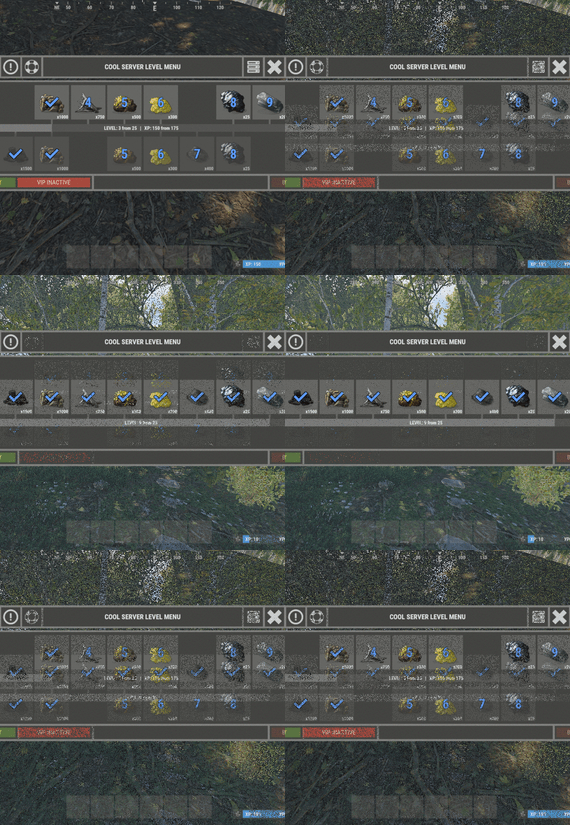
XLevels (BattlePass) - levels and awards for your server.
- Optimization of the interface for different monitor resolutions.
- Storing player data in - oxide/data/XDataSystem/XLevels
- There is a lang ru/en/uk/es.
- Sound effects when interacting with the menu.
- Setting the number of levels and XP to increase the level.
- Setting up the level reward. [ Item, Custom Item, Command ]
[ You can customize the rewards for a specific level. For example 5, 10, 20, 30. The rest will be without rewards ]
- Configuring the issuance of XP by permissions for online.
- Setting the XP multiplier by permissions.
- Setting up coupons. [ Exchange for XP ]
- Configuring boxes and the chance to spawn coupons.
- Configuring the issuance of XP. [ Loot, kill, break barrels, open boxes, pick from the ground, harvest ]
- Possibility to enable/disable the system of coupons.
- Possibility to enable/disable VIP levels.
- Chat prefix with player level.
- Mini-panel with pumping progress.
- Inventory with received awards.
- Two options to get into the level menu. [ Command | NPC shops/keepers ]
- Setting the increase in the amount of required XP with each pumped level.
- The ability to accumulate XP if the maximum level is reached. [ Useful for top players ]
- The ability to exchange coupons for XP if the maximum level is reached. [ Useful for top players ]
- Top players. [ Level | XP ]
- The ability to level up and receive rewards again after the maximum level has been reached.
[Level and XP reset to zero. ]
- Rank system. [ Setting in config. Display in the chat (prefix) and in the menu. ]
- Possibility to hide the reward. [ The reward will not be displayed until the player reaches the required level. ]
-> Overview - YouTube <-
Shortnames for config settings.
WORK WITH BetterLoot
For the correct spawning of coupons in the crate, in the BetterLoot plugin, remove/comment out the following line of code. 630 - container.inventory.capacity = container.inventory.itemList.Count; Permissions
xlevels.vip - access to VIP rewards. xlevels.top - access to the top players. Commands
Open the level menu - /level, /lvl, /pass Give XP - level_give_xp <SteamID> <Amount XP> API
int API_GetLevel(BasePlayer player) - returns the player's level. int API_GetLevel(ulong userID) - returns the player's level. void API_GiveXP(BasePlayer player, float XPAmount) - give the player XP. string API_GetPlayerPrefix(BasePlayer player) - get a ready-made player prefix with all the settings. string API_GetPlayerPrefix(ulong userID) - get a ready-made player prefix with all the settings. Hooks
void OnXLevelsXPGained(BasePlayer player, float xp) - called when the player gains XP. void OnXLevelsUP(BasePlayer player, int level) - called when the player level up. Config
{ "General settings": { "XP for the pickup of resources": true, "XP for harvest": true, "XP for bonus resources": true, "XP for kill": true, "XP for opening crates": true, "Include messages of received rewards in chat": true, "Include level up messages in chat": true, "Enable coupons": true, "Enable VIP rewards": true, "Get VIP reward - [ True - only with permission | False - without permission ]": true, "Take VIP Reward - [ True - take only with permission | False - take at any time without permission ]": true, "Add XP if the maximum level is already reached - [ Suitable for top players ]": false, "Exchange coupons if you have already reached the maximum level - [ Suitable for top players ]": false, "Reset the level and XP of the player after reaching the maximum level - [ Players will re-open levels and receive rewards ]": false, "There is a plugin for custom loot": false, "Profile SteamID for custom avatar": 0, "List of commands to open the menu": [ "level", "lvl", "pass" ], "Enable prefix in chat - [ Set to False if the prefix should be disabled or the prefix is used by a third party chat plugin ]": true, "Display the level in prefix": true, "Display the rank in prefix": true, "List of available ranks - [ Level - Rank ] ( If the list is empty, then the rank will not be displayed in the menu )": { "0": "CAP-Х", "1": "IRON-1", "2": "IRON-2", "3": "IRON-3", "4": "BRONZE-1", "5": "BRONZE-2", "6": "BRONZE-3", "7": "SILVER-1", "8": "SILVER-2", "9": "SILVER-3", "10": "GOLD-1", "11": "GOLD-2", "12": "GOLD-3", "13": "PLATINUM-1", "14": "PLATINUM-2", "15": "PLATINUM-3", "16": "DIAMOND-1", "17": "DIAMOND-2", "18": "DIAMOND-3", "19": "IMMORTAL-1", "20": "IMMORTAL-2", "21": "IMMORTAL-3", "22": "RADIANT-1", "23": "RADIANT-2", "24": "RADIANT-3", "25": "GOD" } }, "Vendings settings": { "Open the level menu. [ True - Immediately after the opening of the NPC shop | False - UI button ]": false, "Access to the level menu is only through the NPC shops. [ True - NPC shop | False - Command ]": false, "List of NPC shops in which you can open the level menu (shop name)": [ "Black Market" ] }, "XP multiplier": { "Enable XP multiplier when exchanging coupons - [ This parameter affects only the multipliers for the exchange of coupons ]": false, "Setting up permissions for XP multipliers for the exchange of coupons and other actions. [ Permission | XP multiplier ]": { "xlevels.125p": 2.25, "xlevels.75p": 1.75, "xlevels.10p": 1.1 } }, "Issuing XP for online": { "Enable issuing XP to online players": false, "XP issue interval (in sec.)": 15.0, "Setting up permissions. [ Permission | XP ]": { "xlevels.default": 5.0 } }, "Mini-bar location / Main menu settings": { "AnchorMin": "1 0", "AnchorMax": "1 0", "OffsetMin": "-403 16", "OffsetMax": "-210 42", "Show mini-bar": true, "Color background_1": "0.517 0.521 0.509 0.95", "Color background_2": "0.217 0.221 0.209 0.95", "Display reward container - [ True - Only when there is a reward in the level | False - Always ]": false, "Display required reward level": true, "Display required VIP reward level": true }, "Settings levels": { "Maximum level": 25, "Number of XP to upgrade one level": 100.0, "How much to increase the number of XP with each level": 25.0 }, "XP settings | Shortname : ValueXP": { "XP for the pickup of resources": { "stones": 10.0, "sulfur.ore": 15.0, "metal.ore": 12.5 }, "XP for harvest": { "potato.entity": 2.5, "corn.entity": 1.75, "hemp.emtity": 0.25 }, "XP for bonus resources": { "stones": 5.0, "sulfur.ore": 10.0, "metal.ore": 7.5 }, "XP for kill / destroy barrel": { "boar": 10.0, "loot-barrel-1": 7.5, "heavyscientist": 2.5 }, "XP for opening crates": { "crate_normal": 5.0, "crate_normal_2": 1.0, "crate_tools": 3.5 } }, "Coupons for XP": [ { "Coupon name": "Coupon 5XP", "Coupon text": "Coupon for 5XP\n\nExchange them and get XP to level up!\n\nCommand for exchange - /level", "Coupon skin": skinID, "XP amount": 5, "Setting the chance of falling out of crates/barrels": [ { "Name crate/barrel": "crate_normal_2", "Drop chance": 50.0, "Minimum amount of coupons": 1, "Maximum number of coupons": 3 } ] }, { "Coupon name": "Coupon 10XP", "Coupon text": "Coupon for 10XP\n\nExchange them and get XP to level up!\n\nCommand for exchange - /level", "Coupon skin": skinID, "XP amount": 10, "Setting the chance of falling out of crates/barrels": [ { "Name crate/barrel": "crate_normal_2", "Drop chance": 50.0, "Minimum amount of coupons": 1, "Maximum number of coupons": 3 } ] }, { "Coupon name": "Coupon 25XP", "Coupon text": "Coupon for 25XP\n\nExchange them and get XP to level up!\n\nCommand for exchange - /level", "Coupon skin": skinID, "XP amount": 25, "Setting the chance of falling out of crates/barrels": [ { "Name crate/barrel": "crate_normal_2", "Drop chance": 50.0, "Minimum amount of coupons": 1, "Maximum number of coupons": 2 } ] }, { "Coupon name": "Coupon 50XP", "Coupon text": "Coupon for 50XP\n\nExchange them and get XP to level up!\n\nCommand for exchange - /level", "Coupon skin": skinID, "XP amount": 50, "Setting the chance of falling out of crates/barrels": [ { "Name crate/barrel": "crate_normal_2", "Drop chance": 50.0, "Minimum amount of coupons": 1, "Maximum number of coupons": 2 } ] }, { "Coupon name": "Coupon 100XP", "Coupon text": "Coupon for 100XP\n\nExchange them and get XP to level up!\n\nCommand for exchange - /level", "Coupon skin": skinID, "XP amount": 100, "Setting the chance of falling out of crates/barrels": [ { "Name crate/barrel": "crate_normal_2", "Drop chance": 50.0, "Minimum amount of coupons": 1, "Maximum number of coupons": 1 } ] }, { "Coupon name": "Coupon 200XP", "Coupon text": "Coupon for 200XP\n\nExchange them and get XP to level up!\n\nCommand for exchange - /level", "Coupon skin": skinID, "XP amount": 200, "Setting the chance of falling out of crates/barrels": [ { "Name crate/barrel": "crate_normal_2", "Drop chance": 50.0, "Minimum amount of coupons": 1, "Maximum number of coupons": 1 } ] }, { "Coupon name": "Coupon 500XP", "Coupon text": "Coupon for 500XP\n\nExchange them and get XP to level up!\n\nCommand for exchange - /level", "Coupon skin": skinID, "XP amount": 500, "Setting the chance of falling out of crates/barrels": [ { "Name crate/barrel": "crate_normal_2", "Drop chance": 50.0, "Minimum amount of coupons": 1, "Maximum number of coupons": 1 } ] } ], "Level reward": { "1": { "Item shortname / custom reward name [ Must not be empty ]": "wood", "Reward display name": "Wood", "Item quantity": 1250, "Item skin": 0, "Command": "", "Link to custom image": "", "Hide reward - [ Reward will not be displayed until the player reaches this level ]": false }, "2": { "Item shortname / custom reward name [ Must not be empty ]": "charcoal", "Reward display name": "Charcoal", "Item quantity": 1500, "Item skin": 0, "Command": "", "Link to custom image": "", "Hide reward - [ Reward will not be displayed until the player reaches this level ]": false }, "3": { "Item shortname / custom reward name [ Must not be empty ]": "metal.ore", "Reward display name": "Metal ore", "Item quantity": 1000, "Item skin": 0, "Command": "", "Link to custom image": "", "Hide reward - [ Reward will not be displayed until the player reaches this level ]": false }, "4": { "Item shortname / custom reward name [ Must not be empty ]": "metal.fragments", "Reward display name": "Metal fragments", "Item quantity": 750, "Item skin": 0, "Command": "", "Link to custom image": "", "Hide reward - [ Reward will not be displayed until the player reaches this level ]": false }, "5": { "Item shortname / custom reward name [ Must not be empty ]": "sulfur.ore", "Reward display name": "Sulfur ore", "Item quantity": 500, "Item skin": 0, "Command": "", "Link to custom image": "", "Hide reward - [ Reward will not be displayed until the player reaches this level ]": false }, "6": { "Item shortname / custom reward name [ Must not be empty ]": "sulfur", "Reward display name": "Sulfur", "Item quantity": 300, "Item skin": 0, "Command": "", "Link to custom image": "", "Hide reward - [ Reward will not be displayed until the player reaches this level ]": false }, "7": { "Item shortname / custom reward name [ Must not be empty ]": "gunpowder", "Reward display name": "Gunpowder", "Item quantity": 400, "Item skin": 0, "Command": "", "Link to custom image": "", "Hide reward - [ Reward will not be displayed until the player reaches this level ]": false }, "8": { "Item shortname / custom reward name [ Must not be empty ]": "hq.metal.ore", "Reward display name": "HQM ore", "Item quantity": 25, "Item skin": 0, "Command": "", "Link to custom image": "", "Hide reward - [ Reward will not be displayed until the player reaches this level ]": false }, "9": { "Item shortname / custom reward name [ Must not be empty ]": "metal.refined", "Reward display name": "HQM", "Item quantity": 20, "Item skin": 0, "Command": "", "Link to custom image": "", "Hide reward - [ Reward will not be displayed until the player reaches this level ]": false }, "10": { "Item shortname / custom reward name [ Must not be empty ]": "scrap", "Reward display name": "Scrap", "Item quantity": 50, "Item skin": 0, "Command": "", "Link to custom image": "", "Hide reward - [ Reward will not be displayed until the player reaches this level ]": false } }, "VIP level reward": { "1": { "Item shortname / custom reward name [ Must not be empty ]": "wood", "Reward display name": "Wood", "Item quantity": 1250, "Item skin": 0, "Command": "", "Link to custom image": "", "Hide reward - [ Reward will not be displayed until the player reaches this level ]": false }, "2": { "Item shortname / custom reward name [ Must not be empty ]": "charcoal", "Reward display name": "Charcoal", "Item quantity": 1500, "Item skin": 0, "Command": "", "Link to custom image": "", "Hide reward - [ Reward will not be displayed until the player reaches this level ]": false }, "3": { "Item shortname / custom reward name [ Must not be empty ]": "metal.ore", "Reward display name": "Metal ore", "Item quantity": 1000, "Item skin": 0, "Command": "", "Link to custom image": "", "Hide reward - [ Reward will not be displayed until the player reaches this level ]": false }, "4": { "Item shortname / custom reward name [ Must not be empty ]": "metal.fragments", "Reward display name": "Metal fragments", "Item quantity": 750, "Item skin": 0, "Command": "", "Link to custom image": "", "Hide reward - [ Reward will not be displayed until the player reaches this level ]": false }, "5": { "Item shortname / custom reward name [ Must not be empty ]": "sulfur.ore", "Reward display name": "Sulfur ore", "Item quantity": 500, "Item skin": 0, "Command": "", "Link to custom image": "", "Hide reward - [ Reward will not be displayed until the player reaches this level ]": false }, "6": { "Item shortname / custom reward name [ Must not be empty ]": "sulfur", "Reward display name": "Sulfur", "Item quantity": 300, "Item skin": 0, "Command": "", "Link to custom image": "", "Hide reward - [ Reward will not be displayed until the player reaches this level ]": false }, "7": { "Item shortname / custom reward name [ Must not be empty ]": "gunpowder", "Reward display name": "Gunpowder", "Item quantity": 400, "Item skin": 0, "Command": "", "Link to custom image": "", "Hide reward - [ Reward will not be displayed until the player reaches this level ]": false }, "8": { "Item shortname / custom reward name [ Must not be empty ]": "hq.metal.ore", "Reward display name": "HQM ore", "Item quantity": 25, "Item skin": 0, "Command": "", "Link to custom image": "", "Hide reward - [ Reward will not be displayed until the player reaches this level ]": false }, "9": { "Item shortname / custom reward name [ Must not be empty ]": "metal.refined", "Reward display name": "HQM", "Item quantity": 20, "Item skin": 0, "Command": "", "Link to custom image": "", "Hide reward - [ Reward will not be displayed until the player reaches this level ]": false }, "10": { "Item shortname / custom reward name [ Must not be empty ]": "scrap", "Reward display name": "Scrap", "Item quantity": 50, "Item skin": 0, "Command": "", "Link to custom image": "", "Hide reward - [ Reward will not be displayed until the player reaches this level ]": false } } }