
Vinni_TV_'s Wishlist
-

$10.00
ZQuarryZone
Add a colorable zone to the Mining Quarry and Pump Jack so that no one can access it.
You don't have to mess with locks and worry about someone accessing your Mining Quarry and Pump Jack, it's simply protected by the zone.
Features
– 7 different zone color
– set zone size
– enable Team enter in config
Config
{ "Quarry zone radius": 12.0, "Quarry zone color (0 None, 1 Blue, 2 Cyan, 3 Green, 4 Purple, 5 Magenta, 6 Red, 7 Yellow)": 1, "Enable enter Team Member?": true } Language: 31 file
I guarantee the functionality of the plugin as described. However, I cannot take responsibility for conflicts or issues arising from incompatibility with third-party plugins or themes. Please take this into account before purchasing. I will list all known compatibility details in the product description.
-
![More information about "Advanced Air Strike [F15]"](https://codefling.com/cdn-cgi/image/width=285,height=275,quality=80,fit=cover,format=webp/https://codefling.com/uploads/monthly_2026_07/AirStrike.thumb.gif.0aa4deed79a522a3472e93e5a81f1148.gif)
$14.99$11.99Advanced Air Strike [F15]
Take Your Rust Server to the Next Level
Premium performance, lightning-fast support, and an exclusive 30% OFF using code KHALED
Features
Target Designator System:
Players receive a binocular designator. Aim and left-click to mark a target point and call in an airstrike
Strike and Nuke Support:
Supports both standard F15 Strike and F15 Nuke runs, each with independent settings for planes, shots, rocket speed, delay, cooldown, and more
Strike Modes:
Includes multiple strike patterns:
precise, circle, line, and carpet
Custom F15 Flight:
Flight altitude, plane speed, and pre-fire distance are fully configurable
Aircraft spawn, fly their attack run, fire, and clean up automatically when the strike is complete
Rocket Mechanics:
Configurable rocket speed, rate of fire, shots per plane, plane stagger, and impact spread
Direct Designator Delivery:
Admins can deliver Strike or Nuke designators directly to players using the give subcommand
Language Support:
Supports both English and Russian languages for chat messages and the in-game UI
In-Game Store:
Optional in-game store support for purchasing Strike and Nuke designators.
Supports Scrap, Economics, ServerRewards, and IQEconomic providers
Admin Control Panel:
Includes an in-game admin panel for managing store settings, strike settings, warnings, and zone restrictions without editing the config manually
Combat Alerts:
Includes target-marked warnings, inbound warnings, and countdown alerts with map grid support
Blocked Use Zones:
Can block strike usage while the caller is inside a safe zone, and can also block target points inside safe zones or monument bounds
Commands are configurable from the config
Permissions
f15estrike.strike → allows using Strike designators f15estrike.nuke → allows using Nuke designators f15estrike.strike.give → allows giving Strike designators to other players f15estrike.nuke.give → allows giving Nuke designators to other players f15estrike.admin → full admin access and admin panel access Commands
/f15 → opens the in-game F15 store /strike → gives the player an F15 Strike designator /nuke → gives the player an F15 Nuke designator /strike give <name|SteamId64> → gives an F15 Strike designator to another player /nuke give <name|SteamId64> → gives an F15 Nuke designator to another player
Config
{ "Config Version": 3, "Flight altitude (m)": 250.0, "Plane speed (m/s)": 200.0, "Pre-fire distance (m)": 750.0, "Chat prefix": "[F15]", "Commands": { "Strike": { "Enabled": false, "Primary": "strike", "Aliases": [] }, "Nuke": { "Enabled": false, "Primary": "nuke", "Aliases": [] } }, "Blocked use zones": { "Block caller while inside a safe zone": true, "Block target point inside a safe zone": true, "Block target point inside monument bounds": true }, "Global warnings": { "Enabled": true, "Broadcast when target is marked": true, "Broadcast countdown reminders": true, "Countdown warning seconds": 7, "Broadcast when aircraft are inbound": true, "Include map grid": true, "Include world coordinates": true }, "Purchases": { "Enabled": true, "Provider (Economics/ServerRewards/Scrap)": "ServerRewards", "Strike": { "Enabled": true, "Cost": 1500.0 }, "Nuke": { "Enabled": true, "Cost": 10000.0 } }, "Strike": { "Planes (count)": 1, "Shots per plane": 10, "Rocket speed (m/s)": 150.0, "Rate of fire (shots/sec)": 2.5, "Stagger between planes (s)": 0.25, "Impact spread radius (m)": 3.0, "Confirm delay (s)": 5.0, "Cooldown (s)": 60.0, "Default mode": "circle", "Damage": { "Building damage enabled": true, "Building damage scale (%)": 100.0, "Player damage enabled": true, "Player damage scale (%)": 100.0 }, "Designator display name": "F15 Strike" }, "Nuke": { "Planes (count)": 5, "Shots per plane": 10, "Rocket speed (m/s)": 200.0, "Rate of fire (shots/sec)": 1.5, "Stagger between planes (s)": 0.35, "Impact spread radius (m)": 6.0, "Confirm delay (s)": 6.0, "Cooldown (s)": 120.0, "Default mode": "circle", "Damage": { "Building damage enabled": true, "Building damage scale (%)": 100.0, "Player damage enabled": true, "Player damage scale (%)": 100.0 }, "Designator display name": "F15 Nuke" } }
-
.thumb.webp.b6d4b84bfc48b783610d4ec09e43da72.webp)
$4.99
Recycler Seats
♻️ Recycler Seats
A lightweight plugin that makes recyclers more comfortable and immersive.
Players automatically sit when they use a recycler, with optional invisible or visible chairs attached directly to the recycler model.
Perfect for RP, PvE, Outpost areas, and QoL enhancement.
Features
Auto Mount
Players automatically sit when interacting with any recycler. Invisible or Visible Chair
Choose a clean invisible seat or a visible deployed chair. Front or On-Top Positioning
Seats can appear in front of the recycler or on top of it. Pre-configured offsets ensure proper alignment. Safe Zone Mode
Option to spawn seats only inside safe zones. All Recyclers Supported
Works automatically for every recycler on the map—monuments or custom placed.
Config File
{ "Use Invisible Chair": true, "Only In Safe Zones": true, "Auto Mount On Use": true, "Use On Top Offset (otherwise In Front)": true, "In Front Offset X": -0.3, "In Front Offset Y": 0.0, "In Front Offset Z": 1.4, "In Front Extra Yaw Degrees": 180.0, "On Top Offset X": -0.2, "On Top Offset Y": 1.0, "On Top Offset Z": 0.23, "On Top Extra Yaw Degrees": 0.0 }
-
$10.00
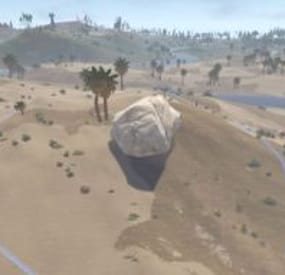
Erma Big Rock Event
This plugin adds the Big Rock event to the server.
It will add another place for your players to fight, because resources need to be not only gathered, but also carried away.
When spawning, notifications are sent to the chat, as well as standard Rust UI notifications.
Big Rocks can be of three types: Rocks, Sulfur, and Metal.
The Big Rock's type is selected randomly.
There is a fine-tuning of the configuration.
You can enable the dropping of seeds when mining Big Rock, which players can then plant and grow their own ore.
These stones will be able to gather everybody, but if you damage the ore before it grows fully, its growth will stop.
The chance of seeds falling out, the growth time, and the resources of growing ores can be configured in the config.
Big Rock has an event area where you can set up teleportation block, building block, and block use specific commands.
Also, Big Rock is displayed on the map.
At the spawn, point of Big Rock - a vending machine icon appears on the map, the name of which you can configure in the config!
Together with it, a zone appears on the map, the display of which is configured in the same way in the config.
Big Rock can only be mined with suitable tools: Stone Pickaxe, Metal Pickaxe, Salvaged Icepick and Jackhammer.
Big Rock works with all plugins for changing Gather Rates, as well as all mining from the Big Rock will be taken into account in any statistics!
You can configure:
How long after the restart will the stone spawn
Stone lifetime and cooldown
Minimum players to start the event
Radius of the event's zone
Blocking the teleport in the event's zone (NTeleportation)
Blocking building in the event's zone
Blocking the use of commands in the event's
Creating an icon and a zone on the map
Each type of stone can be configured separately:
Resources that fall out during stone mining
The number of strokes to remove the Big Rock
Dropping seeds from Big Rock
The time of stone growth from a seed
Config file:
{ "Main settings": { "Event's chat tag": "<color=yellow>Big Rock Event</color>", "The time until the start event from start plugin(in seconds)": 600.0, "Event's duration(in seconds)": 600.0, "Event's cooldown(in seconds)": 3600.0, "Min players count for start event": 0, "Event's zone radius": 100.0, "Block tepeportation in event's zone": true, "Block building in event's zone": true, "List of blocked commands to use in event's zone(without /)": [ "trade", "kit" ], "Create Event's zone on Map?": true, "Color map zone": "#75ff7a", "Color map zone radius": "#003802", "Create Event's vending mark on Map?": true, "Name of vending mark": "Big Rock Event ({0})" }, "Metal Rock": { "Resource amount in rock": { "metal.ore": 6000 }, "Hits for delete rock": 100, "Drop rock seeds?": true, "Seed's name": "Metal Ore Seed", "Seed's skinID": 3585071044, "Chance of rock seed drop": 5.0, "Resources in seeds": { "metal.ore": 3000, "hq.metal.ore": 10 }, "Time of growth seed(in seconds)": 600 }, "Sulfur Rock": { "Resource amount in rock": { "sulfur.ore": 3000 }, "Hits for delete rock": 100, "Drop rock seeds?": true, "Seed's name": "Sulfur Ore Seed", "Seed's skinID": 3583874182, "Chance of rock seed drop": 5.0, "Resources in seeds": { "sulfur.ore": 1500 }, "Time of growth seed(in seconds)": 600 }, "Stones Rock": { "Resource amount in rock": { "stones": 10000 }, "Hits for delete rock": 100, "Drop rock seeds?": true, "Seed's name": "Stones Seed", "Seed's skinID": 3585071736, "Chance of rock seed drop": 5.0, "Resources in seeds": { "stones": 5000 }, "Time of growth seed(in seconds)": 600 } } -
$3.00
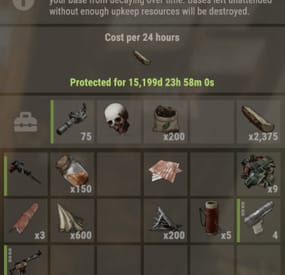
AnyLootInTC
By DarknessItself in Plugins
The harmony plugin allows to put in TC(cupboard) any in-game loot
Usage
Copy the downloaded DLL file into server/HarmonyMods folder
Compatibility
Should work both with: Oxide & Carbon, or as Harmony the only installed mod
Dependencies
No
Support
Use private messages on this site