
SLATE's Wishlist
-
$19.95$11.95Genie
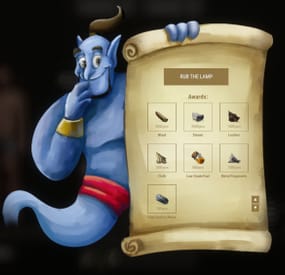
Adds a Genie Lamp to the game: you unwrap it and receive an award. My advice is to add the lamps to your underwater crates and use Dynamic Config to set up rewards over the course of the wipe.
Commands
genie.give [targetId] (give a lamp)
Permissions
You can set permission in config, for example: "Permission to rub the lamp": "genie.use",
Config
{ "Genie Image": "https://i.imgur.com/aNIcQzk.png", "Enable opening progress?": true, "Work with Notify?": true, "Delay to receive": 5.0, "Update Frequency": 0.1, "Opening effect (empty - disable)": "assets/bundled/prefabs/fx/gestures/lick.prefab", "Progress effect (empty - disable)": "assets/bundled/prefabs/fx/notice/item.select.fx.prefab", "Finish effect (empty - disable)": "assets/prefabs/misc/xmas/presents/effects/wrap.prefab", "Permission to rub the lamp": "", "Genie lamp Settings": { "Display Name": "Lamp", "ShortName": "xmas.present.small", "Skin": 2540200362 }, "Awards": [ { "Type": "Item", "Image": "", "Title": "", "Command (%steamid%)": "", "Plugin": { "Hook": null, "Plugin name": null, "Amount": 0 }, "Display Name (empty - default)": "", "ShortName": "wood", "Skin": 0, "Amount": 3500, "Chance": 70.0 }, { "Type": "Item", "Image": "", "Title": "", "Command (%steamid%)": "", "Plugin": { "Hook": null, "Plugin name": null, "Amount": 0 }, "Display Name (empty - default)": "", "ShortName": "stones", "Skin": 0, "Amount": 2500, "Chance": 70.0 }, { "Type": "Item", "Image": "", "Title": "", "Command (%steamid%)": "", "Plugin": { "Hook": null, "Plugin name": null, "Amount": 0 }, "Display Name (empty - default)": "", "ShortName": "leather", "Skin": 0, "Amount": 1000, "Chance": 55.0 }, { "Type": "Item", "Image": "", "Title": "", "Command (%steamid%)": "", "Plugin": { "Hook": null, "Plugin name": null, "Amount": 0 }, "Display Name (empty - default)": "", "ShortName": "cloth", "Skin": 0, "Amount": 1000, "Chance": 55.0 }, { "Type": "Item", "Image": "", "Title": "", "Command (%steamid%)": "", "Plugin": { "Hook": null, "Plugin name": null, "Amount": 0 }, "Display Name (empty - default)": "", "ShortName": "lowgradefuel", "Skin": 0, "Amount": 500, "Chance": 50.0 }, { "Type": "Item", "Image": "", "Title": "", "Command (%steamid%)": "", "Plugin": { "Hook": null, "Plugin name": null, "Amount": 0 }, "Display Name (empty - default)": "", "ShortName": "metal.fragments", "Skin": 0, "Amount": 1500, "Chance": 65.0 }, { "Type": "Item", "Image": "", "Title": "", "Command (%steamid%)": "", "Plugin": { "Hook": null, "Plugin name": null, "Amount": 0 }, "Display Name (empty - default)": "", "ShortName": "metal.refined", "Skin": 0, "Amount": 150, "Chance": 65.0 } ], "Drop Settings": [ { "Prefab": "assets/bundled/prefabs/radtown/crate_normal.prefab", "Chance": 50 }, { "Prefab": "assets/bundled/prefabs/radtown/loot_barrel_2.prefab", "Chance": 5 }, { "Prefab": "assets/bundled/prefabs/radtown/loot_barrel_1.prefab", "Chance": 5 } ] }
VIDEO
⚙️ Web Config Editor
Manage the Genie settings in our web config editor. You change the config in a browser form instead of editing files on the server by hand.
P.S. The web config editor is open to members of the "Genie" group in our Discord server. Join at https://discord.gg/mevent and ask for the group.
- #genie
- #genie lamp
- (and 9 more)
-
$10.00
3D CASES ICONS | PS
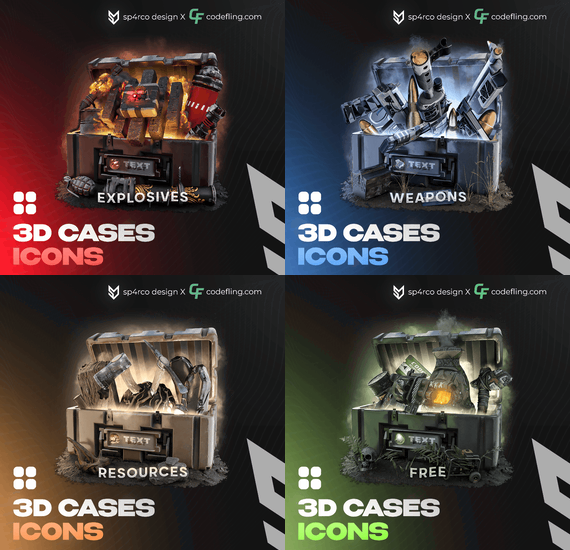
Enhance your projects with our new 3D case icons, created using Blender and Photoshop. This includes four custom renders, providing a high-quality visual upgrade for your applications. The PSD file contains comprehensive instructions for modifying text and adjusting light sources, making customization straightforward and efficient.
Key Features:
4 Custom 3D Renders: Unique and professionally designed case icons. Editable PSD File: Easily change text and light sources with detailed instructions. Professional Design: Created with industry-standard tools like Blender and Photoshop.
For personalized assistance or queries about modifying the PSD file, our experienced designers are available to help. Reach out to us on your preferred social network for prompt support.
-
$9.00
Donate Rust Icons / PS
By DesignCrew in Graphics
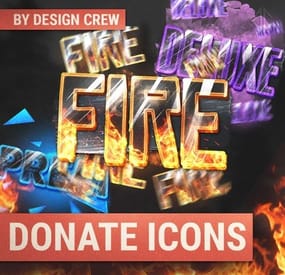
With this template you can create your own unique icons in a couple of minutes. All effects are automatically applied in the template. You just need to change the text, font and colors. To change the template you need Photoshop CS 6 or higher!
All necessary elements are in the archive.
To change you need Adobe Photoshop program
When purchasing you receive endless support from the author
Also, upon purchase, you are given a promotional code for a discount when ordering a design in our studio. Look for it inside the work and use it
- #design
- #designcrew
- (and 6 more)
-
$12.00
STORE RUST ICONS / PS
By DesignCrew in Graphics
▌ Design studio · Est. 2015 · Store icons
About the product
28 new juicy 3D store icons for Rust: backpacks, berries, corn, pumpkin, pots, pumps, wolf, composter and more, with a Photoshop file for every item.
Table of contents
Jump to any section of this page
01 Overview 02 Features 03 Gallery 04 What's included 05 Changelog ▌ Store icons
Overview
28 new juicy icons for your Rust store, added in the v1.5 update. Use them as they are or change them in Photoshop.
PS 28 new icons 3D icons Store ready What you need
▸ Adobe Photoshop (any new version)
What is included
▸ 28 new store icons (update v1.5)
▸ Photoshop files
Highlights
▸ Items, food, pots, tools
▸ Berries, corn, pumpkin, wolf
▸ Ready for the store
▌ Why it stands out
Built to look great
FEATURE 01
Food and plants
Berries in several colours, corn and pumpkin.
FEATURE 02
Items and tools
Backpacks, pumps, composters, magazines and pants.
FEATURE 03
Pots and wolf
Pots with different symbols and a wolf head.
▌ Full gallery
Every icon in one place
▌ Contents
What's included
Item Details Format Photoshop PS Icons 28 store icons Update v1.5 Archive size 9.17 MB Price $12.00 ▌ Updates
Changelog
1.0.0 June 1, 2024 — Initial release. ▌ Stay in touch
Questions, custom work, new releases
Discord · DesignCrew ↗ Discord · MadMappers ↗ VK · DesignCrew ↗ Telegram · DesignCrew ↗ DESIGN CREW · DESIGN STUDIO SINCE 2015 · THANK YOU FOR YOUR SUPPORT- #designcrew
- #photoshop
- (and 6 more)
-
$10.00
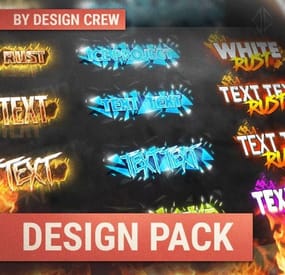
Design Rust Pack / PS
By DesignCrew in Graphics
The package consists of a header, wallpaper and logo
In this big pack you will find:
3 different text banner designs with different effects 8 unique fonts for your design adaptive effects that automatically apply to your changes a complete set for the design of your project
All necessary elements are in the archive.
To change you need Adobe Photoshop program
When purchasing you receive endless support from the author
- #design
- #designcrew
- (and 7 more)