
frizzo420's Wishlist
-
$14.99
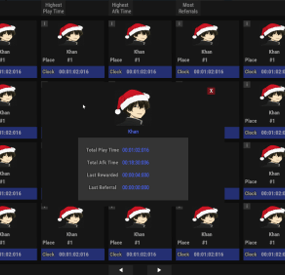
Play Time Rewards
Records playtime, with option to separately record AFK time. Includes a reward system to give players points/money/cash for time played or by referring other players to your server. You can also create custom permissions to give VIP players point multipliers either by using the commands or by simply adding in more config options manually.
Features:
Discord Logging with a simple discord webhook. Last wipe data saving. Currencies. Afk & active tracking. Permissions. Multipliers. UI Leader Board. Cmds.
Recommended Rust Settings
Due to ImageLibary's cache avatar feature being broke I have coded in my own method to manually have ImageLibrary cache them.. For rust you will need ImageLibrary installed for the avatar images to work. Enable the Avatar Image Patch": true , And throw in your steam API Key " ",
Permissions
playtimerewards.admin -- Allows players to use ptr command
Chat Commands
/playtime -- Displays your name and your playtime /playtime Khan -- Display the playtime for the specified player /playtime top -- Display the top 10 play times in chat /playtime lastwipe -- Displays the last time the data was wiped /pt -- Brings up the Rust only UI Leader Board System
Admin Commands
playtimerewards.admin -- Requires the admin permissions to use /ptr add vip 10 -- Adds a new custom permission with multiplier value /ptr remove vip -- Removes a custom permission /ptr list -- Shows all available permissions Note: Permissions will automatically be prefixed with playtimerewards.
Reward System
The reward system can be used to issue currency to players based on their playtime.
It has 2 reward style plugins to handle them.
Permission System
The permission system is there to give VIP players a multiplier for the rewards they are issued. The amount of points will be the default amount set in the config, multiplied by the number you set in the permission.
For example, if you create a permission called "playtimerewards.vip" with a value of 1.5, and the amount of points is 5 (default amount), the user will get 7.5 points when issued a reward for playtime
Referral System
The referral system is simple.
PlayerA invites PlayerB to the server.
For the reward to be Deposited PlayerB simply has to type '/refer PlayerA'.
Once he/she has done this PlayerA will be given points for inviting a player and PlayerB will be given points for joining from a referral
Referred Player B Joined Server, Deposit Amount": 3,
Referral Invite Sent Deposit Amount, After player B has joined is": 5,
Once PlayerB has registered his/her referral they can never use the system again, however they can invite as many players as they want to claim referral rewards
Developer API
double? FetchPlayTime(string playerid) // Returns double playtime in seconds, or null if no data found double? FetchAfkTime(string playerid) // Returns double AFK time in seconds, or null if no data found int? FetchReferral(string playerid) // Returns int number of referrals, or null if no data found
Configuration
The settings and options can be configured in the PlayTimeRewards file under the config directory. The use of an editor and validator is recommended to avoid formatting issues and syntax errors.
{ { "1. Don't Edit This": { "LastWipe": "2021-05-29 19:05:14Z", "WasWiped": false, "WipeTime": "2021-05-29 19:05:14Z" }, "2. Discord Settings": { "1. Enable Discord Logging": false, "2. Discord Web Hook Url": "", "3. Embed Message Color": "#483D8B", "4. Include Plugin Image Name in discord messages": true, "5. Discord Plugin Image": "https://assets.umod.org/images/icons/plugin/60b0e6d6c8900.png", "6. Discord Plugin Name": "PlayTimeRewards" }, "3. Track Settings": { "1. Sets the Save Interval Timer": 15, "2. Enable Afk Time Tracking": true, "3. Enable Avatar Image Patch": true, "4. Avatar Image Patch Requires Steam API Key": "", "5. Ignore Specified Oxide Groups from getting rewards": [ "admin" ] }, "4. Reward Settings": { "1. Enable Rewards": true, "2. Use ServerRewards": false, "3. Use Economics": true, "4. Use Cash System": false, "Cash System Currency": "$", "5. Enable Referrals": true, "6. Enable Earning By Referrals": true, "7. Send Deposit Response": true, "8. PlayTime Deposit Timer": 3600, "9. PlayTime Deposit Amount": 5, "10. Referred Player Joined Deposit Amount": 3, "11. Referral Invite Sent Deposit Amount": 5 }, "5. Permission Multipliers": { "Multiplyer": 1.0, "SetPermission": "" } }
Localization
The default messages are in the PlayTimeRewards file under the lang/en directory.
To add support for another language, create a new language folder (e.g. de for German) if not already created, copy the default language file to the new folder and then customize the messages.
{ "mia": "Unable to find player number or name {0} \n Try there display-name instead.", "playeraccepted": "Your referral has been accepted", "playerread": "{0} has acknowledged a referral from you", "playeraccepteddeposit": "Your referral has been accepted and you have received {0} points", "playeracceptedplayersreferaldeposit": "{0} has acknowledged a referral from you and you have received {1} points", "self": "You can not refer yourself!", "alreadydid": "You have already acknowledged a referral", "refsyntax": "/refer <playername> - Acknowledge a referral from <playername>", "permmultiplier": "permission | multiplier", "notaperm": "The permission {0} does not exist", "permremoved": "You have successfully removed the permission {0}", "missingvalue": "You must enter a multiplier", "alreadyperm": "The permission '{0}' already exists", "permadded": "You have successfully created a new reward multiplier. Permission: {0}, Multiplier {1}", "ptr": "Create custom permissions with reward multipliers for VIP players", "add": "/ptr add <permissionname> <multiplier> - Adds a new reward multiplier", "remove": "/ptr remove <permissionname> - Removes reward multiplier", "list": "/ptr list - List available permissions and their multipliers", "list1": "Permission {0}, multiplier {1} \n", "typo": "Unable to get your playtime", "natime": "Unable to get that players playtime", "sr": "RP", "economics": "Coins", "cash": "Cash", "cashsystem": "custom", "deposit": "{0} {1} have been deposited to your account!", "toptime": "Top Playtimes: ", "topscore": "You can see the top scoring playtimes by typing \n \"/playtime top (optional:number 1, 22, etc)\"", "lastwipe": "{0} Last wipe was {1}" }
- #play time rewards
- #play
- (and 9 more)
-
$10.50
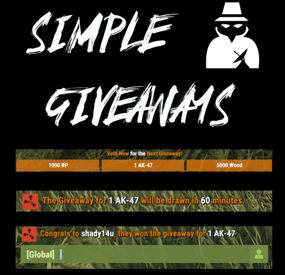
Simple Giveaways
Create "Automated" Giveaways, Items based on Votes
At the Set Interval, a small popup voting UI is shown to players. Based on the players online, this list is randomized, and players vote on the giveaway they want.
After the end of the voting, UIs close and the item with the most votes is locked in.
At the end of the giveaway, a random online user is given the prize.
Awards can be any command you can run in game, (give items, give kits, Give RP, Give Economics, etc.)
Permissions
"simplegiveaways.use" : Ability to start or restart a giveaway.
Chat Commands
/giveaway.start : Stops the current giveaway and starts a new one.
Config
https://pastebin.com/fU2EZBtv
Discord: Shady14u
https://discord.gg/8mvvBrrw4Y
-
$15.99$12.79AutoRestart
[ ✓ ] Works on any host. [ ✓ ]
The plugin needs the free CrashExtensions library. Can't upload DLLs on your host? No problem: the zip includes a small installer plugin. Drop it in your plugins folder, run crashext.install, restart once, and you're done.
AutoRestart restarts your Rust server on a schedule and makes sure nobody is caught by surprise. Pick the restart times in your own time zone, skip them on wipe days, and every player is warned on the channels you choose: a notification panel, the game's own toast, chat, a sound, the vanilla restart banner and a row in the vitals stack.
The admin window is one window with eight tabs across the top: Overview, Schedule, Alerts, Appearance, Voting, Rewards, Discord and Advanced. Every tab slides in as you open it. A draft only saves when you press Save, Preview on screen puts the real panel and countdown strip on your HUD so you can drag them where you want, and two admins can work at the same time.
Players can vote to delay a restart that comes at a bad time, and the players who come back afterwards can claim a reward in items, Economics or ServerRewards. Your Discord hears about it too: a countdown, the final restart and the server coming back online, each one an embed you design.
Works on Oxide and Carbon Needs CrashExtensions 1.12.9 or newer (included) Six alert channels, each on its own switch Seven languages built in Jump to: Features · How it plays · Screenshots · Trailer · Admin window · Commands · Permissions · Install · Configuration · Test server · FAQ · API
🌟 Features
For players
Warnings in their language. Seven languages are built in: English, Spanish, Italian, Russian, Ukrainian, French and Brazilian Portuguese. Each player sees the alerts in their own. The last minute on screen. The notification panel counts the final minute down by itself, and an optional countdown strip shows MM:SS and a progress line from a trigger time you choose. A say in the timing. When a restart is close, a vote panel lets players vote to delay or to continue. If enough of them agree, the restart waits. Late joiners see it too. Players who connect or respawn during a countdown get the strip, the vote panel and the last-minute panel straight away. A reward for coming back. Players who reconnect within the claim window get their items, Economics money or ServerRewards points. Always know when. /restart shows when the next restart is. For server owners
Restart times in your time zone. As many a day as you want, in UTC or any zone you set (Asia/Tokyo, Europe/Berlin, UTC+9...), daylight saving included. Every time players see is shown in that zone. Wipe days skip them on their own cycle: weekly, every 2 or 3 weeks, the 1st to 4th, or the last of the month. Restart in... A one-off restart from the window, chat or RCON. Cancelling it brings your schedule straight back. Warning times you set. Chips for the game and for Discord, set apart. The defaults are 30, 15, 10, 5, 3, 2 and 1 minutes in game, and 30, 15, 10, 5 and 1 on Discord. A player count guard. A scheduled restart is skipped while more players than your limit are online. A restart you start yourself always goes ahead. Your panel, your look. A notification panel with one of 137 game icons, colours with opacity, a solid or gradient background, a border, your own title and message. Five position presets, or drag it anywhere. Discord. A webhook with three embeds (countdown, final restart, server online), a live Discord style preview while you edit them, and a test button. Animations on one switch. Slides and fades everywhere, or none at all. Safe config. Values out of range are repaired on load, and a broken file is left untouched. The window saves only what its own section holds. An optional update check. Restart the server when a new Oxide build is out. It is off by default. For developers
Hooks and a status call. OnRestartScheduled, OnRestartWarning, OnRestartInitiated and OnRestartCancelled, plus GetRestartStatus for the pending restart. See the API. Console and RCON. autorestart status, cancel, now and set <time> work from the console, RCON and your own tools. 🔁 How it plays
Warnings. At every warning time you set, players get the alerts on your channels: the toast, the chat line, the sound and the panel. The vote. Five minutes before the restart, the vote panel opens for 30 seconds. If 60% of the players vote to delay, with at least 3 players online, the restart waits 50 minutes and then runs a new 15 minute countdown. The strip. Once the time is inside its trigger (30 minutes by default), the countdown strip stays on screen with MM:SS and a progress line. The final minute. The panel counts the last minute down on its own, so every player sees the seconds. The restart. Players get a plain message to reconnect in 3 to 5 minutes. The server saves, shuts down cleanly and quits, and your host starts it again. Back online. The server online embed goes to Discord if you turned it on. Players who reconnect within the claim window (5 minutes by default) get their rewards: money at connect, items when they wake. 📸 Screenshots
Every screen below is AutoRestart running in Rust.
The Overview: the next restart, the alert channels and the features at a glance The final minute, as players see it Alerts: every channel and warning time Schedule: restart times and wipe days Appearance: the panel, its size and its position Voting: the share, the window and the delay Rewards: items, Economics and ServerRewards Discord: webhook, message and embeds Advanced: the update check, the reload and the animations 🎥 Trailer
The AutoRestart 5.0 trailer (click to play, 57 seconds)
🗒️ In-Game Admin Window
No file editing needed. /restart config opens every setting in one window. Each section is a draft: an unsaved section shows a dot on its tab, Save applies only the section you are on, and closing with unsaved changes asks first.
Overview - a live clock to the next restart, what is on at a glance, today's restart times, and Restart in..., Cancel restart and Reload schedule. Schedule - restart times and wipe days. Alerts - the channels, the in-game and Discord warning times and the player count guard. Appearance - the notification panel, its text, the countdown strip, the toast style and the background (solid or gradient), with Preview on screen. Voting - the share, the vote window, the delay and the chat command. Rewards - the claim window, Economics, ServerRewards and an item list. Discord - webhook, bot, message and the three embeds, with a live preview. Advanced - the update check, the animations switch and the reload button. 🎮 Commands
Players
/restart - when the next restart is /restart status - detailed restart info /restart help - the command list /vote delay, /vote continue - vote on a restart in progress (the command name is set in the Voting section) Admin
/restart config - the admin window /restart set <time> or /restart <time> - restart in 30s, 5m, 1h or a plain number of seconds. Write 5m, not 5 minutes. /restart cancel - cancel the running restart. A scheduled one skips to the next slot /restart now - restart right away /restart reload - reload the schedule and forget the skipped slots Console and RCON
autorestart, autorestart status, autorestart cancel, autorestart now and autorestart set <time> (or just autorestart <time>) autorestart.testdiscord - send a test message to your webhook autorestart.forceonline - post the server online embed now 🛡️ Permissions
autorestart.use - /restart, /restart status and /restart help for players. Grant it to your default group if you want everyone to see when the next restart is. autorestart.admin - the admin window and every command that changes something. Staff only. Voting and rewards need no permission: every online player can vote and claim.
oxide.grant group admin autorestart.admin oxide.grant group default autorestart.use 📦 Install
Install the extension, once per server. Stop the server, copy Oxide.Ext.CrashExtensions.dll into RustDedicated_Data/Managed (Carbon: carbon/extensions) and start it again. The console prints Loaded extension CrashExtensions with its version. The extension is one shared file for all our plugins, so an older copy is simply overwritten. Host does not allow DLL uploads? Copy CrashExtInstaller.cs (in the zip) into oxide/plugins instead and run crashext.install once in the server console. Install the plugin. Copy AutoRestart.cs into oxide/plugins (Carbon: carbon/plugins). It compiles on its own and creates its config, data and language files. Grant the permissions and add your restart times. Give yourself autorestart.admin, open /restart config and add your times in Schedule. A new install has no restart times. The game toast, chat and sound alerts start on. The notification panel, the countdown strip, Discord and rewards wait until you turn them on. ⚙️ Configuration
Everything lives in oxide/config/AutoRestart.json, and the admin window edits all of it. Claimed rewards and the last "server online" message are kept in oxide/data, and the texts in oxide/lang/<language>/AutoRestart.json.
Config sections (click to expand)
🧪 Test server
Available on the new Meowcraft test server. Type /restart in chat to see the restart status there. Restarts are turned off on this test server.
client.connect 91.229.114.54:28015 📚 FAQ
Q: I run AutoRestart 4.x. What changes when I update?
A: Install the extension, then replace AutoRestart.cs. Your config, rewards and Discord state load as they are, in the new window. Time values are stricter: write 5m, not 5 minutes. A Discord webhook must be the plain https://discord.com/api/webhooks/<id>/<token> form, and the default message content is empty.
Q: Does it start the server again after the restart?
A: AutoRestart saves and shuts the server down cleanly, and your host brings it back. Tested on Pterodactyl and Wisp. On a Windows machine, make sure your .bat starts the server again when it exits.
Q: What is the extension for, and what if I do not want one?
A: AutoRestart draws its interface with the Oxide.Ext.CrashExtensions extension. The DLL is in the zip, and if your host does not allow DLL uploads, CrashExtInstaller.cs (also in the zip) installs it with one console command, crashext.install. If you would rather not run an extension, stay on 3.9.3: it does not need it and keeps working as before.
Q: Does it work on Carbon?
A: Yes. The DLL goes into carbon/extensions instead of RustDedicated_Data/Managed, then restart once. Everything else is the same.
Q: I am on 3.x. Do I lose my settings?
A: No. Your config, the pending reconnect rewards and the Discord state carry over, and old values migrate on load.
Q: Can players stop a restart?
A: They can vote to delay it. Voting opens 5 minutes before the restart and stays open for 30 seconds. When 60% of the players agree, with at least 3 players online, the restart waits 50 minutes and then runs a new 15 minute countdown. Every number is in the config, and voting can be turned off.
Q: What does Cancel do?
A: On a restart you set with Restart in..., it removes it and brings your schedule back at once. On a scheduled restart, it skips that slot (and any earlier one) and arms the next. Reload schedule forgets the skips.
Q: Can I skip a restart while the server is busy?
A: Yes. Turn on the player count guard and a scheduled restart is skipped while more players than your limit are online. A restart you start yourself always goes ahead.
Q: Do I need Economics or ServerRewards?
A: Only to pay rewards in money or points. Item rewards need nothing else.
Q: Does it contact any outside service?
A: Only what you turn on. The plugin downloads the pictures it draws (about 80 small icons and images) once from cdn.crashplugins.space, which your server then caches. The Oxide update check and the Discord webhook are off by default. CrashExtInstaller downloads the extension from GitHub only when you run crashext.install, and never checks for updates.
Q: Can I translate it?
A: Seven languages are built in and each player sees their own. For another one, copy oxide/lang/en/AutoRestart.json into your language folder and translate it.
Q: How heavy is it?
A: Built and load tested for 500+ player servers. Every animation can be turned off with one switch.
🔧 API / Hooks
void OnRestartScheduled(int seconds, bool isCustom) void OnRestartWarning(int secondsLeft) void OnRestartInitiated() void OnRestartCancelled(string reason, int secondsRemaining) Read the pending restart from any plugin:
[PluginReference] private Plugin AutoRestart; var status = AutoRestart?.Call("GetRestartStatus") as Dictionary<string, object>; // HasRestart is always there. With a restart pending you also get IsDelay, IsCustom, // SecondsRemaining, RestartTime and FormattedTime.
Questions, ideas or bug reports? Use the Support tab of this file or join our Discord.
- #restart
- #rustplugin
- (and 19 more)
-
$30.00
BetterTC
Rust / Server Plugins
BetterTC
Tool Cupboard ManagementRust Plugin
Upgrade. Repair. Reskin. Make your base your own.
Bring your most-used Tool Cupboard features together in one interface inspired by Rust’s item store. Automate building upgrades and repairs, manage authorizations, and personalize buildings, external walls, wallpapers and your TC.
Automated upkeep tasks
Upgrade and repair with TC resources
Personalized buildings
Skins, wallpapers and external walls
Permission profiles
Configure access, speed and costs
01 / Video demo
See BetterTC in action
Take a look at BetterTC’s interface and building management features.
Watch on YouTube
02 / Skin ownership
Compatibility with Facepunch’s server policy
Facepunch’s policy prohibits granting paid skins or DLC to players who do not legitimately own them. BetterTC includes ownership validation for building skins, TC skins and wallpapers.
Building skins: all available choices remain visible, but players can only apply skins they own or skins that are free. Wallpapers: only free, custom and owned wallpapers are visible. More custom wallpapers are planned. TC skins: only owned skins are visible and selectable. Read Facepunch’s official server policy
Ownership checks are enabled with the following bypass option set to false:
"Bypass DLC ownership check (⚠ only allowed on creative/test servers per Facepunch rules)": false ⚠ Very important
Keep the bypass disabled on ordinary public PvP and PvE servers. Facepunch only permits temporary exceptions on servers specifically set up to test game mechanics, for testing purposes. A creative or training label alone is not an exemption. Misuse may result in delisting or other sanctions.
03 / Building management
Let the TC do the work
Automatic upgrades
Upgrade building grades using resources directly from the TC. Select the default appearance or an eligible building skin, and use the information button to estimate the materials required. Configure upgrade speed and costs through permission profiles.
Automatic repairs
Repair the building and supported deployables, including doors, trapdoors, windows and boxes, with resources from the TC. Configure a cooldown after recent damage to help prevent repair abuse during raids.
Automatic reskinning
Change a building’s appearance without manually replacing each piece. Players can switch from a skinned grade back to its default appearance when they prefer. The Container skin’s multicolor selection can also be disabled to reduce client rendering load.
Building downgrades
Allow players to return to a lower building grade when their base becomes too expensive to maintain. Downgrading charges resources as a fresh upgrade to the selected grade; it is not a free conversion. Disable this feature if it does not fit your server, or retain a separate administrator-only downgrade override.
Configure NoEscape or RaidBlock integration to stop automatic upgrades, repairs, building reskinning, wallpaper placement and external wall reskinning when a raid block starts. Ownership and team restrictions are also configurable. 04 / Building skins
Keep the available skins up to date
The skin update checker adds newly available construction skins and their options to the configuration.
After installing BetterTC, grant yourself bettertc.admin and click Check Update to populate the available skins and options. Applying paid content remains subject to ownership checks. 05 / External walls
Change the look. Preserve the damage.
Reskin stone external walls with their adobe or ice variants, or switch wooden external walls to Frontier and back. Supported external gates can also be reskinned to their available variants. The original wall’s health is preserved, so reskinning a damaged wall does not repair it.
Recommended setting:
"Only reskin on wall of the same grade": true Keep this enabled to use external wall reskinning as an appearance change. Disabling it allows wood-to-stone and stone-to-wood changes without a resource charge, because this wall system has no cost mechanism.
06 / Wallpapers & TC skins
Personalize the details
Automatically place eligible wallpapers on walls, ceilings and floors. New game wallpapers are added to the list automatically. Use included custom wallpapers and add your own through the admin wallpaper commands. Configure placement on both sides of walls, including exterior sides. Apply wallpapers to both sides of a wall, including the exterior side when configured.
Place wallpapers on boats with /wpb after sitting at the boat’s steering wheel. Let players change their TC’s appearance or deploy a TC with a skin, according to their permissions and ownership. Tool Cupboard skin selection
Choose an eligible TC skin from the interface, or deploy a TC using the selected skin. BetterTC carries over the cupboard’s authorizations, contents and lock when replacing its appearance.
Manual wallpaper tool menu
Hold the wallpaper tool and open BetterTC’s selector with /wp or the configured input button. The default input is the middle mouse button. This menu must be enabled in the configuration and requires bettertc.wallpaper.toolmenu.
Wallpaper rotation hammer
Administrators can obtain a special wallpaper hammer with /wphammer. Hit a wallpapered floor or foundation with this hammer to rotate its wallpaper: 90° on square pieces and 120° on triangles.
Configure the cloth cost of automated wallpaper placement. Building placement uses cloth from the TC; boat placement uses cloth from the player’s inventory. The no-cost wallpaper permission waives placement resource costs.
Set "Wallpaper Damage": false to protect wallpapers from melee and ammunition damage. C4 and rockets can still damage them.
07 / Authorization & inventory
Manage access from the cupboard
Authorized player list
Show who is authorized on the TC, optionally including Steam IDs and Online, Sleeping or Offline status through the player-status permission. Hide administrators with the configured option and allow individual authorization removal with a separate permission.
Automatic TC locks
Use separate permissions to automatically attach a locked key lock or code lock when a TC is deployed. Code locks use a generated code, authorize the deploying player and notify them of the code; the notification masks it in streamer mode. The code-lock permission takes priority when both lock permissions are assigned.
Additional TC storage
Configure which additional item types the TC accepts: gunpowder, sulfur, sulfur ore, explosives, diesel barrels, CCTV cameras and targeting computers. Each item type has its own switch. Select a general inventory filter: Resources, ResourcesAndComponents or All. The ResourcesAndComponents mode also accepts supported building and utility tools.
08 / Interface & integrations
A panel that adapts to your players
The panel keeps a consistent size across player UI scaling settings. Buttons rearrange automatically according to the functions the player can access. Authorization lists and construction skins support pagination. Building options can be automatically sorted by grade, or retain the configured order. Configure whether players can disable automatic construction effects. Most interface images load directly from the game client. Carbon servers use the built-in Image Module; Oxide servers use ImageLibrary. Configure game tip, chat and optional Notify or UINotify alerts, plus button colors and positioning. TiersMode and TCLevels
When TiersMode is installed, BetterTC reads its maximum unlocked building grade for the upgrade menu. When TCLevels is installed, BetterTC adds a button to open its Tool Cupboard level-upgrade menu.
09 / Permissions
Choose the functions each player can use
Assign feature permissions and configure the standard and advanced profiles to match your server. Grant the no-cost permissions carefully.
Permission Purpose bettertc.admin Admin update checks; also used to hide administrators from the authorization list when configured. bettertc.authlist Show the authorized-player list button. bettertc.playerstatus Show each authorized player's status next to their name in the TC authorization list: Online (green) when connected, Sleeping (light blue) when disconnected with a sleeping character in the server, or Offline (red) when registered but no active or sleeping character is found. Without this permission, only the player name is shown. This permission only displays status; it does not grant authorization or removal rights. bettertc.deleteauth Revoke individual player authorizations. bettertc.use Use the standard speed and cost profile defined in the configuration. bettertc.vip Use the advanced speed and cost profile defined in the configuration. bettertc.repair Access automatic building repair. bettertc.repair.nocost Repair without resource costs. bettertc.reskin Access automatic building reskinning. bettertc.reskin.nocost Reskin without resource costs. bettertc.upskin Show building upgrade options with skins. bettertc.upwall Access external wall reskinning. bettertc.upgrade Access building upgrades. bettertc.upgrade.nocost Upgrade without resource costs. bettertc.wallpaper Access wallpaper placement. bettertc.wallpaper.nocost Place wallpapers without resource costs. bettertc.wallpaper.custom Show custom wallpapers. bettertc.wallpaper.toolmenu Access the manual wallpaper tool selector when enabled. bettertc.tcskinchange Change the TC skin. bettertc.tcskindeployed Deploy a TC with a skin. bettertc.autolock Automatically add a locked key lock when deploying a TC. bettertc.autocodelock Automatically add a locked code lock with a generated code when deploying a TC. Skin-related permissions do not replace paid-content ownership checks.
10 / Commands
Add custom wallpapers
Command Purpose /addwp <skinid> <Wall|Floor|Ceiling> Chat: add a custom wallpaper for the selected surface type. addwp <skinid> <Wall|Floor|Ceiling> Console: add a custom wallpaper for the selected surface type. /wpb Chat: place wallpapers on boats; first sit at the boat’s steering wheel. /wp Chat: open the manual wallpaper menu while holding the wallpaper tool; requires bettertc.wallpaper.toolmenu. /wphammer Chat: give yourself the wallpaper rotation hammer; requires bettertc.admin. wphammer Player console: give yourself the wallpaper rotation hammer; requires bettertc.admin. wphammer <playername or steamid> Server console: give the wallpaper rotation hammer to a selected player. Adding wallpapers from chat or a player console requires bettertc.admin. Example for a wall wallpaper:
/addwp 3356517390 Wall Console equivalent: addwp 3356517390 Wall 11 / Configuration
Selected configuration options
This excerpt covers the settings supplied with this description, including ownership checks, raid blocking, repairs, wallpapers and permission profiles. It is not the complete configuration file, and these supplied example values may differ from the defaults in your installed version. Edit the configuration generated by your installed BetterTC version.
{ "Check for updates when loading": true, "Bypass DLC ownership check (⚠ only allowed on creative/test servers per Facepunch rules)": false, "Use NoEscape Plugin": false, "Use RaidBlock Plugin": true, "GUI Buttons TC - Color Default": "0.3 0.40 0.3 0.60", "GUI Buttons TC - Color Active": "0.90 0.20 0.20 0.50", "GUI Buttons TC - OffsetMin": "280 621", "GUI Buttons TC - OffsetMax": "573 643", "GUI Buttons TC - AnchorMin": "0.5 0", "GUI Buttons TC - AnchorMax": "0.5 0", "Alert Gametip": true, "Alert Chat": true, "Alert Notify Plugin": false, "Notify: select what notification type to be used": { "error": 0, "info": 0 }, "Color Prefix Chat": "#f74d31", "Show Admin Auth List": false, "Show SteamID Auth List": true, "Upgrade Effect": true, "Colour Selection MultiColor Option": false, "Reskin Enable": true, "Reskin Wall Enable": true, "Only reskin on wall of the same grade": true, "Reskin Wall TC Distance (Default: 100)": 100.0, "Deployables Repair": true, "Repair Cooldown After Recent Damage (seconds)": 30.0, "Downgrade Enable": true, "Downgrade only Owner Entity Build": false, "Upgrade only Owner Entity Build": false, "Upgrade / Downgrade only Owner and Team": true, "Wallpaper Enable": true, "Wallpaper placement Cost (Cloth)": 5, "Wallpaper Damage": true, "Wallpaper both sides": true, "Force both sides including external sides": true, "Cooldown Frequency Upgrade (larger number is slower)": { "bettertc.use": 2.0, "bettertc.vip": 1.0 }, "Cooldown Frequency Reskin (larger number is slower)": { "bettertc.use": 2.0, "bettertc.vip": 1.0 }, "Cooldown Frequency Repair (larger number is slower)": { "bettertc.use": 2.0, "bettertc.vip": 1.0 }, "Cooldown Frequency Wallpaper (larger number is slower)": { "bettertc.use": 2.0, "bettertc.vip": 1.0 }, "Cost Modifier for repairs": { "bettertc.use": 1.5, "bettertc.vip": 1.0 }, "Allow Items in TC Inventory": { "gunpowder": false, "sulfur": false, "sulfur.ore": false, "explosives": false, "diesel_barrel": true, "cctv.camera": true, "targeting.computer": true }, "Downgrade Admin": true, "Use BetterTC Wallpaper Tool Menu (requires bettertc.wallpaper.toolmenu permission)": true, "BetterTC Wallpaper Tool Menu input button (FIRE_THIRD = middle mouse button)": "FIRE_THIRD", "Item Category Filter (Resources, ResourcesAndComponents, All)": "Resources", "Auto Sort Items by Grade": true } 12 / Known issue
Unexpected default blue wallpapers
If default blue wallpapers appear randomly, check whether TruePVE or a similar plugin is protecting wallpaper damage. Disable that wallpaper protection in the other plugin and use BetterTC’s own wallpaper protection instead.
BetterTC’s protection reduces damage, especially from melee attacks, but does not block all damage.
13 / Support
Questions, ideas or a problem to report?
Contact ninco90 on Discord for questions, suggestions or assistance.
Custom server configuration is also available for an additional fee if you would like the plugin set up around your preferences.
- #builder
- #automation
- (and 9 more)
-

$29.99
Total Control
Introducing Total Control – The Ultimate Rust Server Admin Tool
Total Control is a powerful full GUI admin plugin for Rust servers.
Whether you run hardcore PvP or relaxed PvE, Total Control gives you complete live control over every major system directly in-game, with zero config files or reloading after changes.
📅 Dynamic Schedule System:
•Plan your entire wipe and let the plugin do the work for you.
•Create up to 5 scheduled sets (plus the default) Automatically change gather rates, stack sizes, smelting, rewards, PvE/PvP mode, raid protection, and more at exact dates and times.
•Use real-world time or server time.
•Enable only the pages you want for each set everything else stays on your default settings.
•Run your server exactly how you want.
⚒️ Gather Rates & Stack Sizes:
•Full control over every item (ore, plants, crates, quarries, excavator, etc.) Quick multiplier buttons or type exact values.
•Category multipliers with individual item overrides.
•Add or remove any item instantly with chat commands.
🔥 Smelting & Cooking:
•Adjust speed, charcoal output, fuel usage, and resource output for every furnace type.
•Full control over the Mixing Table and Cooking Workbench.
🎁 Rewards System:
•Reward players for gathering, killing animals/NPCs/players, destroying barrels, emptying crates, Bradley/Heli loot, and playtime.
•Support for Scrap, Economics, and ServerRewards (use any or all three) Optional UI Notify integration with custom message styles.
⚙️ Settings Page:
•Auto or voted night skip. Time freeze, custom day/night lengths, and server date.
•PvE/PvP mode switching (manual or timed).
•Full raid protection (manual or timed).
•Offline raid protection (with adjustable cooldown timer).
•Option to disable shotgun traps, flame turrets, auto turrets, and SAM sites.
Any admin with the correct permission can open the Total Control GUI with /tc and modify everything, without requiring data file access or plugin reload. Ideal for administrators worldwide.
🔑 Permissions & Commands:
Permission: TotalControl.OpenGui
Chat Commands:
/tc Open the GUI
/addgather <shortname> /removegather <shortname> Add/Remove items to GatherRates page.
/addstack <shortname> /removestack <shortname> Add/Remove items to StackSize page.
/addreward <shortname or prefab> /removereward <shortname or prefab> Add/Remove items to Rewards page.
/raid help
/raid list List all excluded prefabs from Raid Protection.
/raid include <shortname | itemID | prefabID> /raid exclude <shortname | itemID | prefabID> Add/Remove items to or from Raid Protection.
/raid include <building.grade prefabID> /raid exclude <building.grade prefabID> Add/Remove Building blocks to or from Raid Protection.
(Shortnames list: https://www.corrosionhour.com/rust-item-list)
💬 Join the Community
Stay up to date, get support, make suggestions, report bugs, or promote your server.
🔗 https://discord.gg/AkwHUs8Qma