
Razor
-
Posts
2,150 -
Joined
-
Days Won
19
Content Type
Profiles
Warranty Claims
Downloads
Forums
Store
Services
Downloads Plus Support
DOWNLOADS EXTRA
Reels
Everything posted by Razor
-
I have it added just not posted the update yet.
-
Changed Status from Pending to Closed Changed Fixed In from Not set to 1.1.3
-
Despawn time option added
-
Yes ill ;look into adding this
-
Version 1.0.1
30 downloads
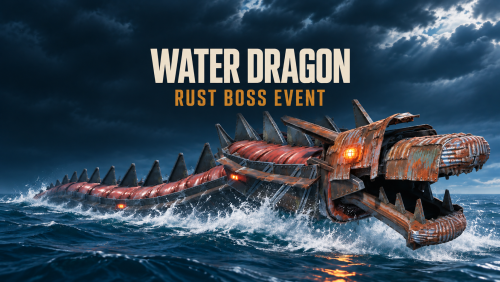
A roaming ocean boss for Rust that hunts occupied boats, pursues submarines, and attacks swimmers. The Water Dragon dives beneath the surface and rises to fire cannonballs at tugboats, player boats and their crews. It can swim under RHIBs and rowboats to flip them, then circle back for anyone thrown into the water. Go deeper in a submarine and it can follow you with torpedoes. Bring it down and its scrap-metal body explodes across the water. Recover floating loot from the wreckage or dive for the optional locked crate on the seafloor. Run the Event Your Way Choose its territory. Send the Dragon along the Cargo Ship route or let it roam within a set radius around a random offshore spawn. Tune the encounter. Adjust spawn and respawn timers, boss health, attack damage, and loot through the in-game admin UI. Track the fight. Players can locate the Dragon on the map and see its health bar when they damage it. Customize the rewards. Use vanilla loot or integrate with AlphaLoot or Loottable. Commands and Permission Command or permission What it does /waterdragon Opens the in-game admin UI. waterdragon.target <player name or Steam ID> Spawns a Dragon to hunt the specified player. Works from the server console or RCON. waterdragon.use Grants access to the admin UI.$20.00 -
 Sounds like a corrupt config/data issue delete your config and datafile For animal farm and replace your farm down hatch a new set of babies and watch recon for any error right after the hatch timer. If you still are getting the error Could you send me the full server log for one of those duplicate-key errors? The line with ArgumentException tells me what happened, but I need the lines underneath it that start with at to see where it happened. If your hosting panel only shows the one-line error, check the server log file or download the raw log from the panel. Copy one error starting at ArgumentException and include all the at ... lines below it, up to the next
-
I Am trying to reproduce this and have not figured out what is happening on your server can you check server for any errors related to the plugin. Also post your config.
-
Are they moving ever? how can i reproduce this. Do you have any other plugins that modify animals?
-
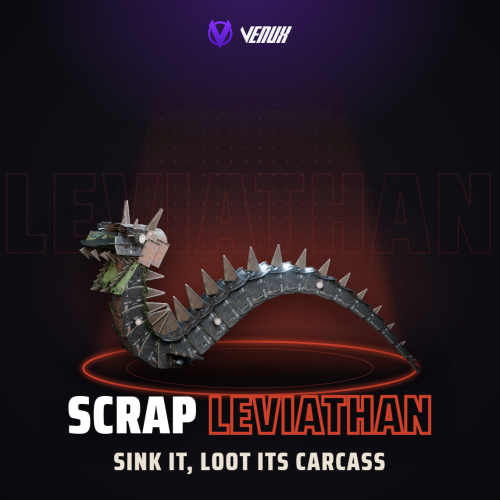 Maybe guys not original.
- 10 comments
-
- 1
-

-
- #scrapleviathan
- #leviathan
- (and 18 more)
-
 Scorpion has no sounds only effects so that bug is not present in scorpion.
-
Changed Status from Pending to Closed
-
Changed Status from Pending to Closed
-
I will work on the logic some.
-
Try and redownload the plugin.
-
Unloaded plugin Auto Farm v3.3.6 by Razor [Auto Farm] Automatically Harmony patched 'GrowableEntity.CalculateQualities_Patch1' method. (PatchGrowable) [Auto Farm] Automatically Harmony patched 'Sprinkler.DoSplash_Patch3' method. (PatchDoSplash) [Auto Farm] Automatically Harmony patched 'Sprinkler.RefreshSprinklerState_Patch1' method. (PatchRefreshSprinklerState) Loaded plugin Auto Farm v3.3.6 by Razor Are you using oxide or carbon?
-
Changed Status from Pending to Fixed Changed Fixed In from Not set to 1.1.1
-
Checking into this now.
-
his head and body are the same.
-
Yes in the path creation tool secton of the ui click Link to nearest monument. and then place your path points and every wipe that path will be there no mather where airfield is he will walk the same path threw it.
-
Version 1.0.4
42 downloads
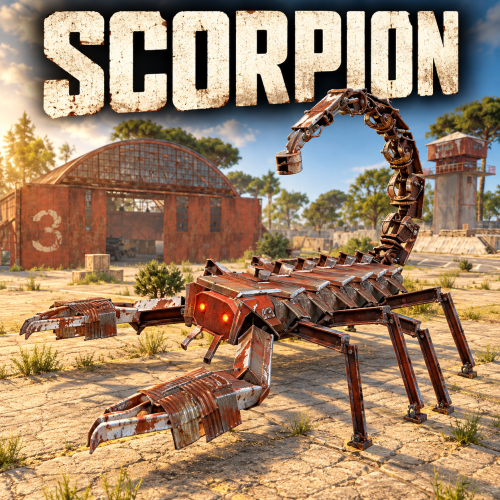
Scorpion - A New Threat on the Ground Bring a giant mechanical scorpion to your Rust server. With eight animated legs, massive claws, and an armed tail, Scorpion turns roads, monuments, and custom arenas into dangerous boss encounters. Players face more than a walking target. Scorpion can intercept rockets and throw them back, launch explosive pursuit drones, retaliate with homing missiles, and fire blowdarts from its tail. Weapons and Defenses Rocket interception: The tail's ray gun catches incoming rockets, swings them around, and throws them back toward the attacker. Tail blowdart: Attacks nearby players with configurable detection range and cooldown. Explosive pursuit drones: Sends drones after attackers. Claw-launched homing missiles: Retaliates against players who damage it, with separate cooldowns for each attacker. Helicopter defense: Acquires occupied player helicopters and launches homing missile salvos. Attack helicopters receive three missiles, fired one second apart. Rocket-assisted obstacle recovery: Boosts over obstacles when needed to continue its patrol. Electrical damage effects: Tesla effects activate when health falls to one-third. Walking sounds: Alternating footstep effects give its movement a heavy, mechanical presence. Patrols and Path Editor Build encounters through the in-game editor. Record custom patrol routes by placing waypoints. Create local paths or link routes to standard and custom monuments. Configure automatic spawning, population, and respawn delays. Enable random road patrols. Use Ring Road patrols to follow the map's largest closed road continuously, without reversing at the end. Adjust individual spawned Scorpions separately from their saved patrol settings. Receive detailed feedback when a route encounters unsuitable ground or an obstacle. Health and Damage Configure regular bullet and explosive ammunition damage separately, including pistol ammunition. Increase its health to create a tougher encounter while retaining the ammunition damage scaling. Loot and Rewards Reward players with configurable Bradley loot crates, adjustable crate fire duration, and optional currency payouts. Supported integrations include: AlphaLoot for custom crate loot profiles. LootTable for preset-based crate contents. Economics for money rewards. ServerRewards for reward points. TruePVE support for combat interaction. Optional reward ownership tracks damage by individual player or combines contributions from a Rust team. Damage contributions expire after a configurable period without further damage, allowing another player or team to take over an abandoned encounter. Crate ownership locks and currency rewards are configurable. Ownership and combined team damage are disabled by default. In-Game Configuration The tabbed editor separates movement, combat, damage, rewards, and player/team ownership settings. Use different settings for defaults, road patrols, saved paths, and individual spawned Scorpions to create encounters suited to different areas of your server. Commands All chat commands require server administrator access or the scorpion.admin permission. Chat Command Description /Scorpion Opens the configuration and patrol editor. /Scorpion spawn Spawns a Scorpion ahead of you using the default settings. /Scorpion remove Removes the nearest Scorpion within 50 metres. /Scorpion path "Patrol 1" Spawns one Scorpion using the named saved path and its settings. /Scorpion spawnpath "Patrol 1" Alternative command for spawning on a saved path. /Scorpion "Patrol 1" Shortcut for spawning on a saved path. Console / RCON Command Command Description scorpion.spawnpath "Patrol 1" Spawns one Scorpion on the specified saved path. Replace Patrol 1 with your saved path's name or ID. Keep quotation marks around names containing spaces. Manual path spawning works when the path's automatic spawning is disabled. The manually spawned Scorpion does not respawn after death, and the command does not change the path's automatic spawning settings. Permission scorpion.admin - Grants access to Scorpion's commands and editor. Developer Integration Other plugins can spawn and despawn Scorpions through API calls, supply custom settings and waypoint paths, retrieve health information, and respond to damage and death hooks. Give your players a boss that can send their own rockets back at them.$30.00 -
Changed Status from Not a Bug to Feature Request
-
Changed Status from Not a Bug to Closed
-
Changed Status from Pending to Not a Bug
-
Changed Status from Pending to Not a Bug
-
Currently his logic is to work like the patrole helecopter.