
Razor
-
Posts
2,094 -
Joined
-
Days Won
19
Content Type
Profiles
Warranty Claims
Downloads
Forums
Store
Services
Downloads Plus Support
DOWNLOADS EXTRA
Reels
Everything posted by Razor
-
 Not realy what does that plugin do?
 -
When done testing do not forget to leave a review good or bad a lot of people always forget. Reviews help me get noticed.
-
Posted update let me know if that resolved it for you.
-
So its blocking it on a icelake? let me check into this.
-
Version 1.0.3
15 downloads
Dragon - Rule the Skies Bring a fire-breathing boss encounter to your Rust server. Dragon patrols above your map, hunts players, launches explosive fireballs, and rains grenades down during strafing runs. Roaring audio and flame effects bring this flying scrap-metal creature to life. Fight it from the ground. Bring it down to claim burning loot crates and wreckage. Features Explosive fireballs: Configurable damage, explosion radius, horizontal attack range, and cooldown. Strafing attacks: Overhead grenade runs with contact explosions. Anti-air combat: Attacks occupied player helicopters. Retaliation: Responds to attackers and remembers recent threats. Cover pressure: Can continue attacking a player's last known location when they hide. Flare defense: Counters incoming homing missiles with a configurable cooldown. Homing targetability: Choose whether players can lock onto Dragon. Damage effects: Electrical sparks activate at one-third health. Death rewards: Airborne explosion, falling harvestable debris, and configurable Bradley loot crates. Loot integrations: Normal loot, AlphaLoot profiles, or Loot Table presets. Map marker: Optional Patrol Helicopter map marker. Automatic spawning: Maintain between 0 and 5 dragons, with configurable lifetime and respawn delay. Departure behavior: Flies toward the map edge when its lifetime ends. In-game editor: Configure the encounter through /dragon. TruePVE support. Customize the Encounter Adjust Dragon's health and protection against bullets, explosions, and anti-vehicle damage. Configure targeting, fire attacks, strafing, flare defense, loot rewards, crate fire duration, and automatic spawning through the in-game editor. Optional targeting settings include patrol helicopter player threat rules, ignoring players in safe zones, and ignoring vanished players. Commands All commands require server administrator access or the dragon.admin permission. /dragon - Opens the settings editor. /dragon spawn - Spawns a flying dragon above and ahead of you. /dragon leave - Sends the nearest dragon toward the map edge to despawn. /dragon remove - Removes the nearest dragon without death rewards. Additional Admin Commands /dragon test - Spawns a stationary demonstration with flame bursts and fireballs. /dragon hover - Makes the nearest dragon hold position. /dragon fly - Resumes flight and patrol, ending stationary test mode. Hover, fly, leave, and remove select the nearest fully built dragon within 150 metres. Permission dragon.admin - Grants access to Dragon's commands and configuration editor. Server administrators already have access. Turn your server's skyline into a battlefield.$30.00 -
Changed Status from Pending to Fixed
-
 Somthing is blocking there targeting of you r they holding there guns? are you runing any pve plugins like truePVE? Sounds like som hook is sending OnNpcTarget and blocking them from shooting you or your in a safezone. do they chase you just not shooting? Youare the first one with this issue so we half to see what is causing it.
 -
are you in god mode? or no clip do you have any other plugins that could be conflicting? did you change anything in the config?
-
Added more things to the collider ignore if he gets stuck and never moves after about a min or 2 look around see what his foot might be seeing in his next step thats blocking the foot from stepingdown.
-
 Listed supportd plugins is on the details page. im adding loottable next update
 -
Looks like hung up on the junk pile does he ever attempt to back up and work his way around it or eventualy just ignore it and walk threw?
-
No eco drops loot crates supports alphaloot
-
Added marker and fixed Player Helicopter attacks.
-
Version 1.0.7
47 downloads
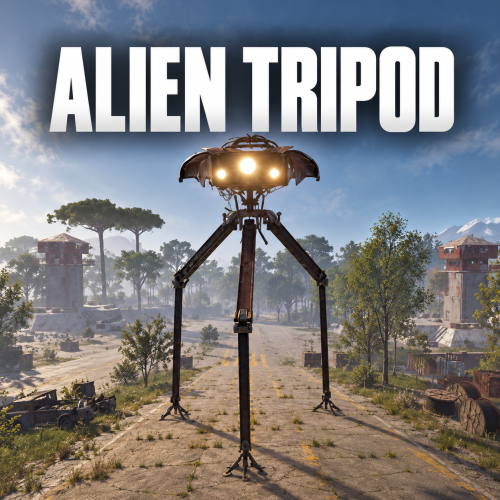
Bring a towering alien war machine to your Rust server. AlienTripod combines animated walking legs, a rotating searchlight head, a player capture laser, homing missiles, and close-range mortar defenses. Create monument patrols, build custom routes anywhere on your map, or enable automatic road patrols—all managed through an in-game editor. Features Patrols and path editor Record waypoints by walking your chosen route. Create local paths or link paths to standard and custom monuments. Preview routes before spawning tripods. Choose looping routes or patrols that reverse at the final waypoint. Configure automatic spawning, population limits, and respawn delays per path. Enable automatic road patrols with configurable spawn separation. Adjust individual spawned tripods without changing their saved patrol settings. Weapons and defenses Capture laser: grabs eligible players and pulls them into the machine, with blood effects and dropped inventory loot. Homing missiles: attack player targets and supported vehicles. Minicopter salvos: configurable lock-on time, missile count, and firing interval. Vehicle targeting: separate options for occupied minicopters and modular cars. Minicopters must have their engine running. Mortar barrages: defend against nearby players, including mounted players, with shells launched around and underneath the tripod. Flare defense: deploys decoys against incoming homing missiles, with a separate cooldown. Lock-on retaliation: can fire back after a player maintains a homing lock for two seconds. Mounted players cannot be captured by the laser. Players using noclip or god mode are ignored by combat targeting. Damage and recovery Each leg has its own health pool. Body pieces share body health, and head pieces share head health. Damaged legs develop fire effects. A failed leg remains at 1 HP, produces electrical effects, and stops the tripod walking. Body health at one-third or lower disables the capture laser while other defenses remain available. A damaged head produces electrical effects around the neck. Destroying the head kills the tripod and drops harvestable debris. After 10 minutes without damage, parts recover 1% of their maximum health every 10 seconds. Healing restores disabled functions once their recovery thresholds are reached. Default health is 1,000 for each leg, 1,000 for the body, and 1,000 for the head. Commands All commands require server administrator access or the alientripod.admin permission. Command Description /AlienTripod Opens the configuration and patrol editor. /AlienTripod spawn Builds a tripod ahead of you using the default settings. Requires suitable open ground. /AlienTripod stop Stops the nearest tripod within 60 metres and releases its captured player. /AlienTripod remove Removes the nearest tripod within 60 metres. Permission alientripod.admin — grants access to the commands and editor. Creating a patrol Open /AlienTripod and select Add New Path. Give the path a name. Choose a local path, or stand near a monument and link the path to it. Select Record Waypoints by Walking the Route. Stand at each waypoint and press USE to add it. Press RELOAD to remove the last waypoint. Click Back to Settings, or hold SPRINT and press RELOAD. Configure the path’s spawning and tripod settings, then save. Add at least two waypoints. Routes are checked for ground suitability and clearance. Saved paths are specific to the current map unless at a monument. Configuration Configure targeting ranges, health, walking speed, stride settings, contact damage, weapon availability, missile damage and cooldowns, minicopter salvos, mortar barrages, homing targetability, and flare defense. Use default settings for new tripods, separate settings for road patrols, and individual settings for saved paths or currently spawned tripods.$29.98 -
Changed Status from Pending to Closed
-
Changed Status from Pending to Closed
-
Changed Status from Pending to Closed
-
Changed Status from Work in Progress to Closed
-
Changed Status from Work in Progress to Closed
-
Changed Status from Pending to Closed
-
Changed Status from Pending to Fixed
-
Changed Status from Pending to Fixed
-
Changed Status from Pending to Fixed
-
Changed Status from Pending to Fixed