-
Posts
84 -
Joined
-
Last visited
Content Type
Profiles
Warranty Claims
Downloads
Forums
Store
Services
Downloads Plus Support
DOWNLOADS EXTRA
Everything posted by Eimon
-
- 9 comments
-
- #discord
- #discordbot
-
(and 3 more)
Tagged with:
-
you need to specify at least one role in the config for the plugin to work the slash commands by default need administrator privileges to show up and you can override them in Server settings , Integrations, your app and the command you need to override. you can also specify multiple roles for the main commands , and multiple roles for each command seperate for more limitations on admins
-
- 9 comments
-
- #discord
- #discordbot
-
(and 3 more)
Tagged with:
-
- 9 comments
-
- #discord
- #discordbot
-
(and 3 more)
Tagged with:
-
- 9 comments
-
- #discord
- #discordbot
-
(and 3 more)
Tagged with:
-
- 9 comments
-
- #discord
- #discordbot
-
(and 3 more)
Tagged with:
-
Version 2.0.0
193 downloads
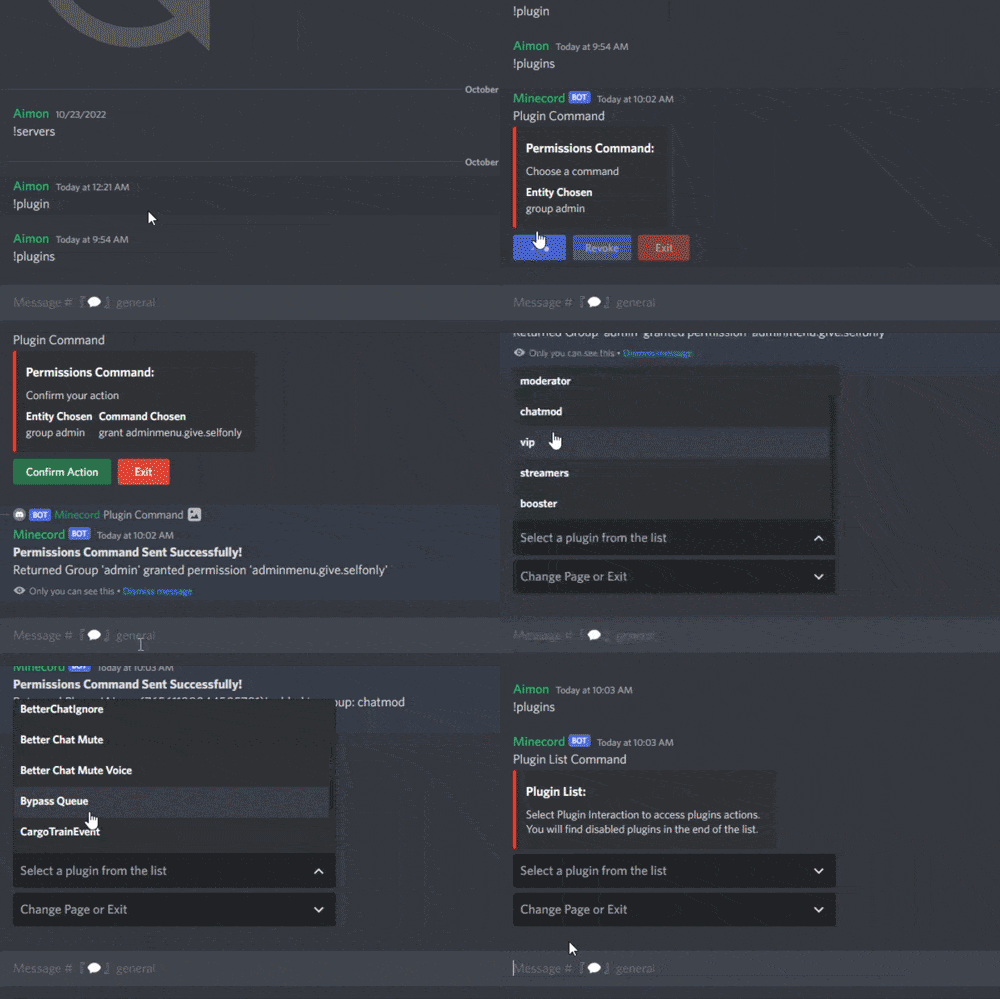
This plugin adds server related commands usable in a specific discord channel with a specific discord role, that gives access to a server panel to do specific commands on the server. Features : Gives access to a permission manager on discord Gives access to a plugin manager on discord Gives access to a restart panel on discord Able to make custom commands from config Gives access to a wipe panel on discord (Only works with DSPWipe or WipeServer loaded) Discord Commands: /server : Shows a list of usable commands for the server /plugins : Gives a plugin list on discord to manage plugins Discord Interactions: When using /server, a list of server commands to manage your server as interactive buttons. Once you use one of the buttons, It will give you more interactive buttons to use different commands and manage your server. Permissions Command shows entity then the command then the permission/group to use the command on after clicking on it : Restart Command shows delay of restart and reasons to use the command after clicking on it : Plugins Command shows the list of plugins you can interact with then shows the command that you can use on it : Custom Command shows the list of commands in the configuration : Console command sends console command to the server: Configuration : { "LogFileName": "DiscordServerPanel", "Bot token": "", "Ignore Roles": false, "Discord Channel ID where the command can be used": [ "1234567891234567890" ], "Embed's color": "#ff0000", "Show Server FPS (Server command)": true, "Show Gamemode (Server command)": true, "Show Plugins Loaded (Server command)": true, "Custom": { "Use Custom (true/false)": false, "Use Confirmation (true/false)": false, "Custom Commands ('command name' 'command to send on console')": { "Restart": "restart 300 Maintenance", "SkipNight": "env.time 12" }, "Discord Role ID (Can be left empty to use the first role id)": [] }, "Console": { "Use Console (true/false)": false, "Use Confirmation (true/false)": true, "Discord Role ID (Can be left empty to use the first role id)": [] }, "MapVoter": { "Use MapVoter (true/false)": false, "Use Confirmation (true/false)": true, "Discord Role ID (Can be left empty to use the first role id)": [] }, "Restart": { "Use Restart (true/false)": true, "Use Modal For Reasons (true/false)": true, "Restart Reasons (One Word)": [ "Maintenance", "Update", "Wipe", "None" ], "Time for command (Use 'h' for hours, 'm' for minutes)": [ "5m", "10m", "30m", "1h" ], "Discord Role ID (Can be left empty to use the first role id)": [] }, "Plugins": { "Use Plugins (true/false)": true, "Use Confirmation (true/false)": true, "Discord Role ID (Can be left empty to use the first role id)": [] }, "Permissions": { "Use Permissions (true/false)": true, "Discord Role ID (Can be left empty to use the first role id)": [] }, "Wipe": { "Use Wipe (true/false)": false, "Generate Random Seeds (How many options to choose from)": 4, "Map Size": 3500, "Backup Map Files (Backup in identity folder)": true, "Time for command (Use 'h' for hours, 'm' for minutes)": [ "5m", "10m", "30m", "1h" ], "Discord Role ID (Can be left empty to use the first role id)": [] }, "logs": { "Log to console (true/false)": true, "Log to discord (true/false)": false, "Discord Extension Log Level (Verbose/Debug/Info/Warning/Error/Exception/Off)": "Info", "Delete message after command": true, "Delete message after interaction": true, "Log Discord Channel ID": "" }, "Discord Guild ID (optional if the bot is in one guild)": "", "Discord Role ID": [ "1234567891234567890" ] } Configure : Set Bot Token, ChannelID and RoleID in config. Reload Plugin. (Optional) To use the wipe functionality : Load DSPWipe. Enable Wipe function in DiscordServerPanel config. You can suggest new functionalities or plugin ideas on discord : aimon_ .$10.99- 9 comments
- 1 review
-
- #discord
- #discordbot
-
(and 3 more)
Tagged with:
-
Version 2.0.0
489 downloads
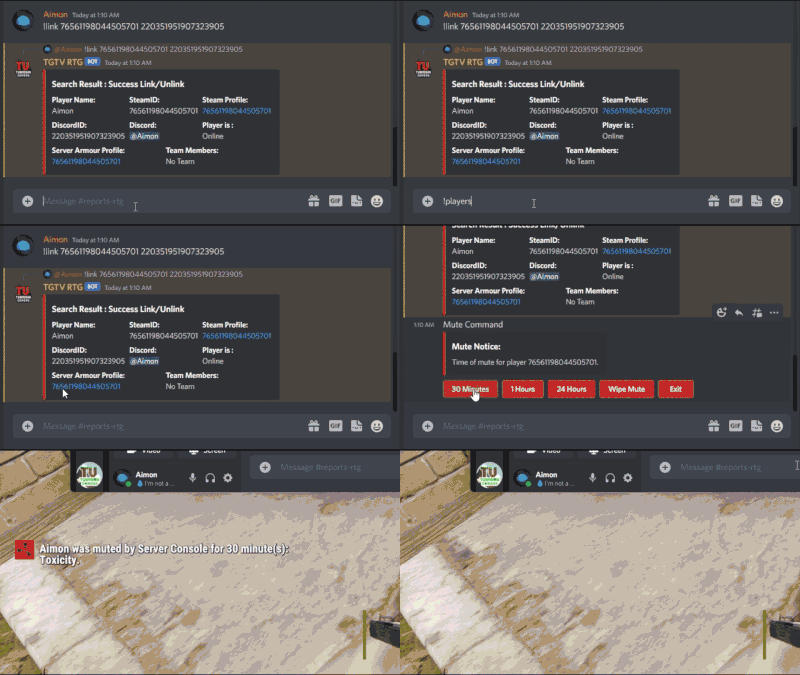
This plugin adds extra useful commands usable in a specific discord channel with a specific discord role, that gives access to an admin panel to do specific commands on players inside the server. Features : Gives access to a players list with a search interaction embedded in the buttons Gives a list of certain commands that you can use on each player (Kick, Ban, Mute, Unban, Unmute) Configurable to add each command's reason of command (If you're kicking a player you can put Toxicity or Warning as a reason for it) With each command that allows timed punishments like ban and mute, you are given access to 5 durations depending on the command. Adds a /auth command to DiscordCore that redirects to /dc join. Gives access to a search command in-game that shows different information about players. Optional : Gives access to buttons like Economics and Timed Permissions (configurable) Gives access to customizable buttons for commands on players (configurable) Permissions: DiscordAdminPanel.emberban allows player to use the /ember.ban command (Only functional with Ignore Ember set to false and Ember loaded) DiscordAdminPanel.emberunban allows player to use the /ember.ban command (Only functional with Ignore Ember set to false and Ember loaded) DiscordAdminPanel.search allows admins to search for players details (SteamID and DiscordID) In-Game Commands: /search <steamID/DiscordID> : Searches for player details like SteamID, DiscordID, and his discord name. Discord Commands: /dap players : Shows a list of online players on the server /search <steamID/SteamName/DiscordID> : Gives an extended search on players details Discord Interactions: When using !players, a list of online players will show up as interaction buttons. Once you use one of the buttons, an extensive search will show up and will give you more interaction buttons to use different commands on the searched player. Kick Command shows reasons after clicking on it : Similarly Ban Command and Mute Command shows periods then reason : (Reasons are configurable) Timed Permissions shows the roles then the period of time: (Both configurable) Economics shows the available commands then the amount : (amount is configurable) Configuration : { "LogFileName": "DiscordAdminPanel", "Bot token": "BOTTOKEN", "Ignore Roles": false, "Discord Channel ID where the command can be used": [ "1234567891234567890" ], "Embed's color": "#ff0000", "Show Clan Tag (Make sure clans is loaded)": false, "Show Oxide Groups": false, "Show Server Armour Profile (search)": false, "Show Team Info (search)": false, "Show Last Names (search) (PlayerInformations plugin required)": false, "Timed Permissions": { "Use Timed Permissions (true/false)": false, "Oxide Groups to give": [ "VIP", "Admin" ], "Time to give (Use 'd' for days, 'h' for hours, 'm' for minutes, 'wipe' for using wipe period)": [ "24h", "7d", "30d", "Wipe" ], "Discord Role ID (Can be left empty to use the first role id)": [] }, "Economics": { "Use Economics (true/false)": false, "Economy Amount (Use '.' for decimal)": [ "1500.5", "3000.3" ], "Discord Role ID (Can be left empty to use the first role id)": [] }, "Ban": { "Use Modal For Reasons (true/false)": true, "Time to give (Use 'd' for days, 'h' for hours, 'm' for minutes, 'wipe' for using wipe period)": [ "24h", "7d", "30d", "Wipe" ], "Ban Reasons (Careful not to use \" or ')": [ "Cheat", "Script", "Over Toxicity", "Abuse" ], "Ignore Ember": true, "Ember Global (Only usable if ember is loaded)": false, "Discord Role ID (Can be left empty to use the first role id)": [] }, "Mute": { "Use Modal For Reasons (true/false)": true, "Time to give (Use 'd' for days,'h' for hours, 'm' for minutes, 'wipe' for using wipe period)": [ "1h", "24h", "30d", "Wipe" ], "Mute Reasons (Careful not to use \" or ')": [ "Toxicity", "Racism" ], "Discord Role ID (Can be left empty to use the first role id)": [] }, "Kick": { "Use Modal For Reasons (true/false)": true, "Kick Reasons (Careful not to use \" or ')": [ "Toxicity", "Warning" ], "Discord Role ID (Can be left empty to use the first role id)": [] }, "Custom": { "Use Custom (true/false)": false, "Use Confirmation (true/false)": false, "Custom Commands (Use '{player}' for player id, 'command name' 'command to send on console')": { "dogdoo": "dog {player}", "pacifism": "pf {player}" }, "Discord Role ID (Can be left empty to use the first role id)": [] }, "Link Commands": [ "link" ], "Auth Commands": [ "auth", "authenticate" ], "Deauth Commands": [ "dapdeauth", "deauthenticate" ], "Search Commands": [ "search", "look" ], "logs": { "Log to console (true/false)": true, "Log to discord (true/false)": false, "Log Data Type (Embed/Simple)": "Embed", "Discord Extension Log Level (Verbose/Debug/Info/Warning/Error/Exception/Off)": "Info", "Delete message after command": true, "Delete message after interaction": true, "Log Discord Channel ID": "" }, "Discord Guild ID (optional if the bot is in one guild)": "", "Discord Role ID": [ "1234567891234567890" ] } How to install You can load the plugin directly with discord extension installed. Configure : Set Bot Token, ChannelID and RoleID in config. Reload Plugin. To Do List : Change the action flow of each command to work under a modal entirely (one action instead of many actions, Requires Discord Extension update) You can suggest new functionalities or plugin ideas on discord : aimon_ .$14.99