

-
Posts
35 -
Joined
-
Last visited
Content Type
Profiles
Warranty Claims
Downloads
Forums
Store
Services
Downloads Plus Support
DOWNLOADS EXTRA
Reels
Everything posted by AlexDev101
-
Hey please message me on discord https://discord.gg/G7BgXntn7S can sort this out
-
Hey, is there any specific reason you cannot run python files? i have no issue assisting you to setup the bot in a python enviroment feel free to join here https://discord.gg/G7BgXntn7S
-

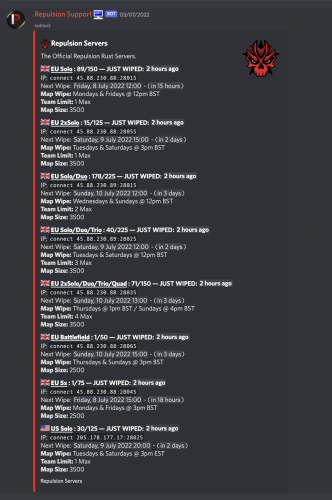
Rust - Discord Automated Wipe Countdown Bot
AlexDev101 commented on AlexDev101's file in Discord Bots
 python
 -
Version 1.0.0
12 downloads
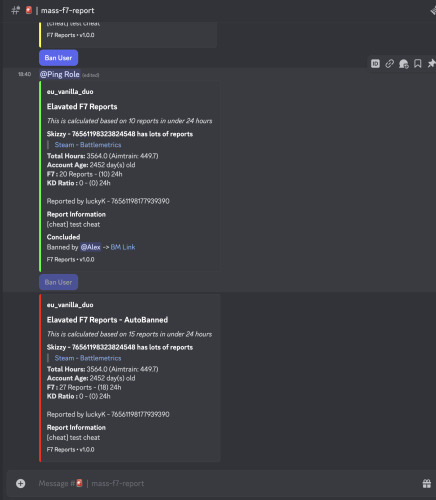
Bored of your simple battlemetrics trigger for F7 Reports? Want a fancy system to search previous f7's & ban from discord or autoban if they are going nuts? F7 Manager (w Autoban) Offers Generic F7 logging to discord (Customisable per guild -> can be sent to muliple channels if desired) Alert style Logging FULLY CUSTOMISABLE e.g. 4 reports in 12h 12 in 7d etc Ping Staff Ping Certain Discord Channel Provide basic account data (Age & Hours etc) Ban Button with pre written reason (Both length and reason can be overriden) Autoban optionality Custom Embed colour dependant on severity (Red for going crazy!) Report History searching /report-info ID Display all Previous f7 reports across your entire org Scroll with buttons (Next & Previous) Sorted by Date Sorted in Teaming Reports & Cheating Reports Bot also has a cool cycling status about how many f7's in the last hour,week,month all time etc Requirements An active subscrption to a Battlemetrics RCON Subscription is required Free database with mongo cloud DB (Instructions easily guide through setup) RCON access to the rust servers you wish to record F7 Data on Support & Setup A full instruction.pdf file is added however i can setup the system for a small fee for you. All support can be found @ https://discord.gg/G7BgXntn7S$29.99 -
Version 1.0.0
9 downloads
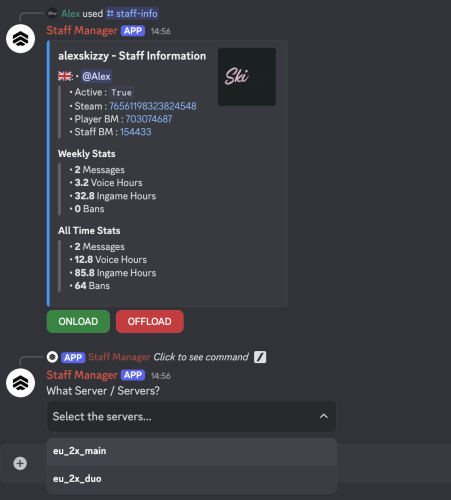
Bored of manually adding your staff ingame? Want to manage your entire staffflow via discord? Want to see hows on online and how active they are? Staff Manager Bot offers Online Staff Embed (Show who is on what server and for how long) Ability to onload and offload staff members (Run the raw commands on x servers) from discord - fully customisable Record staff activity data (Ingame Hours, Battlemetrics Bans, Discord Voice Hours, Discord Voice Messages) Send weekly staff activity reports to discord with leaderbords on each stat Send weekly activity reports per member to dms All the data is automatically calculated and reported weekly upon setup. Commands /Staff-Info - Retrieve a users informaton & activity /Onload-Staff-Member - Onload a staff member /Offload-Staff-Member - Offload a staff member /Add-Staff-Member - Add a member into the staff database /Remove-Staff-Member - Remove a staff member from the staff database NB : You can onload and offload users through the staff info command using "ONLOAD" & "OFFLOAD" buttons A BATTLEMETRICS subscription is a requirements for this product to work How does it work? Discord Stats - Discord info like, messages & ingame hours is recorded via any guild the bot is in with permissions to see the messages / voice channels Ingame Activity - This is recored via battlemetrics, for hours under the servers with your ORGID Bans - This is again done via battelmetrics comparing their staff profile vs the number of bans filtered to ORGID Onloading & Offloading + Online Staff Display - An RCON connection is used to run these raw commands & to fetch the users currently on the server This is a discord.py project using MongoDB, all instructions on setup are provided and how to setup a FREE database instance Support & Setup A full instruction.pdf file is added however i can setup the system for a small fee for you. All support can be found @ https://discord.gg/G7BgXntn7S$25.99 -
 will work fine if it’s on top of the same clans one
 -
Hey does this work on top of the clans plugin? can discuss in more depth and make sure it works how you wish if you reach out on discord https://discord.gg/phsnEuEV3Q
-
Version 1.0.1
12 downloads
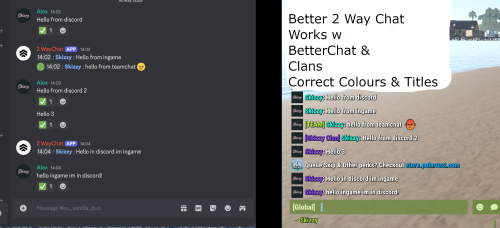
Want to offer your players a way to talk back from discord and have it look as they were ingame and log your chat to discord (teamchat toggleable)? Correct profile picture, name, clantag etc? Better 2 way chat offers Player channel - Log chat and talk back as if the user was typing ingame (fetches the correct info from the steam api) Example Here Staff channel - Log chat and talk back under a predetermined image and title e.g. "Chat Moderator: " Works with: Better Chat - Reads chat groups - Colours & Titles Clans Plugin - Reads ClanTags Components : Discord Bot- This handles the rcon connection the server, logging chat messages and "sending back" any messages from discord Server Plugin - This recieves the messages from the discord bot and fetches info such as betterchat/clans data then formats and sends the 'fake message' ingame How does know who is who? A basic linking system is included (/link-accounts steam64, /unlink) to match the steamprofile to the discord user. A custom linking system can be intergrated easily -> see last few pictures easy intergration with any basic linking api! I can intergrate your current linking system api for 5$ @ https://discord.gg/G7BgXntn7S Support & Setup A full instruction.pdf file is added however i can setup the system for a small fee for you. All support can be found @ https://discord.gg/G7BgXntn7S$15.99 -
hey mate, didnt see this one of your discord bot tokens is wrong
-

Version 1.0.1
49 downloads
Simple script to manage multiple pop bots and a global one for rust game servers in discord NB : If your not using a bot container : You will need to install python and git (must be 3.7+) (https://www.youtube.com/watch?v=XF_rklW9XkU&ab_channel=CBTNuggets) 1. Go to https://discord.com/developers/applications, create a new bot application 2. Go to O2Auth - > URL Generator -> Select bot & invite the bot to your discord 3. Go to BOT -> reset token -> input token in the config Example Config { "RefreshRate":10, "GlobalBotDiscordToken":"", "Servers":[ { "name":"server_name_1", "ip":"168.100.161.191", "rcon_port":28065, "rcon_password":"", "discord_bot_token":"" }, { "name":"server_name_2", "ip":"168.100.161.191", "rcon_port":28085, "rcon_password":"", "discord_bot_token":"" } ] } 5. Input your rust game info, serverip, rcon port and password 6. Install requirements run **pip install -r requirements.txt** in your console 7. Run the main.py file to run the script NB - The server names must be unique for the script to work Suggested hosts -> https://serverstarter.host/ or anything offering a simple bot container - Python is key!$4.99 -
Hey please join here and message me for support https://discord.gg/G7BgXntn7S
-
Changed Status from Pending to Closed
-
answered on discord
-
This error is something to do with your username / password try changing them and make sure to not use an special characters
-
Changed Status from Pending to Closed
-
Changed Status from Pending to Closed
-
please check the Readme.md or message me direct https://discord.gg/G7BgXntn7S
-
Changed Status from Pending to Closed
-
Hey this is because you haven't whitelisted the ip as the readme says you need to do, please seek support https://discord.gg/G7BgXntn7S
-
Changed Status from Pending to Closed
-
Readme file is provided? seek support here https://discord.gg/G7BgXntn7S
-
make sure you have ran pip install -r requirements.txt please seek support at https://discord.gg/G7BgXntn7S
-
Hello please message me on discord at alexskizzy i can personally assist you with any errors you have experienced or join here https://discord.gg/G7BgXntn7S
-
Changed Status from Pending to No Response
-
What battlemetrics perms + discord perms does the bot need?
AlexDev101 replied to BekerMelk aimtraining.net's Support Report in Support
Changed Status from Pending to Not a Bug
