

-
Posts
92 -
Joined
-
Last visited
Content Type
Profiles
Warranty Claims
Downloads
Forums
Store
Services
Downloads Plus Support
DOWNLOADS EXTRA
File Comments posted by ShadoW6
-
-

it is a chance to restore regular timer like it is in Vanila mixing table?
also I make a test and looks like the plugin not works
i give permission to make Warm i put correct items and quantity in the mixing table and press Try Brewing - nothing happen
Ok the problem is not with the plugin it self but with incorrect config file
here is fixed
file and how this works-
 1
1
-
-

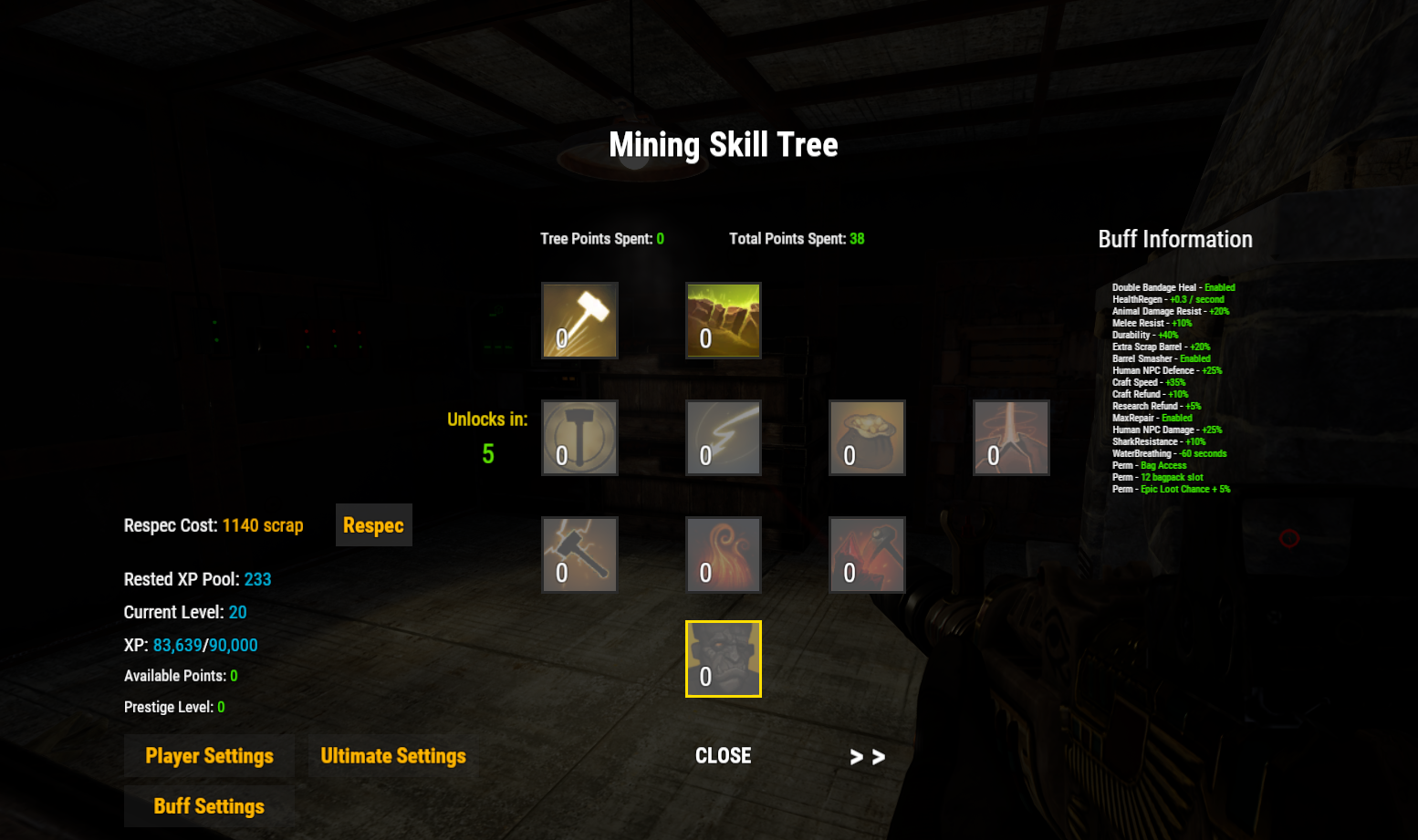
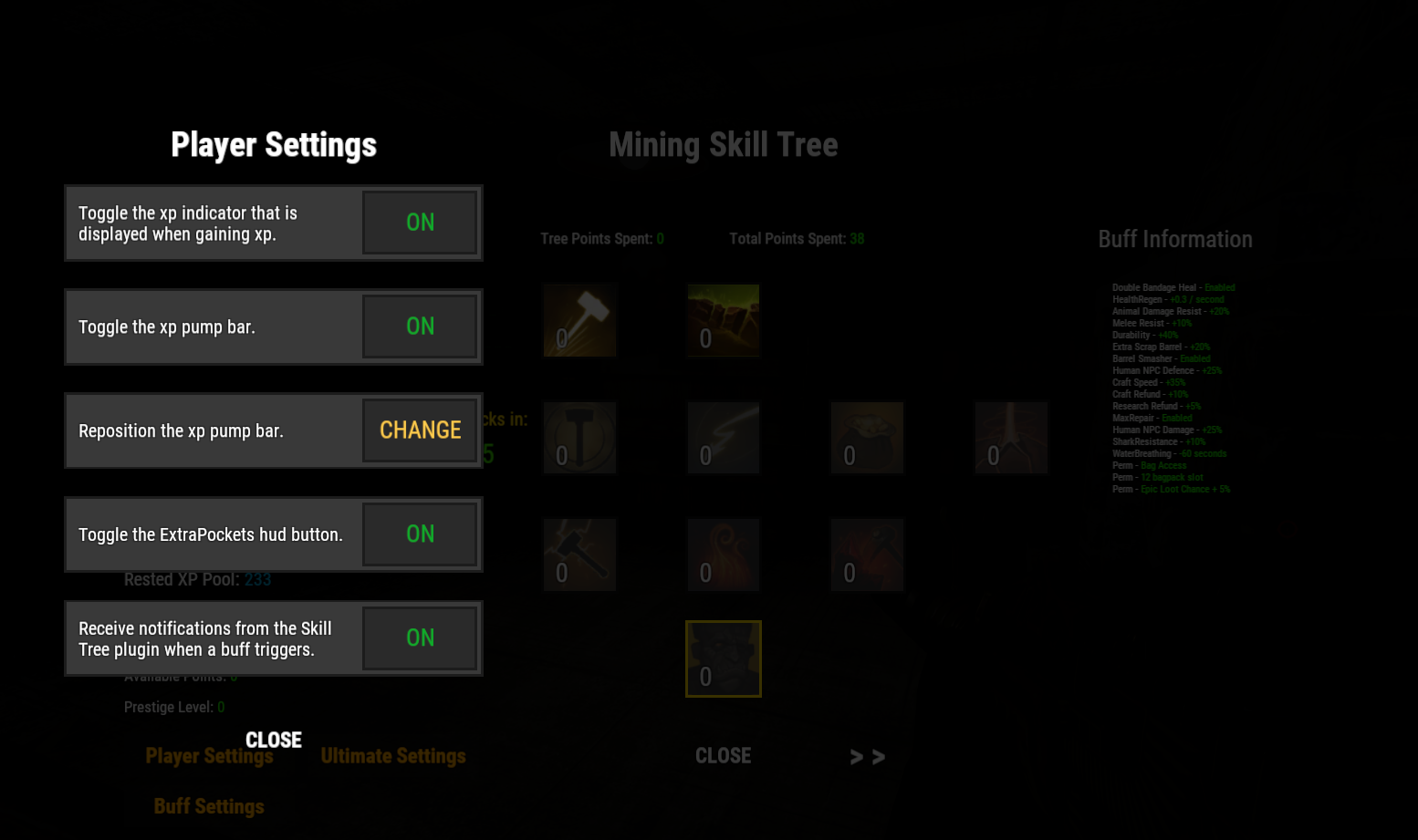
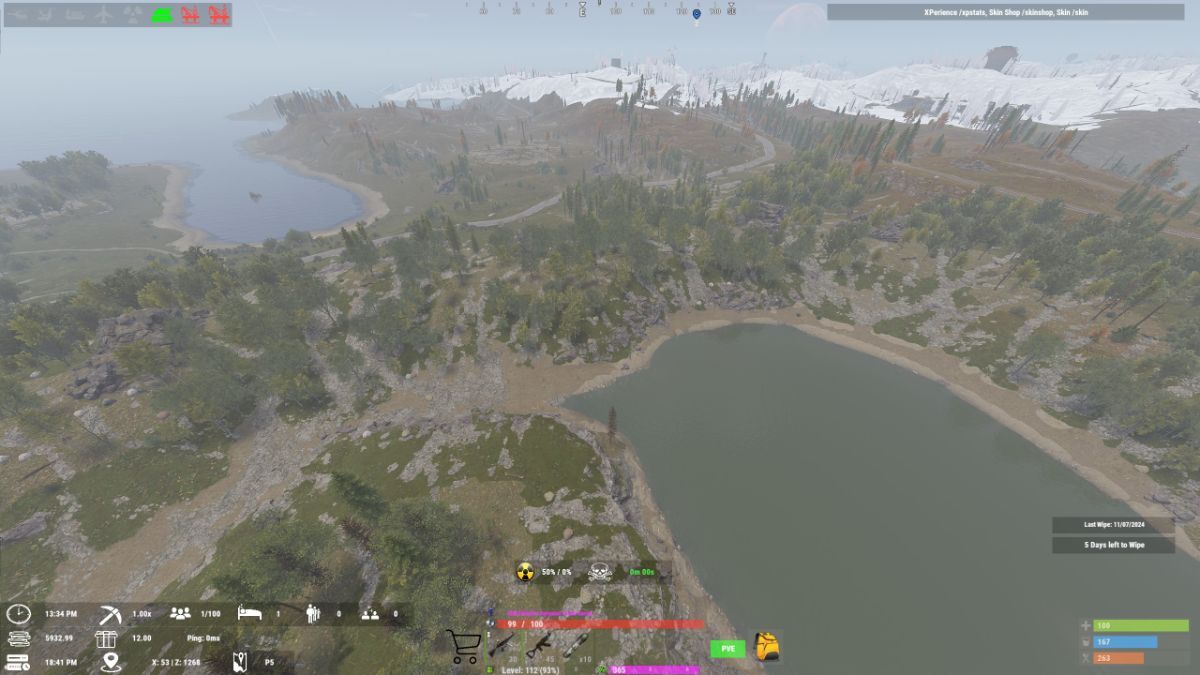
1) open Skill Tree and Press on "Player Settings"
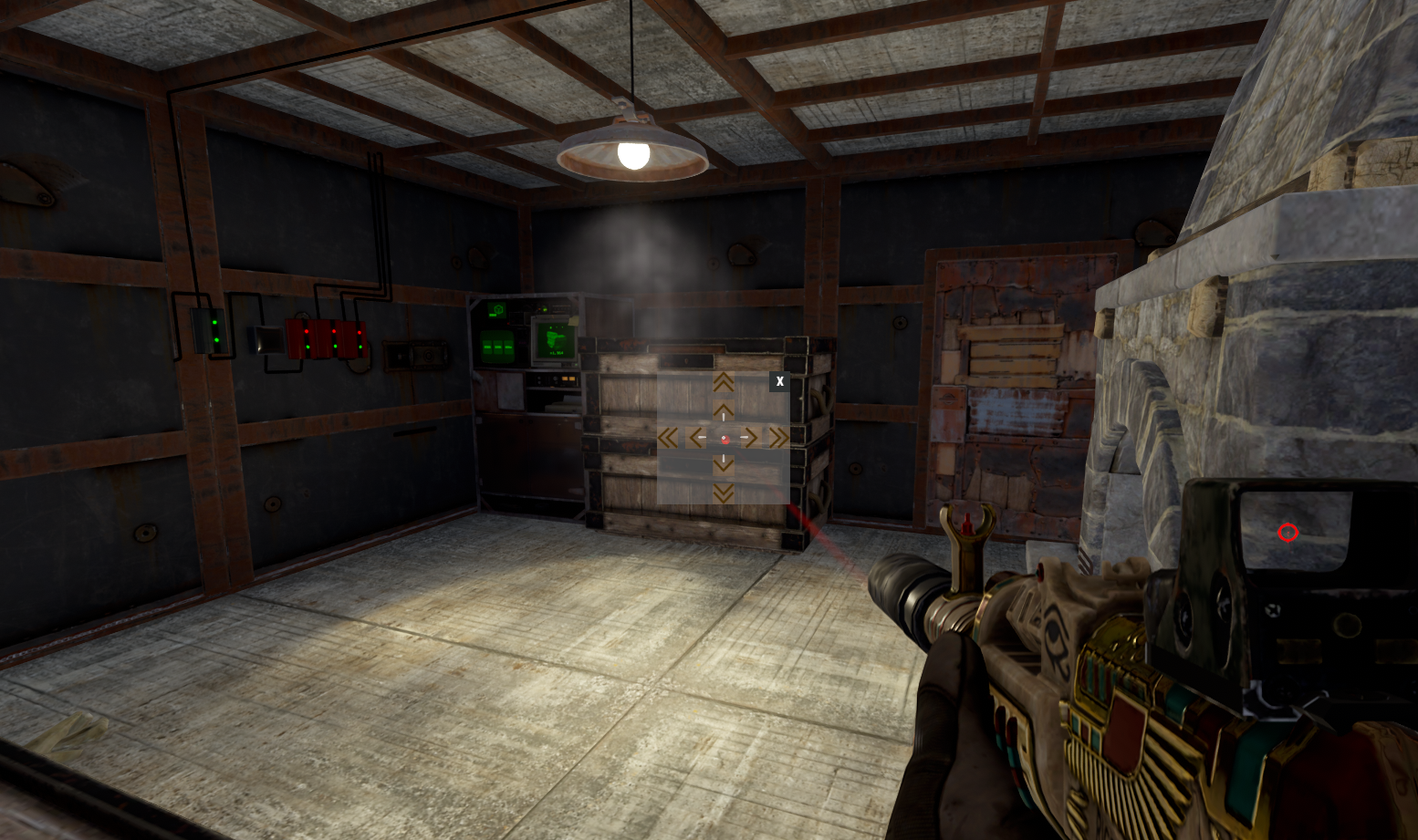
3) press on Reposition the xp pump bar " CHANGE"
3) Use arrow on the center to place Xp BAR1)

2)
3)
-
1
-
-

OK guys all start works after remove the upgrade furnace plugin.
-
-
 On 1/18/2025 at 6:11 PM, Tstew said:
so in theory i can change it to one of the prefabs covered on my loottable plugin and theyll work off that table?
change it here to one of those in the npcspawn config?
if you will mess up with HEAVY loot there will bore problems, like Silo monuments and Oil Rig (both)
so better will be put this
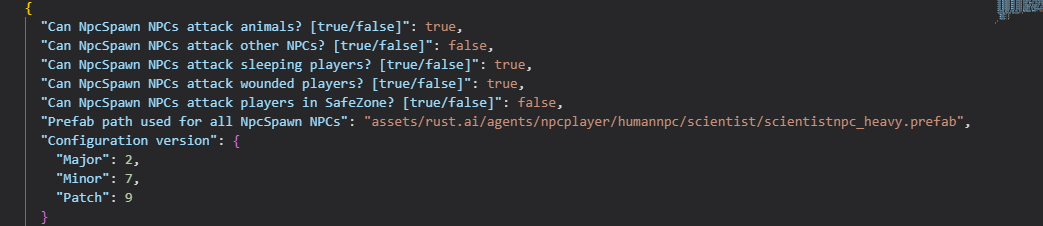
assets/rust.ai/agents/npcplayer/humannpc/scientist/scientistnpc_junkpile_pistol.prefab
then mess with loot for junkpile and you will not mess with other loot in some monument
-
look inside NPCSpawn. And change there. Better NPC just use oilrig prefab better npc do not use this to change loot.
to change that you need change prefab inside NPCSpawn. to any prefab you want
assets/rust.ai/agents/npcplayer/gingerbread/gingerbread.aidesign.asset assets/rust.ai/agents/npcplayer/gingerbread/gingerbreadmelee.aidesign.asset assets/rust.ai/agents/npcplayer/humannpc/banditguard/npc_bandit_guard.prefab assets/rust.ai/agents/npcplayer/humannpc/scientist/bandit_guard.aidesign.asset assets/rust.ai/agents/npcplayer/humannpc/scientist/heavyscientist-1.asset assets/rust.ai/agents/npcplayer/humannpc/scientist/heavyscientist-2.asset assets/rust.ai/agents/npcplayer/humannpc/scientist/heavyscientist-3.asset assets/rust.ai/agents/npcplayer/humannpc/scientist/heavyscientist-4.asset assets/rust.ai/agents/npcplayer/humannpc/scientist/heavyscientist.oilrig.aidesign.asset assets/rust.ai/agents/npcplayer/humannpc/scientist/scientist 1.asset assets/rust.ai/agents/npcplayer/humannpc/scientist/scientist.arctic1.asset assets/rust.ai/agents/npcplayer/humannpc/scientist/scientist.arctic2.asset assets/rust.ai/agents/npcplayer/humannpc/scientist/scientist.arena.roam.aidesign.asset assets/rust.ai/agents/npcplayer/humannpc/scientist/scientist.asset assets/rust.ai/agents/npcplayer/humannpc/scientist/scientist.bradleyapc.aidesign.asset assets/rust.ai/agents/npcplayer/humannpc/scientist/scientist.bradleyapc.stationary.aidesign.asset assets/rust.ai/agents/npcplayer/humannpc/scientist/scientist.cargoship.aidesign.asset assets/rust.ai/agents/npcplayer/humannpc/scientist/scientist.cargoship.turret.aidesign.asset assets/rust.ai/agents/npcplayer/humannpc/scientist/scientist.ch47.gunner.aidesign.asset assets/rust.ai/agents/npcplayer/humannpc/scientist/scientist.excavator.aidesign.asset assets/rust.ai/agents/npcplayer/humannpc/scientist/scientist.junkpile.aidesign.asset assets/rust.ai/agents/npcplayer/humannpc/scientist/scientist.militarytunnels.aidesign.asset assets/rust.ai/agents/npcplayer/humannpc/scientist/scientistnpc_arena.prefab assets/rust.ai/agents/npcplayer/humannpc/scientist/scientistnpc_bradley_heavy.prefab assets/rust.ai/agents/npcplayer/humannpc/scientist/scientistnpc_bradley.prefab assets/rust.ai/agents/npcplayer/humannpc/scientist/scientistnpc_cargo.prefab assets/rust.ai/agents/npcplayer/humannpc/scientist/scientistnpc_cargo_turret_any.prefab assets/rust.ai/agents/npcplayer/humannpc/scientist/scientistnpc_cargo_turret_lr300.prefab assets/rust.ai/agents/npcplayer/humannpc/scientist/scientistnpc_ch47_gunner.prefab assets/rust.ai/agents/npcplayer/humannpc/scientist/scientistnpc_excavator.prefab assets/rust.ai/agents/npcplayer/humannpc/scientist/scientistnpc_full_any.prefab assets/rust.ai/agents/npcplayer/humannpc/scientist/scientistnpc_full_lr300.prefab assets/rust.ai/agents/npcplayer/humannpc/scientist/scientistnpc_full_mp5.prefab assets/rust.ai/agents/npcplayer/humannpc/scientist/scientistnpc_full_pistol.prefab assets/rust.ai/agents/npcplayer/humannpc/scientist/scientistnpc_full_shotgun.prefab assets/rust.ai/agents/npcplayer/humannpc/scientist/scientistnpc_heavy.prefab assets/rust.ai/agents/npcplayer/humannpc/scientist/scientistnpc_junkpile_pistol.prefab assets/rust.ai/agents/npcplayer/humannpc/scientist/scientistnpc_oilrig.prefab assets/rust.ai/agents/npcplayer/humannpc/scientist/scientistnpc_patrol_arctic.prefab assets/rust.ai/agents/npcplayer/humannpc/scientist/scientistnpc_patrol.prefab assets/rust.ai/agents/npcplayer/humannpc/scientist/scientistnpc_peacekeeper.prefab assets/rust.ai/agents/npcplayer/humannpc/scientist/scientistnpc_roam_nvg_variant.prefab assets/rust.ai/agents/npcplayer/humannpc/scientist/scientistnpc_roam.prefab assets/rust.ai/agents/npcplayer/humannpc/scientist/scientistnpc_roamtethered.prefab assets/rust.ai/agents/npcplayer/humannpc/scientist/scientist.nvgm2.asset assets/rust.ai/agents/npcplayer/humannpc/scientist/scientist.nvgm.asset assets/rust.ai/agents/npcplayer/humannpc/scientist/scientist.nvg.roam.aidesign.asset assets/rust.ai/agents/npcplayer/humannpc/scientist/scientist.patrol.aidesign.asset assets/rust.ai/agents/npcplayer/humannpc/scientist/scientist.peacekeeper.aidesign.asset assets/rust.ai/agents/npcplayer/humannpc/scientist/scientist.roam.aidesign.asset assets/rust.ai/agents/npcplayer/humannpc/scientist/scientist.spawnmovetovector3.aidesign.asset assets/rust.ai/agents/npcplayer/humannpc/testloadout.asset assets/rust.ai/agents/npcplayer/humannpc/tunneldweller/npc_tunneldweller.prefab assets/rust.ai/agents/npcplayer/humannpc/tunneldweller/npc_tunneldwellerspawned.prefab assets/rust.ai/agents/npcplayer/humannpc/tunneldweller/tunneldwellera.asset assets/rust.ai/agents/npcplayer/humannpc/tunneldweller/tunneldwellerb.asset assets/rust.ai/agents/npcplayer/humannpc/underwaterdweller/npc_underwaterdweller.prefab assets/rust.ai/agents/npcplayer/humannpc/underwaterdweller/underwaterdwellera.asset assets/rust.ai/agents/npcplayer/humannpc/underwaterdweller/underwaterdwellerb.asset assets/rust.ai/agents/npcplayer/npcplayertest.prefab assets/rust.ai/agents/npcplayer/pet/frankenstein02.asset assets/rust.ai/agents/npcplayer/pet/frankensteinpet_corpse.prefab assets/rust.ai/agents/npcplayer/pet/frankensteinpetmarker.prefab assets/rust.ai/agents/npcplayer/pet/frankensteinpet.prefab assets/rust.ai/agents/npcplayer/pet/pet.assist.aidesign.asset assets/rust.ai/agents/npcplayer/pet/pet.combat.aidesign.asset assets/rust.ai/agents/npcplayer/pet/pet.follow.aidesign.asset assets/rust.ai/agents/npcplayer/pet/pet.guard.aidesign.asset assets/rust.ai/agents/npcplayer/pet/pet.idle.aidesign.asset assets/rust.ai/agents/npcplayer/pet/pet.movetopoint.aidesign.asset assets/rust.ai/agents/npcplayer/pet/sound/frankenstein-monster-vocal-attack.asset assets/rust.ai/agents/npcplayer/pet/sound/frankenstein-monster-vocal-confused.asset assets/rust.ai/agents/npcplayer/pet/sound/frankenstein-monster-vocal-groan.asset assets/rust.ai/agents/npcplayer/pet/sound/frankenstein-monster-vocal-groan-soft.asset assets/rust.ai/agents/npcplayer/pet/sound/frankenstein-monster-vocal-hurt.asset assets/rust.ai/agents/npcplayer/pet/sound/frankenstein-monster-vocal-ordered.asset assets/rust.ai/agents/npcplayer/scarecrow.aidesign.asset assets/rust.ai/agents/npcplayer/scarecrow.dungeon.noroam.aidesign.asset -
-
-
sticks not works. unable to smelt any things.
you can put all this item, but nothing came back.
Plugin for now are useless.
Request money back, plugin is broken and deleted from the server and download.
-
 1
1
-
-
Ok i try smelt Large Sulfur Crystal and Large Metal Piece
and consume wood and this custom ore but nothing came back-
1
-
-
I don't get it, or I misunderstand something, why you making server's P2W that is insane, why you buy a plugins, and not giving all player same chance. why only VIP can have access to all where players without VIP don't have access to 10% of any thing, i was play on moded server's where most of them are P2W. P2W wipe for example, they make rules put some statistic ranking and ppl that even not there or they on the bottom of the list and they win wipe (they are just not wiped) when someone who are on the top of that ranking get wiped all even BP's so you see guys there is some servers where they don't care about EVEN OWN RULES, Kobani better if your server will not have any VIP ranks. I was see how good player left one of that server that i write about. He cant understand why ppl who buy a VIP rank win the wipe instead of place on the ranking
7 minutes ago, Kobani said:Could you add the possibility that only ViP's and other selected groups have access to certain skins?
Any way it will be your server and you make the rules, so be careful with this because many good players will left the server and can make worse that no one new will came.
-
1
-
-
-
 28 minutes ago, tortuga said:
ZMAZ just does the same thing that DynamicPVP does. Generates a zone identifier to be able to plug into WM. Any which way, ZMAZ doesnt work for cargo, heli or bradley. DynamicPVP is required for those zones. If it doesnt work, it doesnt work. I just want to prevent pve players from grubbing the heli loot, bradley or cargo with no consequence.
there is a plugin for that so who take down Heli, Bradley or hack hackable crate is locked to this one player.
I already have something like that for Hackable crate. Also you cant have one plugin for everything.
https://umod.org/plugins/loot-defender -
4 minutes ago, tortuga said:
The issue that I have is dynamic pvp uses a number to create a zone for heli or bradley. Its not a static name. I can make a bubble, it will say you have entered a pvp zone, but warmode wont work if it doesnt have the zone identifier from ZoneManager if I am correct. So Dynamicpvp made the zone pvp, but the zone identifier is not the same every day.
i have Zone Manager Auto Zone that map all monument to PvP zone, also there is a monument names for that, i never was try play around with Dynamic PvP. I'm not sure that War Mode works at all with Zone Manager Auto Zone. when i was testing on my test server, when you enter to any monument status from PvE zome (entire map) change to PvP only when you are in monument. When you left monument the status are back to PvE from PvP. you can try this way and test with some friend that War Mode works properly with Zone Manager Auto Zone.
-
-
4 hours ago, tortuga said:
What are people doing for dynamicpvp zones? Heli, bradley and crates generate a unique zone id everytime and to my knowledge cant be named like the static monuments.
you can rename any monument in the game by using Rust Edit to edit map and even monument to add own things on the map, like custom monument, puzzle and extend existing monuments to add extra crate spawn, npc spawn any almost any thing you need to add.
about dynamicpvp there is a plugin that is named dynamicpvp.
about bradtey to add to any monument you need create path with two node - why with two node becose with one it will not work and will give error.
for Heli there is a plugin that you can call Heli. -
another solution you can use Zone Manager Auto Zone that will create PvP zone on Monuments.
Rust plugin is big field of experiment, so you need find own solution, because none of the server owner will give you a hand wit this only who make the plugin can help, but for 100% sure none of the server owner will keep his secret for him self.
-
1
-
-
if you have truepve so just remove truepve and all should be ok
-
34 minutes ago, dustyhansen said:
LOL
you say LOL. OK that is strange i connect now again to that server and did not show. any way i just a tester so i have no idea what owner of that server did. or what he was doing.
any way i suggest to him to disable the command /flag and i think he did that.
-
 1
1
-
-
I just give you suggestion. so maybe you can look again.
-
hello.
I have a suggestion about this plugin , will be good if this select screen PvE PvP will not show after reconnect. also this should be select at one time because as i know many players will abuse this /flag i know there is a timer but like i say this should be one time select no swap from PvE to PvP and vice versa. -
I don't know how this can't work for you. i was import many skins even if they was not approved.
import one skin for specific item where you don't have to much skins, use /sip "skinID" without ""
after press enter in chat you will see information.
open skinner by /sb and use the item for witch you import the skin (mostly new skin will be at last page)
or paste skinID that you import in search and you will know you have this skin imported or no
about the wipe its no possible as i wipe my server as well and all skin that was imported before wipe are sill present in the game. -
-
-
/sip "skinID"
example
/sip 3360432356
/cip "collectionInport"
example
/cip 3117540077
-

also would be nice to see more gathering in statistic add scroll for that or make like in Xstatistic
-
1
-
-
 11 minutes ago, CommandoSoldat said:
Hey, i’m glad to hear you like the plugin and its features so far. Please read through the description here in Codefling including the Command section it will be all explained. You have to set a config parameter to true in order for it to work. Please see the description for more detail about it
I like your works this put Rust in better position. Why i say like that, because as far all players in Rust let's say 90% of players play alone, afraid to by killed by other players and be looted. Your plugin gives to rust somethings more than only RPG, It force players to trade talk between and push to make some interaction. because most things in Rust is just get resources build the base, and wait to be Offline raided or raid someone that's all about in rust, gave have really massive future not only as PVP but as PvE too.
So if you will make a nice UI for your plugin then this will be really nice and good plugin also what i was thinking player should have at list to select two profession. And option to change but if he will change the profession his previous profession will be wiped like tech tree, this is just my idea do extend the plugin. -

Redesign any of this plugin are nightmare like for me, the biggest problem are move something from place to place like some button or even some background it is a disaster, and yes i have experience with C#, a bit with C++, but i be honest, making this plugins, you must be patient. for example i was moving some part of the UI to different place, And i was shock how this Anchors and Offsets works.
it not will be better use size and position instead Anchors and Offset. -
On 8/12/2024 at 12:15 PM, Mevent said:
Yes, you're right, we need to make it possible to roll back everything.
Regarding the external editor, many people do not want to go beyond the game, into some editors, etc. It's really convenient for many to set up everything inside the game. Yes, we are limited by the possibilities of the game itself, but I'm trying to make the most of it.
look how is done Rust Edit it is an external program to make custom map with all asset that are inside the game at first run you setup where is your rust game then you can open map from your server and add custom things like monuments new road river, in almost same way works Alphaloot you where is you game then config file from loottable for example and boom you have it.
So please.-
 1
1
-
-
ok i will look on that maybe I will find a way
-
hello i watch the video how this plugin working, and I'm impress. But how player can select profession, i did not see any UI for that.
-
i never had any issue with this plugin. maybe because i do not mess with config files to much.
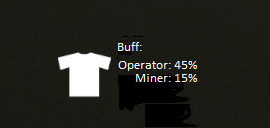
any way imthenewguy i have a question how i can increase the size of the font for Buff Information? is there some settings in the config that i can do this? -
Hello guys Plugin Looks really nice but need be more customizable.
So lets hope this plugin will be better in the future. -
6 hours ago, imthenewguy said:
Do you use a recycler plugin?
yes I have some recycler plugin but only for adding a items that cannot be recycled so i can just add them to recycler.
any way i look in to config file (thanks for tip from ShiiZo) he direct me to make them impossible to put in recycler. in the config for Epic loot i find a line that is responsible for that so I set as false.this is how that was loos
"Allow players to recycle EpicLoot items in the recycler (no components will be received, only EpicScrap)?": true
so i change to this
"Allow players to recycle EpicLoot items in the recycler (no components will be received, only EpicScrap)?": false
ok guys this is not a solution because this just do not prevent from put epic loot item in recycler, it just thread them as regular item.
and all what you getting is just regular resources, just don't give Epic Scrap.
in my opinion they just should be block by Epic Loot plugin from put them in recycler. -
hello guys.
I have no idea is this is bug or glitch.
When i put more item that are with epic loot, in recycler i start getting resource as well.
Do you notice that
Example if is one in recycler all is good you just get epic scrap.
But if you put more this items in recycler you will get resource like cloth and other things i have no ide what with weapon but with all cloth is problem. -
that will be somethings new
-
I be honest i have no idea as I do not use any VIP ranks on my server for any one (server is F2P)
-
1
-
-
On 12/26/2024 at 1:43 AM, imthenewguy said:
Plugin doesn't add epic scrap to loot table. It is obtained from salvaging epic items. If you want to add it to th container, you will need a third party loot plugin.
I short out now all so all is ok now.
Any way would you like to expand epic loot for divers like add oxygen usage reduce. -
make sure the plugin is loaded, if on server console you don't see any errors connected to Skill Tree then probably you mess with permissions.
read the description there is all what you need to know and how to do this and ofcorse you must have installed Oxide or Carbon without this none of the plugin will work. good luck.-
1
-
-

ok i got it and is working grate so the configuration are not that hard.
so I will need a bit work on that.
and i will not set 100% because it will make too easy.-
1
-
-
will be nice
-
how add epic scrap from epic loot? just give me an example with barrel
-
guys how wi can make an women npc
 that will do the same things it is possible to do that, if yes can some one tell how to make this.
-
3 hours ago, S0TR said:
To make NPCs more "aggressive" and/or stronger, go into your data/BetterNpc files and modify how your Npcs function. For example, you would modify these lines inside the data/BetterNpc/
"Enabled? [true/false]": true,
      "Minimum numbers - Day": 25,
      "Maximum numbers - Day": 25,
      "Minimum numbers - Night": 25,
      "Maximum numbers - Night": 25,
      "NPCs setting": {
        "Names": [
          "Pollar Bear Man"
        ],
        "Health": 130.0,
        "Roam Range": 50.0,
        "Chase Range": 30.0,
        "Attack Range Multiplier": 1.0,
        "Sense Range": 35.0,
        "Target Memory Duration [sec.]": 10.0,
        "Scale damage": 0.8,
        "Aim Cone Scale": 1.2,
        "Detect the target only in the NPC's viewing vision cone? [true/false]": true,
        "Vision Cone": 135.0,
        "Speed": 6.5,
        "Minimum time of appearance after death (not used for Events) [sec.]": 1200.0,
        "Maximum time of appearance after death (not used for Events) [sec.]": 1800.0,
        "Disable radio effects? [true/false]": true,
        "Is this a stationary NPC? [true/false]": false,
        "Remove a corpse after death? (it is recommended to use the true value to improve performance) [true/false]": true,
        "Wear items": [
          {
            "ShortName": "coffeecan.helmet",
            "SkinID (0 - default)": 2503956851
          },
          {
            "ShortName": "hoodie",
            "SkinID (0 - default)": 2730818336
          },
          {
            "ShortName": "pants",
            "SkinID (0 - default)": 2730813975
          },
          {
            "ShortName": "shoes.boots",
            "SkinID (0 - default)": 2530900232
          },
          {
            "ShortName": "burlap.gloves",
            "SkinID (0 - default)": 2454377972
          }
        ],
        "Belt items": [
          {
            "ShortName": "smg.mp5",
            "Amount": 1,
            "SkinID (0 - default)": 0,
            "Mods": [
              "weapon.mod.holosight",
              "weapon.mod.flashlight"
            ],
            "Ammo": ""
          },
          {
            "ShortName": "syringe.medical",
            "Amount": 1,
            "SkinID (0 - default)": 0,
            "Mods": [],
            "Ammo": ""
          }
        ],
Increase these values to have faster, stronger, and more alert Npcs
	    "Health": 130.0,
        "Roam Range": 50.0,
        "Chase Range": 30.0,
        "Attack Range Multiplier": 1.0,
        "Sense Range": 35.0,
        "Target Memory Duration [sec.]": 10.0,
        "Scale damage": 0.8,
        "Aim Cone Scale": 1.2,
        "Detect the target only in the NPC's viewing vision cone? [true/false]": true,
        "Vision Cone": 135.0,
        "Speed": 6.5,
Increase their "Health" to be harder to kill
"Roam Range" so they can walk around further
"Chase Range" so they can follow your players further
"Attack Range Multiple" makes them hit harder at distance
"Sense Range" gives them the ability to sense and attack your players from father away (probably the option you're looking for in terms of aggression)
"Target Memory" allows them to remember and stay aggressive to a certain player for longer
"Scale Damage" increases their overall damage
"Aim Cone" determines the spread of their shots (smaller cone = more accurate)
"Detect The Target Only In The NPCs Viewing Cone" determines if you want players to sneak around NPCs or if the NPC senses and attacks them right away
"Vision Cone" is the NPC sight
"Speed" is how fast they move in general.
Change these lines to give your NPCs better armor, weapons and other goodies such as F1 grenades and more
        "Wear items": [
          {
            "ShortName": "coffeecan.helmet",
            "SkinID (0 - default)": 2503956851
          },
          {
            "ShortName": "hoodie",
            "SkinID (0 - default)": 2730818336
          },
          {
            "ShortName": "pants",
            "SkinID (0 - default)": 2730813975
          },
          {
            "ShortName": "shoes.boots",
            "SkinID (0 - default)": 2530900232
          },
          {
            "ShortName": "burlap.gloves",
            "SkinID (0 - default)": 2454377972
          }
        ],
        "Belt items": [
          {
            "ShortName": "smg.mp5",
            "Amount": 1,
            "SkinID (0 - default)": 0,
            "Mods": [
              "weapon.mod.holosight",
              "weapon.mod.flashlight"
            ],
            "Ammo": ""
          },
          {
            "ShortName": "syringe.medical",
            "Amount": 1,
            "SkinID (0 - default)": 0,
            "Mods": [],
            "Ammo": ""
          }
        ],
thank you so much. have a Merry Christmas and Happy new Year. And same for all CF user and Community.
-
 1
1
-
-
i was hope that the npc will be more aggressive than regular npc, but they not.
so my question is how to make them more aggressive. -
-

so if I good understand, if lets say some item get bonus +% from Epic Loot and +% from Item Perks they will have +% from both of them?
-
is this plugin will work with epic loot ?
-
imthenewguy
what about the problem that i have with command /st -
1 hour ago, mcsigu said:
Hey,
I get this error when I start SkillTree, it says it's loaded but it doesn't actually work.
Failed to call hook 'OnServerInitialized' on plugin 'SkillTree v1.5.10' (ArgumentException: An item with the same key has already been added. Key: ducttape)
at System.Collections.Generic.Dictionary`2[TKey,TValue].TryInsert (TKey key, TValue value, System.Collections.Generic.InsertionBehavior behavior) [0x0015a] in <f98723dd4586469db5213ec59da723ca>:0
at System.Collections.Generic.Dictionary`2[TKey,TValue].Add (TKey key, TValue value) [0x00000] in <f98723dd4586469db5213ec59da723ca>:0
at Oxide.Plugins.SkillTree.OnServerInitialized (System.Boolean initial) [0x00ae0] in <4f584cb3358b405689234dc82f6c1876>:0
at Oxide.Plugins.SkillTree.DirectCallHook (System.String name, System.Object& ret, System.Object[] args) [0x098b3] in <4f584cb3358b405689234dc82f6c1876>:0
at Oxide.Plugins.CSharpPlugin.InvokeMethod (Oxide.Core.Plugins.HookMethod method, System.Object[] args) [0x00079] in <206a0f2c6ee141f38e2ad549cde44d70>:0
at Oxide.Core.Plugins.CSPlugin.OnCallHook (System.String name, System.Object[] args) [0x000de] in <beb2b64691c64e2b95b99491bd85442c>:0
at Oxide.Core.Plugins.Plugin.CallHook (System.String hook, System.Object[] args) [0x00060] in <beb2b64691c64e2b95b99491bd85442c>:0
Loaded plugin Skill Tree v1.5.10 by imthenewguydo you have any other plugin with skill's if yes try unload them and load only Skill Tree plugin.
in my case i have one issue with this plugin, I'm unable to use /st command in chat, but if i use /skilltree command all is ok so i have no idea where is the problem maybe some other plugin use same command so I will look at that. -
yes I have this plugin.
-
last question. Is this plugin will work with Spawn NPC ?
-
what about custom monuments?
-
i watch the video how this plugin looks, and I'm impress, would like to know before buy, how to this will spawn around whole map i do not mean only monuments, i mean random spawns on the map.
-
quick question. What is the maximum Level cap or there is no limit?
-
no matter it's not make any sense now for me. player can skin item then stack
-
1
-
-
Hi Scalbox.
i wandering it is a chance to add something like skinID to the config file? -
10 hours ago, Malkizid said:
That would be a nice option to be able to remove "bad" or "unwanted" skins because of problems with some skins displaying image or text correctly.
I know it takes lots of work to remove those skins from the .json configuration file but it can be done,
also Beee has a nice free tool to help you manage skins when you have many skins in your configuration file: https://codefling.com/tools/editor-for-skinboxskinnerskins this makes it simpler to add and remove skins, as you can see an image preview.yes i was test this program, i was see in skinshop that is free that somehow the plugin remove all skins that don't have image. but i would like see in Skinner something like was done in Skin Controller. just a simple option that we can manage the skin way easier. that will be good.
-
1
-
-

after update plugin with new rust update
Error while compiling PuzzlePoints: Cannot convert method group 'PositionToString' to non-delegate type 'string'. Did you intend to invoke the method? | Line: 595, Pos: 71-
1
-
-
here is the same ver. 1.61
maybe problem is with custom map
Error while compiling PuzzlePoints: 'PhoneController' does not contain a definition for 'PositionToGridCoord' | Line: 595, Pos: 77
but some other plugins was have same issue ''PhoneController' -
I have right to give my opinion after reading other user issue, and you are not a GOD or someone who will tell me what I can or what I can't
do not tell other ppl what they can and what they can't because you are ignorant, you have your opinion and i respect that, but as far you do not respect other (who not own the plugin) that is ignorance. And now it will keep me away from buy this plugin, because of your ignorance.
Don't Underestimate Me, I know more than I say, Think more than i spoke and notice more than you realize.
BB end of story. End this conversation with you. -
did you read other ppl comments, and why you quote my post. look at other user post. LoL
-
1
-
-
i be honest I'm not mine they set or not, because i do not play at all on other server's as I do other things on my own server.
-
14 minutes ago, ChristopherS said:
What do you mean that this isn't as stable and causes issues with other plugins?
This plugin is really stable and causes zero issues for me.some server have an issue with this Skill Tree plugin. i was see that when you killing some animals and not only it don't give exp. when with XPerience plugin i never had that issue even on my own server. So please don't tell other that this plugin are good, just read the other user comment's, And yes if you use only that one plugin Skill Tree then is fine.
-
Plugin looks good, as i was see this plugin on some server, bur personally i like XPerience plugin (more stable and do not make issue with other plugins in the server)
-
1
-
-

be honest plugin are nice and done well, but it will kill gameplay, no more players in game only auto bot.
-
1
-
-
what i would like to see in this plugin is option to delete skin that don't have image. Because when they don't have image "icon" they just don't work. so the Delete option will be good.
Another one thing what i notice, is when you apply some skin they don't apply in sec, and when this happen impact game frame rate, so what i mean the game it's like a froggy (I have hope some ppl understand what do I mean).-
1
-
-

hello guys. is this plugin works? As far i watched video the plugin is so simple to use and even for configuration. So i really would like to know is this plugin is still Up To Date?
-
-
i just put the Puzzle Point two days ago on the server. and on the start all was ok the problem appear if i go to the same monument even after an 1h latter.
Also i did not change any thing in the .cs file or even in the config .json
-
1
-
-
(12:35:31) | [Puzzle Points] giving scrap: 25
(12:35:31) | [Puzzle Points] --using rewards
(12:35:31) | [Puzzle Points] shadow swiped a green card at Airfield (W21)!
And when Blue card swipe get this no reward. Monument names are in oxide\plugin folder(12:37:51) | Failed to call hook 'OnCardSwipe' on plugin 'PuzzlePoints v1.5.6' (InvalidOperationException: Collection was modified; enumeration operation may not execute.)
at System.Collections.Generic.List`1+Enumerator[T].MoveNextRare () [0x00013] in <8ce0bd04a7a04b4b9395538239d3fdd8>:0
at System.Collections.Generic.List`1+Enumerator[T].MoveNext () [0x0004a] in <8ce0bd04a7a04b4b9395538239d3fdd8>:0
at Oxide.Plugins.PuzzlePoints.OnCardSwipe (CardReader cardReader, Keycard card, BasePlayer player) [0x00076] in <0143962f21594fb7bfaa2d0330ccda49>:0
at Oxide.Plugins.PuzzlePoints.DirectCallHook (System.String name, System.Object& ret, System.Object[] args) [0x0015e] in <0143962f21594fb7bfaa2d0330ccda49>:0
at Oxide.Plugins.CSharpPlugin.InvokeMethod (Oxide.Core.Plugins.HookMethod method, System.Object[] args) [0x00079] in <206a0f2c6ee141f38e2ad549cde44d70>:0
at Oxide.Core.Plugins.CSPlugin.OnCallHook (System.String name, System.Object[] args) [0x000de] in <beb2b64691c64e2b95b99491bd85442c>:0
at Oxide.Core.Plugins.Plugin.CallHook (System.String hook, System.Object[] args) [0x00060] in <beb2b64691c64e2b95b99491bd85442c>:0
-
i still getting
[Weather] Invalid API key. Please see https://openweathermap.org/faq#error401 for more info.
api key was created a 2 days ago -

ok thanks again i will try.
Thanks for help i add all where it should be and now works perfect, you are the man
-
1
-
-
Thank you HunterZ for advice, but i still don't really understand
so here is an example if i good understand you:
zone_data.json create this"definitions": [ { "Name": "Lighthouse #1", "Radius": 80.0, "Radiation": 0.0, "Comfort": 0.0, "Temperature": 0.0, "SafeZone": false, "Location": "1843.313 0 -1278.681", "Size": "0 0 0", "Rotation": "0 0 0", "Id": "lighthouse_1", "ParentID": null, "EnterMessage": "WARNING: You are now entering a PVP Zone", "LeaveMessage": "Returning to PVE Area", "Permission": null, "EjectSpawns": null, "Enabled": true, "Flags": "AutoLights" }, { "Name": "Lighthouse #2", "Radius": 80.0, "Radiation": 0.0, "Comfort": 0.0, "Temperature": 0.0, "SafeZone": false, "Location": "-1240.894 0 -1984.331", "Size": "0 0 0", "Rotation": "0 0 0", "Id": "lighthouse_2", "ParentID": null, "EnterMessage": "WARNING: You are now entering a PVP Zone", "LeaveMessage": "Returning to PVE Area", "Permission": null, "EjectSpawns": null, "Enabled": true, "Flags": "AutoLights" }, { "Name": "Mining Outpost #1", "Radius": 50.0, "Radiation": 0.0, "Comfort": 0.0, "Temperature": 0.0, "SafeZone": false, "Location": "-1494.454 16.13187 225.0785", "Size": "0 0 0", "Rotation": "0 0 0", "Id": "miningoutpost_1", "ParentID": null, "EnterMessage": "WARNING: You are now entering a PVP Zone", "LeaveMessage": "Returning to PVE Area", "Permission": null, "EjectSpawns": null, "Enabled": true, "Flags": "AutoLights" },
so i need put Name in SuperPVxInfo.json that is locate in oxide\data?
{
  "Mappings": {},
  "PvpEvents": {}
}
so if im wrong please correct me
{
  "Mappings": {Lighthouse #1, Lighthouse #2, Mining Outpost #1},
  "PvpEvents": {}
}





Skill Tree
in Plugins
Posted
hi imthenewguy
I look for change the font size for this scrolled lust and i find max size should be at list 12 not 8, but there is a problem when I change to 12 not all buff are showed on this scrolled UI so I will be grate full for assist in this case.