


Works with
Compatible add-ons, packages, or tools that pair well with this resource.
-
 Image Library Optional
 -
 Notify Optional
 -
 Economics Optional
 -
 Server Rewards Optional
 -
 Simple Embed Builder Bot Optional
About News Broadcaster
The ultimate, modern, and highly-customizable announcement system for your Rust server.
Keep your players informed with sleek, intuitive UI popups and real-time Discord webhooks. Whether it's a server wipe, an upcoming event, a rule change, or a massive update, NewsBroadcaster delivers your message with style.
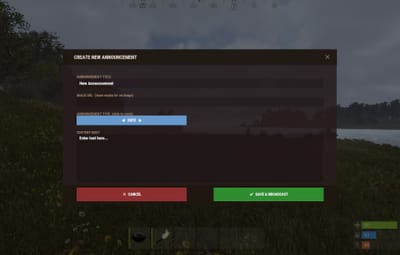
Forget editing clunky JSON files and wrestling with config reloads. NewsBroadcaster features a fully functional in-game Admin Editor UI, allowing you to create, edit, theme, and broadcast announcements directly from your Rust server!
 Key Features:
-
Modern UI: Features smooth UI components and a premium, non-intrusive aesthetic.
-
In-Game Admin Editor: Create, edit, and delete announcements seamlessly without ever leaving the game or touching a configuration file.
-
Instant Discord Webhooks: Automatically broadcast your in-game announcements straight to your Discord server with beautifully formatted rich embeds. Supports custom role mentions (@everyone, <@&RoleID>).
-
Dynamic Theme Engine: Switch between gorgeous pre-made color schemes (Default, Dark, Ocean, Rust) instantly via the in-game Admin menu, or create your own custom themes in the configuration.
-
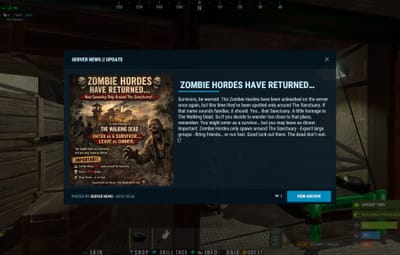
Smart Notifications: Send smaller toast-style notifications (with sound!) or full-screen popups depending on the urgency. Supports native UI or the popular Notify plugin.
-
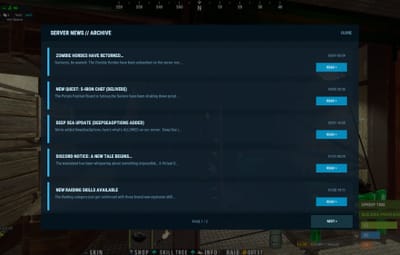
Player Archive & History: Players can easily view past announcements they might have missed using the clean, paginated archive menu.
-
Engagement Tracking: Players can "Like" (
 ) announcements, letting you gauge community interest in events or updates!
-
Image Support: Full integration with ImageLibrary to showcase banners or screenshots alongside your text to make your news pop.
-
Read & Like rewards: Pay players in items, RP (ServerRewards) and/or currency (Economics) for actually reading and liking your news. Once-per-announcement-per-player.
-
Pinned announcements: Keep server rules, wipe schedules or current events at the top of the archive with a coherent gold treatment (gold tint, gold "PINNED" chip, gold popup frame).
Commands
Player Commands:
-
/news - Opens the Announcement Archive and History UI.
Admin / Console Commands:
Requires newsbroadcaster.admin permission.
- news.admin — Opens the In-Game Admin Control Center (Create, Edit, Delete, change Themes).
-
news.show "Title" "ImageURL" "Text" [Type] — Quick-broadcast an announcement from console/RCON. Use - for ImageURL if you don't want an image.
- Types: Info, Warning, Alert, Event, Update
- news.delete <index> — Delete a specific announcement via console.
- news.trigger <SteamID/Name> [index] — Force-open an announcement popup for a specific player. Great for rules screens or welcome messages!
Configuration
NewsBroadcaster is designed to be plug-and-play, but offers deep customization for server owners who want everything perfect.
{
  "General": {
    "AutoCloseSeconds": 15,
    "EnableAutoClose": true,
    "ShowNewsOnConnect": true,
    "ServerName": "SERVER NEWS",
    "AnnouncementsPerPage": 5,
    "MaxStoredAnnouncements": 50
  },
  "Notification": {
    "Enabled": true,
    "UseNotifyPlugin": false,
    "NotifyType": 0,
    "Position": "Right",
    "Duration": 8,
    "NotificationSound": "assets/bundled/prefabs/fx/notice/loot.drag.fx.prefab"
  },
  "Discord": {
    "Enabled": false,
    "WebhookUrl": "YOUR_DISCORD_WEBHOOK_URL_HERE",
    "BotName": "Server News",
    "RoleMention": "@everyone"
  },
  "SelectedTheme": "Default",
  "Themes": {
    "Default": { "..." : "..." },
    "Dark": { "..." : "..." },
    "Ocean": { "..." : "..." },
    "Rust": { "..." : "..." }
  }
}
Permissions
- newsbroadcaster.view — Required to use /news and see popups. Grant to the default group so all players can see announcements.
- newsbroadcaster.admin — Required to access the Admin Editor UI and all console commands.
Rewards
Two independent reward bundles — one for reading an announcement (popup must stay open for ReadDelaySeconds) and one for liking it. Each bundle can grant any combination of:
-
Items — any Rust shortname (scrap, wood, metal.refined, …) with optional skin id
-
Points — RP via ServerRewards
-
Currency — via Economics
Rewards fire at most once per player per announcement. Inventory full? Items drop at the player's feet. ServerRewards / Economics not loaded? Items still apply, points/currency are silently skipped.
"ReadRewards": {
  "Items":    [ { "Shortname": "scrap", "Amount": 5 } ],
  "Points":   25,
  "Currency": 100.0
}
Old configs using bare item arrays are migrated automatically.
Pinned Announcements
Toggle the pin from the admin list — every row has a PIN / UNPIN button. Pinned posts get:
-
A gold tint and PINNED chip in the archive list
-
A matching gold pill in the admin list
A thin gold frame and PINNED chip on the popup itself
API Hooks
Other plugins can subscribe to:
OnNewsBroadcastvoid OnNewsBroadcast(Dictionary<string, object> ann)
OnNewsEditedvoid OnNewsEdited(Dictionary<string, object> ann)
OnNewsDeletedvoid OnNewsDeleted(Dictionary<string, object> ann)
OnNewsReadvoid OnNewsRead(BasePlayer player, Dictionary<string, object> ann)
OnNewsLikedvoid OnNewsLiked(BasePlayer player, Dictionary<string, object> ann, bool added)
The announcement payload contains: id, title, author, type, timestamp, date, text, imageUrl, likes, pinned.
void OnNewsBroadcast(Dictionary<string, object> ann)
{
    Puts($"[News] {ann["author"]} posted '{ann["title"]}' ({ann["type"]})");
}


.thumb.webp.79329c8220f41c4c008e33ef2cc9d733.webp)