Jump to content

Mushroom Event 1.2.5

$15.00
   (0 reviews)

4 Screenshots

  • 39.7k
  • 209
  • 67.28 kB
  • Update details
    v1.2.5
    Released
    Download size67.28 kB
    Total versions9
    Time between versions 727 days
    Typical update pace About every 173 days
    Freshness 69 days ago

Works with

About This File

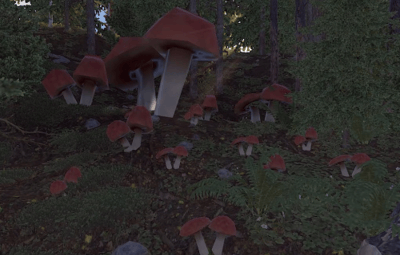
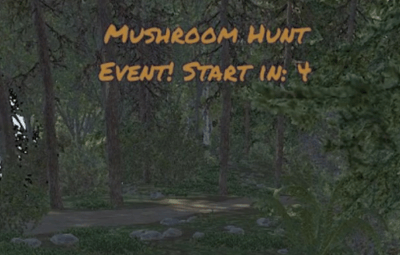
Your players still roof camping? Start mushroom Event, let them start fighting for the title of the best mushroom picker and win prizes for the first three places.

Permission

To assign a permission, use 'oxide.grant <user or group> <name or steam id>'

mushroomevent.admin  - Allow to using commands.


Commands

This plugin provides both chat and console commands using the same syntax. When using a command in chat, prefix it with a forward slash: `/`.

startme   - starts the countdown to the start of the mushroom event.
stopme   - Ends the event immediately, without giving away any prizes.
finishme - Ends the event immediately, with giving away any prizes.
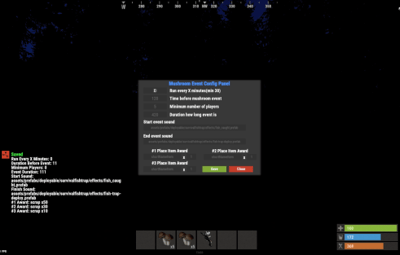
configme - Opens the configuration UI panel


Configuration

Quote


{
  "Run every X minutes": 120,
  "Minimum number of players": 3,
  "Time before mushroom event": 180,
  "Duration how long event is": 420,
  "Rewards for top 3 players": [
    {
      "ShortName": "scrap",
      "Amount": 50
    },
    {
      "ShortName": "scrap",
      "Amount": 30
    },
    {
      "ShortName": "scrap",
      "Amount": 10
    }
  ],
  "Start event sound": "assets/prefabs/deployable/survivalfishtrap/effects/fish_caught.prefab",
  "Finish event sound": "assets/prefabs/deployable/survivalfishtrap/effects/fish-trap-deploy.prefab",
  "Print Logs To Console": false
}

"Run every X minutes"

        How often is the event to be triggered. 0 means that auto start is disabled.

               Default Value:            30
               Disable Value:              0
               Recommended:        120  (every 2 hours)

"Minimum number of players"

        How many players are to be on the server for the mushroom  event to begin.

        Default Value:        3
        Disable Value:          0
         Recommended:      5

"Time before mushroom  event"

        Time in seconds for which the mushroom  event starts.

        Default Value:        180
        Disable Value:          0
         Recommended:      300 (5 minutes)

"Duration how long event is"

        Duration of the mushroom  event

        Default Value:         420
        Disable Value:          Link
         Recommended:       300 (5 minutes)

"Rewards for top 3 players"

          Items that will go to the best anglers.
        The first 'ShortName' and 'Amount' belongs to the best player, each subsequent one is rewards for subsequent places.

        Default Value:

"Rewards for top 3 players": [
      {
         "ShortName": "scrap",
         "Amount": 50
      },
      {
         "ShortName": "scrap",
         "Amount": 30
      },
      {
         "ShortName": "scrap",
         "Amount": 10
      }
   ],

        Disable Value: null

"Rewards for top 3 players": null,

         Recommended:        

"Rewards for top 3 players": [
      {
         "ShortName": "scrap",
         "Amount": 500
      },
      {
         "ShortName": "scrap",
         "Amount": 300
      },
      {
         "ShortName": "scrap",
         "Amount": 100
      }
],

"Start event sound"

        Path to in-game prefab sound. Run when the mushroom  party begins.

        Default Value:        "assets/prefabs/deployable/survivalfishtrap/effects/fish_caught.prefab"
        Disable Value:         ""
         Recommended:      ""

"Finish event sound"

        Path to in-game prefab sound. Run after the mushroom  event is over.

        Default Value:        "assets/prefabs/deployable/survivalfishtrap/effects/fish-trap-deploy.prefab"
        Disable Value:         ""
         Recommended:      ""

"Print Logs To Console"

        Display logs when the event starts, ends, and who will take first place.

        Default Value:         false
        Disable Value:          false
         Recommended:       false


Language

Default English FIle

{
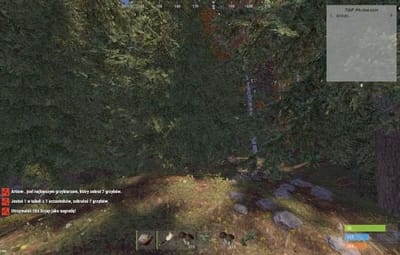
  "noOneStart": "Wow, no one played so no one won.",
  "bestPlayer": "{0} is the best mushroom picker with {1} mushrooms.",
  "playerStats": "You placed {0} of {1} with gather {2} mushrooms.",
  "rewardMessage": "You received {0}x {1} as an award!",
  "timeMessageToEvent": "<color=#326de3>Mushroom Event</color>: The mushroom event starts in {0} minutes."
}


Hooks

   void OnMushroomEventStartCountdown() -  Call when starts counting down to the start of the fishing event.
   void OnMushroomEventStarted() -  Call when the fishing event begins.
   void OnMushroomEventEnded() -  Call when the fishing event is over.
   void OnMushroomEventUIClosed() -  Call when UI disappears from players screen.(Five seconds after fishing event is over)


Credits

@Billy Joe Thanks for your UI Tool(I hate it but i love it still)

Edited by ArtiIOMI


What's New in Version 1.2.5   See changelog

Released

🍄 Fixed problem with String[]


License

Copyright (c) 2021 ArtiIOMI

By purchasing this resource:
• you get support for future updates
• you can't sell anywhere
• you can't transfer to third parties
• you can't exchange for other resources purchased by someone
• you can't edit the code for subsequent use in coloboration with other plugins

If you violate these rules, you will be removed from buyers on all my resources, as well as in relation to you, support for my work will be terminated!


Carbon Compatible

Yes

Hide About Header

No
  • Like 1
  • Love 1

User Feedback

This area is for discussion and questions. Please use the support area for reporting issues or getting help.

Recommended Comments

Covfefe

Posted

Video please. Does using baskets make you pick them up faster?

ArtiIOMI

Posted

25 minutes ago, Covfefe said:

Video please. Does using baskets make you pick them up faster?

Picking mushrooms has no time block for picking between them. The basket is not needed. I'll try to add a video tomorrow.

Kobani

Posted

Can you add the ability to record your own sounds for the start and end of the event? Like how to do it in The_Kiiiing's Halloween mod? Would be really great.

  • Like 1
ArtiIOMI

Posted

10 hours ago, Kobani said:

Can you add the ability to record your own sounds for the start and end of the event? Like how to do it in The_Kiiiing's Halloween mod? Would be really great.

I will consider it.

  • Like 1
Taracmeden

Posted

This may be complicated, but is there any way that you can either add an option to increase the mushroom population or do something like the halloween event where they spawn near players in ever denser quantities until the event is over?

If this is overly complicated, then no need.

ArtiIOMI

Posted

20 hours ago, Taracmeden said:

This may be complicated, but is there any way that you can either add an option to increase the mushroom population or do something like the halloween event where they spawn near players in ever denser quantities until the event is over?

If this is overly complicated, then no need.

I plan to investigate how this works and how to change the populations of individual groups.

  • Like 1
Markiii

Posted

Does this spawn larger mushrooms like in the screenshot or just normal ones on the wild?

  • Like 1
ArtiIOMI

Posted (edited)

On 1/27/2023 at 8:39 PM, Markiii said:

Does this spawn larger mushrooms like in the screenshot or just normal ones on the wild?

Normal ones only.

Edited by ArtiIOMI
damnpixel

Posted

Your new fix wont work


(20:38:51) | Error while compiling: MushroomEvent.cs(1115,24): error CS1061: Type `Network.Server' does not contain a definition for `write' and no extension method `write' of type `Network.Server' could be found. Are you missing an assembly reference?


ArtiIOMI

Posted

6 minutes ago, damnpixel said:

Your new fix wont work


(20:38:51) | Error while compiling: MushroomEvent.cs(1115,24): error CS1061: Type `Network.Server' does not contain a definition for `write' and no extension method `write' of type `Network.Server' could be found. Are you missing an assembly reference?


Works fine on mine. Are you sure you have version 1.0.2?
image.png.4c1268c0207799ac957ef0e218afc643.png

damnpixel

Posted (edited)

7 minutes ago, ArtiIOMI said:

Works fine on mine. Are you sure you have version 1.0.2?
image.png.4c1268c0207799ac957ef0e218afc643.png

Try again and get back to me.


Now it works. Thank you ❤️

Edited by damnpixel
  • Like 1
pandemia

Posted

Make it possible to make the name of the item, shortname, skin ID, and quantity in the reward for the event

ArtiIOMI

Posted

2 hours ago, pandemia said:

Make it possible to make the name of the item, shortname, skin ID, and quantity in the reward for the event

I can do it.

ArtiIOMI

Posted

On 2/3/2023 at 6:48 PM, pandemia said:

Make it possible to make the name of the item, shortname, skin ID, and quantity in the reward for the event

Added! 🥳

ssurry

Posted

Can't I play alone? Is it necessary to have 3 or more people to play? I want to test it on my own, but there is no response when I enter the command.

ArtiIOMI

Posted

On 9/28/2023 at 11:07 PM, ssurry said:

Can't I play alone? Is it necessary to have 3 or more people to play? I want to test it on my own, but there is no response when I enter the command.

"Minimum number of players": 0 << Change it to 0

ssurry

Posted (edited)

5 hours ago, ArtiIOMI said:

"Minimum number of players": 0 << Change it to 0

doesn't work .. 😭

Edited by ssurry
ssurry

Posted (edited)

This plugin is 100% flawed. The /startme command doesn't work. I've only seen it work once. wtf?

Edited by ssurry
ssurry

Posted

please reply

ArtiIOMI

Posted

On 9/30/2023 at 6:54 AM, ssurry said:

This plugin is 100% flawed. The /startme command doesn't work. I've only seen it work once. wtf?

To you try type startme in consola?

ssurry

Posted

1 hour ago, ArtiIOMI said:

To you try type startme in consola?

doesn't work

ArtiIOMI

Posted

22 hours ago, ssurry said:

doesn't work

Any error, ss?

ssurry

Posted

4 hours ago, ArtiIOMI said:

Any error, ss?

idk......... It just doesn't work. It's weird.

mcsigu

Posted

same for me - writing it to the console doesn't start it, event never starts. config is the only command acceptable

Create an account or sign in to comment

You need to be a member in order to leave a comment

Create an account

Sign up for a new account in our community. It's easy!

Register a new account

Sign in

Already have an account? Sign in here.

Sign In Now

About Us

Codefling is the largest marketplace for plugins, maps, tools, and more, making it easy for customers to discover new content and for creators to monetize their work.

Downloads
2.9m
Total downloads
Customers
11.8k
Customers served
Files Sold
168.5k
Total sales
Payments
3.7m
Processed total
×
×
  • Create New...

Important Information

We have placed cookies on your device to help make this website better. You can adjust your cookie settings, otherwise we'll assume you're okay to continue.