
Vinni_TV_'s Wishlist
-

$12.00
Hide And Seek
Spawn a Hidden NPC somewhere in the world and challenge your players to get moving and find it.
Whoever discovers the NPC gets rewarded with a loot bag filled with random items from your custom loot table. Features include: Customizable NPC Outfit. Dynamic NPC spawning across monuments and world locations. Customizable Loot, Put exclusive loot here to get your players moving. Optional delayed respawn of the NPC after being found, if false, it will respawn next load. Top Seekers leaderboard to showcase the best seekers. Discord logging to announce the Seeker find. The NPC can emit a sound chosen from random from an effect pool on interval, and a message notifying players that the NPC is still waiting to be found.
Commands
All Require HideAndSeek.Admin
Cheat - Teleports the user to the NPCS Pos. SeekBag - Gives the user a Mystery Bag useful for testing the loot table. TopSeekers - Announces Top Seekers to chat. WipeHideAndSeekStats - Wipes all Hide And Seek Data. Config
{ "Wipe Top Seekers On Wipe?": false, "Log Top Seekers to Discord?": false, "How Often To Announce Top in Minutes": 180, "Announce Still Hiding Message?": false, "How Often To Announce Still Hiding in Minutes": 30, "Send a Sound Effect at NPC Position?": true, "How Often To Send An Effect in Minutes": 1, "Effect Pool": [ "assets/bundled/prefabs/fx/player/howl.prefab", "assets/prefabs/clothes/diving.tank/effects/scuba_inhale.prefab" ], "Respawn NPC After Find?": true, "Respawn Delay in Minutes": 1, "Discord Webhook": "", "Loot Bag Name": "Mystery Bag", "Loot Bag SkinID": 3603950776, "How many bags to give the Seeker": 1, "Min Item Selections": 1, "Max Item Selections": 2, "OpenEffect": "assets/bundled/prefabs/fx/item_unlock.prefab", "Loot Table": [ { "Item ShortName": "supply.signal", "Item Custom Name": "Hide And Seek Signal", "Item SkinSkinID": 0, "Min Amount": 1, "Max Amount": 3, "Pull Probability": 50 }, { "Item ShortName": "rifle.ak", "Item Custom Name": "Hide And Seek AK", "Item SkinSkinID": 0, "Min Amount": 1, "Max Amount": 1, "Pull Probability": 50 } ], "NPC Clothing Options": [ { "Shortname": "hat.boonie", "Skin": 3603597669 }, { "Shortname": "tshirt", "Skin": 3603594060 }, { "Shortname": "pants", "Skin": 3603595648 }, { "Shortname": "jacket", "Skin": 3603594891 }, { "Shortname": "shoes.boots", "Skin": 3603596326 } ] } Lang
{ "StillHiding": "The <color=yellow>Hidden NPC</color> is still somewhere out there...", "FoundNPCBroadcast": "[<color=yellow>HIDDEN NPC</color>] <color=#ffe135>{0}</color> found the Hidden NPC!", "CheatMessage": "You cheater :/", "TopBanner": "<color=#ff8000>Top Hide & Seek Players</color>", "RankEntry": "\n<color=#ffe135>Rank <color=#b8ff35>{0}</color> - <color=#ffe135>{1}</color> - <color=#ffe135>Finds: <color=#b8ff35>{2}</color></color></color>" }
-
$25.00
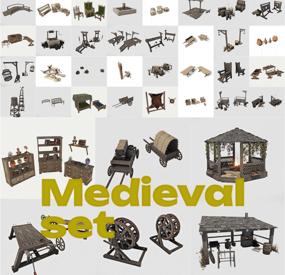
Medieval set
🛡️ Medieval Decor Pack — a set of medieval-style prefabs for Rust ⚔️
Add a touch of old-world flair to your locations! This pack is designed for those who want to imbue their maps with a medieval atmosphere, creating villages, castles, markets, or themed RP zones.
🏰 What's included in the set:
The set includes 81 prefabs stylized to resemble medieval life:
🛏️ Beds, wardrobes, and shelves — furniture for houses, taverns, and barracks
🛒 Carts and crates — elements for trade and warehouses
🍽️ Tableware and utensils — details that enliven the interior
🌿 Garden decorations — flower beds, decor, and small objects
🔗 Torture instruments and dark attributes — perfect for prisons, dungeons, and dark corners of the world
All elements are compact, carefully crafted, and ready to use — you can easily decorate any area of the map, making it more lively and atmospheric.
🧰 Rust Edit is required for use.
🎯 Perfect for RP servers, fantasy projects, events, castle and city decorations, or just to make your map unique.
_____________________________________________
Unzip the archive to the directory where you installed RUST EDIT
...\Rust Edit\CustomPrefabs
-
$14.98
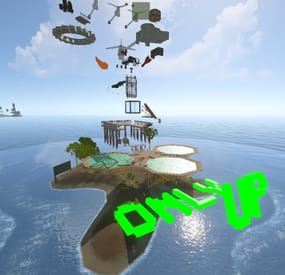
Rust OnlyUP Challenge ver2
A follow-up to my previous work is now complete.
This is a simple game where players climb upward using character-control skills and various gimmicks.
On my server, I use it in combination with racetrack, and it has been extremely well received.
Important: There are several required steps for proper implementation.
Please purchase only if you are able to read and complete all of the instructions below.
This prefab requires editing with RustEdit, so it is assumed that you are able to place prefabs into a MAP. This prefab uses electrical circuits. Implementing Oxide.Ext.RustEdit is mandatory. After placing the prefab into your MAP, several tasks must be completed in order for the course to function correctly:
・You must construct the two Catapults located on the prefab with a hammer. (They require wood and metal fragments.)
・To allow players to use the Ballista on the prefab, please provide them with items such as Piercer Bolts. You may place them in small boxes or distribute them directly using a kits plugin.
Please make sure that all of the above can be carried out before purchasing.
※ You may edit the prefab, but redistribution is prohibited.
※ The screenshots are from Version 1.0 and may differ slightly from the latest version.
-
$10.00$7.00APBoatSpeed
APBoatSpeed — Custom boats with adjustable speed
Overview
APBoatSpeed adds customizable boats (Rowboat, RHIB, Tugboat, and Kayak placeholder)
to your Rust server, allowing per-boat speed multipliers,
item or direct spawn modes, and a modern UI with images, statuses, and cooldown timers.
The plugin supports RU/EN localization and keeps boats linked to each player
to prevent duplicates from being spawned.
Key Features
Custom boat types: Rowboat, RHIB, Tugboat — each with its own speed multiplier and permission. Two delivery modes: as an inventory item (emulated via kayak with a unique Skin ID) or directly spawned near the player. Smart water spawning: adjusts spawn distance for large boats (RHIB/Tug). Player-linked boats: ensures one boat per type per player; old boats are removed automatically. Stored in oxide/data/APSystem/APBoatSpeed/PlayerBoats.json. Localization: English and Russian (auto-detected from player language). Floating name above boats: configurable distance, color, size, and height. Cooldown system: global and per-boat cooldowns displayed in UI. Commands (default)
/boat <name> [amount] — gives a boat item or spawns it (depending on config).
Additional actions:
/boat <name> 1 spawn — force spawn near the player
/boat <name> 1 destroy — destroy player’s boat of that type
/boat <name> 1 toitem — return boat to inventory item
/boatlist — list all available boats with their speed multipliers
/boatui — open graphical user interface
Commands can be customized in the config (BoatCommand, ListCommand, UICommand).
Permissions
apboatspeed.use — allows using plugin commands
apboatspeed.admin — admin-level access
apboatspeed.settings — UI theme & chat notification settings (gear)
Per-boat permissions:
apboatspeed.speedster — Speedster Rowboat apboatspeed.turbo — Turbo Rowboat apboatspeed.speedrhib — Speed RHIB apboatspeed.rocketrhib — Rocket RHIB apboatspeed.speedtugboat — Speed Tugboat apboatspeed.fasttugboat — Fast Tugboat apboatspeed.turbotugboat — Turbo Tugboat apboatspeed.speedptboat — PT Boat apboatspeed.speedsubsolo — Solo Submarine apboatspeed.speedsubduo — Duo Submarine Config
{ "Configuration Version": { "Major": 0, "Minor": 0, "Patch": 140 }, "Command Settings": { "Command to get boat": "boat", "Command to list boats": "boatlist", "Show receive message": true, "Automatically place boat in water": true, "Water search radius (meters)": 50.0, "Boat spawn distance from player (meters)": 8.0, "Give cooldown (seconds)": 5.0, "Spawn cooldown (seconds)": 3.0 }, "Display Settings": { "Show boat name": true, "Minimum display distance (meters)": 2.0, "Maximum display distance (meters)": 15.0, "Display update interval (seconds)": 0.2, "Text color (R G B A)": "0 1 1 1", "Font size": 14, "Height above boat (meters)": 2.0 }, "UI Settings": { "UI open command": "boatui", "Panel background color": "0.1 0.1 0.1 0.95", "Button color": "0.15 0.15 0.15 0.95", "Text color": "0.969 0.922 0.882 1", "Active button color": "0.2 0.6 0.8 1", "Panel position AnchorMin": "0.22 0.12", "Panel position AnchorMax": "0.78 0.88", "Selected row color": "0.2 0.45 0.65 0.55", "Accent color": "0.25 0.55 0.75 1", "Stat block background color": "0.12 0.12 0.12 0.9" }, "Chat Notifications": { "Enable chat notifications (global)": true, "Notify when previous boat is removed": true, "Notify when boat/item already exists": true, "Notify on successful give/spawn": true, "Notify on destroy / return to inventory": true, "Notify on errors": true, "Notify on cooldown": true }, "Console Logging": { "Level (Off/Errors/Info/Verbose)": "Errors" }, "Custom Boats": [ { "Name": "speedster", "Display Name": "Speedster Rowboat", "Base Type": "rowboat", "Speed Multiplier": 1.0, "Health (0 = prefab default)": 400.0, "Fuel Settings": { "Accepted Fuel Types": [ { "Consumption Per Second": 0.1, "Fuel Type Mode (preset/custom)": "preset", "Fuel Preset": "lowgradefuel", "Custom Fuel Shortname": "", "Custom Fuel Skin ID": 0, "Fuel Display Name": "", "Custom Fuel Image (file name without extension, custom mode only)": "" } ] }, "Permission": "apboatspeed.speedster", "Enabled": true, "Give Mode": "Item", "Base Item for Emulation": "kayak", "Unique Skin ID": 3594815869, "Give Cooldown (seconds)": 15.0, "Spawn Cooldown (seconds)": 10.0, "Image File Name (without extension)": "speedster" }, { "Name": "turbo", "Display Name": "Turbo Rowboat", "Base Type": "rowboat", "Speed Multiplier": 2.0, "Health (0 = prefab default)": 350.0, "Fuel Settings": { "Accepted Fuel Types": [ { "Consumption Per Second": 0.18, "Fuel Type Mode (preset/custom)": "preset", "Fuel Preset": "lowgradefuel", "Custom Fuel Shortname": "", "Custom Fuel Skin ID": 0, "Fuel Display Name": "", "Custom Fuel Image (file name without extension, custom mode only)": "" } ] }, "Permission": "apboatspeed.turbo", "Enabled": true, "Give Mode": "Item", "Base Item for Emulation": "kayak", "Unique Skin ID": 3594816585, "Give Cooldown (seconds)": 10.0, "Spawn Cooldown (seconds)": 7.0, "Image File Name (without extension)": "turbo" }, { "Name": "speedrhib", "Display Name": "Speed RHIB", "Base Type": "rhib", "Speed Multiplier": 1.0, "Health (0 = prefab default)": 600.0, "Fuel Settings": { "Accepted Fuel Types": [ { "Consumption Per Second": 0.15, "Fuel Type Mode (preset/custom)": "preset", "Fuel Preset": "lowgradefuel", "Custom Fuel Shortname": "", "Custom Fuel Skin ID": 0, "Fuel Display Name": "", "Custom Fuel Image (file name without extension, custom mode only)": "" } ] }, "Permission": "apboatspeed.speedrhib", "Enabled": true, "Give Mode": "Item", "Base Item for Emulation": "kayak", "Unique Skin ID": 3594816888, "Give Cooldown (seconds)": 5.0, "Spawn Cooldown (seconds)": 3.0, "Image File Name (without extension)": "speedrhib" }, { "Name": "rocketrhib", "Display Name": "Rocket RHIB", "Base Type": "rhib", "Speed Multiplier": 2.0, "Health (0 = prefab default)": 500.0, "Fuel Settings": { "Accepted Fuel Types": [ { "Consumption Per Second": 0.22, "Fuel Type Mode (preset/custom)": "preset", "Fuel Preset": "diesel_barrel", "Custom Fuel Shortname": "", "Custom Fuel Skin ID": 0, "Fuel Display Name": "", "Custom Fuel Image (file name without extension, custom mode only)": "" }, { "Consumption Per Second": 0.16, "Fuel Type Mode (preset/custom)": "preset", "Fuel Preset": "lowgradefuel", "Custom Fuel Shortname": "", "Custom Fuel Skin ID": 0, "Fuel Display Name": "", "Custom Fuel Image (file name without extension, custom mode only)": "" } ] }, "Permission": "apboatspeed.rocketrhib", "Enabled": true, "Give Mode": "Item", "Base Item for Emulation": "kayak", "Unique Skin ID": 3594817179, "Give Cooldown (seconds)": 7.0, "Spawn Cooldown (seconds)": 5.0, "Image File Name (without extension)": "rocketrhib" }, { "Name": "speedtugboat", "Display Name": "Speed Tugboat", "Base Type": "tugboat", "Speed Multiplier": 0.5, "Health (0 = prefab default)": 1200.0, "Fuel Settings": { "Accepted Fuel Types": [ { "Consumption Per Second": 0.25, "Fuel Type Mode (preset/custom)": "preset", "Fuel Preset": "diesel_barrel", "Custom Fuel Shortname": "", "Custom Fuel Skin ID": 0, "Fuel Display Name": "", "Custom Fuel Image (file name without extension, custom mode only)": "" } ] }, "Permission": "apboatspeed.speedtugboat", "Enabled": true, "Give Mode": "Item", "Base Item for Emulation": "kayak", "Unique Skin ID": 3594817448, "Give Cooldown (seconds)": 4.0, "Spawn Cooldown (seconds)": 2.0, "Image File Name (without extension)": "speedtugboat" }, { "Name": "fasttugboat", "Display Name": "Fast Tugboat", "Base Type": "tugboat", "Speed Multiplier": 1.5, "Health (0 = prefab default)": 1000.0, "Fuel Settings": { "Accepted Fuel Types": [ { "Consumption Per Second": 0.3, "Fuel Type Mode (preset/custom)": "preset", "Fuel Preset": "diesel_barrel", "Custom Fuel Shortname": "", "Custom Fuel Skin ID": 0, "Fuel Display Name": "", "Custom Fuel Image (file name without extension, custom mode only)": "" } ] }, "Permission": "apboatspeed.fasttugboat", "Enabled": true, "Give Mode": "Item", "Base Item for Emulation": "kayak", "Unique Skin ID": 3594817649, "Give Cooldown (seconds)": 6.0, "Spawn Cooldown (seconds)": 4.0, "Image File Name (without extension)": "fasttugboat" }, { "Name": "turbotugboat", "Display Name": "Turbo Tugboat", "Base Type": "tugboat", "Speed Multiplier": 2.5, "Health (0 = prefab default)": 900.0, "Fuel Settings": { "Accepted Fuel Types": [ { "Consumption Per Second": 0.4, "Fuel Type Mode (preset/custom)": "preset", "Fuel Preset": "diesel_barrel", "Custom Fuel Shortname": "", "Custom Fuel Skin ID": 0, "Fuel Display Name": "", "Custom Fuel Image (file name without extension, custom mode only)": "" } ] }, "Permission": "apboatspeed.turbotugboat", "Enabled": true, "Give Mode": "Item", "Base Item for Emulation": "kayak", "Unique Skin ID": 3594817910, "Give Cooldown (seconds)": 6.0, "Spawn Cooldown (seconds)": 4.0, "Image File Name (without extension)": "turbotugboat" }, { "Name": "speedptboat", "Display Name": "PT Boat", "Base Type": "ptboat", "Speed Multiplier": 1.6, "Health (0 = prefab default)": 550.0, "Fuel Settings": { "Accepted Fuel Types": [ { "Consumption Per Second": 0.25, "Fuel Type Mode (preset/custom)": "preset", "Fuel Preset": "diesel_barrel", "Custom Fuel Shortname": "", "Custom Fuel Skin ID": 0, "Fuel Display Name": "", "Custom Fuel Image (file name without extension, custom mode only)": "" }, { "Consumption Per Second": 0.18, "Fuel Type Mode (preset/custom)": "preset", "Fuel Preset": "lowgradefuel", "Custom Fuel Shortname": "", "Custom Fuel Skin ID": 0, "Fuel Display Name": "", "Custom Fuel Image (file name without extension, custom mode only)": "" } ] }, "Permission": "apboatspeed.speedptboat", "Enabled": true, "Give Mode": "Item", "Base Item for Emulation": "kayak", "Unique Skin ID": 3794923515, "Give Cooldown (seconds)": 6.0, "Spawn Cooldown (seconds)": 4.0, "Image File Name (without extension)": "speedptboat" }, { "Name": "speedsubsolo", "Display Name": "Solo Submarine", "Base Type": "submarinesolo", "Speed Multiplier": 1.4, "Health (0 = prefab default)": 400.0, "Fuel Settings": { "Accepted Fuel Types": [ { "Consumption Per Second": 0.15, "Fuel Type Mode (preset/custom)": "preset", "Fuel Preset": "lowgradefuel", "Custom Fuel Shortname": "", "Custom Fuel Skin ID": 0, "Fuel Display Name": "", "Custom Fuel Image (file name without extension, custom mode only)": "" }, { "Consumption Per Second": 0.28, "Fuel Type Mode (preset/custom)": "preset", "Fuel Preset": "diesel_barrel", "Custom Fuel Shortname": "", "Custom Fuel Skin ID": 0, "Fuel Display Name": "", "Custom Fuel Image (file name without extension, custom mode only)": "" } ] }, "Permission": "apboatspeed.speedsubsolo", "Enabled": true, "Give Mode": "Item", "Base Item for Emulation": "kayak", "Unique Skin ID": 3794924071, "Give Cooldown (seconds)": 6.0, "Spawn Cooldown (seconds)": 4.0, "Image File Name (without extension)": "speedsubsolo" }, { "Name": "speedsubduo", "Display Name": "Duo Submarine", "Base Type": "submarineduo", "Speed Multiplier": 1.35, "Health (0 = prefab default)": 500.0, "Fuel Settings": { "Accepted Fuel Types": [ { "Consumption Per Second": 0.18, "Fuel Type Mode (preset/custom)": "preset", "Fuel Preset": "lowgradefuel", "Custom Fuel Shortname": "", "Custom Fuel Skin ID": 0, "Fuel Display Name": "", "Custom Fuel Image (file name without extension, custom mode only)": "" }, { "Consumption Per Second": 0.32, "Fuel Type Mode (preset/custom)": "preset", "Fuel Preset": "diesel_barrel", "Custom Fuel Shortname": "", "Custom Fuel Skin ID": 0, "Fuel Display Name": "", "Custom Fuel Image (file name without extension, custom mode only)": "" } ] }, "Permission": "apboatspeed.speedsubduo", "Enabled": true, "Give Mode": "Item", "Base Item for Emulation": "kayak", "Unique Skin ID": 3794923889, "Give Cooldown (seconds)": 6.0, "Spawn Cooldown (seconds)": 4.0, "Image File Name (without extension)": "speedsubduo" } ], "Localization Settings": { "Message Prefix": "<color=#00ff00>[APBoatSpeed]</color>" } }
Installation & UI Images
Upload the plugin file to oxide/plugins.
Run the server to generate the config.
Place PNG images for each boat in:
oxide/data/APSystem/APBoatSpeed/Images/
(file name without extension = ImageFileName in config).
The plugin will automatically upload images to FileStorage and display them in the UI.
- #speed
- #speedboats
- (and 11 more)
-

$2.00
Underwater base
Underwater customization for building. You can turn on the light (the Oxygen plugin must be installed on the server).