
Magnumk's Wishlist
-
$19.90
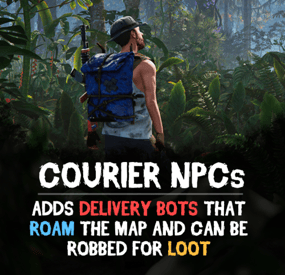
Courier NPCs
Bring your Rust server to life with Courier NPCs — AI bots that travel across the map carrying valuable loot. Hunt them down for rewards, but be careful — they may not go down without a fight.
Features:
📦 Traveling Couriers
• NPCs spawn with random loot from your config and start travel to point.
• At destination, couriers either despawn or dropping a stash.
• Setup health, damage rates, spawn frequency, and other.
• Configure spawn loadouts — weapons, clothes, and loot for delivery.
• Each courier can carry a backpack with its own separate loot.
⚔️ Dynamic Combat
• Configurable combat behaviour:
Friendly (doesn't attack, continues to run) Defensive (defends if attacked) Aggressive (attacks first) • Uses ranged and melee weapons in fights.
• Couriers can deploy mines, bear traps, and other traps while traveling.
• Couriers heal themselves during and outside of combat using configurable health thresholds.
🗺️ Flexible Spawn System
• Multiple spawn modes available — random map position, road/beach position, or SpawnsDatabase points.
• Spawn and destination modes can be mixed for varied and unpredictable routes.
• Couriers can prefer road-based pathfinding or take off-road routes.
📺 See It in Action! Watch The Video
🛠️ Commands ("couriernpcs.admin" permission):
/cnpc vis - shows all couriers on server /cnpc killall - kills all couriers /cnpc tp - teleports all couriers to you 📃 Configuration:
{ "Bots settings": [ { "Enable bot?": true, "How many of these bots can be spawned?": 1, "Bot name (leave empty for random)": "Leon", "Respawn timer (min 3 seconds)": { "Min": 600.0, "Max": 1800.0 }, "Configure the position of the courier's birth. (configure several modes for random selection)": { "Random map position mode": { "Enable this mode?": false }, "Random road position mode": { "Enable this mode?": true }, "Random spawn position mode": { "Enable this mode?": false }, "Mode of selection of a position from the Spawns.cs plugin": { "Enable this mode?": false, "File name with positions": "" } }, "Configure the position of the courier's final path. (configure several modes for random selection)": { "Random map position mode": { "Enable this mode?": false }, "Random road position mode": { "Enable this mode?": true }, "Random spawn position mode": { "Enable this mode?": false }, "Mode of selection of a position from the Spawns.cs plugin": { "Enable this mode?": false, "File name with positions": "" } }, "Maximum health": 500.0, "What spawns on death (PlayerCorpse, NpcCorpse, Backpack)": "PlayerCorpse", "How many items will be destroyed when Backpack is selected (0 - 100%)": 0.0, "Backpack setup": { "Should I give out a backpack?": true, "Backpack item": { "Item shortname or ID": "largebackpack", "Item skin": 0 }, "Lock container? (true - after death loot won't drop)": false, "List of items": [ { "Chance (% 0 - 100)": 10.0, "Item settings": { "Item shortname or ID": "rifle.sks", "Item skin": 0 }, "Random amount": { "Min": 1.0, "Max": 1.0 }, "Attachments": [ { "Item settings": { "Item shortname or ID": "weapon.mod.silencer", "Item skin": 0 }, "Random amount": { "Min": 1.0, "Max": 1.0 }, "Attachments": null } ] }, { "Chance (% 0 - 100)": 5.0, "Item settings": { "Item shortname or ID": "minigun", "Item skin": 0 }, "Random amount": { "Min": 1.0, "Max": 1.0 }, "Attachments": [] }, { "Chance (% 0 - 100)": 20.0, "Item settings": { "Item shortname or ID": "ammo.shotgun.slug", "Item skin": 0 }, "Random amount": { "Min": 100.0, "Max": 500.0 }, "Attachments": [] }, { "Chance (% 0 - 100)": 5.0, "Item settings": { "Item shortname or ID": "explosives", "Item skin": 0 }, "Random amount": { "Min": 100.0, "Max": 500.0 }, "Attachments": [] }, { "Chance (% 0 - 100)": 90.0, "Item settings": { "Item shortname or ID": "wood", "Item skin": 0 }, "Random amount": { "Min": 2000.0, "Max": 5000.0 }, "Attachments": [] }, { "Chance (% 0 - 100)": 80.0, "Item settings": { "Item shortname or ID": "stones", "Item skin": 0 }, "Random amount": { "Min": 1000.0, "Max": 2000.0 }, "Attachments": [] }, { "Chance (% 0 - 100)": 80.0, "Item settings": { "Item shortname or ID": "metal.fragments", "Item skin": 0 }, "Random amount": { "Min": 500.0, "Max": 1000.0 }, "Attachments": [] }, { "Chance (% 0 - 100)": 70.0, "Item settings": { "Item shortname or ID": "sulfur", "Item skin": 0 }, "Random amount": { "Min": 200.0, "Max": 500.0 }, "Attachments": [] }, { "Chance (% 0 - 100)": 60.0, "Item settings": { "Item shortname or ID": "scrap", "Item skin": 0 }, "Random amount": { "Min": 100.0, "Max": 200.0 }, "Attachments": [] }, { "Chance (% 0 - 100)": 50.0, "Item settings": { "Item shortname or ID": "metal.refined", "Item skin": 0 }, "Random amount": { "Min": 50.0, "Max": 100.0 }, "Attachments": [] } ] }, "Wear settings": { "Lock container? (true - after death loot won't drop)": true, "List of items": [ { "Item settings": { "Item shortname or ID": "hazmatsuit.kick", "Item skin": 0 }, "Random amount": { "Min": 1.0, "Max": 1.0 }, "Attachments": [] } ] }, "Belt customization (add weapons, ammo, medicine, traps that the bot can use here)": { "Lock container? (true - after death loot won't drop)": true, "List of items": [ { "Item settings": { "Item shortname or ID": "smg.mp5", "Item skin": 0 }, "Random amount": { "Min": 1.0, "Max": 1.0 }, "Attachments": [ { "Item settings": { "Item shortname or ID": "weapon.mod.silencer", "Item skin": 0 }, "Random amount": { "Min": 1.0, "Max": 1.0 }, "Attachments": null } ] }, { "Item settings": { "Item shortname or ID": "ammo.pistol", "Item skin": 0 }, "Random amount": { "Min": 500.0, "Max": 1000.0 }, "Attachments": [] }, { "Item settings": { "Item shortname or ID": "legacy bow", "Item skin": 0 }, "Random amount": { "Min": 1.0, "Max": 1.0 }, "Attachments": [] }, { "Item settings": { "Item shortname or ID": "arrow.wooden", "Item skin": 0 }, "Random amount": { "Min": 200.0, "Max": 300.0 }, "Attachments": [] }, { "Item settings": { "Item shortname or ID": "salvaged.cleaver", "Item skin": 0 }, "Random amount": { "Min": 1.0, "Max": 1.0 }, "Attachments": [] }, { "Item settings": { "Item shortname or ID": "syringe.medical", "Item skin": 0 }, "Random amount": { "Min": 300.0, "Max": 300.0 }, "Attachments": [] } ] }, "Inventory settings": { "Lock container? (true - after death loot won't drop)": false, "List of items": [ { "Chance (% 0 - 100)": 10.0, "Item settings": { "Item shortname or ID": "rifle.sks", "Item skin": 0 }, "Random amount": { "Min": 1.0, "Max": 1.0 }, "Attachments": [ { "Item settings": { "Item shortname or ID": "weapon.mod.silencer", "Item skin": 0 }, "Random amount": { "Min": 1.0, "Max": 1.0 }, "Attachments": null } ] }, { "Chance (% 0 - 100)": 5.0, "Item settings": { "Item shortname or ID": "minigun", "Item skin": 0 }, "Random amount": { "Min": 1.0, "Max": 1.0 }, "Attachments": [] }, { "Chance (% 0 - 100)": 20.0, "Item settings": { "Item shortname or ID": "ammo.shotgun.slug", "Item skin": 0 }, "Random amount": { "Min": 100.0, "Max": 500.0 }, "Attachments": [] }, { "Chance (% 0 - 100)": 5.0, "Item settings": { "Item shortname or ID": "explosives", "Item skin": 0 }, "Random amount": { "Min": 100.0, "Max": 500.0 }, "Attachments": [] }, { "Chance (% 0 - 100)": 90.0, "Item settings": { "Item shortname or ID": "wood", "Item skin": 0 }, "Random amount": { "Min": 2000.0, "Max": 5000.0 }, "Attachments": [] }, { "Chance (% 0 - 100)": 80.0, "Item settings": { "Item shortname or ID": "stones", "Item skin": 0 }, "Random amount": { "Min": 1000.0, "Max": 2000.0 }, "Attachments": [] }, { "Chance (% 0 - 100)": 80.0, "Item settings": { "Item shortname or ID": "metal.fragments", "Item skin": 0 }, "Random amount": { "Min": 500.0, "Max": 1000.0 }, "Attachments": [] }, { "Chance (% 0 - 100)": 70.0, "Item settings": { "Item shortname or ID": "sulfur", "Item skin": 0 }, "Random amount": { "Min": 200.0, "Max": 500.0 }, "Attachments": [] }, { "Chance (% 0 - 100)": 60.0, "Item settings": { "Item shortname or ID": "scrap", "Item skin": 0 }, "Random amount": { "Min": 100.0, "Max": 200.0 }, "Attachments": [] }, { "Chance (% 0 - 100)": 50.0, "Item settings": { "Item shortname or ID": "metal.refined", "Item skin": 0 }, "Random amount": { "Min": 50.0, "Max": 100.0 }, "Attachments": [] } ] }, "List of items that won't drop on death (applies if the inventory is not locked)": [ { "Item shortname or ID": "smg.mp5", "Item skin": 0 } ], "Courier behavior settings": { "Time for a brain tick (0.01 - 1)": 0.1, "Combat setup (weapons, ammunition, should be given in the belt inventory)": { "Use ammunition from equipment?": true, "The bot's character when meeting players - Aggressive, Friendly, Defensive": "Aggressive", "The bot's character when meeting npc - Aggressive, Friendly, Defensive": "Defensive", "The bot's character when meeting animal - Aggressive, Friendly, Defensive": "Defensive", "Damage settings": { "Damage multiplier for players": 1.0, "NPC damage multiplier": 1.0, "Damage multiplier for animals": 1.0, "Courier damage multiplier from players": 1.0, "Courier damage multiplier from NPCs": 1.0, "Animal damage multiplier for the courier": 1.0 } }, "Treatment settings (medications should be issued in the belt inventory)": { "Percentage of health to enter the healing state (% 50 - 90)": 75.0, "Percentage of health to enter healing state during combat (% 1 - 50)": 30.0, "Use the medicines from the equipment?": true }, "Setting up traps (mines and traps should be given in the belt inventory)": { "Enable this setting?": true, "Use mines and traps from equipment?": false, "Trap usage check timer (min 60 sec.)": { "Min": 300.0, "Max": 300.0 }, "Chance of using a trap (% 0 - 100)": { "Min": 50.0, "Max": 50.0 }, "Life time (0 - will exist until restart)": 3600.0 }, "Setting up movement to the finishing position": { "Allow searching for routes by roads first?": true, "Speed of movement to the finish (Slowest, Slow, Normal, Fast)": "Fast" }, "Setting up behavior when reaching the finish position": { "Use stash mode?": true, "Use suicide mode?": true, "Movement speed while searching for a hiding place (Slowest, Slow, Normal, Fast)": "Fast", "Setting up a stash": { "Stash setup (bot will put items in the stash)": { "Enable?": true, "Hide stash?": true, "Life time (0 - will exist until restart)": 3600.0 }, "Box setup (bot will put items in the box)": { "Enable?": false, "Use small box?": true, "Box skin": 0, "Life time (0 - will exist until restart or until it dies)": 3600.0, "Another container prefab (you can leave it empty)": "" } } } }, "Controller settings": { "Time for a controller tick (0.01 - 0.2)": 0.05, "Allow turrets to attack the courier?": true } }, { "Enable bot?": true, "How many of these bots can be spawned?": 1, "Bot name (leave empty for random)": "Denis", "Respawn timer (min 3 seconds)": { "Min": 600.0, "Max": 1800.0 }, "Configure the position of the courier's birth. (configure several modes for random selection)": { "Random map position mode": { "Enable this mode?": true }, "Random road position mode": { "Enable this mode?": true }, "Random spawn position mode": { "Enable this mode?": true }, "Mode of selection of a position from the Spawns.cs plugin": { "Enable this mode?": false, "File name with positions": "" } }, "Configure the position of the courier's final path. (configure several modes for random selection)": { "Random map position mode": { "Enable this mode?": true }, "Random road position mode": { "Enable this mode?": true }, "Random spawn position mode": { "Enable this mode?": true }, "Mode of selection of a position from the Spawns.cs plugin": { "Enable this mode?": false, "File name with positions": "" } }, "Maximum health": 150.0, "What spawns on death (PlayerCorpse, NpcCorpse, Backpack)": "PlayerCorpse", "How many items will be destroyed when Backpack is selected (0 - 100%)": 0.0, "Backpack setup": { "Should I give out a backpack?": true, "Backpack item": { "Item shortname or ID": "smallbackpack", "Item skin": 0 }, "Lock container? (true - after death loot won't drop)": false, "List of items": [ { "Chance (% 0 - 100)": 10.0, "Item settings": { "Item shortname or ID": "rifle.sks", "Item skin": 0 }, "Random amount": { "Min": 1.0, "Max": 1.0 }, "Attachments": [ { "Item settings": { "Item shortname or ID": "weapon.mod.silencer", "Item skin": 0 }, "Random amount": { "Min": 1.0, "Max": 1.0 }, "Attachments": null } ] }, { "Chance (% 0 - 100)": 5.0, "Item settings": { "Item shortname or ID": "minigun", "Item skin": 0 }, "Random amount": { "Min": 1.0, "Max": 1.0 }, "Attachments": [] }, { "Chance (% 0 - 100)": 20.0, "Item settings": { "Item shortname or ID": "ammo.shotgun.slug", "Item skin": 0 }, "Random amount": { "Min": 100.0, "Max": 500.0 }, "Attachments": [] }, { "Chance (% 0 - 100)": 5.0, "Item settings": { "Item shortname or ID": "explosives", "Item skin": 0 }, "Random amount": { "Min": 100.0, "Max": 500.0 }, "Attachments": [] }, { "Chance (% 0 - 100)": 90.0, "Item settings": { "Item shortname or ID": "wood", "Item skin": 0 }, "Random amount": { "Min": 2000.0, "Max": 5000.0 }, "Attachments": [] }, { "Chance (% 0 - 100)": 80.0, "Item settings": { "Item shortname or ID": "stones", "Item skin": 0 }, "Random amount": { "Min": 1000.0, "Max": 2000.0 }, "Attachments": [] }, { "Chance (% 0 - 100)": 80.0, "Item settings": { "Item shortname or ID": "metal.fragments", "Item skin": 0 }, "Random amount": { "Min": 500.0, "Max": 1000.0 }, "Attachments": [] }, { "Chance (% 0 - 100)": 70.0, "Item settings": { "Item shortname or ID": "sulfur", "Item skin": 0 }, "Random amount": { "Min": 200.0, "Max": 500.0 }, "Attachments": [] }, { "Chance (% 0 - 100)": 60.0, "Item settings": { "Item shortname or ID": "scrap", "Item skin": 0 }, "Random amount": { "Min": 100.0, "Max": 200.0 }, "Attachments": [] }, { "Chance (% 0 - 100)": 50.0, "Item settings": { "Item shortname or ID": "metal.refined", "Item skin": 0 }, "Random amount": { "Min": 50.0, "Max": 100.0 }, "Attachments": [] } ] }, "Wear settings": { "Lock container? (true - after death loot won't drop)": true, "List of items": [ { "Item settings": { "Item shortname or ID": "hazmatsuit.pilot", "Item skin": 0 }, "Random amount": { "Min": 1.0, "Max": 1.0 }, "Attachments": [] } ] }, "Belt customization (add weapons, ammo, medicine, traps that the bot can use here)": { "Lock container? (true - after death loot won't drop)": true, "List of items": [ { "Item settings": { "Item shortname or ID": "rifle.m39", "Item skin": 0 }, "Random amount": { "Min": 1.0, "Max": 1.0 }, "Attachments": [ { "Item settings": { "Item shortname or ID": "weapon.mod.silencer", "Item skin": 0 }, "Random amount": { "Min": 1.0, "Max": 1.0 }, "Attachments": null } ] }, { "Item settings": { "Item shortname or ID": "ammo.rifle", "Item skin": 0 }, "Random amount": { "Min": 100.0, "Max": 300.0 }, "Attachments": [] }, { "Item settings": { "Item shortname or ID": "trap.bear", "Item skin": 0 }, "Random amount": { "Min": 5.0, "Max": 10.0 }, "Attachments": [] }, { "Item settings": { "Item shortname or ID": "trap.landmine", "Item skin": 0 }, "Random amount": { "Min": 5.0, "Max": 10.0 }, "Attachments": [] }, { "Item settings": { "Item shortname or ID": "syringe.medical", "Item skin": 0 }, "Random amount": { "Min": 300.0, "Max": 300.0 }, "Attachments": [] }, { "Item settings": { "Item shortname or ID": "largemedkit", "Item skin": 0 }, "Random amount": { "Min": 1.0, "Max": 1.0 }, "Attachments": [] } ] }, "Inventory settings": { "Lock container? (true - after death loot won't drop)": false, "List of items": [ { "Chance (% 0 - 100)": 10.0, "Item settings": { "Item shortname or ID": "rifle.sks", "Item skin": 0 }, "Random amount": { "Min": 1.0, "Max": 1.0 }, "Attachments": [ { "Item settings": { "Item shortname or ID": "weapon.mod.silencer", "Item skin": 0 }, "Random amount": { "Min": 1.0, "Max": 1.0 }, "Attachments": null } ] }, { "Chance (% 0 - 100)": 5.0, "Item settings": { "Item shortname or ID": "minigun", "Item skin": 0 }, "Random amount": { "Min": 1.0, "Max": 1.0 }, "Attachments": [] }, { "Chance (% 0 - 100)": 20.0, "Item settings": { "Item shortname or ID": "ammo.shotgun.slug", "Item skin": 0 }, "Random amount": { "Min": 100.0, "Max": 500.0 }, "Attachments": [] }, { "Chance (% 0 - 100)": 5.0, "Item settings": { "Item shortname or ID": "explosives", "Item skin": 0 }, "Random amount": { "Min": 100.0, "Max": 500.0 }, "Attachments": [] }, { "Chance (% 0 - 100)": 90.0, "Item settings": { "Item shortname or ID": "wood", "Item skin": 0 }, "Random amount": { "Min": 2000.0, "Max": 5000.0 }, "Attachments": [] }, { "Chance (% 0 - 100)": 80.0, "Item settings": { "Item shortname or ID": "stones", "Item skin": 0 }, "Random amount": { "Min": 1000.0, "Max": 2000.0 }, "Attachments": [] }, { "Chance (% 0 - 100)": 80.0, "Item settings": { "Item shortname or ID": "metal.fragments", "Item skin": 0 }, "Random amount": { "Min": 500.0, "Max": 1000.0 }, "Attachments": [] }, { "Chance (% 0 - 100)": 70.0, "Item settings": { "Item shortname or ID": "sulfur", "Item skin": 0 }, "Random amount": { "Min": 200.0, "Max": 500.0 }, "Attachments": [] }, { "Chance (% 0 - 100)": 60.0, "Item settings": { "Item shortname or ID": "scrap", "Item skin": 0 }, "Random amount": { "Min": 100.0, "Max": 200.0 }, "Attachments": [] }, { "Chance (% 0 - 100)": 50.0, "Item settings": { "Item shortname or ID": "metal.refined", "Item skin": 0 }, "Random amount": { "Min": 50.0, "Max": 100.0 }, "Attachments": [] } ] }, "List of items that won't drop on death (applies if the inventory is not locked)": [ { "Item shortname or ID": "rifle.m39", "Item skin": 0 } ], "Courier behavior settings": { "Time for a brain tick (0.01 - 1)": 0.1, "Combat setup (weapons, ammunition, should be given in the belt inventory)": { "Use ammunition from equipment?": true, "The bot's character when meeting players - Aggressive, Friendly, Defensive": "Defensive", "The bot's character when meeting npc - Aggressive, Friendly, Defensive": "Defensive", "The bot's character when meeting animal - Aggressive, Friendly, Defensive": "Defensive", "Damage settings": { "Damage multiplier for players": 1.0, "NPC damage multiplier": 1.0, "Damage multiplier for animals": 1.0, "Courier damage multiplier from players": 1.0, "Courier damage multiplier from NPCs": 1.0, "Animal damage multiplier for the courier": 1.0 } }, "Treatment settings (medications should be issued in the belt inventory)": { "Percentage of health to enter the healing state (% 50 - 90)": 75.0, "Percentage of health to enter healing state during combat (% 1 - 50)": 30.0, "Use the medicines from the equipment?": true }, "Setting up traps (mines and traps should be given in the belt inventory)": { "Enable this setting?": true, "Use mines and traps from equipment?": true, "Trap usage check timer (min 60 sec.)": { "Min": 300.0, "Max": 300.0 }, "Chance of using a trap (% 0 - 100)": { "Min": 50.0, "Max": 50.0 }, "Life time (0 - will exist until restart)": 3600.0 }, "Setting up movement to the finishing position": { "Allow searching for routes by roads first?": false, "Speed of movement to the finish (Slowest, Slow, Normal, Fast)": "Fast" }, "Setting up behavior when reaching the finish position": { "Use stash mode?": true, "Use suicide mode?": true, "Movement speed while searching for a hiding place (Slowest, Slow, Normal, Fast)": "Fast", "Setting up a stash": { "Stash setup (bot will put items in the stash)": { "Enable?": true, "Hide stash?": true, "Life time (0 - will exist until restart)": 3600.0 }, "Box setup (bot will put items in the box)": { "Enable?": false, "Use small box?": true, "Box skin": 0, "Life time (0 - will exist until restart or until it dies)": 3600.0, "Another container prefab (you can leave it empty)": "" } } } }, "Controller settings": { "Time for a controller tick (0.01 - 0.2)": 0.1, "Allow turrets to attack the courier?": true } }, { "Enable bot?": true, "How many of these bots can be spawned?": 1, "Bot name (leave empty for random)": "Paul", "Respawn timer (min 3 seconds)": { "Min": 600.0, "Max": 1800.0 }, "Configure the position of the courier's birth. (configure several modes for random selection)": { "Random map position mode": { "Enable this mode?": true }, "Random road position mode": { "Enable this mode?": true }, "Random spawn position mode": { "Enable this mode?": true }, "Mode of selection of a position from the Spawns.cs plugin": { "Enable this mode?": false, "File name with positions": "" } }, "Configure the position of the courier's final path. (configure several modes for random selection)": { "Random map position mode": { "Enable this mode?": true }, "Random road position mode": { "Enable this mode?": true }, "Random spawn position mode": { "Enable this mode?": true }, "Mode of selection of a position from the Spawns.cs plugin": { "Enable this mode?": false, "File name with positions": "" } }, "Maximum health": 150.0, "What spawns on death (PlayerCorpse, NpcCorpse, Backpack)": "PlayerCorpse", "How many items will be destroyed when Backpack is selected (0 - 100%)": 0.0, "Backpack setup": { "Should I give out a backpack?": true, "Backpack item": { "Item shortname or ID": "smallbackpack", "Item skin": 0 }, "Lock container? (true - after death loot won't drop)": false, "List of items": [ { "Chance (% 0 - 100)": 10.0, "Item settings": { "Item shortname or ID": "rifle.sks", "Item skin": 0 }, "Random amount": { "Min": 1.0, "Max": 1.0 }, "Attachments": [ { "Item settings": { "Item shortname or ID": "weapon.mod.silencer", "Item skin": 0 }, "Random amount": { "Min": 1.0, "Max": 1.0 }, "Attachments": null } ] }, { "Chance (% 0 - 100)": 5.0, "Item settings": { "Item shortname or ID": "minigun", "Item skin": 0 }, "Random amount": { "Min": 1.0, "Max": 1.0 }, "Attachments": [] }, { "Chance (% 0 - 100)": 20.0, "Item settings": { "Item shortname or ID": "ammo.shotgun.slug", "Item skin": 0 }, "Random amount": { "Min": 100.0, "Max": 500.0 }, "Attachments": [] }, { "Chance (% 0 - 100)": 5.0, "Item settings": { "Item shortname or ID": "explosives", "Item skin": 0 }, "Random amount": { "Min": 100.0, "Max": 500.0 }, "Attachments": [] }, { "Chance (% 0 - 100)": 90.0, "Item settings": { "Item shortname or ID": "wood", "Item skin": 0 }, "Random amount": { "Min": 2000.0, "Max": 5000.0 }, "Attachments": [] }, { "Chance (% 0 - 100)": 80.0, "Item settings": { "Item shortname or ID": "stones", "Item skin": 0 }, "Random amount": { "Min": 1000.0, "Max": 2000.0 }, "Attachments": [] }, { "Chance (% 0 - 100)": 80.0, "Item settings": { "Item shortname or ID": "metal.fragments", "Item skin": 0 }, "Random amount": { "Min": 500.0, "Max": 1000.0 }, "Attachments": [] }, { "Chance (% 0 - 100)": 70.0, "Item settings": { "Item shortname or ID": "sulfur", "Item skin": 0 }, "Random amount": { "Min": 200.0, "Max": 500.0 }, "Attachments": [] }, { "Chance (% 0 - 100)": 60.0, "Item settings": { "Item shortname or ID": "scrap", "Item skin": 0 }, "Random amount": { "Min": 100.0, "Max": 200.0 }, "Attachments": [] }, { "Chance (% 0 - 100)": 50.0, "Item settings": { "Item shortname or ID": "metal.refined", "Item skin": 0 }, "Random amount": { "Min": 50.0, "Max": 100.0 }, "Attachments": [] } ] }, "Wear settings": { "Lock container? (true - after death loot won't drop)": true, "List of items": [ { "Item settings": { "Item shortname or ID": "hazmatsuit.diver", "Item skin": 0 }, "Random amount": { "Min": 1.0, "Max": 1.0 }, "Attachments": [] } ] }, "Belt customization (add weapons, ammo, medicine, traps that the bot can use here)": { "Lock container? (true - after death loot won't drop)": true, "List of items": [ { "Item settings": { "Item shortname or ID": "rifle.lr300.space", "Item skin": 0 }, "Random amount": { "Min": 1.0, "Max": 1.0 }, "Attachments": [] }, { "Item settings": { "Item shortname or ID": "ammo.rifle", "Item skin": 0 }, "Random amount": { "Min": 100.0, "Max": 300.0 }, "Attachments": [] }, { "Item settings": { "Item shortname or ID": "trap.bear", "Item skin": 0 }, "Random amount": { "Min": 5.0, "Max": 10.0 }, "Attachments": [] }, { "Item settings": { "Item shortname or ID": "trap.landmine", "Item skin": 0 }, "Random amount": { "Min": 5.0, "Max": 10.0 }, "Attachments": [] }, { "Item settings": { "Item shortname or ID": "syringe.medical", "Item skin": 0 }, "Random amount": { "Min": 300.0, "Max": 300.0 }, "Attachments": [] }, { "Item settings": { "Item shortname or ID": "largemedkit", "Item skin": 0 }, "Random amount": { "Min": 1.0, "Max": 1.0 }, "Attachments": [] } ] }, "Inventory settings": { "Lock container? (true - after death loot won't drop)": false, "List of items": [ { "Chance (% 0 - 100)": 10.0, "Item settings": { "Item shortname or ID": "rifle.sks", "Item skin": 0 }, "Random amount": { "Min": 1.0, "Max": 1.0 }, "Attachments": [ { "Item settings": { "Item shortname or ID": "weapon.mod.silencer", "Item skin": 0 }, "Random amount": { "Min": 1.0, "Max": 1.0 }, "Attachments": null } ] }, { "Chance (% 0 - 100)": 5.0, "Item settings": { "Item shortname or ID": "minigun", "Item skin": 0 }, "Random amount": { "Min": 1.0, "Max": 1.0 }, "Attachments": [] }, { "Chance (% 0 - 100)": 20.0, "Item settings": { "Item shortname or ID": "ammo.shotgun.slug", "Item skin": 0 }, "Random amount": { "Min": 100.0, "Max": 500.0 }, "Attachments": [] }, { "Chance (% 0 - 100)": 5.0, "Item settings": { "Item shortname or ID": "explosives", "Item skin": 0 }, "Random amount": { "Min": 100.0, "Max": 500.0 }, "Attachments": [] }, { "Chance (% 0 - 100)": 90.0, "Item settings": { "Item shortname or ID": "wood", "Item skin": 0 }, "Random amount": { "Min": 2000.0, "Max": 5000.0 }, "Attachments": [] }, { "Chance (% 0 - 100)": 80.0, "Item settings": { "Item shortname or ID": "stones", "Item skin": 0 }, "Random amount": { "Min": 1000.0, "Max": 2000.0 }, "Attachments": [] }, { "Chance (% 0 - 100)": 80.0, "Item settings": { "Item shortname or ID": "metal.fragments", "Item skin": 0 }, "Random amount": { "Min": 500.0, "Max": 1000.0 }, "Attachments": [] }, { "Chance (% 0 - 100)": 70.0, "Item settings": { "Item shortname or ID": "sulfur", "Item skin": 0 }, "Random amount": { "Min": 200.0, "Max": 500.0 }, "Attachments": [] }, { "Chance (% 0 - 100)": 60.0, "Item settings": { "Item shortname or ID": "scrap", "Item skin": 0 }, "Random amount": { "Min": 100.0, "Max": 200.0 }, "Attachments": [] }, { "Chance (% 0 - 100)": 50.0, "Item settings": { "Item shortname or ID": "metal.refined", "Item skin": 0 }, "Random amount": { "Min": 50.0, "Max": 100.0 }, "Attachments": [] } ] }, "List of items that won't drop on death (applies if the inventory is not locked)": [ { "Item shortname or ID": "rifle.lr300.space", "Item skin": 0 } ], "Courier behavior settings": { "Time for a brain tick (0.01 - 1)": 0.1, "Combat setup (weapons, ammunition, should be given in the belt inventory)": { "Use ammunition from equipment?": false, "The bot's character when meeting players - Aggressive, Friendly, Defensive": "Defensive", "The bot's character when meeting npc - Aggressive, Friendly, Defensive": "Defensive", "The bot's character when meeting animal - Aggressive, Friendly, Defensive": "Defensive", "Damage settings": { "Damage multiplier for players": 1.0, "NPC damage multiplier": 1.0, "Damage multiplier for animals": 1.0, "Courier damage multiplier from players": 1.0, "Courier damage multiplier from NPCs": 1.0, "Animal damage multiplier for the courier": 1.0 } }, "Treatment settings (medications should be issued in the belt inventory)": { "Percentage of health to enter the healing state (% 50 - 90)": 75.0, "Percentage of health to enter healing state during combat (% 1 - 50)": 30.0, "Use the medicines from the equipment?": true }, "Setting up traps (mines and traps should be given in the belt inventory)": { "Enable this setting?": true, "Use mines and traps from equipment?": true, "Trap usage check timer (min 60 sec.)": { "Min": 300.0, "Max": 300.0 }, "Chance of using a trap (% 0 - 100)": { "Min": 50.0, "Max": 50.0 }, "Life time (0 - will exist until restart)": 3600.0 }, "Setting up movement to the finishing position": { "Allow searching for routes by roads first?": false, "Speed of movement to the finish (Slowest, Slow, Normal, Fast)": "Fast" }, "Setting up behavior when reaching the finish position": { "Use stash mode?": true, "Use suicide mode?": true, "Movement speed while searching for a hiding place (Slowest, Slow, Normal, Fast)": "Fast", "Setting up a stash": { "Stash setup (bot will put items in the stash)": { "Enable?": true, "Hide stash?": true, "Life time (0 - will exist until restart)": 3600.0 }, "Box setup (bot will put items in the box)": { "Enable?": false, "Use small box?": true, "Box skin": 0, "Life time (0 - will exist until restart or until it dies)": 3600.0, "Another container prefab (you can leave it empty)": "" } } } }, "Controller settings": { "Time for a controller tick (0.01 - 0.2)": 0.1, "Allow turrets to attack the courier?": true } }, { "Enable bot?": true, "How many of these bots can be spawned?": 1, "Bot name (leave empty for random)": "Mike", "Respawn timer (min 3 seconds)": { "Min": 600.0, "Max": 1800.0 }, "Configure the position of the courier's birth. (configure several modes for random selection)": { "Random map position mode": { "Enable this mode?": false }, "Random road position mode": { "Enable this mode?": false }, "Random spawn position mode": { "Enable this mode?": true }, "Mode of selection of a position from the Spawns.cs plugin": { "Enable this mode?": false, "File name with positions": "" } }, "Configure the position of the courier's final path. (configure several modes for random selection)": { "Random map position mode": { "Enable this mode?": true }, "Random road position mode": { "Enable this mode?": false }, "Random spawn position mode": { "Enable this mode?": false }, "Mode of selection of a position from the Spawns.cs plugin": { "Enable this mode?": false, "File name with positions": "" } }, "Maximum health": 500.0, "What spawns on death (PlayerCorpse, NpcCorpse, Backpack)": "PlayerCorpse", "How many items will be destroyed when Backpack is selected (0 - 100%)": 0.0, "Backpack setup": { "Should I give out a backpack?": true, "Backpack item": { "Item shortname or ID": "kriegbackpack", "Item skin": 0 }, "Lock container? (true - after death loot won't drop)": false, "List of items": [ { "Chance (% 0 - 100)": 10.0, "Item settings": { "Item shortname or ID": "rifle.sks", "Item skin": 0 }, "Random amount": { "Min": 1.0, "Max": 1.0 }, "Attachments": [ { "Item settings": { "Item shortname or ID": "weapon.mod.silencer", "Item skin": 0 }, "Random amount": { "Min": 1.0, "Max": 1.0 }, "Attachments": null } ] }, { "Chance (% 0 - 100)": 5.0, "Item settings": { "Item shortname or ID": "minigun", "Item skin": 0 }, "Random amount": { "Min": 1.0, "Max": 1.0 }, "Attachments": null }, { "Chance (% 0 - 100)": 20.0, "Item settings": { "Item shortname or ID": "ammo.shotgun.slug", "Item skin": 0 }, "Random amount": { "Min": 100.0, "Max": 500.0 }, "Attachments": null }, { "Chance (% 0 - 100)": 5.0, "Item settings": { "Item shortname or ID": "explosives", "Item skin": 0 }, "Random amount": { "Min": 100.0, "Max": 500.0 }, "Attachments": null }, { "Chance (% 0 - 100)": 90.0, "Item settings": { "Item shortname or ID": "wood", "Item skin": 0 }, "Random amount": { "Min": 2000.0, "Max": 5000.0 }, "Attachments": null }, { "Chance (% 0 - 100)": 80.0, "Item settings": { "Item shortname or ID": "stones", "Item skin": 0 }, "Random amount": { "Min": 1000.0, "Max": 2000.0 }, "Attachments": null }, { "Chance (% 0 - 100)": 80.0, "Item settings": { "Item shortname or ID": "metal.fragments", "Item skin": 0 }, "Random amount": { "Min": 500.0, "Max": 1000.0 }, "Attachments": null }, { "Chance (% 0 - 100)": 70.0, "Item settings": { "Item shortname or ID": "sulfur", "Item skin": 0 }, "Random amount": { "Min": 200.0, "Max": 500.0 }, "Attachments": null }, { "Chance (% 0 - 100)": 60.0, "Item settings": { "Item shortname or ID": "scrap", "Item skin": 0 }, "Random amount": { "Min": 100.0, "Max": 200.0 }, "Attachments": null }, { "Chance (% 0 - 100)": 50.0, "Item settings": { "Item shortname or ID": "metal.refined", "Item skin": 0 }, "Random amount": { "Min": 50.0, "Max": 100.0 }, "Attachments": null } ] }, "Wear settings": { "Lock container? (true - after death loot won't drop)": true, "List of items": [ { "Item settings": { "Item shortname or ID": "hazmatsuit.arcticsuit", "Item skin": 0 }, "Random amount": { "Min": 1.0, "Max": 1.0 }, "Attachments": null } ] }, "Belt customization (add weapons, ammo, medicine, traps that the bot can use here)": { "Lock container? (true - after death loot won't drop)": true, "List of items": [ { "Item settings": { "Item shortname or ID": "rifle.ak.ice", "Item skin": 0 }, "Random amount": { "Min": 1.0, "Max": 1.0 }, "Attachments": [] }, { "Item settings": { "Item shortname or ID": "knife.combat", "Item skin": 0 }, "Random amount": { "Min": 1.0, "Max": 1.0 }, "Attachments": [] }, { "Item settings": { "Item shortname or ID": "largemedkit", "Item skin": 0 }, "Random amount": { "Min": 300.0, "Max": 300.0 }, "Attachments": [] } ] }, "Inventory settings": { "Lock container? (true - after death loot won't drop)": false, "List of items": [ { "Chance (% 0 - 100)": 10.0, "Item settings": { "Item shortname or ID": "rifle.sks", "Item skin": 0 }, "Random amount": { "Min": 1.0, "Max": 1.0 }, "Attachments": [ { "Item settings": { "Item shortname or ID": "weapon.mod.silencer", "Item skin": 0 }, "Random amount": { "Min": 1.0, "Max": 1.0 }, "Attachments": null } ] }, { "Chance (% 0 - 100)": 5.0, "Item settings": { "Item shortname or ID": "minigun", "Item skin": 0 }, "Random amount": { "Min": 1.0, "Max": 1.0 }, "Attachments": null }, { "Chance (% 0 - 100)": 20.0, "Item settings": { "Item shortname or ID": "ammo.shotgun.slug", "Item skin": 0 }, "Random amount": { "Min": 100.0, "Max": 500.0 }, "Attachments": null }, { "Chance (% 0 - 100)": 5.0, "Item settings": { "Item shortname or ID": "explosives", "Item skin": 0 }, "Random amount": { "Min": 100.0, "Max": 500.0 }, "Attachments": null }, { "Chance (% 0 - 100)": 90.0, "Item settings": { "Item shortname or ID": "wood", "Item skin": 0 }, "Random amount": { "Min": 2000.0, "Max": 5000.0 }, "Attachments": null }, { "Chance (% 0 - 100)": 80.0, "Item settings": { "Item shortname or ID": "stones", "Item skin": 0 }, "Random amount": { "Min": 1000.0, "Max": 2000.0 }, "Attachments": null }, { "Chance (% 0 - 100)": 80.0, "Item settings": { "Item shortname or ID": "metal.fragments", "Item skin": 0 }, "Random amount": { "Min": 500.0, "Max": 1000.0 }, "Attachments": null }, { "Chance (% 0 - 100)": 70.0, "Item settings": { "Item shortname or ID": "sulfur", "Item skin": 0 }, "Random amount": { "Min": 200.0, "Max": 500.0 }, "Attachments": null }, { "Chance (% 0 - 100)": 60.0, "Item settings": { "Item shortname or ID": "scrap", "Item skin": 0 }, "Random amount": { "Min": 100.0, "Max": 200.0 }, "Attachments": null }, { "Chance (% 0 - 100)": 50.0, "Item settings": { "Item shortname or ID": "metal.refined", "Item skin": 0 }, "Random amount": { "Min": 50.0, "Max": 100.0 }, "Attachments": null } ] }, "List of items that won't drop on death (applies if the inventory is not locked)": [ { "Item shortname or ID": "rifle.ak.ice", "Item skin": 0 } ], "Courier behavior settings": { "Time for a brain tick (0.01 - 1)": 0.1, "Combat setup (weapons, ammunition, should be given in the belt inventory)": { "Use ammunition from equipment?": false, "The bot's character when meeting players - Aggressive, Friendly, Defensive": "Aggressive", "The bot's character when meeting npc - Aggressive, Friendly, Defensive": "Aggressive", "The bot's character when meeting animal - Aggressive, Friendly, Defensive": "Defensive", "Damage settings": { "Damage multiplier for players": 1.0, "NPC damage multiplier": 1.0, "Damage multiplier for animals": 1.0, "Courier damage multiplier from players": 1.0, "Courier damage multiplier from NPCs": 1.0, "Animal damage multiplier for the courier": 1.0 } }, "Treatment settings (medications should be issued in the belt inventory)": { "Percentage of health to enter the healing state (% 50 - 90)": 75.0, "Percentage of health to enter healing state during combat (% 1 - 50)": 30.0, "Use the medicines from the equipment?": true }, "Setting up traps (mines and traps should be given in the belt inventory)": { "Enable this setting?": true, "Use mines and traps from equipment?": false, "Trap usage check timer (min 60 sec.)": { "Min": 300.0, "Max": 300.0 }, "Chance of using a trap (% 0 - 100)": { "Min": 50.0, "Max": 50.0 }, "Life time (0 - will exist until restart)": 3600.0 }, "Setting up movement to the finishing position": { "Allow searching for routes by roads first?": true, "Speed of movement to the finish (Slowest, Slow, Normal, Fast)": "Fast" }, "Setting up behavior when reaching the finish position": { "Use stash mode?": true, "Use suicide mode?": true, "Movement speed while searching for a hiding place (Slowest, Slow, Normal, Fast)": "Fast", "Setting up a stash": { "Stash setup (bot will put items in the stash)": { "Enable?": true, "Hide stash?": true, "Life time (0 - will exist until restart)": 3600.0 }, "Box setup (bot will put items in the box)": { "Enable?": true, "Use small box?": true, "Box skin": 0, "Life time (0 - will exist until restart or until it dies)": 3600.0, "Another container prefab (you can leave it empty)": "" } } } }, "Controller settings": { "Time for a controller tick (0.01 - 0.2)": 0.05, "Allow turrets to attack the courier?": true } } ] }
-
$14.99
Techtree
⚠️ If you use Oxide, Carbon Aliases if required ! Else ignore this.
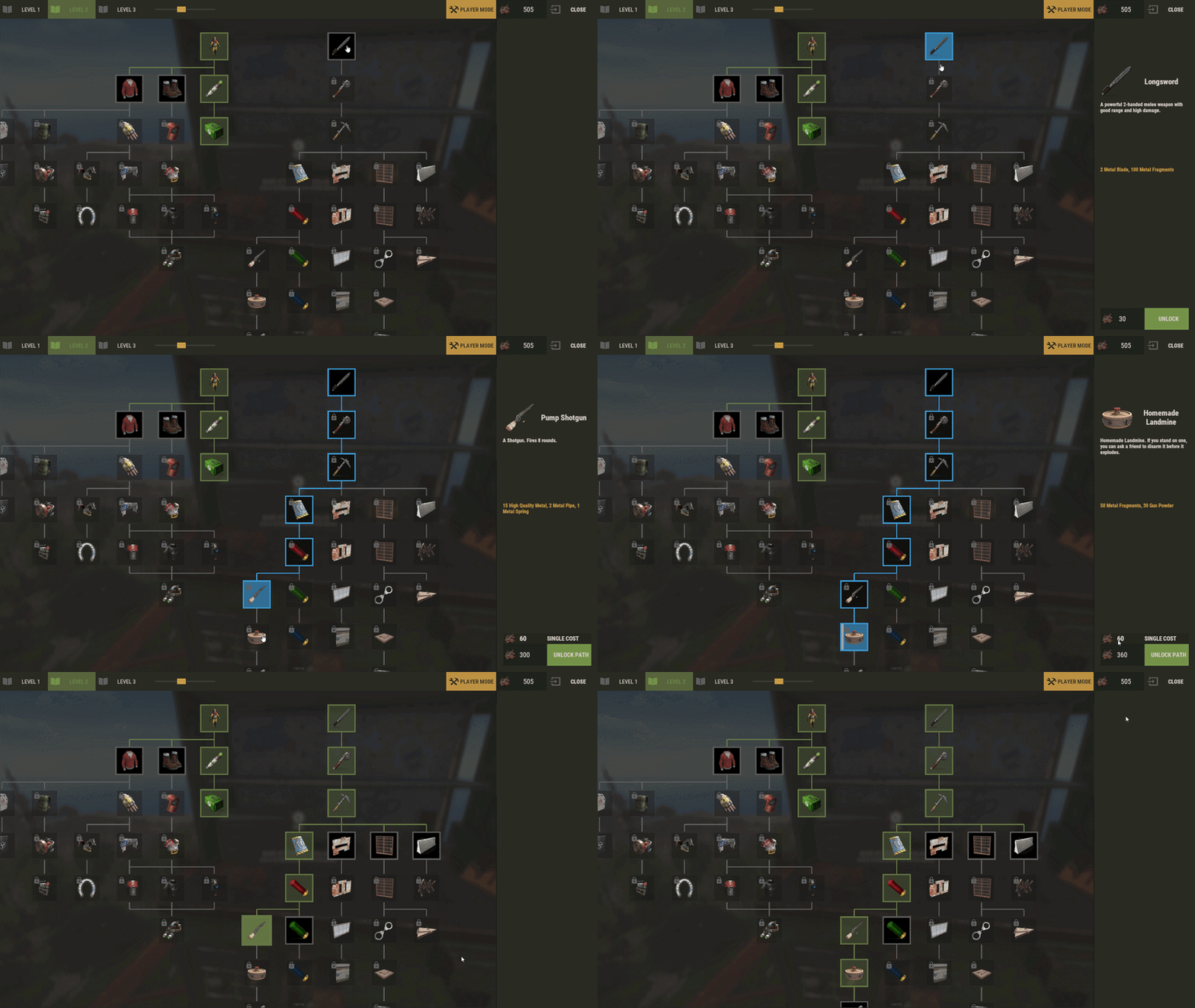
TechTree is a complete custom techtree system for Rust servers.
It can replace the vanilla workbench tech tree, or it can be used as a custom progression layer opened near a workbench. The goal is simple: give server owners a clean in-game way to control progression without spending their life editing giant JSON files by hand.
You can keep a mostly vanilla progression, build something fully custom, or mix both: vanilla nodes, custom branches, permissions, rewards, custom prices, custom currencies.
Replaces the vanilla workbench tech tree by default. Optional mode where players open the tree with R near a workbench. Supports Workbench Level 1, Level 2, Level 3, and Engineering. Includes an in-game CUI editor for admins. Lets you add, modify, move, and remove nodes directly in game. Supports custom node prices and custom currency items. Supports item icons and custom URL images. Supports localized node names and descriptions. Supports node rewards: ConsoleCommand, ChatCommand, and Economics. Supports branch permissions for restricted progression paths. Supports free unlock and instant unlock permissions. Can recover vanilla nodes after Rust updates. Can freeze a tree so Facepunch updates do not modify your custom layout. Includes a theme editor with palette and node style settings. Provides hooks and API methods for other plugins.
Players use TechTree from a workbench.
If vanilla replacement is enabled, opening the workbench tech tree opens TechTree instead.
If vanilla replacement is disabled, players stand near a workbench and press R to open the TechTree UI.
Available tree tabs depend on the workbench:
Level 1 workbench: Level 1 tree Level 2 workbench: Level 1 and Level 2 trees Level 3 workbench: Level 1, Level 2, and Level 3 trees Engineering workbench: Engineering tree Nodes clearly show their state: locked, unlockable, unlocked, or restricted by permission. When a player selects a node, the right panel shows the cost, currency, required path cost when relevant, and unlock action.
Admins can switch from player mode to edit mode directly from the TechTree UI.
The editor works with a draft session:
Changes are previewed immediately. Nothing is permanently written until you press Save. Closing or cancelling edit mode discards unsaved edits. Admins can:
Add a node on an empty grid cell. Modify an existing node. Remove a node. Move nodes on the grid. Set parent nodes. Set a branch permission. Change item icon or URL image. Set name and description. Set price and currency. Add rewards. Edit the grid size. Reset a tree to vanilla. Recover missing vanilla nodes. Exclude vanilla nodes from a frozen/custom tree. Edit and save themes. This means you can build or adjust a progression tree without leaving the server.
TechTree supports local images for node icons.
You can place your image files inside the TechTree Images folder and select them directly from the editor.
Local images support folders and subfolders, so you can organize icons by category, for example:
In the editor, paths are handled relative to the Images folder.
Example:
is used as:
A reload action is available to refresh the image database after adding, removing, or reorganizing image files.
This updates the available local images without requiring a full plugin reload.
Local images are supported on Carbon and Oxide.
On first load, TechTree creates its default data from Rust's vanilla workbench tech trees.
Quick difference between vanilla nodes and custom nodes:
Vanilla nodes
Vanilla nodes come from Rust's original Facepunch tech tree. They have a vanilla ID, which allows TechTree to recognize them later.
Because they are linked to Rust's vanilla data, TechTree can synchronize them, recover them, update missing vanilla entries after Rust changes, or exclude them when you intentionally remove them.
You can still fully edit vanilla nodes. You can move them, change their price, change their currency, adjust their unlock path, add permissions, add rewards, or remove them from the tree.
Use vanilla nodes when you want to keep the familiar Rust progression but customize how it behaves on your server.
Custom nodes
Custom nodes are created by you inside the TechTree editor. They do not come from Rust's vanilla tree and they do not have a vanilla ID.
Because they are fully plugin-side nodes, vanilla synchronization does not restore, recover, or replace them. They belong only to your custom TechTree data.
Custom nodes can use the same kind of options as vanilla nodes: price, currency, parents, permissions, rewards, commands, image, name, and description.
A custom node can even reproduce a vanilla unlock if you really want to build it that way, although this is usually not the main reason to use them.
Custom nodes are mostly useful when you want to create progression that does not exist in the default Rust tech tree, such as custom items, plugin rewards, special server progression, profession branches, VIP paths, economy rewards, command unlocks, or server-specific content.
You can mix both types in the same tree. For example, you can keep most vanilla nodes, remove a few unwanted vanilla unlocks, then add custom nodes with rewards or branch permissions.
The important rule:
Only vanilla nodes need vanilla exclusion logic. If you remove a custom node, it is simply removed from your custom data. If you remove a vanilla node and want it to stay removed, you must exclude it correctly so vanilla synchronization does not bring it back later.
There are three important controls:
Auto Vanilla Synchronization
Useful when you want to keep a tree close to vanilla. Missing vanilla nodes can be imported and conflicts can be handled automatically.
Excluded Vanilla IDs
Marks vanilla nodes that were intentionally removed from a custom/frozen tree.
Disable Future Vanilla Imports
Freezes the current workbench tree. Future vanilla additions will not be imported automatically.
Important:
Exclude from vanilla sync must be used together with Disable Future Vanilla Imports.
If Disable Future Vanilla Imports is not enabled, vanilla synchronization can import removed vanilla nodes again later.
Safe workflow:
Open the TechTree at the correct workbench. Switch to Edit Mode. Open Excluded Nodes. Enable Disable Future Vanilla Imports. Select the vanilla node you want to remove. Click Modify. Enable Exclude from vanilla sync. Confirm. Select the same node again. Click Remove. Press Save. For a fully custom tree:
Open Edit Mode. Open Excluded Nodes. Enable Disable Future Vanilla Imports. Click Exclude All. Remove the vanilla nodes you do not want. Build your custom tree. Save. If you want to keep receiving future Facepunch additions, keep Auto Vanilla Synchronization enabled and avoid permanently removing vanilla nodes.
The config option "Use Permissions ?" enables TechTree permission checks.
This includes the global permissions listed below and the custom branch permissions set on nodes.
When "Use Permissions ?" is false:
Players can open TechTree without techtree.use. techtree.unlock.free does not apply. techtree.unlock.instant does not apply. Branch permissions are not enforced. When "Use Permissions ?" is true:
Players need techtree.use to open TechTree. Players with techtree.unlock.free unlock nodes for free. Players with techtree.unlock.instant skip the unlock timer. Branch permissions are enforced when a node has a custom permission set. Registered global permissions:
techtree.use
Allows the player to open/use TechTree when "Use Permissions ?" is enabled.
techtree.unlock.free
Allows the player to unlock nodes for free when "Use Permissions ?" is enabled.
techtree.unlock.instant
Allows the player to unlock nodes instantly when "Use Permissions ?" is enabled.
Branch permissions are custom node permissions.
They are not the same thing as techtree.use, techtree.unlock.free, or techtree.unlock.instant, but they still require "Use Permissions ?" to be enabled.
A branch permission is a custom permission typed directly on a node in the editor. If a player does not have that permission, the node and its child branch are locked for that player.
Example:
Recommended workflow:
Open the TechTree editor. Select the first node of the restricted branch. Click Modify. Enter your custom permission in the Permission field. Confirm. Save. Grant the permission to the correct player or group. Good examples:
Common mistake:
Typing the permission in the node editor but never granting it. In that case, the branch stays locked for everyone.
Rewards are executed when a player unlocks a node.
You can add multiple rewards to the same node.
Reward types:
ConsoleCommand
Runs a server command from the server console.
Use this for server/admin actions such as granting permissions, giving items, or running plugin commands.
Examples:
ChatCommand
Runs a command from the player's client.
Use this only when the command should be executed by the player.
Example:
Economics
Deposits money into the player's Economics balance.
Example value:
Important:
Most reward actions should use ConsoleCommand. If a command needs server authority, do not use ChatCommand.
The playerID placeholder is automatically replaced with the unlocking player's Steam ID.
Default configuration:
{ "Settings": { "Wipe Player Data at Wipe": true, "Time For Unlock Node": 1.0, "Selected Theme": "Default", "Use Permissions ?": false, "Use Economics ?": false, "Replace tree vanilla ? Open with [R] if false": true } } Config notes:
Wipe Player Data at Wipe
Deletes TechTree player unlock data on a new save.
Time For Unlock Node
Unlock progress duration in seconds.
Selected Theme
Active theme loaded from Themes.json.
Use Permissions ?
Enables the global TechTree permission checks.
Use Economics ?
The config value exists, but Economics integration is handled through the Economics reward type.
Replace tree vanilla ? Open with [R] if false
When true, TechTree replaces the vanilla workbench tech tree. When false, players open it with R near a workbench.
TechTree creates separate data files for each workbench tree:
Player progression is saved separately per player and per workbench.
TechTree includes API methods and hooks for other plugins.
API methods:
API_GetPlayerData(BasePlayer player) // Returns: Dictionary<string, object>
Return format:
{ "workbench": { "Workbench_1": [123, 456], "Workbench_2": [789], "Workbench_3": [], "Engineering": [] } }
API_SetPlayerData(BasePlayer player, Dictionary<string, object> apiData) // Returns: bool
The plugin cleans invalid node IDs before saving.
API_ClearPlayerWorkbenchData(BasePlayer player, Workbench workbench) // Returns: bool
Clears the player's TechTree data only for the workbench category matching the provided Workbench.
API_ClearPlayerData(BasePlayer player) // Returns: bool
Clears all TechTree unlock data for that player.
Example API usage:
[PluginReference] Plugin TechTree; var playerData = TechTree?.Call("API_GetPlayerData", player) as Dictionary<string, object>; if (playerData != null) { var workbenchData = playerData["workbench"] as Dictionary<string, object>; }
Node dictionary format used by hooks:
{ "id": 123456, "vanillaId": 84, "price": 250, "parents": [111111], "isVanilla": true, "currency": { "itemId": -932201673, "skinId": 0 } }
Tree dictionary format:
{ "workbench": Workbench, "nodes": [ nodeDictionary, nodeDictionary, ... ] } Plugin hooks:
// Called before a node is unlocked. OnNodeUnlock(Workbench workbench, Dictionary<string, object> node, BasePlayer player) // Return false to block the unlock. // Return null or true to allow it. // Alternative hook format with the full tree dictionary. OnNodeUnlock(BasePlayer player, Dictionary<string, object> node, Dictionary<string, object> tree) // Return false to block the unlock. // Return null or true to allow it. // Called after a node has been unlocked. OnNodeUnlocked(Workbench workbench, Dictionary<string, object> node, BasePlayer player) // Called after multiple nodes were unlocked through a path unlock. OnPathNodeUnlocked(Workbench workbench, List<object> nodes, BasePlayer player) // The nodes list contains node dictionaries.
Example hook:
private object OnNodeUnlock(Workbench workbench, Dictionary<string, object> node, BasePlayer player) { int nodeId = Convert.ToInt32(node["id"]); if (nodeId == 123456 && !permission.UserHasPermission(player.UserIDString, "myplugin.allow")) { player.ChatMessage("You cannot unlock this node yet."); return false; } return null; }
Example after-unlock hook:
private void OnNodeUnlocked(Workbench workbench, Dictionary<string, object> node, BasePlayer player) { int nodeId = Convert.ToInt32(node["id"]); Puts($"{player.displayName} unlocked TechTree node {nodeId}"); } Vanilla-compatible hooks are also called for vanilla nodes where possible:
OnTechTreeNodeUnlock(Workbench workbench, TechTreeData.NodeInstance node, BasePlayer player) OnTechTreeNodeUnlocked(Workbench workbench, TechTreeData.NodeInstance node, BasePlayer player, List<ItemDefinition> unlockedItems)
More detail : https://github.com/Gdkenni/TechTree-Doc
Place TechTree.cs in your server plugins folder. Make sure the file is named exactly TechTree.cs. Load the plugin. Let it generate the config and data files. Open a workbench in game. As an admin, switch to edit mode. Customize the tree. Press Save.
Always press Save after editing. Back up oxide/data/TechTree before major progression changes. If you remove vanilla nodes, use Disable Future Vanilla Imports first. If a branch permission locks everyone out, check that the permission was granted. If techtree.use blocks players, check that "Use Permissions ?" is enabled and the permission was granted. Use ConsoleCommand for most rewards. Use ChatCommand only for commands that should be executed by the player. If upgrading from very old versions (before v2), older data files may not be compatible with the revamped system.
TechTree is built for servers that want progression to feel intentional.
You can keep the familiar Rust workbench flow while changing how players unlock items, what path they follow, what they pay, and what they receive along the way.
It works well for:
Modded progression servers. Economy servers. Roleplay servers with professions. VIP or group-based branches. Servers that want to reorganize, delay, or remove vanilla unlocks.
Send me a private message on Codefling. Send me a message on Discord: gd.kenni
-
$29.99
Contracts
By MaxiJonson in Plugins
Contracts is a time-rotating quest system plugin that allows you to create versatile quests/missions that rotate periodically.
Each contract can have one or more objectives, with multiple objective types to choose from. It doesn't stop there: each objective can be augmented with objective conditions, which add additional requirements in order to progress it. This allows you to define versatile and unique quests:
You could have quests as simple as "Kill 5 scientists"... or a little bit more challenging quests like "Kill 5 scientists with an assault rifle" or have crazy requirements like "Kill 5 scientists, with an assault rifle OR an MP5, between 25-50m away, while being below 20 HP, while wearing a bandana and riding a horse". The possibilities are endless! Not just another quest plugin
Most quest plugins hand out static, repeatable, single-objective quests with no cap on how many you can have active at once and no deadline on finishing them. Players end up completing them passively in the background without ever engaging with the system, like achievements.
Contracts turns these side-quests into main quests by putting them on a timer. A limited set of contracts is live at a time, each with a real deadline you define, so players have to decide what to prioritize rather than mindlessly clear a checklist. That's what keeps players logging back in throughout the wipe, when they'd otherwise burn out once progression stalls.
Contracts also supports multi-objective quests with layered conditions (requirements), so a single contract can demand more than "kill 10 scientists." Simple objectives stack into real challenges.
Features
Highly customizable quests/missions to help you build your unique set of goals and control difficulty beyond just progression amounts required. Control the flow and order of how contract objectives can be completed. 21 objective types to vary gameplay across your server 23 objective condition types to add as many layers of challenge that you want to your objectives Customizable categories and their rotation period, with the possibility to disable rotations altogether and manually control when contracts rotate. Clean and customizable UI for browsing and tracking contracts. HUD to track contracts while playing. Leaderboard to rank your whole server by Contract Score. Permission based features for your VIP members: Max active contracts globally, Max active contracts per category and Max HUD pins. Event logging with JSONL format support Powerful Web editor to make editing your configs a breeze and viewing insightful charts on your JSONL logs Quick Links
🗨️ Discord Server
📄 Full Documentation
✏️ Web Editor
🧭 Roadmap
🆓 Lite Edition - Try Contracts for FREE
Included
While you can discard and customize the contracts, categories and presets yourself, the plugin comes with:
4 categories: Hourly (14 contracts), Daily (26 contracts), Weekly (19 contracts) and Wipe (6) 65 contracts designed to touch just about every objective types and objective conditions available. These contracts' difficulty was designed for the category they were assigned to. You can preview these without purchasing the plugin in the web editor by loading the default data.
Full Plugin Documentation
Contracts is a very large plugin with a growing number of features. Documenting everything on the Codefling plugin page (here) can be very intimidating, inconvenient to read/search and drive new users away when they see a wall of text. For these reasons, I've created a structured, digestable and detailed documentation website with guides for new Contracts users! Check it out:
https://www.rustcontracts.com
Web Editor
Nobody wants to be writing complex JSON structures by hand! Head to the Web Editor at https://editor.rustcontracts.com , drop your data configs and start editing your configs in a convenient UI. The quality of the editor and its extensive features are on par with the quality of the plugin! This isn't just simple forms and inputs.
Editor Features
Convenient UI: Edit all your contracts, categories and presets in a Web-based UI. No manual JSON editing required. Rich Editing Experience: Validation, undo/redo from anywhere, ID refactoring, autocomplete fields, optional raw JSON editing and more QoL features. Data Persistence: Save snapshots of your configs and restore or download them at a later time (data saved in your browser). Advanced Data Importing: You can import entire data files or choose parts of them to merge into your working config. This makes importing new default contracts or shared contracts into your existing config a breeze. AI Generated Contracts: Use the prompt given by the editor in ChatGPT/Claude and paste its response into the editor to generate a contract. Command Palette: Easily navigate through contracts, categories, presets from anywhere in the editor through the command palette. Stats: View your JSONL logs in pre-made charts to gain insights into your contracts, such as pacing and reward balance. Discord
Join the official Discord server for support, announcements and more! https://discord.rustcontracts.com
- #contracts
- #quests
- (and 19 more)
-
.thumb.jpg.6d90c32170175972115ad34533fbcd58.jpg)
$14.99
Defendable Bases (Bundle-2)
This is a set of 3 bases for the Defendable Bases plugin.
Defendable Bases (Bundle-1) - the first bundle
The plugin itself is not included in the bundle, it must be purchased separately
Video:
Base [F]
Has 2 corridors for zombies to General Newman 3 barricades can be installed in each corridor It has 3 types of traps: Auto Turrets, Flame Turrets and Shotgun Trap 8 rooms for loot crates Base [G]
Has 4 corridors for zombies to General Newman 3 barricades can be installed in each corridor It has 3 types of traps: Auto Turrets, Flame Turrets and Shotgun Trap 6 rooms for loot crates Base [H]
Has 4 corridors for zombies to General Newman 3 barricades can be installed in each corridor It has 2 types of traps: Auto Turrets, Flame Turrets and Shotgun Trap 4 rooms for loot crates
Maps on which you can install these bases on custom monuments:
Check out more of my work here!
If you have any ideas or suggestions on how to improve / supplement this pack, please contact me. (Discord: jtedal#8448)
Join the Mad Mappers Discord Here! https://discord.gg/UpUXuxs4Vx
- #mad mappers
- #kpuc
- (and 14 more)
-
$41.95$31.95Ultimate Cases
Welcome to UltimateCases - the most exciting case opening experience for Rust servers! Give your players the thrill of unboxing rare items with beautiful roulette animations, create unlimited custom cases with unique rewards, and build a thriving economy through our advanced key exchange system. Whether you want to reward active players with free cases or monetize your server with premium loot boxes, UltimateCases has everything you need to keep players engaged and coming back for more!
⭐️ Why Choose UltimateCases?
Beautiful Unboxing Experience - Watch your players' excitement as they spin the roulette and discover their rewards! Customizable animations, rarity backgrounds, and sound effects create an unforgettable opening experience. Easy Case Creation - No coding required! Use our in-game visual editor to create cases, add items, set prices, and configure everything you need. Edit cases on the fly without touching configuration files. Monetize Your Server - Turn your server into a profitable venture with our key exchange system. Players can buy keys using any currency (Economics, ServerRewards, scrap, etc.) and you control the economy. Reward Active Players - Keep players engaged with free cases! Set playtime requirements and cooldowns to reward your most dedicated community members. Protect Your Economy - Advanced limits and restrictions prevent abuse. Set daily limits, lifetime limits, minimum playtime requirements, and block case opening during combat or raids. Store Rewards Safely - Built-in inventory system stores all case rewards securely. Players can retrieve items when they're ready, with options to persist items across wipes. Share the Excitement - Announce rare wins in chat and Discord! Customizable logging and webhook integration lets your community celebrate big wins together. NPC Traders at Monuments - Spawn NPCs at monuments where players can exchange keys for currency. Perfect for creating trading hubs and encouraging exploration! VIP Benefits - Reward your supporters with exclusive discounts on case opening and key exchange. Multiple VIP tiers with customizable benefits. Works Everywhere - Seamlessly integrates with ServerPanel, supports all major economy plugins, and works with ImageLibrary for perfect image management.
💰 Key Exchange System
Turn any currency into case keys! Our flexible exchange system supports:
Multiple Currencies - Use Economics, ServerRewards, BankSystem, IQEconomic, or any item (scrap, sulfur, etc.) as currency for key exchange. Bulk Discounts - Reward players who exchange more keys! Automatic discounts: 5% off for 10+ keys, 10% off for 25+ keys, 15% off for 50+ keys, 20% off for 100+ keys. VIP Discounts - Give your supporters extra savings! Configure permission-based discounts (5%, 10%, 15%, 20%) with custom daily limits. Daily Limits - Prevent abuse by limiting how many keys players can exchange per day. Perfect for controlling your server economy. Monument NPCs - Spawn traders at monuments! Players can visit NPCs at lighthouse, outpost, or any monument to exchange keys. Fully customizable appearance and rates.
📦 Smart Inventory System
Never lose a reward again! Our inventory system stores all case rewards safely:
Secure Storage - All case rewards are automatically stored in your personal inventory, accessible anytime through the UI. Wipe Protection - Choose whether items persist across server wipes or are cleared automatically. Perfect for seasonal rewards! Safe Retrieval - Items can only be retrieved when it's safe - no retrieving during combat, raids, or building blocked situations. Post-Wipe Cooldown - Optional cooldown after wipe before items can be retrieved, helping maintain server balance.
📬 Video Overview
🖼️ Showcase
Templates
Fullscreen Template
ServerPanel V1 Template
ServerPanel V2 Template
ServerPanel V4 Template
In-Game Editor
Monument Trader
How to get Keys?
🎮 Commands
/opencases or /cases - Opens the cases interface for players /cases.trader - Chat command for managing Monument Traders (requires ultimatecases.edit permission) /cases.trader create [currencyID] [defaultKeys] [prefab] - Create a new trader bot /cases.trader start <botIndex> - Enter edit mode for a trader /cases.trader move - Update trader position (requires edit mode) /cases.trader rotate <angle> - Set trader rotation (requires edit mode) /cases.trader save - Save and reload trader (requires edit mode) /cases.trader cancel/stop - Cancel edit mode /cases.trader list - Show all configured trader bots /cases.trader teleport <botIndex> - Teleport to a trader bot location /cases.trader help - Show help for trader commands cases.give - Console/Rcon command for giving keys or cases to players (admin only) cases.give <player> keys <amount> - Give keys to a player cases.give <player> case <caseID> [amount] - Give case(s) to a player Examples: cases.give PlayerName keys 100 or cases.give 76561198000000000 case 0 5 cases.convert - Console command for converting cases from old Cases plugin (requires UltimateCasesConverter plugin, admin only) cases.convert - Convert all cases and add them to existing UltimateCases data cases.convert true - Clear existing UltimateCases data before converting (fresh start)
🛡️ Permissions
ultimatecases.edit - Permission to edit cases, items, and modals using the in-game editor. Required to access all editor functions and manage Monument Traders. ultimatecases.discount1 - 5% discount on case opening ultimatecases.discount2 - 10% discount on case opening ultimatecases.discount3 - 15% discount on case opening ultimatecases.vip1 - 5% discount on key exchange, with optional custom daily limit ultimatecases.vip2 - 10% discount on key exchange, with optional custom daily limit ultimatecases.vip3 - 15% discount on key exchange, with optional custom daily limit ultimatecases.vip4 - 20% discount on key exchange, with optional custom daily limit Note: Additional permissions can be configured in the config file for demo mode and quick unbox mode. These are optional and can be left empty to disable the features.
📚 FAQ
Q: How do I open the Case Editor?
A: To open the Case Editor:
Make sure you have the ultimatecases.edit permission Open the cases menu using /opencases or /cases Look for the "EDIT" button in the header of the interface (usually in the top-right area) Click the "EDIT" button to open the Case Editor From here you can create new cases, edit existing cases, add items, configure prices, permissions, and all case settings
Q: How do I open the Item Editor?
A: To open the Item Editor:
First, open the Case Editor (see instructions above) Select a case from the list or create a new case In the case editor, you'll see a section for items Click "ADD ITEM" or click on an existing item to edit it The Item Editor will open where you can configure item type, chance, image, title, description, permissions, and all item-specific settings (weapons, contents, genes, etc.)
Q: How do I open the Modal Editor?
A: To open the Modal Editor:
Make sure you have the ultimatecases.edit permission Open the cases menu and navigate to any modal window (like the keys exchange modal) Look for the "EDIT" button that appears on modal windows when you have edit permission Click the "EDIT" button to open the Modal Editor From here you can edit modal content, text elements, images, buttons, and all modal settings
Q: How do I create a case?
A: It's super easy! Open the cases menu in-game, click the "EDIT" button in the header, then click "ADD CASE" in the Case Editor. Configure the case title, image, price, permission, and add items. No file editing needed!
Q: Can players get free cases?
A: Yes! Enable Free Case Settings for any case. Set minimum playtime (e.g., 2 hours) and cooldown (e.g., 24 hours). Players meeting requirements can open the case for free once per cooldown period.
Q: How do I set up key exchange?
A: Go to Exchange Settings in the config. Add currencies (Economics, ServerRewards, scrap, etc.), set exchange rates, configure discounts, and you're done! Players can exchange currency for keys instantly.
Q: What can I put in cases?
A: Almost anything! Add items (weapons with attachments, containers with contents, blueprints, plant seeds with genes), or execute commands when cases are opened. Full customization for every reward type.
Q: How do Monument Traders work?
A: Configure NPCs in Exchange Settings to spawn at monuments. Players can visit these NPCs to exchange keys for currency. Set the monument (lighthouse, outpost, etc.), NPC appearance, position, and exchange rate.
Q: Can I limit how many cases players can open?
A: Absolutely! Set daily limits (e.g., 5 cases per day), total lifetime limits (e.g., 50 cases total), minimum playtime requirements, and block opening for a period after server wipe.
Q: How does the inventory system work?
A: When players open cases, rewards go to their inventory automatically. Players can access inventory through the UI and retrieve items when ready. Configure whether items persist across wipes.
Q: Can I announce rare wins?
A: Yes! Enable chat announcements and Discord webhooks. Set rarity threshold (e.g., only announce items with 5% or lower chance), customize message format, and share the excitement with your community!
Q: How do I add UltimateCases to ServerPanel?
A: In ServerPanel, create a new category with Type: "Plugin", Plugin Name: "UltimateCases", Plugin Hook: "API_OpenPlugin". The plugin integrates seamlessly!
Q: Can I give VIP players discounts?
A: Yes! Configure permission-based discounts in Case Opening Discounts and Exchange Privilege Settings. Set different discount percentages for different VIP tiers.
Q: How do I configure the plugin config file?
A: The config file is located at oxide/config/UltimateCases.json (or carbon/config/UltimateCases.json for Carbon). Here's how to configure key settings:
Template Selection: Set "Template" to "Fullscreen", "V1", "V2", or "V4" Commands: Modify "Open UI Commands" array to add custom command aliases Key Exchange: Configure "Exchange Settings" → "Currencies" to add currencies (Economics, ServerRewards, items, etc.) Roulette Duration: Set "Roulette Settings" → "Default Duration" (seconds) and "Quick Mode Duration" Sound Effects: Enable/disable sounds in "Sound Effects" section and set effect prefab paths Logging: Configure console, file, chat, and Discord logging in "Logging Settings" Restrictions: Enable/disable case opening restrictions in "Restrictions Settings" Inventory: Configure inventory settings in "Inventory settings" section After editing, reload the plugin: o.reload UltimateCases (Oxide) or c.reload UltimateCases (Carbon).
Q: How do I set up LangAPI for multi-language support?
A: To enable LangAPI support:
Make sure LangAPI plugin is installed and loaded on your server In UltimateCases config, set "Work with LangAPI?" to true Create language files in oxide/lang/UltimateCases/ (or carbon/lang/UltimateCases/ for Carbon) Create files like en.json, ru.json, etc. with translation keys Use LangAPI's translation system to translate all plugin messages Reload the plugin to apply changes Example translation key structure:
{ "UI_Header_Title": "Ultimate Cases", "UI_Content_ButtonOpen": "OPEN CASE", "UI_Content_ButtonOpenFREE": "FREE", ... }
Q: How do I set up Monument Traders using commands?
A: To create and configure Monument Traders:
Make sure you have ultimatecases.edit permission Go to the monument where you want to spawn a trader (e.g., lighthouse, outpost) In server console, use: cases.trader create [currencyID] [defaultKeys] [prefab] currencyID - ID of the currency from Exchange Settings (0, 1, 2, etc.) defaultKeys - Default number of keys per exchange (e.g., 1) prefab - NPC prefab path (e.g., "assets/prefabs/npc/bandit/missionproviders/missionprovider_outpost_b.prefab") Enter edit mode: cases.trader start <botIndex> (use cases.trader list to see bot indices) Position yourself where you want the NPC to spawn Update position: cases.trader move Set rotation: cases.trader rotate <angle> (0-360 degrees) Save: cases.trader save The NPC will spawn automatically at the configured monument
Q: How do I configure custom economy plugins?
A: To use a custom economy plugin:
In config, find "Custom Economy Settings" Set "Use Custom Economy" to true Set "Type" to "Plugin" Enter "Plugin Name" (exact name as it appears in plugins list) Configure hooks: "Plugin Hook Add" - Hook name for adding balance (e.g., "AddPoints", "Deposit") "Plugin Hook Remove" - Hook name for removing balance (e.g., "TakePoints", "Withdraw") "Plugin Hook Balance" - Hook name for checking balance (e.g., "CheckPoints", "Balance") Test the hooks work correctly by checking plugin documentation Reload the plugin
Q: How do I configure rarity backgrounds?
A: To set up rarity backgrounds:
In config, find "Rarity Settings" → "Rarity Backgrounds" Add entries with chance ranges and images: "Min" - Minimum chance percentage (e.g., 0) "Max" - Maximum chance percentage (e.g., 1) "Image" - Background image URL for case display "Roulette Item Background Image" - Background image URL for roulette item display Example: Legendary (0-1%), Epic (1-5%), Rare (5-15%), Uncommon (15-50%), Common (50-100%) Items with drop chances within each range will display the corresponding background
Q: How do I configure Discord webhook logging?
A: To set up Discord webhook logging:
Create a Discord webhook in your Discord server (Server Settings → Integrations → Webhooks → New Webhook) Copy the webhook URL In config, find "Logging Settings" → "Discord" Set "Enabled" to true Paste webhook URL in "Webhook URL" Configure options: "Rare Threshold" - Only log items with chance ≤ X% (0 = log all items) "Embed Color" - Decimal color code (e.g., 15844367 for gold) "Title" - Embed title "Show Player Avatar" - Display player avatar in embed "Show Item Icons" - Display item icons in embed "Group Items" - Group multiple items in single message "Include Statistics" - Add statistics to embed Reload the plugin
Q: How do I configure item rewards with weapons and attachments?
A: In the Item Editor:
Set "Type" to "Item" Enter the weapon "ShortName" (e.g., "rifle.ak") In "Weapon" section, set "Enabled" to true Set "Ammo Type" (e.g., "ammo.rifle.explosive") Set "Ammo Amount" (e.g., 128) In "Content" section, set "Enabled" to true Add attachments in "Contents" array: "ShortName" - Mod shortname (e.g., "weapon.mod.lasersight") "Condition" - Item condition (0-100) "Amount" - Usually 1 for mods "Position" - Slot index (-1 for auto-assignment) Save the item
Q: How do I configure command rewards in cases?
A: To add command rewards:
In Item Editor, set "Type" to "Command" In "Command (%steamid%)" field, enter your command Use placeholders: %steamid% - Player's Steam ID %username% - Player's display name %player.x% - Player's X coordinate %player.y% - Player's Y coordinate %player.z% - Player's Z coordinate Multiple commands can be separated by | or line breaks Example: "inventory.giveto %steamid% rifle.ak 1|oxide.usergroup add %steamid% vip"
Q: How do I enable Offline Image Mode?
A: To use local images instead of downloading from internet:
In config, set "Enable Offline Image Mode" to true Create folder "TheMevent" in oxide/data (or carbon/data for Carbon) Download PluginsStorage (click "CODE" → "Download ZIP") Extract the ZIP and copy all contents to the "TheMevent" folder Reload the plugin: o.reload UltimateCases (Oxide) or c.reload UltimateCases (Carbon) Note: For custom images, place them in the "TheMevent" folder and reference them with the "TheMevent/" prefix (e.g., "TheMevent/MyImage.png").
Q: How do I configure demo mode and quick unbox mode?
A: Demo mode allows testing cases without spending keys, and quick unbox mode speeds up animations:
In config, find "Roulette Settings" For demo mode: Set "Demo Mode Permission" to a permission name (e.g., "ultimatecases.demo") or leave empty to disable For quick unbox: Set "Quick Unbox Permission" to a permission name (e.g., "ultimatecases.quick") or leave empty to disable Set "Quick Mode Duration" (seconds) - how long the quick animation should last Grant the permissions to players who should have access Reload the plugin
Q: How do I configure case opening restrictions?
A: To prevent case opening in certain situations:
In config, find "Restrictions Settings" Set "Enabled" to true Enable/disable specific restrictions: "Block During Combat" - Requires NoEscape plugin "Block During Raid" - Requires NoEscape plugin "Block in Building Blocked" - Blocks when player can't build "Block While Swimming" - Blocks when player is swimming "Block When Player is Wounded" - Blocks when player is wounded "Block During Duel" - Requires Duel/Duelist plugin "Block During Helicopter Flight" - Blocks when in helicopter "Block When Player is Sleeping" - Blocks when player is sleeping Reload the plugin
🧪 TEST SERVER
Join our test server to experience UltimateCases yourself!
Copy the IP Address below to start playing!
connect 194.147.90.147:28015
Ready to create the ultimate case opening experience? UltimateCases gives you all the tools you need to build excitement, reward players, and monetize your server. Start creating your first case today!