
JeffG's Wishlist
-
$18.00
Additional Belt
The AdditionalBelt plugin is a useful tool for players who want to get the most out of their game experience.
By providing an extra slot in your inventory to carry needed items, this plugin can make gameplay more enjoyable and rewarding.
One of the main benefits of using this plugin is that it allows players to carry more items without losing valuable inventory space. This can be especially useful in gameplay moments where inventory management is a key gameplay element, as it allows players to be more efficient and effective in exploration and combat.
Feathures:
Doesn't stress the server. The whole plugin is made on the mechanics of the game and does not stress the server in any way, no data files, no containers with the creation of new items. Convenient bind switch through "E then R", which allows you to freely switch between belts even in the most intense PvP. Nice UI button next to belt slots for switching inside inventory. It's possible to protect a dropped belt, after which a codelock will be installed on the crate. Video
Plugin Demo:
Permissions:
additionalbelt.enabled - Permission to receive/wear an additional belt additionalbelt.loot.protection - protect a dropped belt from being looted by other players additionalbelt.nodrop - Disable the belt dropout additionalbelt.keep - Saving the belt, returns after respawning
Key combination for switching:
E then R
Default Command:
belt (Configurable in the config)
Default Config:
{ "Cooldown between belt switches in seconds": 0.0, "Notify the player in the chat after switching belts?": true, "Command": "belt" }
Default Lang:
{ "NoPermission": "You do not have permission to use this command.", "LootProtection": "This crate is protected, it cannot be looted.", "Title": "Belt of {0}", "Switch": "You switched to an additional belt.", "Cooldown": "You switch between belts too often, you can switch again after {0} seconds.", "Grant": "You have been added an additional belt. Usage: E then R, console command - {0}, chat command - /{0}.", "Revoke": "You have been revoked for an extra belt.", "RevokeWithDrop": "You have been revoked for an extra belt. The belt is dropped next to you, remember to pick up your items." }
API:
bool HasBelt(ulong playerId) // Find out if a player has an additional belt or not (includes sleepers) List<Item> GetItems(ulong playerId) // Get a list of additional belt items (includes sleepers)
- #additional
- #belt
- (and 2 more)
-
$19.95$15.96PortalSystem
PortalSystem Fast travel that stays balanced for any Rust server. PortalSystem adds placeable, name-linked portals that teleport players between a matching pair — while giving you full admin control over cooldowns, limits, costs, and sharing. And yes: Map/Monument Portals are included too, so you can create fixed portals for hubs, events, monuments, arenas, and custom locations — perfect for building a real server travel network. Perfect for: PvE, RPG/RP, Hub servers, Vanilla+, and PvP servers that want fast travel without abuse.
✨ Features Portal Pair System (name linking): Portals link by name — only 2 portals can share the same name (A ↔ B). Use one to teleport to the other. Player Portals (placeable item): Portals are placed from an item (configurable name + skin). Includes anti-stack to prevent stacking/abuse. Map / Monument Portals: Admins can place fixed portals on monuments / locations using /portal commands (great for hubs & travel routes). Portal UI Menu: Clean UI to manage portal settings in-game (distance-limited to prevent remote abuse). Sharing Modes: Set portals as Everyone / Only Me / My Team. Optional clan logic (treat clanmates/allies as team) if enabled. Access Mode: Set a portal to Entry / Exit / Both. Teleport Cooldowns: Global cooldown + VIP overrides (permission → cooldown seconds). Portal Limits: Default portal limit per player + optional permission limits (portalsystem.limit.X). (Limit 0 = unlimited.) Entry Costs (optional): Charge players to use portals via: Items Economics ServerRewards Includes a bypass permission for free entry. Pickup System: Pickup with hammer right-click hold (configurable) with optional durability/HP behavior. Portal Visual Options: Optional name text above portals + optional map marker support + optional placement indicator. Loot Integration (optional): Add portal items to loot containers with configurable chances.
Map Portals (Custom Maps) PortalSystem supports map-placed portals for custom maps, hubs, monuments, arenas, and event areas. How to use 1. Enable it in config: [Custom Maps] Enable map-placed portals from prefabs = true 2. Place prefab "Halloweenportalexit" on your map and set its Name to: portalsystem.<portal name> (Prefix is configurable via [Custom Maps] Prefab name prefix (e.g. portalsystem.) — default: portalsystem.) 3. ✅ 2 portals with the same name will link (A ↔ B). ⚠️ Important: Make sure you don’t break the prefab, and don’t add these portals as part of other prefabs.
💬 Commands Player /buyportal → Buy a portal (if enabled; Economics/ServerRewards). /giveportal [amount] → Give yourself portal items. /giveportal <player> [amount] → Give portal items to another player. (Also available as console: giveportal <player> [amount].) Admin /spawnportal → Spawns a portal at your look position and opens its UI. /portal add <name> → Add a Map/Monument Portal where you’re looking. /portal remove → Remove the portal you’re looking at (monument). /portal reset → Remove all portals on the current monument. /portal edit → Edit the portal you’re looking at. /portal list → List monument portals on the current monument. /portal list all → List all monument portals (grouped by monument) in console.
📁 Example Configuration
🔐 Permissions portalsystem.use → Use portals (teleport) portalsystem.place → Place portals portalsystem.give → Use /giveportal portalsystem.spawn → Use /spawnportal portalsystem.admin → Access /portal map/monument portal management portalsystem.buy → Required for /buyportal (when enabled) portalsystem.free → Free /buyportal purchase (bypass buy cost) portalsystem.freeuse → Bypass entry cost when using portals (configurable) portalsystem.limit.X → Extra portal limits via permission (example: portalsystem.limit.6) VIP cooldown perms → whatever you define in the VIP cooldown override list
🔗 API Item API_CreatePortalItem() // returns a ready-to-use portal item BaseEntity API_SpawnPortal(Vector3 position, Quaternion rotation, string name) // spawns a portal entity at position/rotation and registers it (spawn portal)
🎯 Why Choose PortalSystem? Because fast travel should be useful for players and controllable for admins. PortalSystem gives you a clean paired portal system, plus Map/Monument Portals for hubs and events all while keeping things fair with cooldowns, limits, costs, and sharing rules. -

$20.00
Pyramid
first off i should warn you this monument will straight up murder your players and basically every trap their lifeless useless body will not be retrievable. there are many many rooms and about 23~ of the rooms all have different puzzles that have a medium/high chance to kill your players
this a pyramid with a ton of puzzles in most of the rooms and all of the puzzles can/probably will kill your players... A LOT. but they seem to enjoy it... masochists'... there are 4 separate main paths that all lead to the same room you can see this in the video. the video only does 1 path and is the easiest path also shows no secrets. each of the 4 paths have secrets and branches in them. each path has their own normal loot at the end but is not the main loot of the pyramid. there are many secret rooms but only 1 real loot room that are quite difficult for players to find...
i also made it very easy to change the exterior of the pyramid to your pleasing. info in zip file
8045 prefab
780 io
186 loot container - they only have access to roughly 10-25% of the loot depending on which path they take then they will need to exit the pyramid and try again from the start
there is a guide in the zip file with more details on how to place prefab
-
$18.99$15.19XFastButtons ( Custom Buttons )
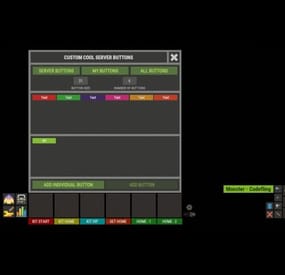
XFastButtons - custom buttons for your server.
- Optimization of the interface for different monitor resolutions.
- Storing player data in - oxide/data/XDataSystem/XFastButtons
- There is a lang ru/en/uk/es.
- Sound effects when interacting with the menu.
- Various settings for buttons. [ Font, Text, Command, Image, Color, Size, Coordinates, Parent Layer ]
- A handy list of buttons under the slots.
- Easy and fast selection of coordinates. [ AnchorMin, AnchorMax, OffsetMin, OffsetMax ]
- Customize the list of server images. [ For server logo, etc. ].
- Customize the image list. [ For button creation by the player. ].
- Customize the list of button colors. [ For button creation by the player. ].
- The player can hide server/my buttons using the settings menu.
- The player can create his own buttons and place them on the screen as he wishes.
- Ability to limit the number of buttons created by a player.
- Ability to create buttons with commands (chat and console) that have multiple arguments. [ /kit vip, /home 1, /sethome 1 - etc. ]
- Ability to edit already created buttons.
- Ability to delete created buttons.
- Ability to undo changes. [ Convenient preview while editing/creating a button. ].
- Ability to create any number of server(admin) buttons by permissions.
- Ability to hide/show buttons when the player interacts with containers or mounted prefabs(chair, transport, etc.) [ Configure in config. ].
- A button can execute multiple commands in sequence. Use the "|" separator.
[ chat.say /kit|chat.say /report ]
- Placeholders for commands:
%ID% --> Player SteamID.
%POS% --> Player coordinates.
- By default, the plugin has a few customized buttons, a list of images, and a list of colors.
Permissions
xfastbuttons.settings - access to basic settings. xfastbuttons.use - access to create/edit/delete buttons. [ Regular players cannot create/edit/delete server(admin) buttons in any way! ] Config
{ "General setting": { "Maximum number of buttons a player can create": 6, "Maximum number of individual buttons a player can create": 5, "List of containers - buttons will react to open/close container. [ Leave the list empty to extend this to all containers. Or set null to disable this feature. ]": null, "List of mountable prefabs (chair, transport, etc) - buttons will react to interaction with the prefab. [ Leave the list empty to apply this to all prefabs. Or set null to disable this feature. ]": [ ......... ], "List of server buttons - [ You can only configure parameters - Text, Command, Color, Font ]": [ ......... ], "List of server buttons by permissions - [ You can only configure parameters - Text, Command, Color, Font ]": { ......... }, "List of individual server buttons - [ You can configure all parameters ]": [ ......... ], "List of individual server buttons by permissions - [ You can configure all parameters ]": { ......... } }, "GUI setting": { "Color_background_1": "0.517 0.521 0.509 1", "Color_background_2": "0.217 0.221 0.209 1", "Close button (icon) color": "1 1 1 0.75", "Server image list - [ These images are not available to players ]": { ......... }, "Image list - [ These images are available for players to select ]": { ......... }, "List of button colors": [ ......... ] } } -

$4.99
Better Fish Trap
Overview
Better Fish Trap transforms the survival fish trap into a fully automated fishing station. It automatically attaches an Industrial Storage Adaptor to every fish trap placed on your server, making them compatible with the industrial conveyor system. Fish caught by the trap can be automatically routed through conveyor belts to furnaces, storage boxes, or any other industrial destination -- no manual looting required.
Beyond automation, the plugin includes three independent systems that work together: health protection to prevent traps from breaking, configurable fishing speed tiers based on permissions, and a full upgrade system where players spend currency to permanently improve individual traps, with independent 15-level speed and yield ladders. Each system can be enabled or disabled independently.
Features
Industrial Storage Adaptor Integration
Automatically spawns a storage adaptor as a child entity of every survival fish trap Works with all industrial entities: conveyor belts, industrial splitters, industrial combiners Adaptor position and rotation are fully configurable to fit your server's aesthetic Existing adaptors are detected on server restart -- no duplicates created Adaptor inherits the fish trap owner's ID for authorization Health Protection (3 Modes)
Fish traps take decay damage every time they catch a fish. This system prevents traps from breaking:
Mode 1 - Prevent Damage: Saves the trap's health before damage is applied and restores it on the next tick. The trap briefly shows reduced health but recovers instantly. Mode 2 - Heal After Catch: Saves health and schedules a heal. Supports instant heal or a configurable delay in seconds. Mode 3 - Block Decay Damage: Completely blocks all decay-type damage to managed fish traps. Best performance -- the damage event is cancelled before any processing. This is the default and recommended mode. Fishing Speed Control (Permission-Based)
Control how fast fish traps catch fish through a tiered permission system:
The vanilla tick rate is 60 seconds per catch attempt Define unlimited custom tiers, each with its own tick rate, priority, and display name Players receive the speed from their highest-priority tier Players without any speed permission use the configurable default tick rate Tiers are fully customizable: add, remove, or rename as needed Default tiers included:
Tier Permission Tick Rate Priority VIP betterfishtrap.speed.vip 40s 1 Premium betterfishtrap.speed.premium 30s 2 Elite betterfishtrap.speed.elite 20s 3 Admin betterfishtrap.speed.admin 10s 999 Upgrade System
Players can upgrade individual fish traps through an in-game UI to improve their tick rate. This system is independent from the permission-based speed tiers -- upgrades take priority over permissions when present.
15 speed levels and 15 yield levels by default, fully configurable (add more or fewer). Speed changes how often a catch fires (2s floor); yield multiplies how much fish comes out per catch (up to x16) -- the two are independent and stack. Level caps: both ladders are capped by plan (No VIP through VIP 3). Levels above a player's cap render in red with a ✕ and can't be purchased 3 currency options: in-game items (scrap by default, supports custom items with skin ID), Economics, or ServerRewards Keep Attributes: When enabled, picking up an upgraded fish trap preserves its upgrade level. Placing it again restores the upgrade. Upgraded traps cannot stack with non-upgraded traps or traps of different levels. Access control: Restrict upgrades to the owner only, teammates/clanmates only, or allow anyone with the permission Clan integration: When "Only Teammates" is enabled, the plugin checks both native Rust teams AND the Clans plugin for membership and alliances Visual feedback: Configurable upgrade effect plays on each upgrade (default: stone upgrade sound) Full UI: Upgrade button and status indicator appear when looting a managed fish trap. A detailed modal shows all levels, current progress, costs, and the upgrade button. Speed and yield upgrade levels (default config, 15 levels each):
Level Tick Rate Yield Multiplier 1 50s x2 2 40s x3 3 30s x4 4 20s x5 5 15s x6 6 10s x7 7 8s x8 8 6s x9 9 4s x10 10 3s x11 11 2.8s x12 12 2.6s x13 13 2.4s x14 14 2.2s x15 15 (MAX) 2s x16 Entry cost is 100 scrap for speed level 1 (60s -> 50s) and 150 scrap for yield level 1 (x1 -> x2). The last level of each ladder costs 450,000 scrap (speed) and 61,000 scrap (yield) respectively. Costs scale progressively between those two points -- see your config/BetterFishTrap.json after first load for the exact per-level values, which are fully editable.
Level caps by plan:
Plan Speed cap Yield cap No VIP 30s (lvl 3) x4 (lvl 3) VIP 1 15s (lvl 5) x6 (lvl 5) VIP 2 8s (lvl 7) x8 (lvl 7) Diamond 3s (lvl 10) x11 (lvl 10) VIP 3 2s (lvl 15) x16 (lvl 15) Levels above a player's cap are shown in the upgrade menu but can't be purchased. Speed and yield are capped independently, though by default both use the same tier thresholds. Throughput relative to a stock trap (60s / x1): a no-VIP trap maxed at its cap (30s, x4) is 8x; a VIP 3 trap maxed on both ladders (2s, x16) is 480x.
Admin Tools
Reset command: Removes all existing adaptors and reattaches them cleanly, reapplying all fishing speeds Toggle command: Instantly disable/enable the upgrade system server-wide for testing or performance debugging. When disabled, all traps revert to vanilla 60s tick rate. When re-enabled, all upgrades and permissions are reapplied. Permissions
Permission Description betterfishtrap.use Required for fish traps to receive a storage adaptor. Grant to all players or specific groups. betterfishtrap.admin Access to admin commands (reset, toggle). betterfishtrap.upgrade Access to the upgrade UI and ability to upgrade traps. betterfishtrap.speed. Grants the player a specific fishing speed tier. Replace with the tier name defined in config (e.g., vip, premium, elite, admin). Commands
Chat Commands
Command Permission Description /fishtrap.reset admin Removes all adaptors and reattaches them to every fish trap on the server. Reapplies fishing speeds. /fishtrap.toggle admin Toggles the upgrade system on/off server-wide. Useful for testing or debugging performance. Console Commands
Command Description fishtrap.reset Same as chat command, usable from server console or RCON. fishtrap.toggle Same as chat command, usable from server console or RCON. Configuration
Located at config/BetterFishTrap.json after first load.
{ "Enabled": true, "AdaptorPosition": { "x": 0.0, "y": 0.5, "z": -0.8 }, "AdaptorRotation": { "x": -90.0, "y": 0.0, "z": 0.0 }, "Health Protection Settings": { "Enable Health Protection": true, "Protection Mode (1=Prevent Damage, 2=Restore Health, 3=Block Decay Damage)": 3, "Instant Heal (Mode 2 only)": true, "Heal Delay Seconds (Mode 2, if not instant)": 0.5 }, "Fishing Speed Settings": { "Enable Fishing Speed Modification": true, "Default Tick Rate (seconds) - Used when player has no speed permission": 60.0, "Speed Tiers - Permission: betterfishtrap.speed.{tier_name}": { "vip": { "Tick Rate (seconds)": 40.0, "Priority (higher = applied first if player has multiple)": 1, "Display Name": "VIP" } }, "Info": "Vanilla tick rate is 60s. Lower = faster fishing. Players get highest priority tier they have permission for." }, "Upgrade System Settings": { "Enable Upgrade System": true, "Currency Type (0 - Scrap | 1 - Economics | 2 - Server Rewards)": 0, "Currency Item (if type is 0)": { "Short Name": "scrap", "Skin ID": 0 }, "Keep Attributes When Removing": true, "Owner Only Can Upgrade": false, "Only Teammates Can Upgrade": true, "Upgrade Effect (empty = disabled)": "assets/bundled/prefabs/fx/build/promote_stone.prefab", "Tick Rate Upgrades": [ { "Cost": 100, "Tick Rate (seconds)": 50.0, "Display Name": "Nível 1" }, { "Cost": 250, "Tick Rate (seconds)": 40.0, "Display Name": "Nível 2" }, { "Cost": 500, "Tick Rate (seconds)": 30.0, "Display Name": "Nível 3" }, { "Cost": 1000, "Tick Rate (seconds)": 20.0, "Display Name": "Nível 4" }, { "Cost": 2000, "Tick Rate (seconds)": 15.0, "Display Name": "Nível 5" }, { "Cost": 5000, "Tick Rate (seconds)": 10.0, "Display Name": "Nível 6 (MAX)" } ], "Fish Yield Upgrades": [ { "Cost": 150, "Multiplier": 2, "Display Name": "Rendimento 1 (x2)" }, { "Cost": 400, "Multiplier": 3, "Display Name": "Rendimento 2 (x3)" }, { "Cost": 1000, "Multiplier": 4, "Display Name": "Rendimento 3 (x4)" }, { "Cost": 2500, "Multiplier": 5, "Display Name": "Rendimento 4 (x5)" }, { "Cost": 4000, "Multiplier": 6, "Display Name": "Rendimento 5 (x6)" }, { "Cost": 6000, "Multiplier": 7, "Display Name": "Rendimento 6 (x7)" } ], "Fish Yield Permission Tiers (betterfishtrap.yield.{tier} => Max Yield Level)": { "vip1": 3, "vip2": 4, "vip_diamond": 5, "vip3": 6, "admin": 999 }, "Default Base Yield Level (vip0 - yield cap for players with no VIP tier)": 2, "Speed Permission Tiers (betterfishtrap.speed.{tier} => Max Speed Level)": { "vip1": 3, "vip2": 4, "vip_diamond": 5, "vip3": 6, "admin": 999 }, "Default Base Speed Level (speed cap for players with no speed permission tier; set >= tier count to disable the gate)": 2 } } Configuration Reference
General
Setting Type Default Description Enabled bool true Master switch. When false, no adaptors are attached and placement hooks are unsubscribed. AdaptorPosition Vector3 (0, 0.3, 0) Local position offset of the storage adaptor relative to the fish trap. AdaptorRotation Vector3 (0, 0, 0) Local rotation of the storage adaptor relative to the fish trap. Health Protection Settings
Setting Type Default Description Enable Health Protection bool true Enable or disable the health protection system. Protection Mode int 3 1=Prevent damage, 2=Heal after catch, 3=Block all decay damage (recommended). Instant Heal bool true Mode 2 only. If true, heals on the next tick. Heal Delay Seconds float 0.5 Mode 2 only. Seconds to wait before healing. Fishing Speed Settings
Setting Type Default Description Enable Fishing Speed Modification bool true Enable or disable the fishing speed system. Default Tick Rate float 60.0 Tick rate in seconds for players without any speed permission. Speed Tiers Dictionary 4 tiers Each key is a permission suffix with tick rate, priority, and display name. Upgrade System Settings
Setting Type Default Description Enable Upgrade System bool true Enable or disable the upgrade UI and functionality. Currency Type int 0 0=In-game item, 1=Economics, 2=ServerRewards. Currency Item object scrap Only used when Currency Type is 0. Keep Attributes When Removing bool true When true, picking up an upgraded trap preserves the upgrade level. Owner Only Can Upgrade bool false When true, only the player who placed the trap can upgrade it. Only Teammates Can Upgrade bool true When true, only owner, team members, or clan members can upgrade. Upgrade Effect string promote_stone Prefab path for the visual/sound effect on upgrade. Tick Rate Upgrades array 15 levels Array of speed upgrade levels with cost, tick rate, and display name. Fish Yield Upgrades array 15 levels Array of yield upgrade levels with cost, multiplier, and display name. Independent from the speed ladder. Fish Yield Permission Tiers dictionary 5 tiers Maps a betterfishtrap.yield.{tier} permission to the maximum yield level it unlocks. Speed Permission Tiers dictionary 5 tiers Maps a betterfishtrap.speed.{tier} permission to the maximum speed level it unlocks. Default Base Yield Level int 2 Yield cap for players with no yield permission tier. Default Base Speed Level int 2 Speed cap for players with no speed permission tier. Upgrade Priority System
The plugin uses a hybrid approach for determining a fish trap's tick rate:
Upgrade level (highest priority) -- If the trap has been upgraded through the UI, that upgrade's tick rate is used. Permission tier (fallback) -- If the trap has no upgrade, the owner's highest-priority speed permission is used. Default tick rate (final fallback) -- If the owner has no speed permissions, the configured default tick rate is used. This means a VIP player who also upgrades their trap will use the upgrade tick rate, not the VIP tier rate. Upgrades are per-trap, permissions are per-player.
Optional Dependencies
Plugin Usage Economics Alternative currency for the upgrade system (Currency Type = 1) ServerRewards Alternative currency for the upgrade system (Currency Type = 2) Clans When "Only Teammates Can Upgrade" is enabled, checks clan membership and alliances in addition to native Rust teams None of these are required. The plugin works standalone with the default item-based currency and native Rust teams.
Localization
The plugin ships with full language support for:
English (en) Brazilian Portuguese (pt-BR) All messages are registered through the Oxide/Carbon lang system and can be customized or extended by adding new language files.
Quick Start
Install the plugin in your plugins folder. Grant the base permission to all players: oxide.grant group default betterfishtrap.use Grant upgrade access: oxide.grant group default betterfishtrap.upgrade (Optional) Grant speed tiers to VIP groups: oxide.grant group vip betterfishtrap.speed.vip (Optional) Grant yield tiers to VIP groups: oxide.grant group vip1 betterfishtrap.yield.vip1 (and vip2 / vip_diamond / vip3 as needed) Reload the plugin. All existing fish traps will receive storage adaptors automatically. Players open a fish trap to see the upgrade button and status. Clicking the upgrade button opens the full upgrade modal.