
Forbidden Lands Rust's Wishlist
-

$40.00$32.00Europa Semper
By Ionut Shiro in Maps
Europa is my 6000 custom map project i've been slowly working on for the past 12 months between other projects that i've finally been able to finish and publish , it features the continent layout with no political or religious replication of existing countries in Europe , monument locations have no meaning simply how i've felt placing them based on the terrain layout and feel.
The map has vast infrastracture for roads and railways and tunnels through the mountains to ease transport around the map.
Procedural & Custom monuments are scattered all around the map with build islands off shore and small prefabs here and there to encourage exploration and make players more engaging.
Custom Monuments :
Lumber Yard
Radio Tower
Nuclear Power Plant
City Market
Fallen City
Dam
Weapons Factory
Abandoned City
Custom Lighthouse
Decorated Procedural Monuments
Entity Count : 80000
- #6000 map
- #rust custom map
- (and 14 more)
-

$8.99
Road Bunkers
This plugin adds bunkers to your server that spawn along roads. It doesn't require any complex setup or additional plugins; just launch it and it's ready to use.
You can also configure bunker types: building grade, security door color, and whether to use a fuse. You can also customize the loot in crates and their quantity.
Config:
{ "Bunker removal time after opening(in seconds)": 180, "Types of bunkers": [ { "Number of bunkers of this type on the map": 60, "Access level (from 1 to 3)": 1, "Fusebox spawn chance (0 to 100)": 0, "Minimum number of crates": 1, "Maximum number of crates (no more than 3)": 1, "Grade type (0 - twigs, 1 - wood, 2 - stones, 3 - metal, 4 - topTier)": 2, "Use own loot table": false, "SimpleLootTable name": "" }, { "Number of bunkers of this type on the map": 30, "Access level (from 1 to 3)": 2, "Fusebox spawn chance (0 to 100)": 50, "Minimum number of crates": 1, "Maximum number of crates (no more than 3)": 2, "Grade type (0 - twigs, 1 - wood, 2 - stones, 3 - metal, 4 - topTier)": 3, "Use own loot table": false, "SimpleLootTable name": "" }, { "Number of bunkers of this type on the map": 10, "Access level (from 1 to 3)": 3, "Fusebox spawn chance (0 to 100)": 100, "Minimum number of crates": 3, "Maximum number of crates (no more than 3)": 3, "Grade type (0 - twigs, 1 - wood, 2 - stones, 3 - metal, 4 - topTier)": 4, "Use own loot table": false, "SimpleLootTable name": "" } ], "Own loot table(there can be a maximum of 12 items in a crate)": { "minAmount": 2, "maxAmount": 4, "itemsList": [ { "name": "metal.fragments", "dropChance": 100, "minAmount": 50.0, "maxAmount": 300.0, "displayName": "", "skinID": 0 }, { "name": "metal.refined", "dropChance": 100, "minAmount": 5.0, "maxAmount": 10.0, "displayName": "", "skinID": 0 }, { "name": "scrap", "dropChance": 100, "minAmount": 10.0, "maxAmount": 20.0, "displayName": "", "skinID": 0 }, { "name": "techparts", "dropChance": 50, "minAmount": 1.0, "maxAmount": 2.0, "displayName": "", "skinID": 0 } ] } }
-
.thumb.gif.734e2c05d0583fba3ca2be9e58bda3a9.gif)
$19.99
Military Checkpoints
By Code Brothers in Plugins
Establish dynamic military control points across your Rust server with tactical checkpoint deployments. Military Checkpoints delivers armed guard forces and defensive infrastructure to strategic locations, creating high-stakes combat zones that challenge players to breach fortified positions.
Watch as military forces establish a defensive perimeter complete with armed scientists and protective barriers. Players must eliminate all defending forces to claim access to the checkpoint's secured loot and resources.
Features
Spawn checkpoints on raods
Armed Scientists with defensive AI behavior
Configurable deployment radius and guard count
Automated checkpoint spawning with time intervals
Randomt selection
Automatic cleanup and despawn system
Performance-optimized spawn validation
Admin commands for manual control
Fully customizable configuration values
Chat Commands (Admin Only)
/checkpoints - Manually spawn a Military Checkpoint at a random location
Permissions
militarycheckpoints.admin - Required to manually spawn checkpoints and access admin commands
Configuration
{ "Plugin Enabled": true, "Checkpoint Settings": { "Cleanup Delay After Clear (seconds)": 300.0, "Barricade Prefabs": [ "assets/prefabs/deployable/barricades/barricade.concrete.prefab", "assets/prefabs/deployable/barricades/barricade.sandbags.prefab" ], "Min Barricades Per Checkpoint": 6, "Max Barricades Per Checkpoint": 8 }, "Scientist Settings": { "Min Scientists": 3, "Max Scientists": 6, "Scientist Health": 100.0, "Scientist Prefab": "assets/rust.ai/agents/npcplayer/humannpc/scientist/scientistnpc_roam.prefab", "Scientist Sense Range": 50.0, "Scientist Target Lost Range": 60.0, "Scientist Attack Range Multiplier": 1.5, "Scientist Max Roam Distance": 50.0 }, "Loot Settings": { "Min Regular Crates": 2, "Max Regular Crates": 4, "Locked Crate Chance (0.0 - 1.0)": 0.25, "Military Crate Prefab": "assets/prefabs/deployable/chinooklockedcrate/codelockedhackablecrate.prefab" }, "Spawn Settings": { "Max Active Checkpoints": 5, "Spawn Interval (seconds)": 600.0, "Min Distance Between Checkpoints": 200.0, "Road Detection Radius": 10.0 }, "UI Settings": { "Main Color (RGBA)": "0.1 0.1 0.1 0.95", "Panel Color (RGBA)": "0.15 0.15 0.15 0.9", "Button Color (RGBA)": "0.25 0.45 0.25 1", "Button Hover Color (RGBA)": "0.35 0.55 0.35 1", "Text Color (RGBA)": "0.9 0.9 0.9 1", "Success Color (RGBA)": "0.3 0.7 0.3 1", "Danger Color (RGBA)": "0.7 0.3 0.3 1" } } Default values are balanced for tactical gameplay and server performance.
Notes
This plugin creates authentic military checkpoint encounters that blend seamlessly with Rust's combat mechanics. Perfect for servers seeking territorial PvP hotspots and contested loot zones.
Feedback, suggestions, and feature requests are always welcome.
Created by CodeBrothers
Check out our other work on Codefling
-
$19.95$15.95Stacks
Stacks gives you control over how items pile up on your server. Set a custom stack size for any item, multiply stacks inside specific containers, and give your VIPs bigger stacks through permissions. You edit all of it from an in-game panel, so you never open a JSON file.
Most stack plugins hand every player the same limits. Stacks was one of the first to make stacks permission-based, and it is still one of the very few that does it. Set a multiplier or an exact stack size per permission, so a default player and a VIP carry completely different amounts of the same item. You can take it all the way down to a single item for a single rank.
It patches the game's stack limit directly. Overstacked items keep their amount when moved, split, or dropped, with no dupes and no lost loot. The same file runs on both Oxide and Carbon.
🌟 Features of Stacks
Set a custom stack size for any item across the whole server Multiply stack sizes inside specific containers (boxes, furnaces, fridges, and more) Per-permission stack multipliers for VIP ranks, like stacks.vip at x2 and stacks.vip2 at x5 Per-permission stack sizes when you want an exact number instead of a multiplier Per-item, per-permission sizes, so one rank gets 50000 sulfur and another gets 25000 Per-container, per-permission multipliers, like a bigger wooden box for top donors Edit items, containers, and settings from an in-game panel, no JSON editing Category tabs and a search box to find any item fast Overstack control to stop or allow overstacked items moving into the player inventory Splits oversized stacks when they hit the ground instead of dropping one giant floating pile Block list for items and skins you never want re-stacked Edit a container's multiplier by hitting it with a hammer FurnaceSplitter compatibility Five built-in languages: English, Russian, Chinese, German, and French
🎮 Commands
/stacks – open the in-game editor (requires stacks.admin) /stacks setstack [shortname] [size] – set a custom stack size for an item /stacks sethandstack [size] – set a custom stack size for the item in your hand stacks.manage stack set [shortname] [size] – set a stack size from the server console stacks.manage stack get [shortname] – read a stack size from the server console (use get all for every item)
🛡️ Permissions
stacks.admin – open the editor and use the stack commands stacks.vip – example VIP tier (x2 stacks by default; rename or add your own in the config) stacks.vip2 – example VIP tier (x5 stacks by default) Any permission you put in the config (multipliers, stack sizes, per-item and per-container overrides) is registered automatically on load.
🗒️ Visual Editor
Type /stacks in-game and you get a panel with three tabs: ITEMS for per-item stack sizes, CONTAINERS for per-container multipliers, and SETTINGS for everything else. Pick an item or container, change a value, save. You never edit a config or data file by hand.
🧪 TEST SERVER
Join our test server to view and experience all our unique features yourself!
Copy the IP Address below to start playing!
connect 194.147.90.239:28015
📚 FAQ
Q: Players get "The plugin does not work correctly, contact the administrator!" How do I fix it?
A: The icons are downloaded through ImageLibrary. If players see this message, ImageLibrary is not working. Install it, confirm it loads with o.plugins, restart the server, and check the console for ImageLibrary errors.
Q: Where can I edit item names or add my language?
A: Open the lang file at oxide/lang/en/Stacks.json (or carbon/lang/en/Stacks.json) and edit the text there. Drop in a new language file the same way.
- #stacks
- #chest stacks
- (and 9 more)
-
$15.00$11.95Quarry Levels
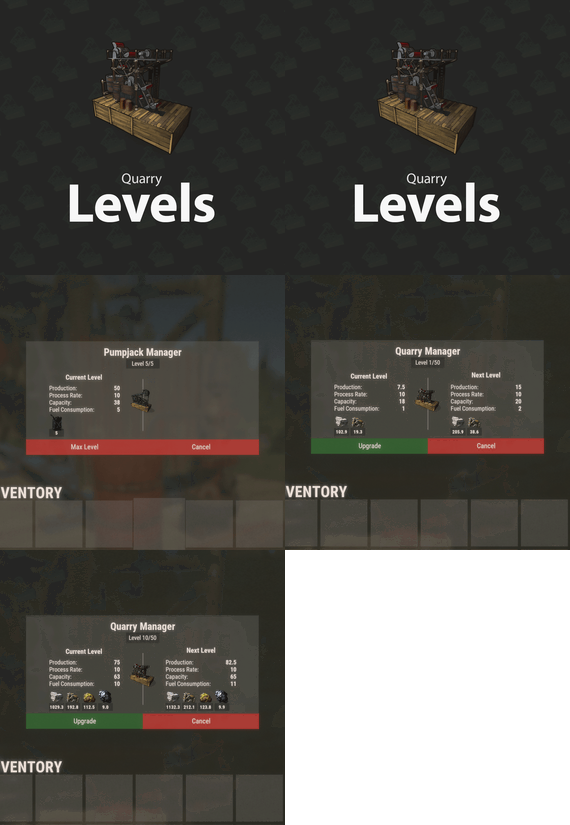
Allows players to upgrade their quarries or pumpjacks with another quarry or pumpjack effectively allowing them to stack up to x quarries and pumpjacks together instead of having them placed individually causing clutter. This plugin is very performant and was designed to run on very high-pop servers.
A level 2 quarry will produce the same amount as 2 level 1 quarries. Same for pumpjacks. Every quarry level will also unlock the next tier of production. Level 3 will unlock metal, level 4 sulfur and level 5 HQM. The production rates for each output are default but can be adjusted in the config.
The GUI displays the production amount, process rate, capacity and fuel consumption for each level. The production of each type is also displayed under it's respective icon each time fuel is consumed. The time it takes to complete 1 cycle is based on process rate.
Permissions
quarrylevels.use - Required to use the quarry levels system.
Config
ChatIconId - Set the Steam ID to the account with your server's icon. UnlockMetalAtLevel - Set what level metal unlocks at while upgrading. UnlockSulfurAtLevel - Set what level sulfur unlocks at while upgrading. UnlockHQMAtLevel - Set what level HQM unlocks at while upgrading. PreventUnauthorizedToggling - When enabled, only authorized players can toggle quarries/pumpjacks PreventUnauthorizedLooting - When enabled, only authorized players can access the quarry/pumpjack. EnableOilCraters - When enabled, oil craters will have a chance to spawn while surveying. OilCraterChance - The chance an oil crater will spawn while surveying. QuarryMaxLevel - Sets the maximum level a player can upgrade their quarry to. PumpjackMaxLevel - Sets the maximum level a player can upgrade their pumpjack to. QuarryCapacityPerLevel - Sets the number of slots unlocked per level. PumpjackCapacityPerLevel - Sets the number of slots unlocked per level. EnableEconomics - Enables the Economics plugin for upgrades. Leaving disable will use the old upgrade method. EconomicsCost - Sets the price per upgrade for both quarries and pumpjacks. EconomicsCurrency - Sets the vanity name of the currency to be displayed in the GUI and info text. EnableServerRewards - Enables the ServerRewards plugin for upgrades. Leaving disable will use the old upgrade method. ServerRewardsCost - Sets the price per upgrade for both quarries and pumpjacks. ServerRewardsCurrency - Sets the vanity name of the currency to be displayed in the GUI and info text. Metal_Production - Increases the amount produced each process rate. Lower = higher. Sulfur_Production - Increases the amount produced each process rate. Lower = higher. HQM_Production - Increases the amount produced each process rate. Lower = higher. ButtonBounds - Change the position of the "upgrade" button. ButtonColor - Change the container color of the "upgrade" button. ButtonOpacity - Change the background opacity of the "upgrade" button. ButtonFontColor - Change the font color of the "upgrade" button. PanelBounds - Change the position of the upgrade panel. PanelColor - Change the container color of the upgrade panel. PanelOpacity - Change the background opacity of the upgrade panel. PanelFontColor - Change the font color of the upgrade panel.
Commands
QL reload - Hot loads the config to apply config changes without having to reload the plugin. (Console command)
- #rust plugin
- #custom rust plugin
- (and 2 more)