-
Posts
76 -
Joined
-
Last visited
Content Type
Profiles
Warranty Claims
Downloads
Forums
Store
Services
Downloads Plus Support
DOWNLOADS EXTRA
Reels
Everything posted by jakman76
-
Version 1.0.0
118 downloads
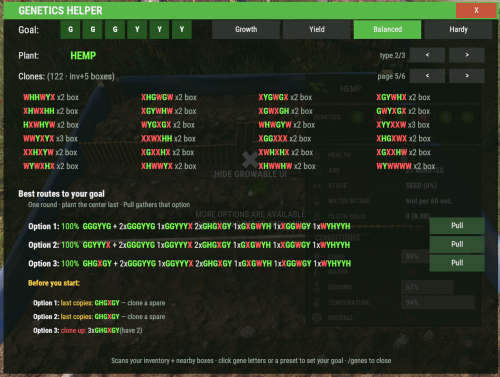
Plant crossbreeding, solved. Genetics Helper scans every hemp, berry, corn, pumpkin, potato and other clone you're carrying (and in nearby boxes), then tells you the exact clones to plant to reach a target genome — one‑round recipes when they exist, and full two‑round bridge routes when they don't. No spreadsheets, no external calculators, no tabbing out of the game. What it does Rust plants have six gene slots, each holding one of five genes. Three are "good" (green) — **G** Growth, **Y** Yield, **H** Hardiness — and two are "bad" (red) — **W** Water, **X** Empty. Crossbreeding mixes a plant with its same‑type neighbors slot by slot, and turning a bank of messy wild clones into a perfect "god clone" is notoriously fiddly. Genetics Helper does the math for you: Scans your clones automatically — inventory plus nearby boxes you own — and groups them by plant type (you can't crossbreed hemp with berries, and it respects that). Pick a goal by clicking six gene‑letter buttons or a one‑click preset. Presets auto‑fit to whichever arrangement is *easiest* to reach from the clones you actually have. Finds the best route and shows it with real success probabilities: One‑round recipes — a center plant plus the donors to surround it with, including "throwaway center" combines where the donors dominate any center. Two‑round bridge routes — when a bank is too messy for one round, it works out a clean intermediate ("bridge") clone to breed first, then the finishing combine. Both rounds shown, with combined odds. Honest advice — if even a two‑round route isn't possible, it tells you what to grow to unblock it. Before you start" checks — warns you when a recipe would use your *last* copy of a clone, or needs more than you have, so you clone up spares before committing (crucial for sub‑100% gambles you may need to retry). Pull buttons — gather the exact donors a recipe needs from nearby boxes into your inventory, only what you don't already have, respecting free space. Flush junk — one button (with a confirm step) to permanently destroy every clone with more than three red genes, cleaning out your bank in seconds. It's fast and lag‑free: the solver is allocation‑free and cached, so opening and clicking around the panel never stalls the server. Getting started 1. Install the plugin (see below) and grant yourself the `rustgeneticshelper.use` permission. 2. Gather some clones — clone wild plants and keep the cuttings on you or in a box beside you. 3. Stand near your storage and type in chat: /genes 4. Click a preset (Growth / Yield / Balanced / Hardy) or set a custom goal with the gene‑letter buttons. 5. Read the recipe under "Best route to your goal", hit "Pull" to grab the donors, and plant them. Installation 1. Drop `RustGeneticsHelper.cs` into your server's `oxide/plugins` (or `carbon/plugins`) folder. 2. The plugin loads automatically and writes a default config to `oxide/config/RustGeneticsHelper.json`. 3. Grant permissions (below) and you're done. Works with Oxide/uMod and Carbon. Commands Player commands: /genes Opens the main panel: set a goal, browse your clones by plant type, and get the best route with Pull buttons. Type it again (or press the **X**) to close. /gene Shows a short help message. Everything else in the panel is done with buttons — setting the goal, switching plant type, paging your clone list, pulling donors, and flushing junk. There's nothing else to memorize. Admin command: /gene grow [all] [stage] Force‑grows the plant you're looking at to a given stage. Add `all` to affect every plant in the same planter. `stage` is one of `seedling`, `sapling`, `crossbreed`, `mature`, `fruiting`, `ripe`. Using `crossbreed` runs the game's real gene‑mixing and prints the before → after genomes — the way to verify a recipe's odds in game. Permissions rustgeneticshelper.use Access to /genes and the panel rustgeneticshelper.admin Access to the /gene grow Configuration Permission required to use | `rustgeneticshelper.use` | Permission node checked for `/genes` and the panel. Leave as‑is unless you have a reason to rename it. Permission for admin/testing commands (grow) | `rustgeneticshelper.admin` | Permission node for the `/gene grow`/`debug`/`itemdebug` tools. Green gene weight (G/Y/H) | `0.6` | The crossbreed weight of a green gene. This is a game constant — **don't change it** unless the game's genetics math changes; the solver's accuracy depends on it. Red gene weight (W/X) | `1.0` | The crossbreed weight of a red gene. Also a game constant — leave it. Default target genome (order-independent for stats) | `GGGYYY` | The goal a player starts with before they pick one. Any 6 letters from `G Y H W X`. Recipe finder: how many recipes to show | `5` | How many candidate recipes the solver keeps internally; the panel displays up to the best three. Higher values do a little more work. Scan boxes within this radius for clones (m) | `4.0` | How far from the player to look for boxes when scanning clones and pulling donors. Also scan teammates' boxes | `true` | If `true`, clones in your teammates' nearby boxes are counted for recipes. (The **Flush** button never touches teammate boxes — it only destroys clones in your own inventory and your own boxes.) Max distinct clones listed per page | `6` | Rows per page in the clone grid. The grid is always four columns wide, so `6` shows up to 24 distinct clones per page. Target presets (name -> genome) | Growth/Yield/Balanced/Hardy | The preset buttons. Rename them or point them at any 6‑gene combo you like. When clicked, a preset auto‑fits to the easiest matching arrangement for the player's clones (slot order doesn't affect a plant's stats). Look-at ray distance (m) | `5.0` | How far the admin `/gene` tools reach when detecting the plant you're aiming at. Planter neighbour scan radius (m) | `2.0` | Radius used by `/gene grow all` to find the other plants sharing a planter. Green colour (rich-text hex) | `#7BFF52` | Colour used for green genes (G/Y/H) in the UI. Red colour (rich-text hex) | `#FF5B5B` | Colour used for red genes (W/X) in the UI. Tips & FAQ Why does the goal rearrange when I click a preset? Slot order has no effect on a plant's stats, so the plugin snaps a preset (e.g. 3× Growth + 3× Yield) to whichever arrangement your clones are already closest to. That's what makes an easy recipe appear instead of "no recipe." It says "grow cleaner clones" — why can't it just combine what I have? Reaching an all‑green genome needs enough *green* donors in each slot to outweigh scattered reds. If your whole bank is red‑heavy, no single‑ or two‑round combine can get there yet — the honest move is to roll a few seeds down to 0–1 reds first, then the routes open up. This is normal Rust genetics, not a limitation of the tool. What do the percentages mean? The odds that a round produces the exact target. `100%` is guaranteed; anything less is a gamble — inspect the center plant the instant it hits the Crossbreed stage, and if it missed, harvest it and retry from your backups. That's why the "Before you start" check nags you to keep spare copies. Is Flush safe? It only destroys clones with **more than three** red genes (pure junk that's never used in a recipe), only from **your own** inventory and boxes, and only after you click **Confirm**. Any other action cancels the pending confirm. Will it lag my server? No. The solver is bounded, allocation‑free, and cached per player — it only recomputes when your clones or goal actually change.Free -
made a new one, will be on codefling as soon as they approve it:
-
the new release should solve your issue.
-
looking into it. what locale is your server ? EU? Trying to eleminate an idea I just got
-
Changed Fixed In to Next Version
-
(15:39:08) | Group 'admin' granted permission 'busstopport.admin' (15:39:22) | [BusStopPort] Creating new config file. (15:40:13) | [ServerVar] giving jakman76 1000 x Scrap (15:42:01) | Group 'admin' granted permission 'busstopport.use' (15:42:09) | Calling 'BusStopTeleport' on 'BusStopPort v0.17.0' took 121ms (15:42:15) | Calling 'BusStopTeleport' on 'BusStopPort v0.17.0' took 105ms (15:44:24) | Calling 'BusStopTeleport' on 'BusStopPort v0.17.0' took 126ms (15:44:35) | Calling 'BusStopTeleport' on 'BusStopPort v0.17.0' took 113ms All 4 ports worked fine.
-
Hi kleinkiko, I just set up a fresh server with just the latest Busstop mod installed. Everything works as expected. Do you have the "busstopport.use" permission set? Any other specific configurations you have ? jakman76
-
Changed Status from Work in Progress to Can't Reproduce Changed Fixed In from Next Version to 0.17.0
-
I’ll have a look. You’re the first to report an issue.
-
Changed Status from Pending to Work in Progress Changed Fixed In to Next Version
-
Changed Status from Pending to Work in Progress Changed Fixed In to Next Version
-
Hi, sorry to hear - let me take a look. I'm a bit busy till Thursday, but will get back to you before the weekend.
-
Changed Status from Work in Progress to Fixed Changed Fixed In from 0.16.0 to 0.17.0
-
I released a temp update to bring the mod back to life but it is currently unable to take payment for the teleport until I figure out the new mechanism. Will try to get this out by Sunday. jak
-
I’ll have a look at it tonight. Thanks for reporting and thank you FP for breaking it again.
-
Changed Status from Pending to Work in Progress Changed Fixed In to Next Version
-
Hi Mirdon, take a look, V0.15 should be what you were looking for. You need to change the config after the update. Jak.
-
Changed Status from Pending to Closed Changed Fixed In to 0.15.0
-
Seems relatively easy. So you want something like this in the config?:: "Block Teleport (ZoneManager)": false/true ....if this is done, would you still need the build restrictions or can this be done with ZM? (dont know the mod - yet) jak.
-
Hi Mirdon, im glad you like it. I’ll have a look at what it would take. It has been a while since I worked on it so it might take a bit. jak
-
Changed Status from Work in Progress to Closed
-
Let me know if you can work with V0.14.0 for the time being. Seems like a change in Rust 2.0 causing this.