

Yashcute1
-
Posts
4 -
Joined
-
Last visited
Content Type
Profiles
Warranty Claims
Downloads
Forums
Store
Services
Downloads Plus Support
DOWNLOADS EXTRA
Reels
Everything posted by Yashcute1
-
Open index_template.php and change these 7 lines at the top: php define('DB_HOST', 'localhost'); // usually localhost define('DB_NAME', 'your_database_name'); // your DB name define('DB_USER', 'your_db_username'); // your DB user define('DB_PASS', 'your_db_password'); // your DB password define('SERVER_NAME', 'Your Server Name'); // e.g. Rust Samrajya 3X define('DISCORD_URL', 'https://discord.gg/yourlink'); define('SERVER_IP', 'your-server-ip:28015'); Then rename file from index_template.php to index.php and upload DB+template.zip
-
Full Setup Guide (Server + Database + Website) What You Need A MySQL database (Hostinger, PlanetHoster, any hosting with MySQL) A web server (same hosting works) A VPS or second server to run the sync scripts (Oracle Free Tier works) Step 1 — Create MySQL Database Go to your hosting control panel Create a new MySQL database, user and password Note down: host, database name, username, password Run this SQL to create the tables: Go to phpMyAdmin → your database → SQL tab and paste the schema from the download package (schema.sql) Step 2 — Set Up Sync Scripts on VPS Upload sync_stats.py and rcon_sync.py to your VPS at /opt/rust-sync/ Install requirements: pip3 install mysql-connector-python websocket-client Edit both files and fill in your database credentials: DB_HOST = "your-mysql-host" DB_NAME = "your-database-name" DB_USER = "your-username" DB_PASS = "your-password" For rcon_sync.py also fill in: RCON_HOST = "your-server-ip" RCON_PORT = 28017 RCON_PASS = "your-rcon-password" Step 3 — Set Up Push Script on Rust Server Upload push_stats.sh to your Rust server and make it executable: chmod +x push_stats.sh Edit the script and fill in your VPS details: ORACLE_USER = "ubuntu" ORACLE_IP = "your-vps-ip" ORACLE_KEY = "/path/to/ssh/key" Add to crontab to run every 5 minutes: crontab -e */5 * * * * /path/to/push_stats.sh >> /var/log/rust-sync.log 2>&1 Step 4 — Set Up Live Player Tracking (RCON) Add rcon_sync.py to crontab on your VPS to run every minute: * * * * * /usr/bin/python3 /opt/rust-sync/rcon_sync.py >> /var/log/rcon-sync.log 2>&1 Step 5 — Set Up Website Upload index.php to your web hosting public_html folder Edit the config section at the top: define('DB_HOST', 'localhost'); define('DB_NAME', 'your-database'); define('DB_USER', 'your-username'); define('DB_PASS', 'your-password'); define('SERVER_NAME', 'Your Server Name'); define('SERVER_IP', 'your-server-ip:28015'); define('DISCORD_URL', 'https://discord.gg/yourlink'); Upload your server logo as logo.png to the same folder Upload Rust item icons to an icons/ folder (list included in download) Step 6 — Test Everything Join your Rust server and do some actions (shoot, gather, raid) Run push_stats.sh manually once Visit your website — you should see your stats That's it! Everything runs automatically from here. Stats sync every 5 minutes Live player count updates every minute via RCON Wipe data is tracked automatically on each map wipe
-
Requirements • Oxide or Carbon installed on your server Installation Download RustStats.cs Upload to oxide/plugins/ or carbon/plugins/ Plugin compiles and loads automatically Stats start tracking immediately — no restart needed Configuration Config file is created automatically at oxide/config/RustStats.json Save interval (seconds) — default 300 — how often stats save Clear stats on wipe — default true — auto wipes stats on map wipe Track suicides as deaths — default true — counts suicides as deaths Console Commands ruststats.save — force save all stats (admin only) ruststats.wipe — wipe all stats (admin only) Data Location oxide/data/RustStats/PlayerData.json Optional Plugins NTeleportation — enables teleport tracking (/home /tpr /outpost) Mevent Clans — enables clan data export Troubleshooting Stats not saving → run ruststats.save in console Stats not resetting on wipe → set Clear stats on wipe to true in config Teleports showing 0 → install NTeleportation plugin C4 not counting → make sure plugin is loaded before players join
-

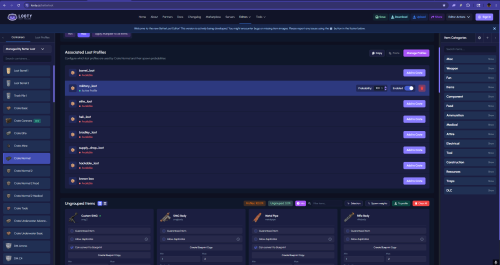
Version 1.2.1
1 download
Take full control of every loot container on your Rust server with this hand-crafted 3x boosted BetterLoot configuration pack — covering 132 prefabs and 8 fully balanced loot groups. Designed for servers that want meaningful, rewarding loot without being overpowered. Includes LootGroups.json with 8 custom loot group profiles (barrel, military, elite, heli, bradley, supply drop, hackable crate, brown box) and LootTables.json with 132 prefab entries covering barrels, rad town crates, elite crates, military tunnels, underwater labs, oil rigs, helicopter crash sites, and more. Every item probability is hand-tuned for a genuine 3x boosted feel. Blueprint conversion flags are set per-item, duplicate rules are configured per drop, and unique weapons like the M249 and L96 are set to no duplicates. Drop-in ready — just place the files in your BetterLoot data folder and reload. Compatible with BetterLoot on Oxide / uMod. Open a support ticket for any questions.$6.99-
- 1
-

-
- #betterloot
- #3x loot
- (and 6 more)