Jump to content

punchinelli

Member
  • Posts

    18
  • Joined

  • Last visited

Everything posted by punchinelli

  1. Don't hate me - but ChatGPT Premium/"Thinking" seems to think the following. I don't know if this is accurate or not, but providing as a courtesy, regardless. Sometimes it makes incorrect assumptions, but other times it fixes stuff like gangbusters with precision. - Punch The GUI is failing because Skinner is trying to render “request items” with a null ItemDefinition, and then it dereferences itemDef.condition.max, which throws the NullReferenceException you’re seeing. Where it blows up (and why) In BoxController.GetItemFromPool(), the plugin unconditionally uses itemDef.condition.max (twice). If itemDef is null, you get your exact exception and the UI never completes. That null itemDef originates here in the skin-requests UI fill loop: It reads a RequestItem from _requestsData It does ItemManager.FindItemDefinition(requestitem.itemID) If itemID is 0/invalid, FindItemDefinition() returns null It then calls InsertItem(..., itemDef, ...) anyway So the immediate “problem” is: your request entries contain invalid itemID values (commonly 0), which causes itemDef to be null and the UI render to crash. Why your _requestsData is ending up with bad itemIDs The code that is supposed to populate RequestItem.itemID from the Steam API is bugged in two separate ways: Chunking bug (wrong indexing): In GetSteamWorkshopSkinRequests(), it loops batches using start, but it always reads _requestsData[i] instead of _requestsData[start + i]. That means every batch submits the same first chunk repeatedly (and can leave later entries unprocessed). Struct write-back bug (the big one):RequestItem is a struct. In the response processing loop, it does: RequestItem request = _requestsData[i]; ... request = new RequestItem { ... }; break; That only updates the local variable. It never assigns back to _requestsData[i], so itemID in the list stays whatever it was (often 0). Result: _requestsData never gets valid itemIDs, and /skinrequests tries to render null ItemDefinitions and crashes. Confirm quickly (no guessing) Check the plugin data file Skinner uses for requests: It loads requests from Skinner/SkinsRequestData On disk that will typically be: oxide/data/Skinner/SkinsRequestData.json If you open it and see entries like "itemID": 0, that directly explains the null ItemDefinition and the crash. (PUNCHINELLI'S NOTE: YES, THIS IS HAPPENING!) Recommended fixes (in order of impact) Fix A : Correctly populate request itemID and save it Apply both corrections in GetSteamWorkshopSkinRequests(): Fix the batching index: // was: RequestItem request = _requestsData[i]; RequestItem request = _requestsData[start + i]; Write updated struct back into the list: // was: request = new RequestItem { ... }; _requestsData[i] = new RequestItem { itemID = itemDef.itemid, skinID = workshopIdUlong, itemDisplayname = file.title }; After updating _requestsData, ensure it persists (either call SaveData() at the end of the coroutine, or rely on periodic save if enabled). The plugin does have periodic saves if config.periodicDataSave > 0. Fix B : Make /skinrequests robust so one bad entry can’t brick the UI Add a null-check in the requests UI loop before calling InsertItem(): ItemDefinition itemDef = ItemManager.FindItemDefinition(requestitem.itemID); if (itemDef == null) { skinner.Puts($"Skin request {requestitem.skinID} has invalid itemID {requestitem.itemID}; skipping"); continue; } InsertItem(requestitem.skinID, itemDef, 1, i); This prevents GetItemFromPool() from ever receiving a null itemDef (which currently guarantees the NRE). Fix C : Defensive coding inside GetItemFromPool() (optional but advisable) Right now InsertItem() accepts ItemDefinition?, but GetItemFromPool() assumes non-null and dereferences it. Either make GetItemFromPool() accept nullable and return null early, or keep it strict and enforce non-null before calling it (Fix B).
  2. The /skinrequests (or /srs) feature isn't working. I'll post the console error below. I'm fairly certain this has to do with the new indexing changes. The skin's item ID isn't getting populated in the skin requests JSON file in /data. It's returning 0 every time. This is causing it to crash.
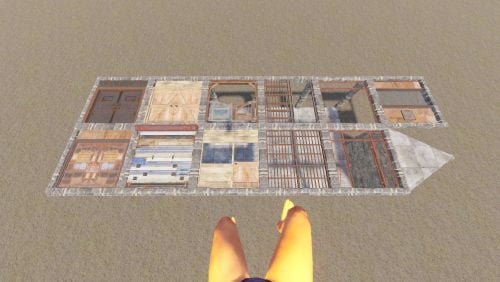
    The best door frames plugin out there. Enables you to place double-doors flat (not just garage doors) without doing any tricky transforms of items. Has a rotation feature for both clockwise, as well as Z-axis (which way it swings). Has opened up so many possibilities on my build server. Great work.
  3. Sent - Jeremy/punchinelli
  4. More information part two: when rotating doors, my teammates see different configurations of the hinge plate. Sometimes it's good for them, and sometimes it's not - and it's different per-player. If I rotate a double door, the hinge plate is wrong, but my teammates say it's perfect. And sometimes the other way around. Teleporting fixes it for all of us.
  5. More information: this is pretty interesting. If I teleport out of the area, and back in, then the issue is resolved for misplaced hinge panels. In other words, if the hinge panel is showing improperly at the top of the door frame even after rotation, and I teleport out and back in, the hinge plate reappears in the proper rotation. This means it's something client-side (I'm using "client-side" very loosely here) - the rotation IS actually occurring, it's just not being displayed properly, it seems.
  6. Great work on the plugin - it's so much better than the other "door rotation" plugins. We are encountering an issue where many double doors must be placed twice in order for the top "hinge plate" to align with the rotation. The door must be placed, removed, and then placed again for it to align properly. See video below. We have not modified the plugin, but are running several other plugins on our server. Is anyone else experiencing this? Video: https://drive.google.com/file/d/1Y_SWhny8ZsMvWNCElBfHsPfNYB2QQEUl/view?usp=sharing
  7. punchinelli

    doors breaks

    I've actually run into this issue as well, although I find it extraordinarily difficult to reproduce. I kept finding that double-doors I had rotated were strangely missing from my base. I kept replacing them, until one day, my teammate removed an item, and it crumbled the doors right in front of me. We tried to reproduce, but were unable. However, it has happened several more times since then. I will try to reproduce it today.
  8. I am getting the same error on mine. Version 3.0.4.
  9. I got this error before my server was patched - after patching, the error went away.
  10. This took FOREVER, but I've did an analysis to exemplify what I mean - it's hiding the bottom row of skins on each page when you max out the "recent skins" on the top row. Here's proof:
  11. punchinelli

    New Update

    This error went away when Rust patched today at force wipe. I'm guessing the new plugin code was for a change in the Rust code base that was to be deployed at force wipe today.
  12. Firstly, WE LOVE THIS PLUGIN! Great work! It loads SO MUCH FASTER than the others! Ok, the issue: the top row of skins in the plugin, which are the "recently used" skins, are hiding some of your skins. It's hard to notice if you have a lot of skins, but it's definitely happening. I feel like the skins should "shift over" to make room for the "recently used" ones, but they don't. It simply covers them up. I'll be happy to help reproduce the issue if needed - just let me know. Thanks so much! Version 3.0.1
  13. punchinelli

    New Update

    I get the same error. Coming from 3.0.1 to 3.0.2.
  14. I was able to fix this by removing the reference to "mission_objective_complete.prefab" in the CS file. Use with caution, but it fixed the problem. I think it was simply trying to play the "mission complete" audio file when choosing a skin, and couldn't find it because the path changed or something. Just delete the path in between the quotes, so it's left with just "".
  15. Yes - I am getting same error.
2.2m

Downloads

Total number of downloads.

10.1k

Customers

Total customers served.

146.7k

Files Sold

Total number of files sold.

3.1m

Payments Processed

Total payments processed.

×
×
  • Create New...

Important Information

We have placed cookies on your device to help make this website better. You can adjust your cookie settings, otherwise we'll assume you're okay to continue.