

LeroyJenkins420
-
Posts
331 -
Joined
-
Last visited
-
Days Won
2
Content Type
Profiles
Warranty Claims
Downloads
Forums
Store
Services
Downloads Plus Support
DOWNLOADS EXTRA
Reels
Everything posted by LeroyJenkins420
-
i'm not sure what you mean. Trains spawn with FLOORS on them, you then build off these floors. You DO NOT place foundation/floors on them then build, the floors are placed by default then you build off of these. If you wish to up the chance of a train spawning "built" you would up the chance in the TrainBases.json config file
-
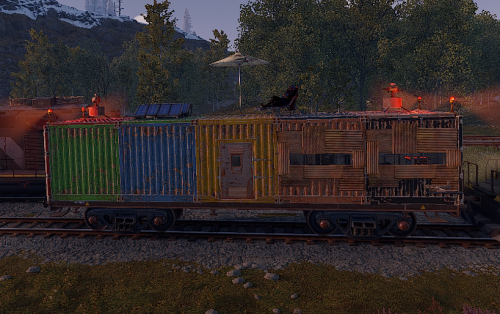 This is normal Facepunch behavior unfortunately. When I have some free time I will look into preventing animal AI from considering players parented to vehicles
 -
@0g.Ghost.7373 try version 1.2.1 and let me know if this fixes your issue I believe the issue may have been in my recursive checks it would get stuck in an infinite loop causing the stack overflow when branches were connected in a loop.
-
Could you screenshot some of their electrical systems and paste them here?
-
@DrayTemplar @Zelious, @ninco90 has asked for a video of this behavior. If one of you can provide this to him/us i'd be happy to work to make the two compatible
-
Hey @DrayTemplar, after looking at your plugin list again it looks like another customer had the same issue as you and found BetterTC to be the cause of their issue
-
of course, it shouldnt be acting like that, I feel like enhanced hammer might be interfering. When I tested the plugin earlier on Oxide and Carbon I had no issues. Granted I had 0 other plugins installed. try disabling enhanced hammer or other plugins that use the building system and see if the issue is resolved
-
Hey @0g.Ghost.7373, I just tested this on Oxide and I dont get the same error/s can you tell me a bit more about how to re-create this? plugin compiles successfully, and attaching wires works properly too
-
Changed Status from Pending to Fixed Changed Fixed In to 1.1.6
-
tested in 1.1.6 and all seems stable. Closing this support request
-
Hello @DrayTemplar, try version 1.1.6 and let me know if you have the same issue please. V1.1.6 was just released this morning. the plugins you're running do not seem to be the issue. Let me know if you still have this issue with the latest version
-

Train base not rendering properly... walls seem to "disappear"
LeroyJenkins420 replied to DangerKittie8083's Support Report in Support
Changed Status from Pending to Fixed Changed Fixed In to 1.1.6 -
Train base not rendering properly... walls seem to "disappear"
LeroyJenkins420 replied to DangerKittie8083's Support Report in Support
Fixed this in 1.1.6 Please let me know if you experience otherwise -
Train base not rendering properly... walls seem to "disappear"
LeroyJenkins420 replied to DangerKittie8083's Support Report in Support
it will not wipe any bases. doing o.reload or c.reload then the name of the plugin "TrainBases" will reload the plugin and re-add all monos to the trains. sometimes upon server restart it seems not all monos are being initialized properly. I'll have this fixed soon, but for the time being reloading the plugin fixes it Can you tell me 1. How long after adding the plugin did you notice this behavior? Was the server restarted at anytime after adding the plugin? 2.. Did reloading the plugin fix the behavior? -
Train base not rendering properly... walls seem to "disappear"
LeroyJenkins420 replied to DangerKittie8083's Support Report in Support
reload the plugin and let me know if it gets fixed -
1. There is no need to wipe the map, plugin is plug and play 2. on server restart there have been times where trains dont get initialized properly but reloading the plugin fixes it entirely 3. this is a known bug and i'm working on a fix 4. trains that are buildable have sheet metal skins, I made this change so people can't grief the trains by going around and destroying the twig floors before building. 5. If you find any conflicting plugins i'd love to know! Thank you for your feedback
-
 Hey @0g.Ghost.7373 the plugin has been updated to now do exactly this! Anytime an entity is connected whether it be in the middle of a wire network, beginning, or end the power is automatically calculated for the entire branch of the network. I'd greatly appreciate if you could leave a review if you like the update!
 -
Absolutely agree and this is ideally my end goal, unfortunately the IO system can be quite messy to work with. I've currently got an update where I've accomplished this however I'm working to also adjust power when the wire is disconnected too so not only will it increment when new consumers are added into the line but also decrement appropriately too. for any non customers reading this I'm considering increasing the price to $9.99 when this update releases, so get it now while you can for a discount!
-
it figures out what is needed for that branch so for example if I connect an auto turret up it'll auto set the branch to 10 power because this is whats required to run the auto turret. If I connect any other entity it will set the branch to the required power for that entity. The default config value isn't used right now, im going to release an update tonight to fix this. I went out of town shortly after publishing this and then got super sick when I got home so I havent had a chance to update it. Feeling much better now so i'll work on this tonight in regards to the simple light using 2 power I have logic in place if the consumption Amount < 2 it'll set it to 2. I swear the branches used to use 1 power but now after reviewing it seems they have 0 power usage. I cannot remember exactly why I added this logic, but I know there had to of been a reason. I will remove this logic and test functionality, if all is fine then the next update will set simpleLights and any other source < 2 to the appropriate amount. apologies for any inconvenience and I appreciate you reaching out. Keep in mind the passthrough isnt calculated currently, so if you string multiple lights together you'd need to still calculate this number and set this amount. In this next update I'll work to add logic to calculate passthrough amounts too!
-
You cant place a wall in that manner, the train HAS to have floors on it. Either find a train with floors or spawn one by doing spawn [train name] EX: spawn wagonc you might need to spawn the wagon a few times as its chance based, or you can of course adjust the chance in config. This is a common misconception about the plugin. Not all trains spawn with floors, though if you want them to you can easily change this in the config
-
If the plugin compiles at all then it should also compile on server restart automatically. What do you mean it doesnt work? Are you not able to build on trains, are they not spawning etc?
-
Version 1.4.3
1,218 downloads
Auto Branch intelligently sets branch power to match whatever the branch is connected to, including upstream/downstream IOEntities. With no permissions required and a simple setup, it's plug-and-play ready for any server. Config "Default Branch Amount": 10, "IOEntity BlackList (prevents from being powered)": [ "example1", "example2", "For ShortNames Go to:", "https://docs.carbonmod.gg/references/items/", "https://www.corrosionhour.com/rust-item-list/", "autoturret" ]$15.00 -
Interesting, I messaged Ninco to see if hes any idea why this would be the case. I can work to make this compatible but cannot make any promises as of now. I appreciate the update and will keep you updated on any progress I make
-
odd, the plugin worked for me on the same version of carbon, the only difference is my server was already up when I added it. The only thing I can think of is you have a conflicting plugin or the fact it was added before it was up fully caused the issue. Though I highly doubt it was due to being added before it was up fully.
-
@Zelious i'd first try to reload TrainBases and ensure it compiled successfully, if it did test to make sure you do/dont have issue. after i'd then try disabling plugins that deal with the building system until you find the culprit. When you noticed these bugs did you just add the plugin or how long after adding the plugin did you notice the "bugs"?
