K9N_Twitch
-
Posts
517 -
Joined
-
Last visited
Content Type
Profiles
Warranty Claims
Downloads
Forums
Store
Services
Downloads Plus Support
DOWNLOADS EXTRA
Reels
Everything posted by K9N_Twitch
-
Hey! Since the Thursday wipe (Aug 6) some of my players have been getting kicked with "Invalid Packet: Client Ready" right after connecting, and my console is getting spammed nonstop with this: NullReferenceException: Object reference not set to an instance of an object at (wrapper dynamic-method) MonoMod.Utils.DynamicMethodDefinition.ItemCrafter.FinishCrafting_Patch1(ItemCrafter,ItemCraftTask) at ItemCrafter.ServerUpdate (...) It happens as long as someone has something in their crafting queue, and seems to get worse the longer the server runs. I'm on QualityCrafting v3.0.4. Not sure if it's related to the plugin or something on my end, but wanted to check if this rings a bell for you or if anyone else has reported it after this week's update? Happy to send more of the log if that helps. Thanks!
-
@FakeNinja
-

il Platform Blue Door puzzle is broken (Card swiped but door won't open) at Y16
K9N_Twitch posted A Support Report in Support
Hi , I would like to report a persistent bug on regarding the Oil Platform at Y16. [The Issue] Location: Y16 (Oil Platform) Action before incident: Flipped the active switch inside the Green Keycard room, then swiped the Blue Keycard at the Blue Door. Current Status: The Blue Keycard loses its durability/uses normally, but the Blue Door remains locked and does not open. Reproducibility: Confirmed 100% of the time (Happens every single time). It seems like the IO entity connection or the door trigger logic between the green switch and the blue door is broken or missing at this specific monument. Could you please check the keycard puzzle setup at the Y16 Oil Platform? Thank you for your hard work and for creating this map! -
Oil Platform Blue Door puzzle is broken (Card swiped but door won't open) at Y16
K9N_Twitch replied to K9N_Twitch's Support Report in Support
Oops, I posted this in the wrong place. Sorry. -
+
-
Oil Platform Blue Door puzzle is broken (Card swiped but door won't open) at Y16
K9N_Twitch replied to K9N_Twitch's Support Report in Support

-
Oil Platform Blue Door puzzle is broken (Card swiped but door won't open) at Y16
K9N_Twitch posted A Support Report in Support
Hi Shemov, I would like to report a persistent bug on Crisis: The Rebirth of the Island regarding the Oil Platform at Y16. [The Issue] Location: Y16 (Oil Platform) Action before incident: Flipped the active switch inside the Green Keycard room, then swiped the Blue Keycard at the Blue Door. Current Status: The Blue Keycard loses its durability/uses normally, but the Blue Door remains locked and does not open. Reproducibility: Confirmed 100% of the time (Happens every single time). It seems like the IO entity connection or the door trigger logic between the green switch and the blue door is broken or missing at this specific monument. Could you please check the keycard puzzle setup at the Y16 Oil Platform? Thank you for your hard work and for creating this map! -
Similarly
-
1. Argument 1: cannot convert from 'Facepunch.StringView' to 'string' [CS1503] (AutoBan 37 line 696)
-
1. Argument 1: cannot convert from 'byte[]' to 'System.IO.MemoryStream' [CS1503] (UiEngineFramework 41 line 2402) 2. 'CommunityEntity' does not contain a definition for 'ClientRPCEx' and no accessible extension method 'ClientRPCEx' accepting a first argument of type 'CommunityEntity' could be found (are you missing a using directive or an assembly reference?) [CS1061] (UiEngineFramework 52 line 2411)
-
07/03 08:46:53 | 1. 'CommunityEntity' does not contain a definition for 'ClientRPCEx' and no accessible extension method 'ClientRPCEx' accepting a first argument of type 'CommunityEntity' could be found (are you missing a using directive or an assembly reference?) [CS1061] (AutomaticCountdownSave 40 line 857)
-
Need an update please 1. Cannot implicitly convert type 'string[]' to 'Facepunch.StringView[]' [CS0029] (SmartWarnings 32 line 642)
-
"InsideTerrain Violation" causing instant death and server kick at I8
K9N_Twitch replied to K9N_Twitch's Support Report in Support
@Skaer -
Hi, I would like to report another severe terrain issue on Raiders Realms at coordinates N6. [The Issue] A player originally died here by clipping through the ground and falling to their death. When attempting to recover the body/loot, the same issue repeated multiple times in that exact area: Fell through the map (Void death): 2 times Got physically stuck in the terrain (Unable to move): 2 times It seems the ground mesh or collision in the N6 area is completely broken, making body recovery impossible and repeatedly trapping players. Could you please review the collision and terrain at N6 as soon as possible? Thank you for your hard work on these map fixes!
-
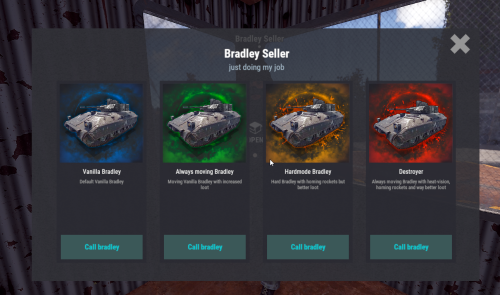 Sometimes I don't spawn on custom maps, and since it's hard to specify a location using coordinates, I wanted to set my current position as the NPC spawn point.
 -
Client crash and instant death at E16 Cave (Iron Ladder)
K9N_Twitch posted A Support Report in Support
Hi, I found another critical issue on Raiders Realms regarding the cave near the dome at E16. [The Issue] Location: E16 (Cave near the dome) Symptom: Inside the cave, there is a structure with an iron ladder going up and down. Attempting to climb up seems impossible. However, when trying to climb down the ladder, it triggers a client error/crash and causes instant death. Could you please check the structure, ladder prefabs, and collision data at this location? Thank you for your hard work and quick support!-
- 1
-

-
Button actions insert an unwanted leading space into commands / chat messages
K9N_Twitch replied to K9N_Twitch's Support Report in Support
Problem solved! -
hank you for the great plugin. I have a quality-of-life feature request for Custom BradleyAI. [Suggestion] Could you add a command that allows admins to set NPC spawn points or waypoints directly at their current standing position? For example, something like /cbai setpos <npc_type> or /cbai addwaypoint. Currently, having to manually check and type in raw coordinates (X, Y, Z) is quite time-consuming when configuring multiple locations. Being able to just stand on the spot and run a command to register the position would make setup much faster and more accurate. Thank you for considering this request!
-
Missile Silo collision/terrain glitch on Raiders Realms
K9N_Twitch posted A Support Report in Support
Hi, I found another map glitch regarding the Missile Silo monument. [The Issues] Under-map Access & Instant Death: Players can accidentally clip beneath the monument. If they try to enter the facility from underneath, it causes instant death. Invisible Floor Glitch (Surface): On the surface (normal route), there is an invisible area where players will suddenly fall through the floor to their death. If players manage to avoid that invisible glitch spot on the surface and enter the regular way, the monument can be completed normally without issues. Could you please check the terrain collision and prefabs around the Missile Silo? Thank you! Hi, I found another map glitch regarding the Missile Silo monument. [The Issues] Under-map Access & Instant Death: Players can accidentally clip beneath the monument. If they try to enter the facility from underneath, it causes instant death. Invisible Floor Glitch (Surface): On the surface (normal route), there is an invisible area where players will suddenly fall through the floor to their death. If players manage to avoid that invisible glitch spot on the surface and enter the regular way, the monument can be completed normally without issues. Could you please check the terrain collision and prefabs around the Missile Silo? Thank you!
-
Button actions insert an unwanted leading space into commands / chat messages
K9N_Twitch posted A Support Report in Support
Hi, I am encountering an issue with Custom Buttons where pressing a button inserts an unwanted leading space into the executed command or text message. [The Problem] For example, if I configure a button to execute /shop, it actually sends " /shop" (with a space at the very beginning) to the chat. As a result, it is treated as a regular text message rather than a proper chat command, making the button fail to work as intended. [Example Config] "/shop" Even when configured like above without any spaces, the plugin still executes it with a leading space. Could you please check the input string parsing or the method that registers the button action to see if it's accidentally appending a whitespace? Thank you for your time and for creating this plugin! -
"InsideTerrain Violation" causing instant death and server kick at I8
K9N_Twitch posted A Support Report in Support
Hi, I would like to report a critical bug on Raiders Realms. A player encountered an issue where they were instantly killed, lost all their items, and were kicked from the server. Here are the details of the incident: Location (Coordinates): I8 (-464.74, 48.39, 442.26) Action before incident: Walking towards the exit of the Safe Area. Current Status: Instantly killed (all items lost) and force-kicked from the server. Error Log: InsideTerrain: Enforcing (violation of 200) at (-464.74, 48.39, 442.26) Reproducibility: Not confirmed yet, but it behaves identically to an anti-flyhack / terrain violation glitch. It seems like Rust's anti-hack system is falsely triggering a terrain violation near the safe area exit, likely due to an invisible collision or prefab issue at that specific spot. Could you please check the collision data or terrain layout at these coordinates? Thank you for your help and for creating this map!
-
Cannot implicitly convert type 'Facepunch.StringView' to 'string'. An explicit conversion exists (are you missing a cast?) [CS0266] (LootReroll 33 line 350)
-
@あひがお
-
06/05 09:24:40 | 1. Cannot implicitly convert type 'Facepunch.StringView' to 'string'. An explicit conversion exists (are you missing a cast?) [CS0266] (AdvancedEntityLimit 32 line 1200) 06/05 09:24:40 | 2. Argument 1: cannot convert from 'Facepunch.StringView[]' to 'System.Collections.Generic.IReadOnlyList<string>' [CS1503] (AdvancedEntityLimit 41 line 1204)
-
06/05 09:23:54 | 1. Cannot implicitly convert type 'Facepunch.StringView[]' to 'string[]' [CS0029] (SendVideo 33 line 126) 06/05 09:23:54 | 2. Argument 3: cannot convert from 'Facepunch.StringView[]' to 'string[]' [CS1503] (SendVideo 57 line 279)