
Murgator
-
Posts
38 -
Joined
-
Last visited
Content Type
Profiles
Warranty Claims
Downloads
Forums
Store
Services
Downloads Plus Support
DOWNLOADS EXTRA
Reels
Everything posted by Murgator
-
 Yes you are right, Paymentwall will soon be added to Tip4serv because other countries can't use Stripe too. But for now you can use Tip4serv with Paypal. If you have any other questions contact us at https://tip4serv.com/contact
 -
Alipay and Wechat Pay are available, for this you need to activate STRIPE on https://tip4serv.com/dashboard/my-gateway
-
Yes I understand, Tip4serv was created so that even small servers can enjoy an income. Tip4serv is very young and it will evolve and offer more customization options.
-
Version 1.5.1
4,081 downloads
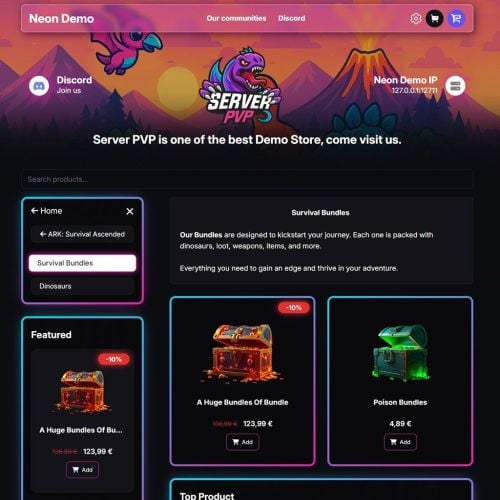
Monetize Your Rust Server Tip4Serv is a complete Rust Webstore, Donation Store and Server Monetization platform built for Rust communities. Create your own professional Rust server store in minutes and sell VIP ranks, kits, permissions, queue priority, items, virtual currency, subscriptions and donation packages with automatic in-game delivery. Looking for a Tebex alternative for Rust? Tip4Serv provides a customizable storefront, automatic Rust command execution, RCON and plugin integration, Discord integration, subscriptions, multi-currency checkout and 25+ payment methods worldwide. Create your store: https://tip4serv.com Built for Rust Server Monetization Turn your Rust community into a sustainable project by selling: VIP Memberships & Ranks Queue Priority Kits Item Bundles Oxide / Carbon Groups Permissions Economics Money Server Rewards Points Virtual Currency Subscriptions Battle Passes Donation Packages Cosmetics Supporter Packages Monthly Memberships Custom Products After a successful payment, Tip4Serv can automatically execute commands on your Rust server to deliver the purchased product. No manual delivery required. Automatic Rust Delivery Connect your Rust server using either: Tip4Serv Rust Plugin RCON Once connected, purchases can automatically trigger Rust console commands. Tip4Serv can work with standard Rust commands as well as commands provided by other Oxide or Carbon plugins. This means you can integrate your store with plugins such as: Economics Server Rewards Kits Permission systems VIP systems Custom plugins and virtually any other plugin exposing console commands. 25+ Payment Methods Give your players a fast checkout experience with payment methods available around the world, including: Credit & Debit Cards PayPal Apple Pay Google Pay Venmo Amazon Pay Revolut Pay CashApp Klarna Link iDEAL Bancontact EPS BACS BECS SEPA Multibanco Przelewy24 Boleto OXXO MobilePay and more Available payment methods are automatically adapted to the customer's country and payment configuration. Multi-Currency Rust Store Sell to players around the world without maintaining separate stores. Tip4Serv supports multi-currency checkout, allowing international customers to purchase your Rust packages using supported currencies while your products remain centrally managed. This is especially useful for Rust communities operating servers across Europe, North America, Australia and other regions. Payments, Fraud Protection & Chargebacks Tip4Serv provides features designed to help protect your Rust server revenue: Secure online payments 3D Secure support Anti-fraud protection Chargeback Protection tools Automatic dispute evidence assistance Transaction history Detailed sales statistics Tax & VAT tools Spend less time managing payments and more time running your Rust community. Build Your Own Rust Store Create a professional storefront without building a website yourself. Features include: Custom Store Branding Multiple Store Themes Dark & Light Mode Custom Domain Name Free SSL Certificate DDoS Protection Product Images, GIFs & Videos Product Categories Related Products Product Search Top Customers Custom CSS Advanced Theme Editor Customer Avatars Steam Account Linking Discord Account Linking Mobile-Friendly Checkout Your Rust store can be customized to match the branding of your server or network. Starter – Start for Free €0/month – 5% platform fee Includes: Unlimited Products & Categories Unlimited Rust Servers & Commands Automatic Rust Delivery Subscription Products Discord Roles & Webhooks Multi-Currency 25+ Payment Methods Managers & Staff Access Sales Statistics Coupons & Discounts Loyalty Points Custom Domain Name Resend Orders Tax & VAT Tools Chargeback Protection Free SSL Certificate DDoS Protection No Advertisements No credit card is required to get started. PRO – 21-Day Free Trial €11.99/month + 3.8% platform fee Includes all Starter features plus: Reduced Platform Fee: 3.8% instead of 5% Gift Cards Multiple Dynamic Themes Custom Fields & Command Integration Product Galleries Video & GIF Support Top Customers Related Products Built-In Product Search Advanced UI Theme Editor Custom CSS Editor Additional Store Customization Features Available in 15 Languages Tip4Serv stores can serve international Rust communities in: English, Danish, Dutch, French, German, Hungarian, Italian, Norwegian, Polish, Portuguese, Romanian, Russian, Spanish, Swedish and Turkish. Rust Plugin Installation 1. Create your Tip4Serv store Create a free account: https://tip4serv.com/ Create your store and add your Rust server from the Tip4Serv dashboard. 2. Install the plugin Place: Tip4Serv.cs inside your Rust server's: oxide/plugins/ directory. The plugin is compatible with Oxide/uMod and Carbon. 3. Reload Tip4Serv Run: oxide.reload Tip4Serv from your Rust server console. 4. Configure your API key Add your Tip4Serv API key to: Tip4Serv.json 5. Reload the plugin Run again: oxide.reload Tip4Serv Your console should confirm that the server has been successfully connected. Installation via RCON You can also connect your Rust server without using the plugin. Create your account at https://tip4serv.com Create your Rust store Add your Rust server Enter your server IP Enter your RCON port Enter your RCON password Connect the server Once connected, Tip4Serv can execute your configured commands automatically after purchases. Setting up commands on Tip4Serv Before setting up your commands on Tip4serv.com, you should know that command work in your server's console (not ingame as an admin). Here are some sample commands you can use in the products configuration: MY PRODUCTS. But you can use any plugin commands you want. Give a group or permission Add a player to a group previously created with oxide.group add [group-name]: oxide.usergroup add {steam_id} group-name Remove a player from a group: oxide.usergroup remove {steam_id} group-name Give a permission to a player: oxide.grant user {steam_id} permission-name Remove a permission from a player: oxide.revoke user {steam_id} permission-name Give an item to a player inventory with steam_id (advised) IMPORTANT: Please select the option [Player must be online] in your product editor inventory.giveto {steam_id} item-short-name quantity Example: inventory.giveto {steam_id} scientist 5 Give an item to a player inventory with Give plugin IMPORTANT: Please select the option [Player must be online] in your product editor giveto {steam_id} item-short-name quantity Example: giveto {steam_id} fun.guitar 1 Give a kit to a player with Give plugin: givekitto {steam_id} kit-name Give money Give money to a player with Economics plugin: deposit {steam_id} amount Give points Give points to a player with Server Rewards plugin: sr add {rust_username} amount Quantity multiplier You can also multiply the quantity choosen by the customer like this: {quantity*50} Note: You must first activate the **Allow quantity choice** option in your product. Use this command on Tip4serv if you want to sell bundles of $200 with economics plugin: deposit {steam_id} {quantity*200} This will run in your server console after a purchase if the player buys product 4 times: deposit 76561198181797231 800 Built for Growing Rust Communities Tip4Serv is designed for both small Rust servers and established multi-server networks. Manage your products, servers, customers, subscriptions, payments and automatic delivery from one platform. Tip4Serv has processed more than $10 million in sales and 640,000+ payments across gaming communities. Looking for a Tebex Alternative for Rust? If you're searching for: Rust Tebex Alternative Rust Donation Store Rust Webstore Rust Server Store Rust VIP Store Rust Monetization Plugin Rust Shop Plugin Rust Payment Plugin Rust Server Donations Sell Rust Kits Sell Rust VIP Sell Rust Ranks Tip4Serv provides an all-in-one solution with automatic Rust delivery, subscriptions, Discord integration, international payments and customizable storefronts. Rust Store Demo See what a Tip4Serv store can look like: https://rust.tip4serv.com/ More store examples: https://tip4serv.com/demos Documentation & Support Tip4Serv Documentation: https://docs.tip4serv.com Create Your Store: https://tip4serv.com Contact Support: https://tip4serv.com/contact Create your Rust donation store, connect your server and start selling VIP ranks, kits, permissions and other packages in minutes.Free