
.thumb.png.1b1aa5453487689e5078fff6378d12b6.png)
.thumb.png.fd04b0a9768e2dfd50c6d03c335f7d92.png)
About Save Countdown Announcer
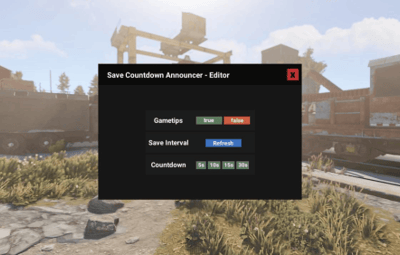
Save Countdown Announcer notifies all players with a visual countdown (see pictures) or in the chat before the Server saves.
The plugin detects when the server saves and initiates a countdown based on the configuration before the server saves again.
If you're working on the server using "server.save" unload the plugin first and load it again when you are finished.
The plugin cannot distinguish whether the save comes from the server or "server.save"
Why does the Plugin don’t save the Server directly?:
The Plugin don’t handle the saves of the Server because manual saves can cause lags on servers with many entities (its a rust thing lol) 

Quote
- Installation
➤ | Place AutomaticCountdownSave.cs into your plugin folder
- Configuration [Save Interval]
➤ | First set the Interval your Server should save.
➤ | Go to server/my_server_identity/cfg/server.cfg
➤ | If it's not already there, add a line and write:
➤ | server.saveinterval YourSaveInterval || The Interval should be more than 60 Seconds
➤ | Save the server.cfg and Restart your Server
- Use the UI
➤ | Open the UI with /sca || You need Auth 2 (ownerid)
➤ | Switch between the Gametip and the Chat Notifications
➤ | Click on the Refresh Button after you changed the Save Interval
➤ | Change the Countdown

{
  "CountdownMessage": "The Server saves in {0} Second{1}",
  "SaveMessage": "The Server saves now. Expect some lag"
}

{
  "ChatMessageSize": 14,
  "CountdownInSeconds": 10,
  "ServerSaveInterval": 600,
  "UseGameTips": true
}


![More information about "Container Item Block [Tool Cupboard, Small & Large Wooden Box]"](https://codefling.com/cdn-cgi/image/width=285,height=285,quality=80,fit=cover,format=webp/https://codefling.com/uploads/monthly_2025_05/ItemBlockTemplateNew.thumb.png.f70ebc2dec43377ada413c52dd1d2638.png)