








About RaidSelector
WHAT IS RAIDSELECTOR?
A user-friendly raid base purchasing system for Rust servers that transforms how
players engage with raidable content. Featuring an intuitive UI, multilingual
support, and seamless integration with popular server plugins.
 Perfect for server owners who want:
• Professional player experience with modern UI
• Monetization through VIP raid access
• Multi-language support for international players
• Easy integration with existing economy systems
═══════════════════════════════════════════════════════════════════
WHY CHOOSE RAIDSELECTOR?
═══════════════════════════════════════════════════════════════════
 PLAYER EXPERIENCE
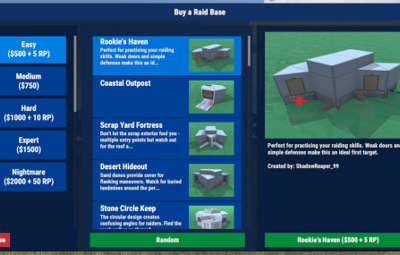
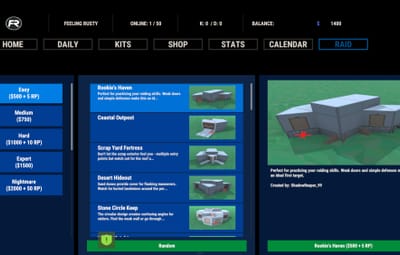
• Intuitive point-and-click interface - no complex commands
• Automatic per-player language via Oxide's lang system
• Beautiful image previews of raid bases
• Clear cost display with multiple currency support
• Instant raid spawning after purchase
 MONETIZATION FEATURES
• VIP-only difficulty tiers (Expert, Nightmare)
• Permission-based purchase restrictions
• Tiered access system for progression servers
• Browse-only mode for non-VIP players
 MULTILINGUAL SUPPORT (NEW!)
• Full localization system with external JSON files
• Translates ALL UI text, errors, and base descriptions
• Automatic language detection per player
• Easy translation management for server admins
• Admin command to generate language templates
 PROFESSIONAL INTEGRATION
• Works standalone OR with ServerPanel unified menu
• Seamless Economics, ServerRewards, and Custom Costs integration
• Automatic base detection from RaidableBases profiles
• No manual cost configuration needed
• Russian RaidableBases config support (auto key translation)
 COMPLETE CUSTOMIZATION
• 24+ customizable UI colors for branding
• Custom base names, descriptions, and credits
• Image preview support via ImageLibrary/ImageDatabase
• Unlimited difficulty levels - automatically detected from RaidableBases profiles
• Individual permission control per difficulty tier• Five difficulty levels with individual permission control
 PERFORMANCE OPTIMIZED
• Memory-efficient object pooling
• Cross-platform: Oxide AND Carbon support
• Minimal server impact
• Tested on high-population servers
• Difficulties auto-sorted by cost (cheapest first)
• New bases auto-detected from RaidableBases profiles
═══════════════════════════════════════════════════════════════════
FLEXIBLE PERMISSION SYSTEM
═══════════════════════════════════════════════════════════════════
Granular permissions for complete control:
✓ raidselector.can.use Open the UI
✓ raidselector.admin Manage translations & admin tools
✓ raidselector.difficulty.easy Access Easy raids
✓ raidselector.difficulty.medium Access Medium raids
✓ raidselector.difficulty.hard Access Hard raids (VIP)
✓ raidselector.difficulty.expert Access Expert raids (VIP)
✓ raidselector.difficulty.nightmare Access Nightmare raids (VIP)
✓ raidselector.buyraidspecific Purchase selected bases
✓ raidselector.buyraidrandom Purchase random bases
 Smart UI: Buttons automatically hide when players lack permissions
Perfect for VIP tiers: Grant higher difficulties to premium players
Flexible control: Allow browsing but restrict purchasing
═══════════════════════════════════════════════════════════════════
GETTING STARTED - 5 MINUTES TO LAUNCH
═══════════════════════════════════════════════════════════════════
 INSTALLATION (2 minutes)
1. Install RaidableBases plugin (required)
2. Drop RaidSelector.cs into oxide/plugins/ or carbon/plugins/
3. Server automatically loads plugin and creates config
4. Done! Players can immediately use /rs
FOR PLAYERS (30 seconds)
1. Type /rs in chat (or click RAID SELECTOR in ServerPanel)
2. Pick a difficulty level from the left panel
3. Browse bases in the middle or click "Random"
4. Hit "Buy" button - raid spawns instantly!
 FOR ADMINS (Optional customization)
• Grant basic access: o.grant group default raidselector.can.use
• Create VIP tiers: o.grant group vip raidselector.difficulty.expert
• Add translations: /rsinitlang es (Spanish, French, German, etc.)
• Customize colors and base info in config file
• Add base images via ImageLibrary/ImageDatabase
• Enable Debug mode in config for detailed startup diagnostics and troubleshooting logs
 MULTILINGUAL SETUP (1 minute per language)
1. Run: /rsinitlang <language> (e.g., /rsinitlang es)
2. Edit: oxide/lang/es/RaidSelector.json
3. Reload: o.reload RaidSelector
4. Players see their Steam language automatically!
PLUGIN INTEGRATION
 REQUIRED
• RaidableBases - Core raid system and base configurations
 OPTIONAL (Enhance functionality)
• Economics - Use server currency ($) for purchases
• ServerRewards - Use reward points (RP) for purchases
• ImageLibrary (Oxide) - Show base preview images
• ImageDatabase (Carbon) - Show base preview images
• ServerPanel - Unified menu integration (/info command)
Works with ANY combination of optional plugins
Costs automatically detected from RaidableBases config
Supports dual currency: Economics + ServerRewards together!
KEY CONFIGURATION OPTIONS
Config automatically created at: oxide/config/RaidSelector.json
BRANDING & APPEARANCE
• ChatCommand - Change /rs to your preferred command
• Colors - 24+ RGBA colors for complete UI theming
• Base info - Custom names, descriptions, builder credits
• Images - Add preview images via URLs
 ACCESS CONTROL
• RequiresOxidePermission - Public or permission-based access
• DifficultyPermissions - Enable/disable difficulties, require permissions
• BuyButtonPermissions - Control who can purchase raids
INTEGRATION
• ServerPanelConfig - Enable/configure ServerPanel integration
- Works standalone, embedded, or both modes
- Perfect for unified server menu systems
 All settings hot-reload with: o.reload RaidSelector
SMART PAYMENT SYSTEM
 AUTOMATIC COST DETECTION
• Reads costs from RaidableBases config (no duplicate setup!)
• Supports Economics, ServerRewards, Custom Costs, or any combination
• Plugin-based currencies supported via RaidableBases custom costs
• Free raids supported (no payment required)
 FLEXIBLE DISPLAY
• Economics only: "Easy ($500)"
• ServerRewards only: "Easy (100 RP)"
• Dual currency: "Easy ($500 + 100 RP)"
• Custom costs: item and plugin currency amounts displayed
• Free raids: "Easy"
PLAYER-FRIENDLY
• Clear cost display before purchase
• Payment handling delegated to RaidableBases (balance checks, charges, refunds)
• Supports free raids with no payment required
USE CASES & SERVER TYPES
 PERFECT FOR:
• PvE servers wanting organized raid content
• PvX servers with economy-based raid access
• VIP/donor servers with tiered content access
• International servers needing multi-language support
• High-population servers requiring performance optimization
• Servers using ServerPanel for unified menu systems
POPULAR CONFIGURATIONS:
• Public Easy/Medium, VIP-only Hard/Expert/Nightmare
• Browse free, purchase requires VIP subscription
• Progressive unlocking: rank up to access harder raids
• Multi-language: Spanish, French, German, Russian supported
• Branded UI matching your server's color scheme
WHAT PLAYERS WILL LOVE
✓ No complicated commands - just /rs or click ServerPanel
✓ See exactly what you're buying with images and descriptions
✓ Know the cost before clicking - clear pricing display
✓ Interface in their own language automatically
✓ Instant raid spawning - no waiting
✓ Professional, polished experience
WHAT ADMINS WILL LOVE
✓ 5-minute setup, works immediately out of box
✓ No manual cost configuration - reads from RaidableBases
✓ Permission system perfect for VIP monetization
✓ Easy translation management for international players
✓ Extensive customization without code editing
✓ Works on both Oxide AND Carbon servers
✓ Detailed configuration documentation included
✓ Debug mode for troubleshooting configuration issues
✓ Automatic Russian config key translation for RaidableBases
✓ New bases auto-detected on reload - zero maintenance
DOCUMENTATION & SUPPORT
 INCLUDED DOCUMENTATION:
• CONFIGURATION.md - Complete setup guide with examples
• User changelog - All features and updates
• Design documents - Technical architecture details
 FULL CONFIGURATION GUIDE:
Comprehensive 1900+ line documentation covering:
• Installation walkthrough
• Permission system examples
• Color customization guide
• Multi-currency setup
• Localization system
• ServerPanel integration
• Troubleshooting solutions
• Real-world configuration examples
Base Image Library
I've started a git repository with images we've started collecting of different bases. Feel free to create a pull request if you have any additional base images you'd like to share with others. See the README for information about contributing and creating the pull request.
