Jump to content

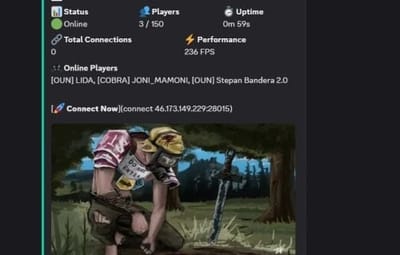
Discord Server Status 1.2.8

$3.00
   (0 reviews)

2 Screenshots

  • 1.1k
  • 33
  • 25.91 kB

This area is for discussion and questions. Please use the support area for reporting issues or getting help.

Recommended Comments

moulinch

Posted

Hi,
I have a quick question regarding the Discord Server Status plugin.
Does this plugin require a Discord bot (with a token), or does it work only with a Discord webhook?

Thanks in advance for your clarification.

YAR

Posted

hi.    it work with a Discord webhook

  • Like 1
moulinch

Posted

ok thanks you 🙂

moulinch

Posted

is it possible to change the interface language?

YAR

Posted

Yes, In config & plugin file .If you have any difficulties, I will translate it for you into any language.

moulinch

Posted

Thank you, I appreciate it. I’ve already done it, but what bothers me is that I’ll have to redo everything again after each update.

moulinch

Posted

When the server goes fully offline, the status doesn’t switch to offline.
I wanted to check with you if there’s something specific I should configure, or if this is a known limitation of the plugin.

Let me know if there’s anything I can test or provide on my side.

Thanks again for your help 👍

YAR

Posted

in config  "Update settings": {

    "Enable offline message on shutdown": true

try the updated version should work

moulinch

Posted

Thanks for the update 👍
I’ve enabled that option and I’m testing the updated version right now.

I’ll let you know how it goes.

moulinch

Posted

I’ve tried with Enable offline message on shutdown set to true and tested the updated version, but unfortunately the behavior is still the same.

The status doesn’t switch to offline when the server goes down.

Let me know if you’d like me to test something else or provide logs.

YAR

Posted

Discord sometimes won't let you edit old messages. try in mode always new messages launch new message  

  "Discord message ID to edit (0 = ignore)": 0,

or with such a configuration

    "Always create new messages": true,
    "Discord message ID to edit (0 = ignore)": 0,
    "Auto-update message ID": true,
    "Delete old message when creating new": true


, then the message will be replaced by a new one

Create an account or sign in to comment

You need to be a member in order to leave a comment

Create an account

Sign up for a new account in our community. It's easy!

Register a new account

Sign in

Already have an account? Sign in here.

Sign In Now

User Feedback

2.2m

Downloads

Total number of downloads.

10.1k

Customers

Total customers served.

146.1k

Files Sold

Total number of files sold.

3.1m

Payments Processed

Total payments processed.

×
×
  • Create New...

Important Information

We have placed cookies on your device to help make this website better. You can adjust your cookie settings, otherwise we'll assume you're okay to continue.