.thumb.png.1e9569837c8b99d3b9e52eabb8f12977.png)
.thumb.png.8422c4f75c519ff1e65a1293134c5db4.png)
.thumb.png.a2effe26e588b5f8842f653bb15a3935.png)
.thumb.png.6c419b5e3dda12e65608c0f7ee7fd36d.png)
.thumb.png.dbe29f43bac5ad4afae5c1fb1ca8475a.png)
.thumb.png.318d146377eb2a1aecb303c7b808a96c.png)
.thumb.png.88c2e8754654426c34bfb143d2895ecf.png)
.thumb.png.8a2eca06a7dadd14096db8178fcc9af6.png)

About ServerPanel — Five Theme Collection
 ServerPanel V4 — Five Custom Themes
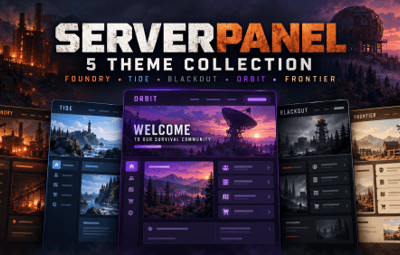
Give your Rust server a fresh look with five distinct ServerPanel V4 themes, each featuring its own background artwork, matching colours, organised information pages and coordinated popup windows.
From industrial survival to coastal scenery and sci-fi landscapes, choose the style that suits your community.
 Pick Your Theme
 Foundry — Industrial scenery with warm amber accents.
 Tide — Coastal scenery with fresh teal colours.
 Blackout — Military survival styling with bold red accents.
 Orbit — Sci-fi scenery with violet highlights.
 Frontier — Wilderness scenery with warm gold and olive tones.
 Features
 Five custom backgrounds — included and loaded locally, with no external hosting needed for the supplied artwork.
 Organised information pages — Home, Rules, Commands, Field Guide and Community.
 Matching popups for every theme — quick rules, commands and keybind help, getting started, and community help.
 Quick access — open popups from menu buttons or use the full pages through the navigation tabs.
 Live information — server name, player name and online player count.
 Button hover feedback — responsive highlights on custom menu shortcuts.
 Contextual tooltips — helpful hints on menu shortcut buttons.
 Smooth menu fade — a subtle opening and closing effect.
Editable settings — personalise text, colours, rules and server information.
 Carbon and Oxide support — separate installation folders for each framework.
Matching Popup Windows
Each theme includes four coordinated popups, giving players quick access to useful information:
Quick Rules — a handy summary of your server guidelines.
Commands & Keybinds — menu shortcuts, popup commands and guidance on finding personal keybind settings.
Getting Started — practical guidance for new arrivals.
Community Help — information about support, reports and staying connected.
The popups use their theme’s colours and supplied artwork. Players open them when needed and close them with the CLOSE button or by clicking outside the window.
They can also be opened directly through chat:
/spc.rules
/spc.commands
/spc.guide
/spc.community
The full information pages remain available through the main menu.
 Make It Your Own
Use the ServerPanel and ServerPanelPopUps editors to add your own rules, community details and supported commands.
Extra command spaces on the full Commands page are left blank so you can add features your server actually uses. Review the supplied guidance and customise it for your community. When changing information shared by a page and its popup, update both.
The pack uses the plugin author’s existing configuration system. No plugin edits are required.
 What’s Included?
 Five V4 theme configurations.
Matching background artwork for every theme.
Player information pages and navigation shortcuts.
Four matching popups per theme — 20 popup designs in total.
Connected popup buttons and direct chat commands.
Menu shortcut hover effects, tooltips and fade settings.
Separate Carbon and Oxide installation files.
One straightforward installation guide with backup and customisation instructions.
 Requirements
ServerPanel 2.0.42 and ServerPanelPopUps 2.0.42 must be installed separately. Use ServerPanel.cs and ServerPanelPopUps.cs from the author’s ServerPanel download.
V4 refers to the t4 template style, not the plugin version.
This is a configuration and artwork pack. Plugin files and additional gameplay plugins are not included.
 Installation
Choose one theme.
Select the Carbon or Oxide folder for your server.
Stop your server and back up your existing ServerPanel and ServerPanelPopUps files.
Upload the selected theme’s files, including both plugin configs, the panel data and the artwork folder.
Start the server and type /menu or /info in chat.
Try the quick-view buttons and personalise the pages and popups.
Installing the collection replaces matching configuration files, so keep a backup of any existing custom rules, links, commands and popups.
 Install one theme at a time. Full instructions are included.
Custom backgrounds are supplied with this collection. If you use ServerPanel’s offline-image mode for its default or editor images, obtain those separately using the plugin author’s instructions.