
BetterDeadThanZed's Wishlist
-
.thumb.gif.ce3e655eacd87cd0f0b325ee7750b24d.gif)
$39.90
Frostland
Global warming has reached another eternally frozen island in the depths of the Arctic, glaciers began to melt and once forgotten monuments built by the former owners of the island appeared from under the ice. This island was recently a piece of ice, but now you can see life and a magnificent landscape on it, which has been worked out to the smallest detail. The remains of monuments from a past civilization will not let your players get bored. Cracks have formed in the ice, creating canyons in which you can find a large amount of resources and loot underwater. This map is not like all my other maps, here I decided to pay special attention to the landscapes, the erosion of the earth has created many places to build a base, rivers with fresh water and open spaces for roads and railways. Dive under the water in the icy gorges and you will find valuable loot. This island is also decorated with Christmas garlands and other Christmas paraphernalia. I wish you a Merry Christmas and a Happy New Year, I hope this map will bring you joy, good luck fighters!
Attention: the plugin shown in the video is a paid Armored Train plugin from the creator Adem and is not provided with the map.
A new update for the Armored Train:
https://codefling.com/plugins/armored-train
Features:
Prefab Count: ~67к prefabs Size: 4000 With the release of the map, the Christmas update of the Armored Train plugin will also be released A lot of interesting locations to explore A huge number of unique places to build bases (Land, underwater, rocky,) Magnificent landscape Railway Great Christmas party atmosphere Custom plugin for NPC control on the server, as well as random clothing for scientists (by Adem) This map is constantly supported and updated for the current version of the game with all updates! How can I view the map?
You can do this in our Discord server by submitting a request for an invitation to our servers. There you will be given the rights of an "administrator” and without any difficulties you will be able to fly around the map and fully familiarize yourself with it.
Custom Monuments:
Lapland Village Frozen Castle Christmas Village Wild City Recreation Camp Cobalt Industry Frozen Gas Station Frozen Supermarket Frozen Warehouse Round City (By LevexKroyt) Ice Gorge Village of Peaceful Neighbors interesting places to build a base marked X Monument Facepunch:
Launch Site Radtown Missile Silo Junkyard Harbor 1 and 2 Arctic Research Base Satellite Dish Airfield Bandit Camp Outpost (Christmas Version) Giant Excavator Pit (Ice Version) Military Tunnel The Dome (Glass Version) Ranch Fishing Village 1,2,3 (Christmas Version) Lighthouse Underwater Lab Railway HQM, Sulfur, Stone Quarry Roadside Monument -
$39.90
Destroyed World
A global catastrophe has broken out on a remote island located in the open ocean. Quite recently, life flourished here. It took quite a bit of time and people began to come to the remains of the island, but this world has become too cruel. Be careful exploring the island. Incredibly huge multi-level locations are waiting for you. For a complete atmosphere, I suggest profiles for the BetterNPC plugin, you will find them in the archive with the map. I also want to express my gratitude for the help in creating some locations of a good Shemov mapper.
Features:
Prefab Count: ~74к prefabs Size: 4000к A lot of interesting locations to explore (Ground, underground, underwater) Several places to build bases Extensive network of railways connected to underground tunnels Configuration for custom monuments for the Better NPC plugin You can take the subway to the underwater laboratory How can I view the map?
You can do this in our Discord server by submitting a request for an invitation to our servers. There you will be given the rights of an "administrator” and without any difficulties you will be able to fly around the map and fully familiarize yourself with it.
Discord Server: https://discord.gg/UpUXuxs4Vx
For which plugins do I provide configuration files?
Defendable Bases BetterNpc Custom monuments:
Huge Radioactive Settlement (A huge monument with radiation, lots of puzzles and an unusual landscape) Brooklyn (Dilapidated part of the famous city) Abandoned Complex (An underground monument with many levels and atmosphere) Village by the Lake (A post-Soviet village with beautiful nature and lots of details) Destroyed Church (A large monument in a scary style) Military Bunker (Mysterious intelligence and research station) Ancient City (The flooded ancient city) Rozovo Station Landfish Station Lanova Station Station Supermarket Diner The ground railway is connected to underground tunnels (please enter the tunnel only with the workcart in front) Place to Build Monuments from Facepunch:
Launch Site Radtown Nuclear Missile Silo Ferry Terminal Outpost Junkyard Water Treatment Plant Train Yard Airfield Military Tunnel Power Plant OilRig (2) Harbor Bandit Camp Sewer Branch Lighthouse Fishing Village Ranch The Dome Satellite Dish Roadsite Monument Underground Tunnels Arctic Research Base Underwater Lab Ziggurat -
$15.00
BoatControl
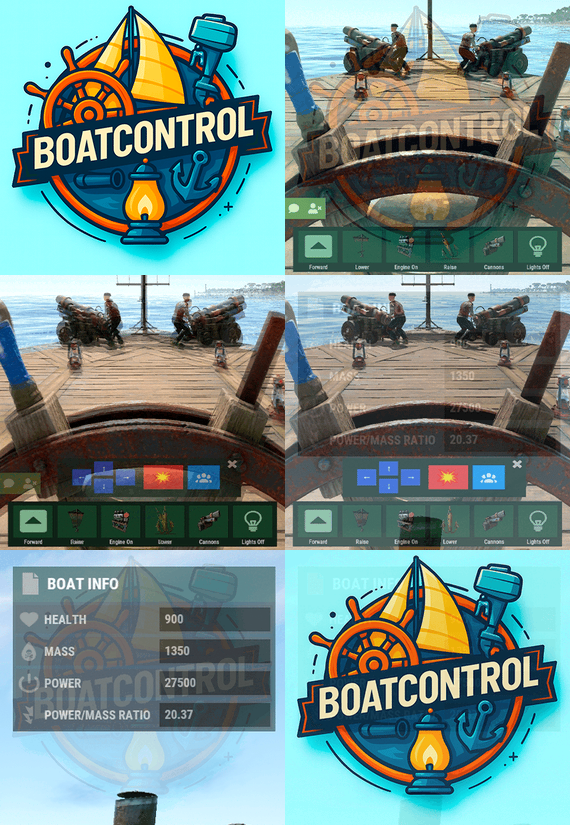
BoatControl is a Rust server plugin that completely enhances boat handling. When taking the helm, a user-friendly CUI interface appears, allowing players to raise/lower sails and anchors, start/stop engines, and switch navigation direction forward or backward.
The plugin also supports automatic reloading when the player has ammunition, cannon firing with configurable cooldown (or bypass via permission), and toggling all torches and lanterns without fuel consumption. Additionally, players can control navigation using W/S and fire cannons with the left mouse click.
Want to try it before you buy it?
You can try it by accessing the Staging server: connect staging.rustspain.com (provided the server is online, as it's my test server).
Video Update 1.0.0
Features
Displays a CUI interface when taking the helm that allows you to:
Raise / lower sails. Raise / lower anchors. Turn engines on / off. Change the navigation direction forward / backward (engines and sails reverse accordingly). Reload (if the player has ammunition in their inventory, with a permission to bypass this). Fire cannons with a cooldown (or without it if you have the bypass permission).
Turn all torches and lamps on/off (In the settings you can decide whether you want them to consume fuel or not).
Allows enabling boat editing anywhere.
Blocks edit mode within safe zones.
Blocks the ability to activate the anchor within safe zones.
Allows you to view the list of authorized players (similar to BetterTC).
Sail Configuration System: Displays a window similar to the config menu showing all sails placed on the boat. Each sail shows its health amount below it. Added a button that allows upgrading sails by levels (thrust power). Everything is configurable, including upgrade costs (in-game resources, RP, or Economy). This allows admins to add as many levels as they want in the config.
Engine Configuration System: Displays a window similar to the config menu showing all engines placed on the boat. Each engine shows its fuel amount and health below it. Added the ability to refuel engines using fuel from the player’s inventory. Added another button that allows upgrading engines by levels (fuel efficiency and engine power). Everything is configurable, including upgrade costs (in-game resources, RP, or Economy). This allows admins to add as many levels as they want in the config. Important: There is a maximum speed limit in the game. I have been testing ways to increase the speed, but I still need to continue researching and testing to find the best way to increase it.
Automatic repair system: If damage is received during repair, it will stop. If the player runs out of materials in their inventory, it will stop. If the player disconnects, it will also stop. Note: The boat health system is unusual and does not work like a normal building, so the system simulates repairs at different points on the boat depending on the percentage of health lost. That is why you will not hear the actual damaged entity being repaired.
BetterTC Integration: If you have BetterTC installed with version 1.6.2 or higher, the automatic Wallpaper placement system will be enabled. Facepunch will add wallpaper support for Boats starting in March; you can test it meanwhile on staging.
You can also change the navigation direction using the W and S keys, and fire the cannons with the left mouse click.
I'm open to further improving this plugin over time. If you'd like to see any features integrated, please mention them in the discussion section.
Ideas I've tried but haven't been able to implement:
Modifying the build area (net size) to make it larger. It doesn't seem possible to change this. Making the engines work without fuel consumption. I managed to do this in an initial test, but then FacePunch changed something and it's no longer possible. I'll try to see if I can adjust fuel consumption to make it more economical. The maximum number of engines and sails cannot be increased. Or at least not easily; it could be done with commands and strange contraptions, but it wouldn't be entirely convenient.
Permissions
boatcontrol.use – Enables the functionality for the player when mounting the boat’s helm. boatcontrol.bypassammo – Allows you to fire cannons without using real ammunition from your inventory. Free ammo! (not recommended to give to regular players) boatcontrol.bypasscannoncooldown – Allows you to fire cannons with no cooldown. Maximum bombardment! boatcontrol.edit allows enabling boat editing anywhere. boatcontrol.cannonuse If the player doesn’t have it enabled, the option to control cannons won’t appear in the interface. Not having this permission will not block manual/vanilla use. boatcontrol.authlist Shows the list of players authorized to the Boat, similar to BetterTC. boatcontrol.deleteauth Allows authorized players to remove player permissions individually. boatcontrol.sailconfig Allows players to open and manage the Sail Configuration menu for boats. boatcontrol.sailupgrade Allows players to upgrade sails (thrust power) according to the configured upgrade levels. boatcontrol.engineconfig Allows players to open and manage the Engine Configuration menu for boats. boatcontrol.engineupgrade Allows players to upgrade engines (fuel efficiency and engine power) according to the configured upgrade levels. boatcontrol.wallpaper Allows players to use the wallpaper placement system on boats. (Requires BetterTC version 1.6.2 or higher.) boatcontrol.repair Allows players to use the automatic boat repair system. boatcontrol.repair.nocost Allows players to repair boats without consuming materials Dynamic repair permissions (speed adjustment) Allows admins to grant specific permissions defined in the config to adjust boat speed limits.
Commands
It currently has no chat or console commands.
Configuration
DEFAULT CONFIGURATION
{ "Enable WASD Direction": true, "Enable Cannon Fire Key (Left Mouse Button)": true, "Cannon Aim Step (degrees per click)": 5.0, "Cannon Fire Cooldown": 5.0, "Cannon Crew": { "Enable": true, "Names": [ "Seaman", "Deckhand", "Bosun", "Gunner", "Quartermaster", "Navigator", "Sailor", "Crewman", "Mate", "Boatswain", "Cannoneer", "Buccaneer", "Mariner", "Sea Dog", "Old Salt" ], "Health": 100.0, "MaxCannons": 0, "Wear": { "burlap.shirt": 1380044819, "burlap.trousers": 1380047706, "burlap.shoes": 2215057317, "hat.boonie": 965553937 }, "RequireOperate": true, "ToggleCrewCooldown": 30.0, "NoCorpse": true }, "Lights": { "Enable Light Toggle Key (R)": true, "Light Toggle Cooldown": 1.0, "Require Fuel For Lights": false, "Light Items (shortnames)": [ "tunalight", "lantern", "torchholder", "largecandles", "smallcandles", "jackolantern.angry", "jackolantern.happy", "chineselantern", "chineselanternwhite" ] }, "Impact Force Physics": { "Enable Impact Physics": true, "Impact Force (default: 100, range: 50-500)": 100.0, "Enable Debug Logging": false }, "Alert Chat": true, "Alert Notify Plugin": false, "Notify: select what notification type to be used": { "error": 0, "info": 0 }, "Color Prefix Chat": "#f74d31", "GUI": { "GUI Windows Belt": { "BG Color Primary": "0.10 0.15 0.10 1", "BG Color Secundary": "0.2 0.30 0.2 0.80", "Button Active Color": "0.2 0.6 0.2 0.80", "Button Inactive Color": "0.2 0.30 0.2 0.80", "OffsetMin": "-200 15", "OffsetMax": "181 79", "AnchorMin": "0.5 0", "AnchorMax": "0.5 0" }, "GUI Windows Info": { "BG Color Primary": "0.10 0.10 0.10 0.8", "BG Color Secundary": "0.2 0.30 0.2 0.80", "Button Active Color": "0.2 0.6 0.2 0.80", "Button Inactive Color": "0.2 0.30 0.2 0.80", "OffsetMin": "-115 -100", "OffsetMax": "115 100", "AnchorMin": "0.902 0.8104", "AnchorMax": "0.902 0.8104" }, "GUI Windows Cannons Menu": { "BG Color Primary": "0.10 0.15 0.10 1", "BG Color Secundary": "0.2 0.30 0.2 0.80", "Button Active Color": "0.2 0.6 0.2 0.80", "Button Inactive Color": "0.2 0.30 0.2 0.80", "OffsetMin": "-140 85", "OffsetMax": "140 185", "AnchorMin": "0.5 0", "AnchorMax": "0.5 0" } }, "Show Info Window": true, "Boat Edit Damage Cooldown (seconds)": 30.0, "Block Anchor in Safe Zone": true, "Block Boat Edit in Safe Zone": true, "Config Version": "1.2.0", "Repair Cooldown After Recent Damage (seconds)": 30.0, "Cooldown Frequency Repair (larger number is slower)": { "boatcontrol.use": 2.0, "boatcontrol.vip": 1.0 }, "Repair Costs (ItemShortName: Amount per block/component)": { "lowgradefuel": 4, "wood": 75 }, "Engine Upgrades": { "Enable Engine Upgrades": true, "Upgrade Levels": [ { "Level": 1, "Display Name": "Tier 1", "Fuel Efficiency Multiplier (1.0 = normal, 0.5 = half fuel consumption)": 0.9, "Power Multiplier (1.0 = normal, 2.0 = double power)": 2.0, "Upgrade Cost": { "Resource Costs (ItemShortName: Amount)": { "scrap": 100, "lowgradefuel": 50 }, "ServerRewards Points": 0, "Economics Money": 0.0 } }, { "Level": 2, "Display Name": "Tier 2", "Fuel Efficiency Multiplier (1.0 = normal, 0.5 = half fuel consumption)": 0.8, "Power Multiplier (1.0 = normal, 2.0 = double power)": 4.0, "Upgrade Cost": { "Resource Costs (ItemShortName: Amount)": { "scrap": 250, "lowgradefuel": 100, "metal.fragments": 300 }, "ServerRewards Points": 0, "Economics Money": 0.0 } }, { "Level": 3, "Display Name": "Tier 3", "Fuel Efficiency Multiplier (1.0 = normal, 0.5 = half fuel consumption)": 0.65, "Power Multiplier (1.0 = normal, 2.0 = double power)": 8.0, "Upgrade Cost": { "Resource Costs (ItemShortName: Amount)": { "scrap": 500, "lowgradefuel": 200, "metal.fragments": 500, "metal.refined": 25 }, "ServerRewards Points": 0, "Economics Money": 0.0 } }, { "Level": 4, "Display Name": "Tier 4", "Fuel Efficiency Multiplier (1.0 = normal, 0.5 = half fuel consumption)": 0.65, "Power Multiplier (1.0 = normal, 2.0 = double power)": 16.0, "Upgrade Cost": { "Resource Costs (ItemShortName: Amount)": { "scrap": 1000, "lowgradefuel": 300, "metal.fragments": 1500, "metal.refined": 100 }, "ServerRewards Points": 0, "Economics Money": 0.0 } } ], "Currency Type (Resources, ServerRewards, Economics)": "Resources" }, "Sail Upgrades": { "Enable Sail Upgrades": true, "Upgrade Levels": [ { "Level": 1, "Display Name": "Tier 1", "Thrust Multiplier (1.0 = normal, 2.0 = double thrust)": 1.5, "Upgrade Cost": { "Resource Costs (ItemShortName: Amount)": { "scrap": 75, "cloth": 100 }, "ServerRewards Points": 10, "Economics Money": 0.0 } }, { "Level": 2, "Display Name": "Tier 2", "Thrust Multiplier (1.0 = normal, 2.0 = double thrust)": 2.0, "Upgrade Cost": { "Resource Costs (ItemShortName: Amount)": { "scrap": 150, "cloth": 200, "leather": 50 }, "ServerRewards Points": 15, "Economics Money": 0.0 } }, { "Level": 3, "Display Name": "Tier 3", "Thrust Multiplier (1.0 = normal, 2.0 = double thrust)": 2.5, "Upgrade Cost": { "Resource Costs (ItemShortName: Amount)": { "scrap": 300, "cloth": 300, "leather": 100, "metal.fragments": 200 }, "ServerRewards Points": 20, "Economics Money": 0.0 } }, { "Level": 4, "Display Name": "Tier 4", "Thrust Multiplier (1.0 = normal, 2.0 = double thrust)": 3.0, "Upgrade Cost": { "Resource Costs (ItemShortName: Amount)": { "scrap": 600, "cloth": 500, "leather": 200, "metal.fragments": 500 }, "ServerRewards Points": 30, "Economics Money": 0.0 } } ], "Currency Type (Resources, ServerRewards, Economics)": "ServerRewards" } } For any problem, doubt, suggestion or assistance do not hesitate to contact me by Discord ninco90
- #boat
- #controller
- (and 8 more)
-
$9.90
Lighthouse Party Event
This plugin creates a party in the lighthouse where one of the dancers has had too much to drink and feels sick.If you help him and find him a bottle of mineral water in a foodbox in the lighthouse area, he will give you the key to the door.
Chat and Consolecommand available to admins only.:
lpstart lpstop givekey givewater Contact:
Additional free plugins created by me are available on Discord: https://discord.gg/C5CehdJMdK
If you want to try out this plugin, you can do so on the test server. IP: 212.73.137.3:27195
My public Rust server IP: 136.243.135.46:28050
Video:
FoodBox position:
Config:
{ "Version": { "Major": 1, "Minor": 0, "Patch": 2 }, "Automatic event start": false, "Minimum time for event start": 3600.0, "Maximum time for event start": 7200.0, "Duration of the event": 2800.0, "Warning messages before event start": 120.0, "Warning messages before event end": 120.0, "The event starts at night only?": true, "Use mapmarker?": true, "Chat icon": 0, "RadioLink": "https://stream.techno.fm/radio1-192k.mp3", "List of lootable crates": [ { "Prefab": "assets/bundled/prefabs/radtown/crate_normal.prefab", "Position": "(1.572, 27.500, -1.136)", "Rotation": "(0, 54.606, 0)", "Use custom loot?": false, "CustomLoot": { "Minimum items": 1, "Maximum items": 1, "Use minimum - maxium?": false, "List of items": [ { "ShortName": "xmas.present.small", "Minimum": 3, "Maximum": 6, "Chance": 100.0, "Give blueprint?": false, "SkinID": 0, "Displayname": "" } ] } }, { "Prefab": "assets/bundled/prefabs/radtown/crate_normal.prefab", "Position": "(0.282, 29.517, -2.851)", "Rotation": "(0, 90, 0)", "Use custom loot?": false, "CustomLoot": { "Minimum items": 1, "Maximum items": 1, "Use minimum - maxium?": false, "List of items": [ { "ShortName": "xmas.present.small", "Minimum": 3, "Maximum": 6, "Chance": 100.0, "Give blueprint?": false, "SkinID": 0, "Displayname": "" } ] } }, { "Prefab": "assets/bundled/prefabs/radtown/crate_elite.prefab", "Position": "(1.783, 27.500, -2.563)", "Rotation": "(0, 327.260, 0)", "Use custom loot?": false, "CustomLoot": { "Minimum items": 1, "Maximum items": 1, "Use minimum - maxium?": false, "List of items": [ { "ShortName": "xmas.present.small", "Minimum": 3, "Maximum": 6, "Chance": 100.0, "Give blueprint?": false, "SkinID": 0, "Displayname": "" } ] } }, { "Prefab": "assets/bundled/prefabs/radtown/underwater_labs/crate_food_2.prefab", "Position": "(0.428, 28.211, -1.426)", "Rotation": "(0, 327.621, 0)", "Use custom loot?": false, "CustomLoot": { "Minimum items": 1, "Maximum items": 1, "Use minimum - maxium?": false, "List of items": [ { "ShortName": "xmas.present.small", "Minimum": 3, "Maximum": 6, "Chance": 100.0, "Give blueprint?": false, "SkinID": 0, "Displayname": "" } ] } } ], "Key item setting": { "Key item shortname": "door.key", "Key skinID (0 - default)": 3370208540, "Key item displayname": "LIGHTHOUSE PARTY KEY" }, "Mineral water item setting": { "Mineral water item shortname": "smallwaterbottle", "Mineral water skinID (0 - default)": 3371773425, "Mineral water item displayname": "MINERAL WATER" }, "Dancing Npcs name and outfit": { "Name": "Party Face", "Wear items": [ { "ShortName": "shirt.collared", "SkinID (0 - default)": 3035466202 }, { "ShortName": "pants", "SkinID (0 - default)": 2357992772 }, { "ShortName": "shoes.boots", "SkinID (0 - default)": 2673890130 }, { "ShortName": "partyhat", "SkinID (0 - default)": 0 } ] } }
- #lighthouse
- #event
- (and 1 more)
-
$22.00
The Dome Event
The Dome Event plugin, the idea is to get on top of the Dome. In the meantime, defeat a tank and turrets. Inside the dome you will find a Locked Crate. When you click on it, a patrol helicopter spawns and a blue card reader appears on top of the Dome. If you kill the helicopter and the Npc's on top of the Dome and use the card reader then the finale is coming.
Support PveMode plugin.
Support BotReSpawn plugin.
Chat and Consolecommand available to admins only.:
destart destop Hooks:
void OnDomeEventStart();
void OnDomeEventStop();
Contact:
Additional free plugins created by me are available on Discord: https://discord.gg/C5CehdJMdK
If you want to try out this plugin, you can do so on the test server. IP: 212.73.137.3:27195
My public Rust server IP: 136.243.135.46:28050
Video:
Config:
{ "Version": { "Major": 1, "Minor": 0, "Patch": 4 }, "Automatic event start": true, "Minimum time for event start": 3600.0, "Maximum time for event start": 7200.0, "Duration of the event": 2800.0, "Warning messages before event start": 300.0, "Warning messages before event end": 300.0, "Chat icon": 0, "Locked crate hack time": 900.0, "Disable BetterNpc plugin npc's for the duration of the event?": false, "Spawn NpcSpawn Scientist?(Required: NpcSpawn plugin!)": true, "Spawn BotReSpawn Scientist?(Required: BotReSpawn plugin!)": false, "BotReSpawn profil name:": "", "BotReSpawn Npc's number": 10, "Messages setting": { "Message before the event starts.": "Everyone be careful, the <color=#ff0000>Dome Event</color> is about to start.", "Warning message before the event stop.": "The Dome event will end soon!!", "Message when someone event owner": "Someone has become the owner of Dome Event.", "Start message": "<color=#ff0000>Dome Event</color> has started!!", "Stop message": "<color=#ff0000>Dome Event</color> end!", "Map marker name": "Dome Event", "Map marker radius": 0.6, "Color": { "r": 1.0, "g": 0.0, "b": 0.0 } }, "Bradley setting": { "Bradley health": 1000.0, "Number of crate to spawn when the bradley dies": 3, "Number of Npc spawning from Bradely": 3 }, "Patrolhelicopter setting": { "Patrolhelicopter health": 10000.0, "Number of crate to spawn when the helicopter dies": 3 }, "AutoTurret setting": { "Health": 300.0, "Weapon ShortName": "rifle.ak", "Ammo ShortName": "ammo.rifle", "Number of ammo": 5000 }, "List of lootable crates": [ { "Prefab": "assets/bundled/prefabs/radtown/crate_elite.prefab", "Position": "(2.567, 47.640, -7.085)", "Rotation": "(0, 337.426, 0)", "Use custom loot?": false, "CustomLoot": { "Minimum items": 1, "Maximum items": 1, "Use minimum - maxium?": false, "List of items": [ { "ShortName": "xmas.present.small", "Minimum": 3, "Maximum": 6, "Chance": 100.0, "Give blueprint?": false, "SkinID": 0, "Displayname": "" } ] } }, { "Prefab": "assets/prefabs/npc/patrol helicopter/heli_crate.prefab", "Position": "(-6.099, 47.640, 4.679)", "Rotation": "(0, 303.510, 0)", "Use custom loot?": false, "CustomLoot": { "Minimum items": 1, "Maximum items": 1, "Use minimum - maxium?": false, "List of items": [ { "ShortName": "xmas.present.small", "Minimum": 3, "Maximum": 6, "Chance": 100.0, "Give blueprint?": false, "SkinID": 0, "Displayname": "" } ] } }, { "Prefab": "assets/prefabs/npc/m2bradley/bradley_crate.prefab", "Position": "(19.550, 65.059, -9.339)", "Rotation": "(0, 289.162, 0)", "Use custom loot?": false, "CustomLoot": { "Minimum items": 1, "Maximum items": 1, "Use minimum - maxium?": false, "List of items": [ { "ShortName": "xmas.present.small", "Minimum": 3, "Maximum": 6, "Chance": 100.0, "Give blueprint?": false, "SkinID": 0, "Displayname": "" } ] } }, { "Prefab": "assets/bundled/prefabs/radtown/crate_elite.prefab", "Position": "(-25.683, 65.179, -6.666)", "Rotation": "(0, 79.714, 0)", "Use custom loot?": false, "CustomLoot": { "Minimum items": 1, "Maximum items": 1, "Use minimum - maxium?": false, "List of items": [ { "ShortName": "xmas.present.small", "Minimum": 3, "Maximum": 6, "Chance": 100.0, "Give blueprint?": false, "SkinID": 0, "Displayname": "" } ] } }, { "Prefab": "assets/bundled/prefabs/radtown/crate_elite.prefab", "Position": "(-3.239, 71.638, 6.203)", "Rotation": "(0, 331.058, 0)", "Use custom loot?": false, "CustomLoot": { "Minimum items": 1, "Maximum items": 1, "Use minimum - maxium?": false, "List of items": [ { "ShortName": "xmas.present.small", "Minimum": 3, "Maximum": 6, "Chance": 100.0, "Give blueprint?": false, "SkinID": 0, "Displayname": "" } ] } }, { "Prefab": "assets/bundled/prefabs/radtown/crate_elite.prefab", "Position": "(-2.268, 71.638, -6.717)", "Rotation": "(0, 17.623, 0)", "Use custom loot?": false, "CustomLoot": { "Minimum items": 1, "Maximum items": 1, "Use minimum - maxium?": false, "List of items": [ { "ShortName": "xmas.present.small", "Minimum": 3, "Maximum": 6, "Chance": 100.0, "Give blueprint?": false, "SkinID": 0, "Displayname": "" } ] } } ], "Floor Npcs settings inside": { "Minimum": 6, "Maximum": 6, "List of position": [ "(1.654, 71.638, -6.538)", "(-6.142, 71.638, -3.089)", "(-0.235, 71.638, 7.514)", "(6.279, 71.638, 3.544)", "(-22.664, 65.172, -2.128)" ], "NPCs setting": { "Name": "Dome Guard", "Health": 200.0, "Roam Range": 10.0, "Chase Range": 30.0, "Attack Range Multiplier": 3.0, "Sense Range": 30.0, "Target Memory Duration [sec.]": 60.0, "Scale damage": 1.0, "Aim Cone Scale": 0.6, "Detect the target only in the NPC's viewing vision cone? [true/false]": false, "Vision Cone": 135.0, "Speed": 7.5, "Disable radio effects? [true/false]": false, "Is this a stationary NPC? [true/false]": false, "Use custom loot?": false, "CustomLoot": { "Minimum items": 1, "Maximum items": 1, "Use minimum - maxium?": false, "List of items": [ { "ShortName": "xmas.present.small", "Minimum": 3, "Maximum": 6, "Chance": 100.0, "Give blueprint?": false, "SkinID": 0, "Displayname": "" } ] }, "Wear items": [ { "ShortName": "riot.helmet", "SkinID (0 - default)": 1136847802 }, { "ShortName": "pants", "SkinID (0 - default)": 2469702450 }, { "ShortName": "hoodie", "SkinID (0 - default)": 2472131751 }, { "ShortName": "metal.plate.torso", "SkinID (0 - default)": 2462023997 }, { "ShortName": "shoes.boots", "SkinID (0 - default)": 1192621630 } ], "Belt items": [ { "ShortName": "smg.mp5", "Amount": 1, "SkinID (0 - default)": 0, "Mods": [], "Ammo": "" }, { "ShortName": "syringe.medical", "Amount": 2, "SkinID (0 - default)": 0, "Mods": [], "Ammo": "" } ] } }, "Ground Npcs settings outside": { "Minimum": 8, "Maximum": 8, "List of position": [ "(8.450, 5.677, -39.192)", "(42.784, 5.677, 5.506)", "(-31.383, 5.808, 33.135)", "(-43.109, 5.677, -23.131)" ], "NPCs setting": { "Name": "Dome Guard", "Health": 150.0, "Roam Range": 30.0, "Chase Range": 30.0, "Attack Range Multiplier": 2.0, "Sense Range": 40.0, "Target Memory Duration [sec.]": 60.0, "Scale damage": 0.6, "Aim Cone Scale": 1.5, "Detect the target only in the NPC's viewing vision cone? [true/false]": false, "Vision Cone": 135.0, "Speed": 7.5, "Disable radio effects? [true/false]": false, "Is this a stationary NPC? [true/false]": false, "Use custom loot?": false, "CustomLoot": { "Minimum items": 1, "Maximum items": 1, "Use minimum - maxium?": false, "List of items": [ { "ShortName": "xmas.present.small", "Minimum": 3, "Maximum": 6, "Chance": 100.0, "Give blueprint?": false, "SkinID": 0, "Displayname": "" } ] }, "Wear items": [ { "ShortName": "coffeecan.helmet", "SkinID (0 - default)": 1164355094 }, { "ShortName": "pants", "SkinID (0 - default)": 2115326845 }, { "ShortName": "hoodie", "SkinID (0 - default)": 1133942186 }, { "ShortName": "sunglasses", "SkinID (0 - default)": 0 }, { "ShortName": "roadsign.jacket", "SkinID (0 - default)": 1164353601 }, { "ShortName": "roadsign.kilt", "SkinID (0 - default)": 1164357032 }, { "ShortName": "shoes.boots", "SkinID (0 - default)": 916448999 } ], "Belt items": [ { "ShortName": "smg.2", "Amount": 1, "SkinID (0 - default)": 0, "Mods": [], "Ammo": "" }, { "ShortName": "syringe.medical", "Amount": 2, "SkinID (0 - default)": 0, "Mods": [], "Ammo": "" } ] } }, "PVE Mode Setting (only for users PveMode plugin)": { "Use PveMode plugin?": false, "Required damage to the event owner": 500.0, "The event is a right of ownership, to obtain it you need damage multiplier.": { "Npc": 1.0, "Bradley": 1.0 }, "Non owner can loot the crates?": false, "Non owner can loot the Npc's?": false, "Non owner can damage Npc's?": false, "Non owner can be attacked by Npc's?": false, "Non owner, can you enter the event zone?": false, "Allow a player who has an active cooldown of the Event Owner to enter the event zone?": true, "The time that the Event Owner may not be inside the event zone.": 300, "The time until the event owner can return to the event zone.": 60, "Block the RestoreUponDeath plugin in the event zone.": true, "After all this time, an event owner can be an event owner again.": 86400.0, "Darkening the sphere.": 15 } }