

-
Posts
132 -
Joined
-
Last visited
Content Type
Profiles
Warranty Claims
Downloads
Forums
Store
Services
Downloads Plus Support
DOWNLOADS EXTRA
Reels
Support Center
Everything posted by SpookyBoo12
-

Possible Issue with Oil Rig 3 Turrets
SpookyBoo12 replied to SpookyBoo12's Support Report in Support
I forgot to mention that I don't have any other PvE plugins installed that could be affecting the turrets behavior. -
Hi, I believe Oil Rig 3 might need an update. The turrets are no longer working as expected — they track targets but do not shoot. This issue may have started after the latest Facepunch update. Could you please take a look? Thank you.
-
Turret Placement Restriction Ignoring VIP Group Permissions
SpookyBoo12 replied to SpookyBoo12's Support Report in Support
Hello, Everything seems to be working fine now — both the aiming and, from what I can see, the VIP rank. Thank you for your effort and the work you’ve put in! -
Turret Placement Restriction Ignoring VIP Group Permissions
SpookyBoo12 replied to SpookyBoo12's Support Report in Support
Hello, I have configured the permission so that only VIP and VIP+ ranks can use the roofturrets feature. I only have the default rank on my account, and in the default rank permissions I did not set roofturrets to be accessible. However, I can still access and use roofturrets even with the default rank. I’m wondering if I am doing something wrong or if there is an issue. On other plugins that use a similar rank/permission system, this works fine — the feature is not accessible for default rank unless permission is explicitly given. Thank you. Here is a video showing the issue (the file was too large to upload directly): [ https://imgur.com/a/1QAQ6t1 ] -
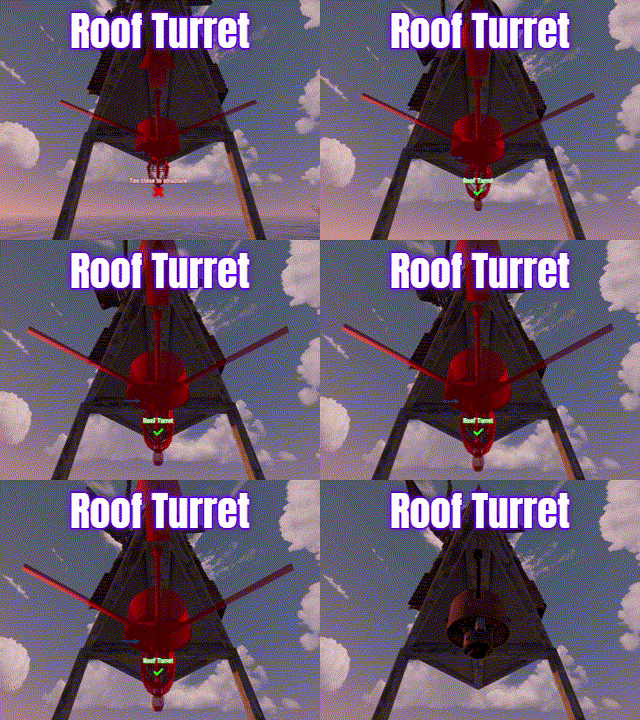 The developer is actively involved in keeping the plugin up to date, which is always great to see. The concept behind this plugin is excellent, and it adds a fresh and unique twist to the game. It’s well worth trying if you want something that enhances gameplay in a creative way.
 -
Turret Placement Restriction Ignoring VIP Group Permissions
SpookyBoo12 replied to SpookyBoo12's Support Report in Support
There is no problem -
I just noticed it now — the weird thing is that on the other one it’s like this :))
-
The train gets stuck in the mountain, same when going in reverse. https://imgur.com/a/43tYYC9 I fixed the issue, but I reported it just so you're aware.
-
https://imgur.com/a/ZO5RZjR https://imgur.com/a/zzTOgQK https://imgur.com/a/OLiDmvl https://imgur.com/a/CjPVsuZ https://imgur.com/a/05ROtew https://imgur.com/a/PIjGchV There are no chairs on the map. You get stuck in place — you can't see anything, but you're stuck. You can sit down and it looks like you're levitating. Some floating objects are also affected, like that sign or the support pole under the railroad bridge and those floating fragments.
-
The issue is located in the bottom corner at X5. I can’t attach an image as the upload limit has been reached.
-
There are missing fragments of water, and you can go under it without swimming. RUST 2025.07.24 - 12.33.48.03.mp4
-
Turret Placement Restriction Ignoring VIP Group Permissions
SpookyBoo12 posted A Support Report in Support
Hello, I am experiencing an issue with your plugin regarding turret placement restrictions. I have configured the plugin to restrict turret placement only to the VIP group (set “Disable roof auto turret for non-VIP” and “Disable roof flame turret for non-VIP” to true). However, I am not in the VIP group, and I am still able to place turrets without any restriction. I have verified my permissions and group memberships on the server—I am not assigned to the VIP group at all. I even recorded a short video demonstrating that I have no VIP permissions but can still place turrets. I apologize for finding issues frequently, I bought this plugin some time ago but only now had time to work on it. Could you please look into this issue? Thank you for your support! RUST 2025-VEED.mp4 -
Issues with Ceiling Turret Placement and Bullet Impact – Follow-up
SpookyBoo12 posted A Support Report in Support
Hi, I've recorded a video to better illustrate the issue I'm experiencing. There seem to be some inconsistencies or unclear limitations regarding turret placement on the ceiling. Sometimes it works, sometimes it doesn't, and I can't figure out the logic behind it. Could you please clarify whether ceiling placement is intended to be supported or not? Also, not sure if you saw my previous ticket, but the bullet impact still doesn’t behave correctly. I really hope this isn’t by design, because while the idea seemed useful at first, in practice it feels like it’s just not working out – maybe even a failed concept. Thanks in advance for your help. RUST 2025.07.23 - 12.20.54.01.mp4 -
Issue with Plugin – Turrets Have Poor Aim (Video Included)
SpookyBoo12 replied to SpookyBoo12's Support Report in Support
Hi, I just got back from work and checked the fix. I can see some improvement — it's closer to the target now, but it's sti RUST 2025.07.22 - 23.08.58.0.mp4 ll quite far off. RUST 2025.07.22 - 23.08.58.0.mp4 -
Issue with Plugin – Turrets Have Poor Aim (Video Included)
SpookyBoo12 posted A Support Report in Support
Hello, I purchased this plugin because it seemed interesting and useful. However, after testing it, I found that it’s not very effective. The main issue is with the turrets – they don’t aim correctly, and none of the bullets hit their targets. I’ve attached a video to show you exactly what I mean. Looking forward to your help or a possible fix. RUST 2025.07.22 - 13.09.10.01.mp4 -
[BUG] Custom tea and explosive icons not showing in UI – Full Drugs Configuration v1.4.5
SpookyBoo12 replied to SpookyBoo12's Support Report in Support
-
BetterNPC Configuration Request – Volcano Area
SpookyBoo12 replied to SpookyBoo12's Support Report in Support
Problema este că nu prea știu cum să configurez NPC-urile folosind BetterNPC. Când încerc să adaug NPC-uri prin RustEdit și să le fac statice, nu mi se pare corect - vreau să patruleze. Am încercat să folosesc coordonatele din RustEdit pentru a le seta locațiile de apariție, dar nu apar în joc. Simt că fac ceva greșit. Am încercat chiar să copiez o configurație NPC existentă, dar tot nu funcționează corect... -
Hello, I would like to request the configuration of a few NPCs using the BetterNPC plugin in the Vulcano area. Currently, the loot there is very valuable, but the location is completely unguarded, which feels unbalanced. The goal is to add a bit of challenge and make the area more rewarding and competitive. Also, I just wanted to say – great job on the map overall! It looks amazing and feels well thought out. The layout and attention to detail really make the experience enjoyable. Keep up the great work! Thanks in advance for your help!
-
Hi there, First of all, great work on the Barges plugin — it adds a really unique feature to the game and works very well! I have a suggestion regarding barge ownership and protection once a player spawns one using a flare: Currently, any player can steal or take control of a barge, even if it was spawned by someone else. It would be very helpful to implement an ownership system, where only the player who called the barge can: anchor or move it; interact with the engine or anchor controls. Implementation ideas: Store the ownerID of the player who threw the flare. Add permission checks for core interactions (anchoring, driving, etc.). (Optional bonus) Integration with ZoneManager to create a temporary private zone around the barge. This would prevent griefing or barge stealing and would make the plugin more secure and server-friendly, especially in PvP environments where barge loot is valuable. Thanks in advance — and keep up the awesome work!
-
[BUG] Custom tea and explosive icons not showing in UI – Full Drugs Configuration v1.4.5
SpookyBoo12 posted A Support Report in Support
Hi, After updating to Full Drugs Configuration for Custom Mixing Table v1.4.5, I noticed that the icons for all custom items (teas and explosives) no longer appear in the mixing table UI. Details: All custom teas, custom drugs, and custom explosives show up in the list but without any icon/image (just a transparent or blank square). The items still work and can be crafted correctly – it’s just the icons that are missing. -
Question about barge plugin configuration on Sunkenland_ver11
SpookyBoo12 posted A Support Report in Support
Hi! I saw in your video that you had working barges on the Sunkenland_ver11 map, and I wanted to ask how you managed to configure the barge plugin to make them appear correctly on that map. I’m also using the barge plugin, but I’m not sure how to set the spawn points or coordinates specifically for this map. If you could share an example of your configuration or explain how you set it up, it would really help me out. Thanks a lot for your time and support! All the best, SpookyBoo12 -
Question about barge plugin configuration on Sunkenland_ver11
SpookyBoo12 posted A Support Report in Support
Hi! I saw in your video that you had working barges on the Sunkenland_ver11 map, and I wanted to ask how you managed to configure the barge plugin to make them appear correctly on that map. I’m also using the barge plugin, but I’m not sure how to set the spawn points or coordinates specifically for this map. If you could share an example of your configuration or explain how you set it up, it would really help me out. Thanks a lot for your time and support! All the best, SpookyBoo12 -
Hello, I recently downloaded the map Sunkenland_ver11 because it looked really cool and well-designed. However, I noticed something unusual: the train goes through water. Is this intentional, or is it a bug? I was expecting a more realistic environment where the tracks don't get flooded. Looking forward to your reply. Thanks in advance!
-
Floating NPCs on KongSkullIslandv1.25 -Jungle Map
SpookyBoo12 replied to SpookyBoo12's Support Report in Support
I wanted to show you a detail of that floating grass. And yes, I fixed it — I also had the NPCs from the Gasoline map, I reconfigured everything and now it's all perfect. -
Floating NPCs on KongSkullIslandv1.25 -Jungle Map
SpookyBoo12 replied to SpookyBoo12's Support Report in Support
Bună, Acest lucru ar putea fi legat de obiectele plasate cu harta benzinei, dar am găsit ceva neobișnuit în timp ce observam NPC-urile. Ar fi putut fi plasat incorect sau neintenționat grupat acolo. Vă rog să-mi spuneți dacă doriți să vă ofer mai multe detalii sau coordonate. Mulţumesc!
