
RoadTech
-
Posts
156 -
Joined
-
Last visited
-
Days Won
4
Content Type
Profiles
Warranty Claims
Downloads
Forums
Store
Services
Downloads Plus Support
DOWNLOADS EXTRA
Everything posted by RoadTech
-
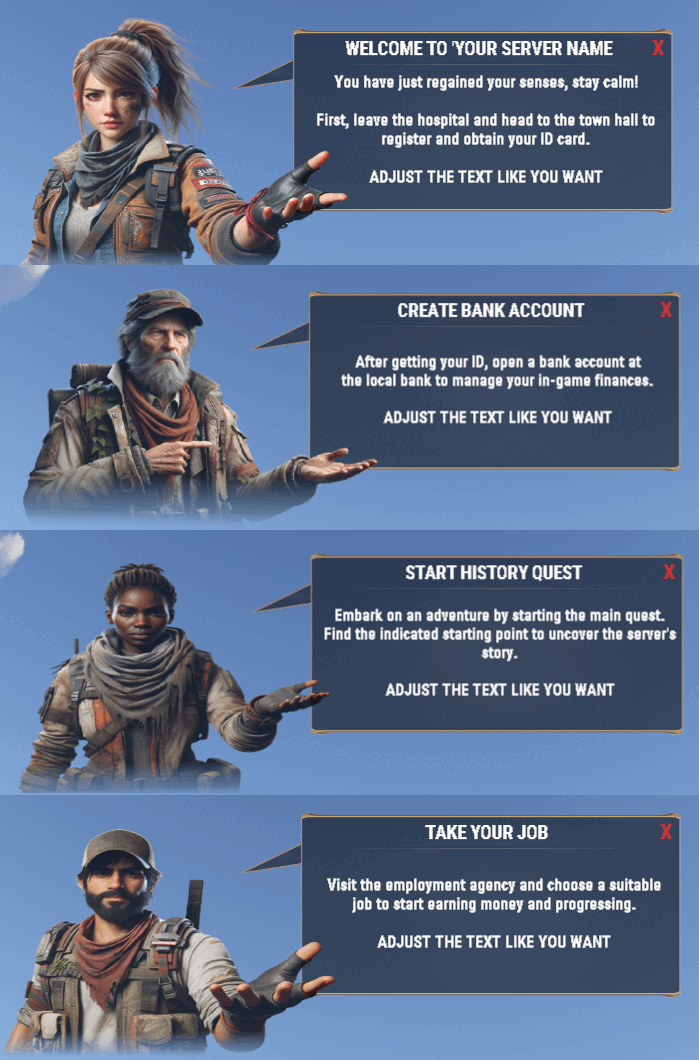 Yes but the problem is if you create zone or tutorial permission you can't replace the text for langages because all created it's on config file. I can try something but i'm not very sure
 -
 ImageLibrary it's not necessary for use skinid
 -
I'm back, sorry for my absence, you can just go in config file and put in skinID your IDSkin but you need to put im on steam
-
 the update is coming, sorry for the wait.
 -
Hi, i see all the problems with this plugin, I am working on a new update that is much more functional than this last one. The plugins are entirely created by me. AI is an interesting element today for debugging; I sometimes use it to target certain problems. Could you enlighten me on the clarity of your question? What is the connection ? I had some personal complications which postponed the update, I also have a job in parallel, a family, as well as several servers to manage, however I understand your frustration given that you paid for this plugin and it That's why now that I'm recovered I'm resuming my updates as quickly as possible but after 3 weeks of complications I won't hide from you that I'm behind on a lot of things... Please forgive me for this problem, I will get back to you in the next few days with the update.
-
Update are coming sorry for my absence
-
 Unload the plugin delete your file data and restart the server
 -
Before the next rust update
-
Yes sorry the update are coming soon, i'm just need finish tu create my FUTUR PROJET : I Think like 3-5 days MAX
-
Yes I understand the situation, it is sometimes complicated to understand this in writing and even more so in different languages ^^ No worries on my side, I'm preparing the next update this week. PS: when I talk about quest and profession it is quite simply because it is what I use for my roleplay server, but when I offer my plugins I try to ensure that you can all use it from the way you want. I'm going to finish the video to further clarify how it works by next week because I have a lot of other work going on. Thank you for the support and feedback and sorry if we misunderstood Have a nice day
-
So, cumbersome you say ? Yes for you utility i think too. On my server i use it with my job plugin and quest plugin so all permission are remove when i need. For the configuration yes is very very specific because i want propose all option for all type of usage. You can use it like you want, you idea is interesting, like a player discover a new permission for all time he have the UI but i see a problem. Actualy the tutorial can delete with the button so imagine, your player have permission light he have tutorial for 5m. if he forget that. He can't show again. I will take note of your feedback and I will add the maxdisplay by permission as well as the timer and effects. However, given the number of modifications necessary to add all the possibilities of tutorial recovery and others, you will have to wait... Thanks for your return.
-
I prepare a video for explain all ^^ But for your problem : I wanted to explain to a player with the configuration that he has been given permission for everlight.lantern. And that's how it works. Revoking the permission would mean that the player can no longer use the plugin assigned for the permission. SIMPLE SOLUTION : Use my plugin PERMADDER. 1- Type /addperm everylightlantern 2- Give the permission permadder.everylightlantern on your player when you give him the everylight.lantern (In Same Time) 3- You can use imed-permissions for give permadder.everylightlantern with timing if you don't have ation for remove the permission 4 - ENJOY Permadder Link : TimedPermission Link : https://umod.org/plugins/timed-permissions Verry verry simple TUTORIALDISPLAY have two option if you see you can use permission so the plugin check every time if you have or not the permission and he create or delete it in fonction. Or You can use zone system with time, permission, maxenter or maxleave for other information. I'm working on futur update for add the effect and for add 2 New characterIMAGE A bit like when you discover an area in wow When you say Could you explain the usage or send me an example configuration? Above you mentioned use maxamount. I don't understand this and can't find it in the configuration. The use maxamount is when you enter or leave zone : Like HERE : OnEnter = new ZoneTutorialEvent { DescriptionPages = new List<string> { "Description when entering the zone", "Another page of description", "And so on..." }, Title = "Enter Zone Title", CharacterImageLevel = 1, Permission = null, Timer = 10.0f, Effect = "assets/prefabs/misc/easter/painted eggs/effects/gold_open.prefab", MaxDisplays = null, HERE (NULL = NO LIMITE ADD UI ALL TIME WHEN PLAYER ENTER Commands = new List<string> { "say Welcome to the zone! {playername}", "othercommand" } }, OnLeave = new ZoneTutorialEvent { DescriptionPages = new List<string> { "Description when entering the zone", "Another page of description", "And so on..." }, Title = "Leave Zone Title", CharacterImageLevel = 2, Permission = "tutorialdisplay.onleave", Timer = 10.0f, Effect = "assets/prefabs/misc/easter/painted eggs/effects/gold_open.prefab", MaxDisplays = 3, HERE Commands = new List<string> { "say Goodbye from the zone!", "othercommand" } } If you have more question does not hesitate
-
This is not a problem, this is how the plugin works, you just need to remove the permission from the affected player or use use système for use maxamount. For the effects I forgot this part
-
-
Yes, i have good news for you i have finish to resolved the problem with Time its located on permission. When player enter or leave WE have checkplayerpermission and he close the UI... So i have resolved all about that and all about all discussions. I just need to finish description page for UI in zone and After that i put update whis video at 23h - 00h40 in France tonight. Its Big UPDATE all need remove your config and data files
-
i look that tonight thanks for you back
-
All is ready for update Permission type have change and log for picture added for see where is you problem. Now i'm trying to put the real timer but i dont understand why he don't work after my last update
-
I try to update the plugin tonight, sorry im late im working on Big project on quest and he take me all m'y time. So i try to fix all tonight or tomorrow
-
Ok i add that on my next update
-
Yes you can you just need to put this permission in your config file
-
Yes i see the problem m'y update are coming on next monday
-
Hi, it's possible you have problem in your country with my picture. for resolve the problem you can take link in cs fils and download it then after upload her on new website. If you can't i can give you all picture pack.
-
I think yes i Can put option type message information and when you config type texte like IS wipe ? Or info ? Or other word you config that. And default text for this informations BUT. I qee one problem, if thé player type thé word all type je have all type tutorial.