Jump to content

Tree Spawner 1.2.1

$5.99
   (0 reviews)

4 Screenshots

  • 1.1k
  • 27
  • 84.47 kB
  • Update details
    v1.2.1
    Released
    Download size84.47 kB
    Total versions5
    Time between versions 1 day
    Typical update pace About every 34 days
    Freshness 2 days ago

This area is for discussion and questions. Please use the support area for reporting issues or getting help.

Recommended Comments

Lumin

Posted

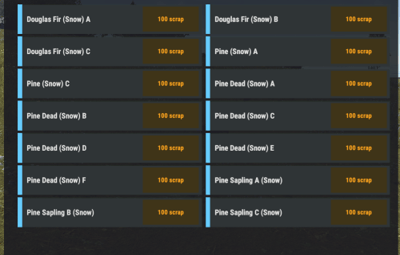
I was looking at purchasing this do you think you could add small pictures next to each type of tree so we have a preview of the tree before it spawns

  • Like 3
Lincoln

Posted

I can see if I can figure out how to incorporate images, but usually that requires other plugin dependencies like ImageLibrary (which I try to avoid). Great idea though, let me see what I can come up with. 

cheers~

  • Like 1
  • Love 1
johnWinter

Posted

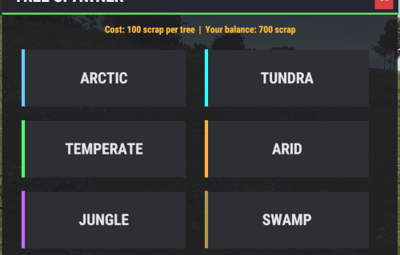
Hi, quick question. The spawner doesn’t seem to be working correctly in the desert. The trees have no hitbox and they disappear from certain angles. Am I doing something wrong, or is there something I need to configure?

Lincoln

Posted

2 minutes ago, johnWinter said:

Hi, quick question. The spawner doesn’t seem to be working correctly in the desert. The trees have no hitbox and they disappear from certain angles. Am I doing something wrong, or is there something I need to configure?

Hmm, I haven't seen that. Are you running Carbon or Oxide modding framework? I will see if I can recreate that issue.

johnWinter

Posted

6 minutes ago, Lincoln said:

Hmm, I haven't seen that. Are you running Carbon or Oxide modding framework? I will see if I can recreate that issue.

It's actually even stranger, when I place a tree it seems to be working fine. but another player has the issues stated. It seems to be disappearing on certain distances and reappearing when walking a little further away. We tried both the same exact tree in the correct biome for it. The tree i placed behaves fine, we were wondering at this point if its a graphics settings issue. Thanks for your super fast response! 

johnWinter

Posted

1 minute ago, johnWinter said:

It's actually even stranger, when I place a tree it seems to be working fine. but another player has the issues stated. It seems to be disappearing on certain distances and reappearing when walking a little further away. We tried both the same exact tree in the correct biome for it. The tree i placed behaves fine, we were wondering at this point if its a graphics settings issue. Thanks for your super fast response! 

It turns out that the issue was caused by a low setting for tree quality, the user had it set under a 100 after changing it a higher number it seems to be fixed. And the hitbox issues was a jungle tree placed in dessert. 

  • Like 1
Lincoln

Posted

Just now, johnWinter said:

It turns out that the issue was caused by a low setting for tree quality, the user had it set under a 100 after changing it a higher number it seems to be fixed. And the hitbox issues was a jungle tree placed in dessert. 

Glad you figured it out! Thanks for letting me know what the fix is as well 🙂 Ive seen that hit-box issue with some trees before. Never really thought much about it, figured it was just some foolery with the Rust client loading graphics haha. 

Thanks for being a customer and as always feel free to hit me up on here or Discord any time if you come across bugs, issues, or concerns. 

  • Like 1

Create an account or sign in to comment

You need to be a member in order to leave a comment

Create an account

Sign up for a new account in our community. It's easy!

Register a new account

Sign in

Already have an account? Sign in here.

Sign In Now
  • Like 1

User Feedback

2.3m

Downloads

Total number of downloads.

10.6k

Customers

Total customers served.

152.8k

Files Sold

Total number of files sold.

3.3m

Payments Processed

Total payments processed.

×
×
  • Create New...

Important Information

We have placed cookies on your device to help make this website better. You can adjust your cookie settings, otherwise we'll assume you're okay to continue.