


About Hopper Controller
HopperController (Ai Assisted)
Change how far hoppers pick up items, per player, with a live range preview while placing them.
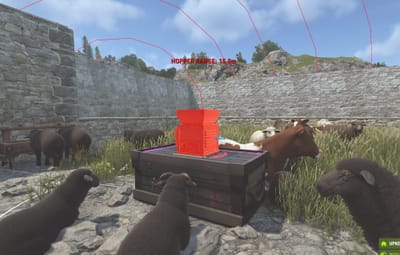
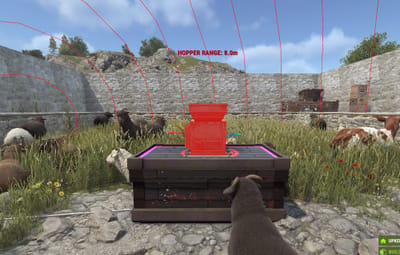
Vanilla hoppers pick up items within 3 m. HopperController lets you change that for the whole server, for VIP tiers, or both. While holding a hopper, players see a sphere showing exactly how far it will reach.
AI disclosure: Written with AI assistance (ChatGPT and Claude). I designed the features and tested it on a live Rust server. Free release. Bugs are fixed as time allows.
Features
VIP tiers with their own permission, pickup radius, and item speed
Global mode: change all hoppers with no VIP needed (can be turned off for non-VIP)
Range sphere and label shown at the aim point while holding a hopper
Teammates can see the sphere to help place large-radius hoppers
Safe limits: radius and speed from vanilla up to 30
Hoppers update automatically when permissions or groups change
A broken config is reported with its line number and never overwritten
Permissions
hoppercontroller.vip1 to vip4: default tiers (configurable)
hoppercontroller.indicator: see the range sphere without a tier
hoppercontroller.admin: use /hopperrefresh
Default tiers
VIP 1
VIP 2
VIP 3
VIP 4
Installation
Put HopperController.cs in oxide/plugins
Edit oxide/config/HopperController.json
Grant permissions, e.g. o.grant group vip hoppercontroller.vip1
Config Sample :
{
  "Config Version": "1.2.0",
  "Default Hopper Settings": { "Pickup Radius": 3.0, "Item Move Speed": 2.0 },
  "Apply Default To Non-VIP": true,
  "VIP Permission Tiers": [
    {
      "Tier Name": "VIP 1",
      "Permission": "hoppercontroller.vip1",
      "Priority": 1,
      "Pickup Radius": 5.0,
      "Item Move Speed": 5.0
    }
  ],
  "Startup Scan Batch Size": 500,
  "Placement Range Indicator": {
    "Enabled": true,
    "Update Interval": 0.15,
    "Display Duration": 0.2,
    "Sphere Color": "cyan",
    "Show Radius Text": true,
    "Radius Text Height": 1.0,
    "Maximum Aim Distance": 8.0,
    "Show To Teammates": true,
    "Teammate Maximum Distance": 50.0
  }
}